


The Tasks board: organize and track SEO work
Use the Tasks board to turn findings into work: columns, priorities, progress, filters and the other Tasks tabs such as Backlog, Milestones and Time Tracker.
1 min read · Last updated November 13, 2026

The Tasks section keeps the work that comes out of your SEO data in one place, next to the data itself. Open it from the left menu: Tasks → Tasks.
The board
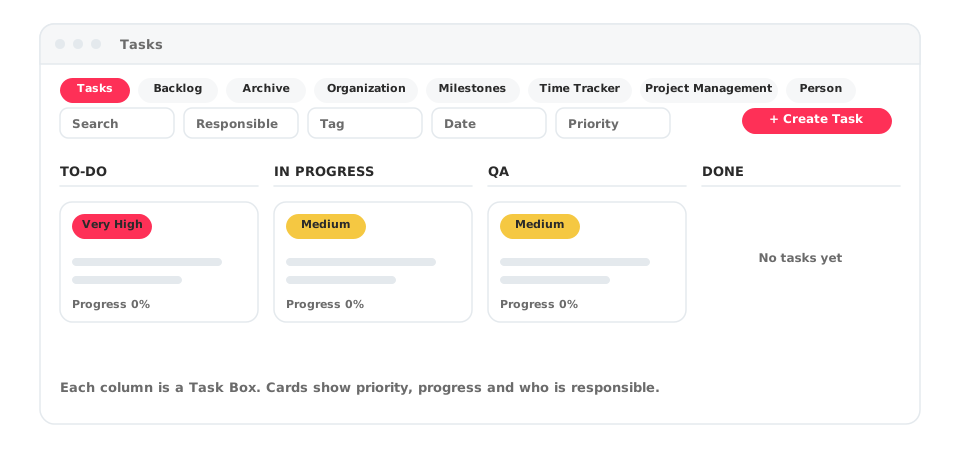
Tasks are grouped in columns. A new board starts with TO-DO, IN PROGRESS, QA and DONE. Each column is a Task Box, and the + next to Task Boxes adds another one.
Every card shows:
- A priority label, such as Very High or Medium.
- The task title and description.
- A Progress bar.
- The people responsible.
Use the switch next to + Create Task to see the board as columns or as a list.
Find a task fast
Above the board you can use Search and filter by Responsible, Tag, Date and Priority. The avatars next to Team show the people who work on the project.
Create a task
Select + Create Task. You can also create tasks from where you find the problem: the AI Tracker alerts offer Create Task, so an alert becomes work with one click.
The other Tasks tabs
The Tasks page has more tabs along the top: Backlog, Archive, Organization, Milestones, Time Tracker, Project Management and Person. A Connections link sits on the right.