Free Title Tag Checker: measure length in pixels and preview Google
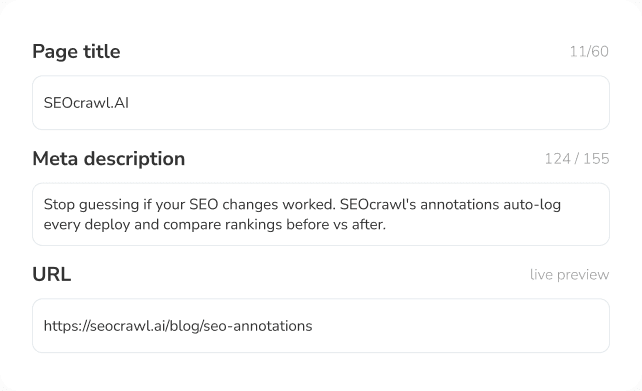
Paste a title and meta description — or pull them live from any URL — and see the exact character count, pixel width, and a real Google SERP preview on desktop and mobile. Spot truncation before you publish. No sign-up.
Load the real title tag and meta description from any public URL — or just type your own below. Free, no sign-up.

Seocrawl
https://seocrawl.ai › free-seo-tools › title-tag-checker
Title Tag Checker — Free SERP Preview & Pixel Length Tool
Check your title tag length in pixels and characters, preview how it looks in Google, and spot truncation before you publish.
Title tag length: pixels vs characters
Google doesn't truncate titles at a fixed number of characters — it truncates them at a fixed width in pixels. A title made of wide letters (W, M, capitals) runs out of room sooner than one made of narrow letters (i, l, t), even at the same character count. That's why two 60-character titles can render completely differently in search results.
The practical limit on Google desktop is about 600 pixels, which usually lands between 50 and 60 characters. On mobile, Google wraps titles onto a second line, so you get a little more room, but the first ~600px still does the heavy lifting for the click. This checker measures the real pixel width of your title as you type, so you're optimising for what Google actually renders rather than a rough character estimate.
Pixels are the real limit
Aim to keep your title under ~600px on desktop. The pixel meter turns amber as you approach the edge and red once you'd be cut off.
Characters are the quick proxy
50–60 characters is a safe character target for most titles, and ~120–155 characters for meta descriptions. Use it as a guide, then confirm with the pixel width.
How to write a click-worthy title
Length keeps your title from being cut off — but it's the wording that earns the click. A few principles that consistently lift click-through rate:
- Lead with the keyword. Put the primary keyword as close to the front as the grammar allows. It signals relevance to both searchers and Google, and survives truncation if the tail gets cut.
- Front-load the value. Searchers scan the first few words. Say what they get — a number, an outcome, a year, a benefit — before any branding or filler.
- Add a specific hook. Numbers, brackets, and concrete promises ('Free', '2026', '5-Minute') stand out in a wall of blue links and set accurate expectations.
- Match search intent. A how-to query wants a guide; a comparison query wants 'vs'; a buyer query wants the product. Mirror the intent and the click follows.
- Keep brand at the end. Unless your brand is the reason people click, append it after a separator. It's the first thing Google drops when space runs out.
Common title-tag mistakes
Going over the pixel limit.
The end of your title — often the part with the benefit — gets replaced with an ellipsis. Check the pixel width, not just the character count.
Duplicate titles across pages.
Identical or near-identical titles make pages compete with each other and confuse Google about which to rank. Every page needs a distinct title.
Keyword stuffing.
Repeating the keyword or cramming in variants reads as spammy and pushes Google to rewrite your title with one of its own.
Vague or generic titles.
'Home', 'Services', or 'Blog Post' tell searchers nothing. A descriptive title is the cheapest CTR win available.
Ignoring what Google rewrites.
Google rewrites roughly a third of titles. If yours keeps getting changed, it's usually too long, too vague, or a poor match for the query — all fixable.
Find your under-clicked pages automatically
A checker tells you if one title fits. SEOcrawl AI tells you which titles are costing you clicks. It pulls your real Google Search Console data and surfaces the pages that rank well but get clicked far less than they should — the clearest sign of a weak title. Tag them, rewrite them, and watch CTR move. Tag candidates by rule, by hand, or via the MCP, then track the impact over time.
FAQs
What's the ideal title tag length?
Keep it under about 600 pixels on Google desktop, which usually works out to 50–60 characters. Pixels are the real constraint because Google truncates by width, not by character count, so a title full of wide letters can be cut off sooner than a longer title made of narrow ones. This tool shows both numbers live as you type.
Why does Google rewrite my title?
Google rewrites a title when it thinks a different headline serves the query better. The usual triggers are titles that are too long and get truncated, titles that are too vague or generic, keyword stuffing, or a title that doesn't match the words people actually searched. Fixing those issues is the most reliable way to get Google to keep your original title.
Characters or pixels — which matters?
Pixels are what Google actually measures, so they're the source of truth. Characters are a handy quick proxy, but they can mislead you because letter widths vary. Use the character count as a fast guide and confirm with the pixel width before you publish — that's exactly what this checker is built to do.
How do I preview my title in Google?
Paste your title and meta description into this tool, or load them live from any URL, and the Google preview renders your snippet exactly as it would appear on desktop and mobile — including where it truncates. You can edit the text and watch the preview update in real time, no account required.
Can I check the title of a page that's already live?
Yes. Enter the URL in the 'Check a live URL' box and the tool fetches the page's real title tag, meta description, and og:title, then loads them into the editor so you can measure and improve them. One URL at a time; for site-wide title and CTR auditing, the SEOcrawl AI platform handles it in bulk.