


Models and Responses
See how visible your brand is in each AI engine, then read the answers themselves: how often you are mentioned and with what sentiment.
2 min read · Last updated November 12, 2026

The Visibility tab gives one number for your brand. Models and Responses explain it: which engine recommends you, and what the answers actually say. The examples use Chess.com data.
Models: the same prompts on every engine
Open AI Tracker and select Models. At the top there is one card per engine, each with a visibility percentage, points and number of mentions.
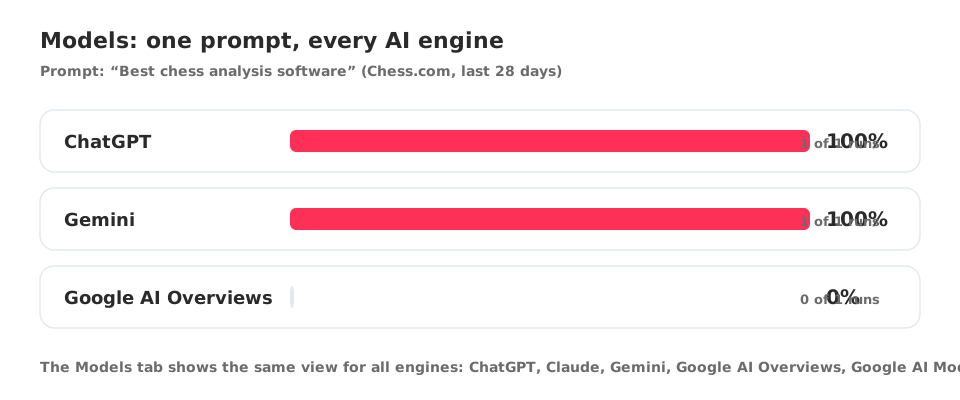
Below the cards, Multi-Model Comparison lists each topic as a row and each engine as a column, so you can see at a glance where one engine ignores you while another recommends you.
Responses: read what the AI says
Select Responses. The header counts the responses and prompts in the period, for example “212 responses · 9 prompts”.
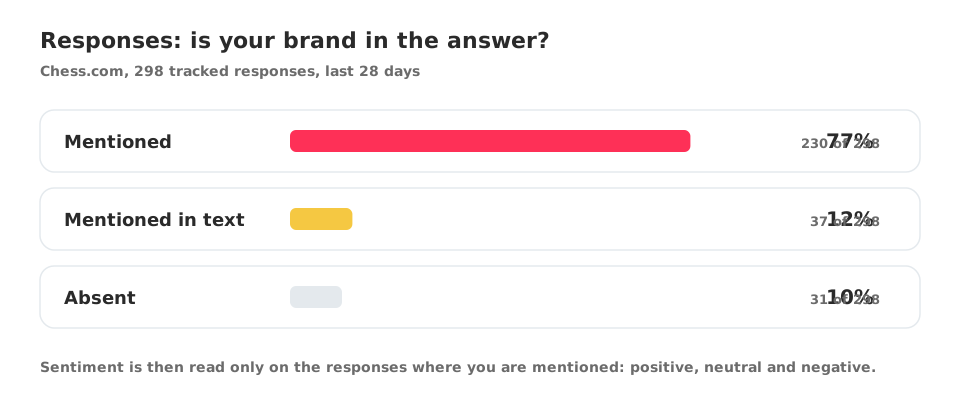
Two groups of numbers follow:
| Group | What it shows |
|---|---|
| Mentions | Mentioned, Mentioned in text and Absent, each as a percentage and a count of responses |
| Sentiment | Positive, Neutral and Negative, measured only on responses where you are mentioned |
Response intelligence shows an analysis of the answers once there is data to analyse. A brand that is absent from every response has no sentiment to measure, so those cards stay at 0%.
What to do with it
- Low Absent is the goal. If it is high, open Opportunities.
- Use Export to share the numbers.
- Pair this with visibility, mentions and citations to understand each metric.