


Create topics and prompts in AI Tracker
Add prompts, choose engines, country, language and frequency, and group them into topics, with real Chess.com examples.
1 min read · Last updated November 11, 2026

A prompt is a question you want to test on AI engines, such as “Best website to learn chess”. A topic groups related prompts so you can read results by theme.
Add a prompt
- Open AI Tracker in your project and stay on Prompt Tracker.
- Click + Add Prompt.
- Write the question the way a customer would ask it.
- Choose the engines to run it on, the country, the answer language and how often it runs (daily, weekly or monthly).
- Optionally file it under a topic. The first run starts right away.
Write prompts that work
- Use natural questions, not keywords: “Does Chess.com Premium help you improve?”
- Mix comparison, best of and how to prompts, as your customers do.
- Track a few branded prompts and many non-branded ones.
- Keep wording stable, so the history stays comparable.
Organize with topics
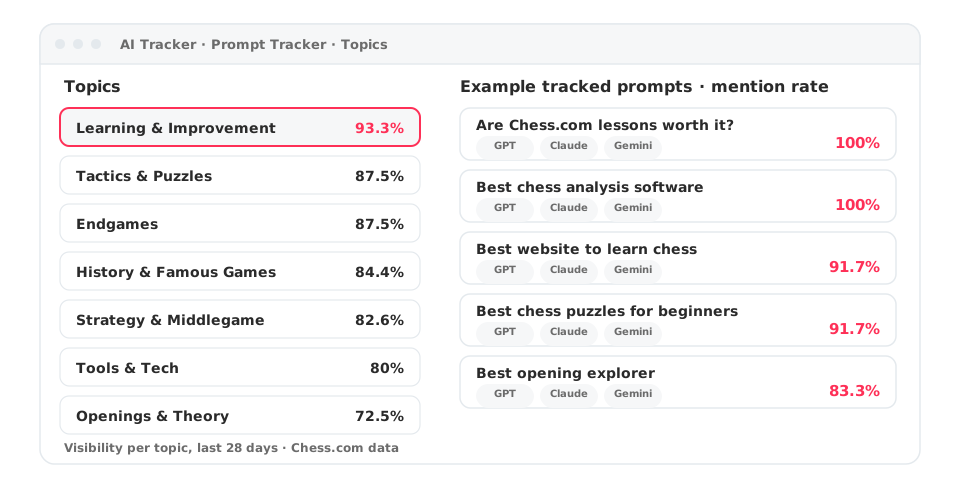
The Chess.com workspace groups its prompts into topics such as Learning & Improvement, Tactics & Puzzles, Endgames, Openings & Theory and Tools & Tech. In the Topics view each topic shows its visibility, mentions and the competitors that appear.
Also available from your AI assistant
You can create and list prompts and topics from Claude or ChatGPT once the MCP is connected.