


Keywords and rankings
Explore the queries that bring traffic from Google, with clicks, impressions, CTR and average position from Search Console.
1 min read · Last updated November 11, 2026

The Keywords section shows the search queries behind your traffic, from your Google Search Console data.
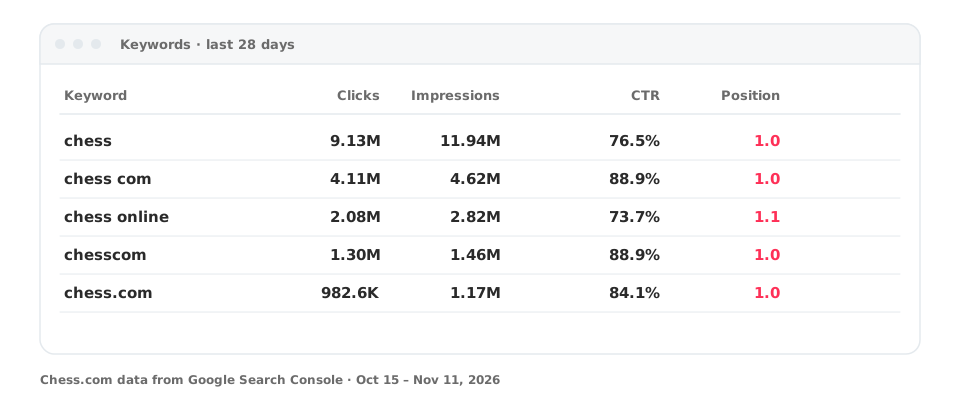
Read the table
| Column | Meaning |
|---|---|
| Clicks | Visits from Google results |
| Impressions | Times your page appeared in results |
| CTR | Clicks divided by impressions |
| Position | Your average ranking position (lower is better) |
Every metric is compared with the previous period of the same length, so you can see what is rising or falling.
Useful ways to use it
- Sort by clicks to find your biggest sources of traffic.
- Look for queries with many impressions and low CTR: a better title may win clicks.
- Check Pages to see which URL ranks for a query, and spot two pages competing for the same keyword.
- Add an annotation when you change a page, so you can judge the effect.
Ask your assistant
“Which keywords lost the most clicks in the last 28 days?” See MCP prompts.