Crawled – Currently Not Indexed: What It Means & How to Fix It
Google visited your URL, read it and left it out of search. Here's how to tell which pages deserve a second chance, and how Google says to get them back in.
Crawled – currently not indexed means Googlebot fetched your page and decided not to add it to Google's index, so it can't appear in search. Google's Page indexing report help puts it this way: the page was crawled but not indexed, and it "may or may not be indexed in the future".
The cause is usually the page itself, not a technical block. Below, you'll see how to decide, URL by URL, whether to fix, noindex or delete each page, and how long Google says a fix takes. New to the report? Start with this Google Search Console guide.
What does "Crawled – currently not indexed" mean?
The status means Google crawled the page and chose not to index it. Nothing blocked Googlebot: Google decided to leave the page out for now. Two distinctions help you read the status correctly.
Crawled vs. indexed
Crawling is Googlebot downloading a page. Indexing is Google storing it so it can show up for searches. A page can be crawled many times and still never be indexed.
The URL Inspection tool help says a page's quality must be "high enough to warrant indexing", and its live test can't check for this status at all.
How it differs from "Discovered – currently not indexed"
Discovered – currently not indexed comes one step earlier: Google found the URL but postponed the crawl to avoid overloading your site, so the last crawl date is empty.
| Discovered – currently not indexed | Crawled – currently not indexed | |
|---|---|---|
| Crawled by Google? | No | Yes |
| Last crawl date | Empty | A date |
| Usual reason | Crawl postponed to avoid overloading the site | Google read the page and skipped it |
| Look first at | Crawl capacity, on very large sites | Content quality, duplicates, canonicals |
Google also says "Not indexed is not necessarily bad." Noindexed pages, URLs blocked in robots.txt, duplicates and 404s with no replacement are meant to stay out.
Why Google crawls pages without indexing them
Indexing has a quality bar that crawling doesn't. Google's crawl budget guide says crawl demand rises with the value and uniqueness of your content.
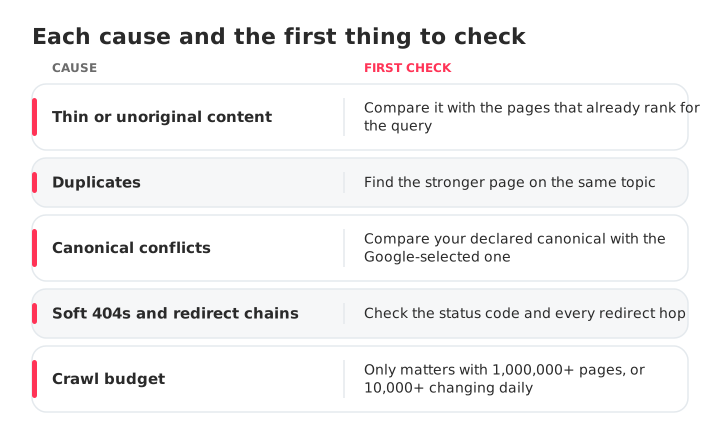
Most affected URLs fall under one of these causes, each with its first check:
- Thin or unoriginal content: the page repeats what already ranks.
- Duplicates: tag archives, sorted URLs, two posts on one topic. Here's how to spot and fix keyword cannibalization.
- Canonical conflicts: compare your declared canonical with the one Google selected. When Google picks another URL, the page usually moves to Alternate page with proper canonical tag or a duplicate status.
- Soft 404s and redirect chains: Google says soft 404s waste crawl budget.
- Crawl budget: it matters for sites with 1,000,000+ pages changing weekly or 10,000+ changing daily. For most sites, it isn't the cause.
The bar rose in two dated steps. On August 18, 2022, Google announced the helpful content update, a site-wide signal, and said removing unhelpful content could help the rest of a site. On March 5, 2024, Google announced a core update to show less content made to attract clicks, together with a new scaled content abuse spam policy.
Google's helpful content guidance says E-E-A-T isn't a specific ranking factor, that trust matters most, and that there's no preferred word count. Padding a page won't fix it.
How to find and diagnose affected pages in GSC
Open the Page indexing report (formerly Coverage), inspect a sample, then group the list by pattern. Google notes that sites under 500 pages probably don't need the report.
Finding affected URLs in the Pages report
- In Google Search Console, go to Indexing > Pages.
- Under "Why pages aren't indexed", click Crawled – currently not indexed.
- Click Export and download the list.
The report shows up to 1,000 example URLs, not necessarily all of them, so on a large site the export is a sample.
Checking pages with the URL Inspection tool
Inspect five to ten exported URLs for the last crawl date and the Google-selected canonical. A canonical pointing elsewhere means Google sees a duplicate; a months-old crawl date suggests Google rarely returns.
Spotting patterns across hundreds of URLs
Sort the export by folder, template and URL parameter, then count each group. Say 300 URLs split into 180 /tag/ pages, 70 ?sort= URLs and 50 posts: that's three decisions, not 300.
Fix, noindex or delete: decide what each URL deserves
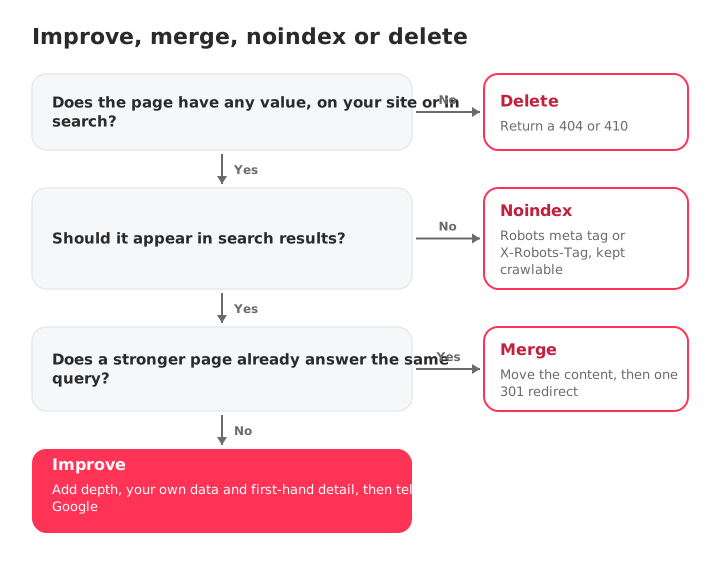
Each URL deserves one of four outcomes. Ask: would a searcher be glad to land here, and is this the only page on your site answering the query?
| Page type | Example | Decision | How |
|---|---|---|---|
| Useful and unique, but thin | A 300-word guide on a topic you know | Improve | Add depth and first-hand detail |
| Duplicates a stronger page | Two posts on the same query | Merge | Move the content, then 301 redirect |
| Useful on site, not in search | Tag archives, internal search, thank-you pages | Noindex | Robots meta tag or X-Robots-Tag |
| No value, no replacement | Expired promos, test pages | Delete | Return a 404 or 410 |
Google's crawl budget guide backs the last two rows: return 404 or 410 for removed pages and consolidate duplicates. A 404 in Search Console is expected for pages you removed on purpose.
Noindex is where triage most often goes wrong:
Not like this: a noindex tag on your /tag/ pages while robots.txt blocks /tag/. Googlebot can't fetch the pages, so it never sees the tag.
Like this: /tag/ stays crawlable and carries the noindex as a meta tag or X-Robots-Tag header.
Per Google's noindex documentation, the rule doesn't work inside robots.txt, and on rarely visited pages the recrawl can take months. Once the tag is read, those URLs move to Excluded by 'noindex' tag, which is what you want for them.
How to fix the pages worth indexing
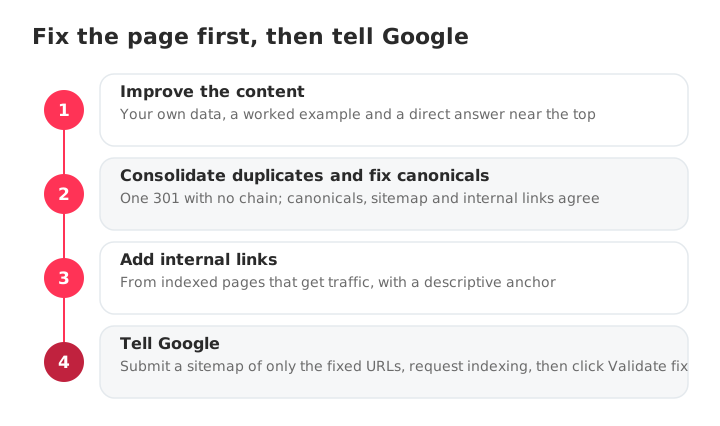
Make the page worth indexing first, then tell Google. Requesting indexing on an unchanged page asks Google to repeat a decision it already made. The order:
- Improve the content.
- Consolidate duplicates and fix canonicals.
- Add internal links.
- Submit a focused sitemap and request indexing.
Improve content depth and originality
Rewrite against the query, not a word count: add your own data, screenshots, a worked example and a direct answer near the top.
For example, take a thin 300-word guide: add a first-hand dataset and a worked example, link to it from two posts that already get traffic, and only then add it to a focused sitemap.
Consolidate duplicates and fix canonicals
When two URLs cover the same thing, keep one, move the useful content into it and 301 redirect the other straight to it, with no chain. Then check that canonicals, sitemap and internal links agree, and that no stray noindex is left.
Add internal links from pages Google already values
Link to each fixed page from indexed pages that get traffic, with a descriptive anchor. Any site crawler can list orphan pages (zero internal links) by filtering for zero inlinks. The full method is in this internal linking strategy guide.
Also check the page on a phone and in the Core Web Vitals report: a broken mobile page is quick to rule out.
Submit a focused sitemap and request indexing
Build a sitemap with only the URLs you fixed, submit it, and filter the Pages report by it before clicking Validate fix. Google suggests this to speed up validation. If you need your current file first, find your site's sitemap.
Google ignores priority and changefreq, so keep lastmod accurate instead. Then click Request indexing in the URL Inspection tool for your priority URLs: Google applies a quota and says repeat requests don't speed things up.
How long does indexing take after a fix?
Expect a day to several weeks, and indexing is never guaranteed. Google gives different ranges on different pages, so here they are side by side:
| What you did | What Google says | Source |
|---|---|---|
| Asked Google to recrawl | A few days to a few weeks | Ask Google to recrawl |
| Request indexing | Typically a day or so, up to a week or two, with a daily limit | URL Inspection help |
| Validate fix | Up to about two weeks, sometimes much longer | Page indexing help |
These are Google's timelines, not recovery cases. Check the Pages report weekly; if fixed URLs haven't moved once those ranges pass, go back to the content.
How to stop new pages from landing in this status
Prevention is a routine: check each page before it goes live and review Search Console monthly. Before publishing, confirm the page:
- Answers a query no other page on your site answers.
- Adds your own data, examples or experience.
- Has a self-referencing canonical and no stray noindex.
- Is in the sitemap with an accurate lastmod.
- Has a named author and, where it applies, structured data.
- Gets a link from a related, indexed page.
Once a month, compare the Pages report with the previous month; an issue stays listed for 90 days after its last instance is gone. Sites over a thousand pages should also watch the Crawl Stats report.
SEOcrawl AI handles the technical side at scale. The Crawler scans every page and returns an Audit Health Score, with issues broken down by Indexability, Crawlability, On-Page and more. Its Indexation view groups your URLs by Search Console coverage state, so you can see how many sit in "Crawled – currently not indexed" and track the count over time.
Between crawls, SEO Monitor alerts you when a key page gains a noindex, changes its canonical, returns a 404 or leaves the sitemap. The same platform tracks your brand's visibility in ChatGPT, Claude, Gemini, Perplexity and Copilot, so SEO and GEO sit together.
FAQs
What does "Crawled – currently not indexed" mean?
It means Googlebot fetched your page and decided not to add it to Google's index, so it can't appear in search. Nothing blocked the crawl: Google read the page and chose to leave it out for now. It isn't a manual penalty, and the page may or may not be indexed in the future.
Is it the same as "Discovered – currently not indexed"?
No. "Discovered" means Google knows the URL but postponed the crawl, so the last crawl date is empty. "Crawled" means Google already visited and read the page, then decided not to index it. With Discovered, look at crawl capacity on very large sites; with Crawled, look at content quality, duplicates and canonicals.
Does "Crawled – currently not indexed" hurt my SEO?
Not by itself: the status isn't a penalty, and the affected page only loses its own search traffic. The risk is volume, because Google treats a large share of unhelpful content as a site-wide signal. A tag archive out of the index costs nothing; a product page does. If the count rises every time you publish, treat it as a site-level content problem, not a list of single URLs.
How long does it take for a page to get indexed after a fix?
Expect anywhere from a day to several weeks, and indexing is never guaranteed. Google says a recrawl takes a few days to a few weeks, a Request indexing is typically processed in a day or so but can take a week or two, and a Validate fix usually takes up to about two weeks.
Will requesting indexing help?
Only after you change the page. Requesting indexing on an unchanged page asks Google to repeat a decision it already made. Requests are subject to a daily quota, and Google says sending the same URL several times doesn't speed anything up.
Does adding the page to my XML sitemap help?
It helps Google find a URL, not index it. Google calls a submitted sitemap "merely a hint", and these pages have already been found and read. After a fix, the sitemap's job is to group the URLs you want rechecked. Each sitemap file holds up to 50,000 URLs or 50 MB.
Why did my "Crawled – currently not indexed" validation fail?
Validation stops as soon as Google finds one URL in the group still unfixed, so a single leftover page can fail the whole batch. Fix every URL in the group, or narrow the group by filtering the report with a sitemap of only your fixed URLs, then validate again.
How can SEOcrawl AI help with pages Google crawls but doesn't index?
SEOcrawl AI finds the on-site causes behind the status. The Crawler shows each URL's health score, HTTP status code and crawl depth, so you spot pages that are hard for Google to reach. The Indexation view groups your URLs by Search Console coverage state, and SEO Monitor alerts you when a key page gains a noindex, changes its canonical, returns a 404 or leaves the sitemap.
Author: David Kaufmann

I've spent the last 10+ years completely obsessed with SEO — and honestly, I wouldn't have it any other way.
My career hit a new level when I worked as a senior SEO specialist for Chess.com — one of the top 100 most visited websites on the entire internet. Operating at that scale, across millions of pages, dozens of languages, and one of the most competitive SERPs out there, taught me things no course or certification ever could. That experience changed my perspective on what great SEO really looks like — and it became the foundation for everything I've built since.
From that experience, I founded SEO Alive — an agency for brands that are serious about organic growth. We're not here to sell dashboards and monthly reports. We're here to build strategies that actually move the needle, combining the best of classical SEO with the exciting new world of Generative Engine Optimization (GEO) — making sure your brand shows up not just in Google's blue links, but inside the AI-generated answers that ChatGPT, Perplexity, and Google AI Overviews are delivering to millions of people every single day.
And because I couldn't find a tool that handled both of those worlds properly, I built one myself — SEOcrawl AI, an enterprise SEO intelligence platform that brings together rankings, technical audits, backlink monitoring, crawl health, and AI brand visibility tracking all in one place. It's the platform I always wished existed.
Discover more content about this author