Alternate Page with Proper Canonical Tag: What It Means and How to Fix It
You opened the Page indexing report, found a list of URLs labeled "Alternate page with proper canonical tag," and now you're wondering whether something is broken.
When Google Search Console flags URLs as "Alternate page with proper canonical tag," it means Google discovered duplicate or alternate versions of a page, found a canonical tag pointing to the master version, and indexed that master URL instead. In most cases, the system is working exactly as intended.
This guide explains what the status means, when it is normal, when it signals a real problem, and how to fix it in WordPress, Shopify, Squarespace and Wix. SEOcrawl AI's Indexation view lists every URL in this state with its user-declared and Google-selected canonical side by side, so you can spot the few URLs that actually need attention across your whole site.
What does "Alternate page with proper canonical tag" mean in Google Search Console?
This status confirms that Google found several versions of a page that share the same canonical target, honored your canonical tag, and indexed the canonical URL instead of the flagged alternate. The alternate page is still available to visitors, but Google doesn't index it separately.
The word "proper" means Google agrees with your canonical setup. That's the key difference with statuses like "Duplicate, Google chose different canonical than user," where Google overrides the canonical you declared.
Where this status appears in GSC
In Google Search Console, go to Indexing › Pages and review the "Why pages aren't indexed" table. Click "Alternate page with proper canonical tag" to see the affected URLs, and use Export to download the full list for analysis.
Alternate, canonical and duplicate, in one line each
A canonical URL is the primary version you designate as the master copy. An alternate URL serves identical or similar content while its canonical tag points to the master version. Duplicate content is the same content reachable at several URLs. Canonical tags resolve it by consolidating ranking signals onto the primary URL.
When it's completely normal (and you should do nothing)
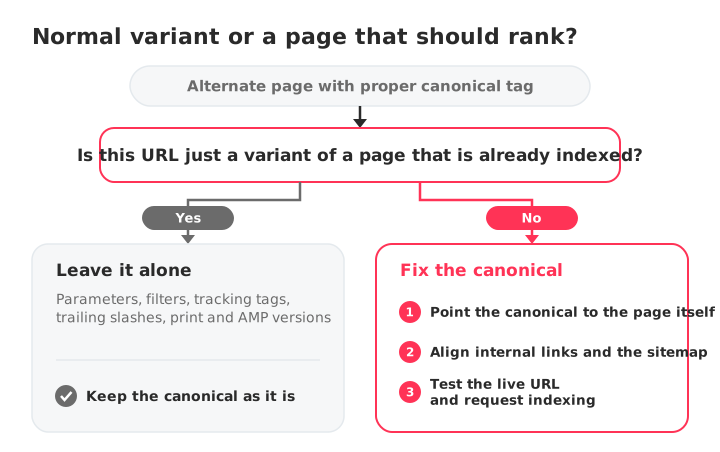
Most URLs with this status don't need any action. If the alternate URL is a valid variant of an indexed master page, the status confirms that canonicalization is working correctly. Common expected cases include:
- URL parameters and filters: tracking parameters, sorting options or faceted navigation (for example,
?color=blueor?utm_source=...). - Session IDs and tracking tags: parameters that append unique identifiers without changing the page content.
- URL structure variations: trailing slashes, uppercase letters, or HTTP variants pointing to HTTPS master URLs.
- Print and AMP versions: alternate formats that correctly canonicalize back to the primary page.
- Syndicated content: third-party sites republishing your content with a canonical tag pointing to your original.
If the flagged URLs fall into these categories, leave them as they are. Forcing indexation or removing the canonical tag can bring the duplicate content problem back.
To confirm a page's canonical is set up correctly, run it through the free canonical tag checker.
When it's actually a problem
This status becomes an issue when a primary page you want indexed is marked as an alternate, or when the canonical tag points to the wrong target. Review these five scenarios:
1. The canonical points to the wrong target
A template error or a bad plugin configuration can force a page to canonicalize to an unrelated URL, such as the homepage or a top-level category page. If an important page is flagged and points elsewhere, update its canonical target.
2. The canonical points to a non-indexable page
Canonical tags must point to a live, indexable URL that returns a 200 status code and canonicalizes to itself. If the target redirects, returns a 404, is blocked by robots.txt or carries a noindex tag, Google may select a different canonical or leave the content out of the index.
3. Pagination and parameter URLs consolidated incorrectly
On ecommerce sites, paginated pages or filtered views often canonicalize to page 1 by mistake. That keeps deeper products or listings from being indexed. Paginated pages should normally self-canonicalize so the items they list stay discoverable.
4. Hreflang and canonical in conflict
On multilingual sites, each localized version should canonicalize to itself and link to the other language versions with hreflang tags. Pointing the canonical of every localized page to a single default language drops those localized pages from the index and breaks the hreflang cluster.
5. Genuine duplicates you meant to consolidate the other way
If a canonical tag points to the weaker duplicate instead of the primary page, Google will index the target you specified. Make sure canonical tags, internal links and sitemaps all agree on the preferred master URL.
If you're dealing with other indexing statuses, see our guides on Not found (404) and Blocked due to other 4xx issue.
How to diagnose it with URL Inspection
Before you change anything, check how Google sees the page.
Compare the Google-selected and user-declared canonical
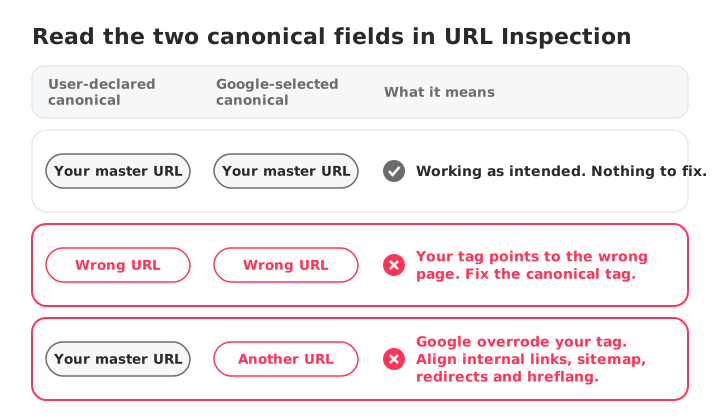
Paste the flagged URL into the URL Inspection bar at the top of Search Console and expand the Page indexing section. Compare the "User-declared canonical" with the "Google-selected canonical." If both point to the master URL you intended, the setup is correct. If they differ, or if the declared target is wrong, adjust the tag.
Verify what you're actually sending
A canonical can be declared in the HTML <head> or in the HTTP Link response header. The free canonical tag checker reads both and tells you whether a URL is self-referencing, cross-domain, missing, or sending an HTML canonical that disagrees with the header one.
Find every problem URL across the site
Inspecting URLs one by one doesn't scale. The SEOcrawl AI Crawler crawls the whole site and flags canonical issues, such as canonicals pointing to the wrong URL, a redirect or an error page, together with each page's indexability. SEOcrawl AI's Indexation view groups your URLs by Search Console coverage state and shows the Google-selected and declared canonical for each one, and you can tag the problem URLs by rule or by hand. Teams working with AI assistants can pull the same data, URL by URL, through the SEOcrawl AI MCP server.
How to fix "Alternate page with proper canonical tag"
Apply the fix that matches your diagnosis. The goal is always the same: canonical tags, internal links and XML sitemaps all point to one indexable primary URL.
Correct the rel=canonical tag
For pages you want to rank, set a self-referencing canonical tag in the HTML <head>:
<link rel="canonical" href="https://example.com/your-page" />
Use an absolute URL that returns a 200 status code. Remove any second canonical tag on the same page: when a page declares conflicting canonicals, Google may ignore all of them.
Fix internal links and sitemaps
Align your internal signals with your canonical structure. Link internally to the primary canonical URLs, not to parameter or alternate versions, and make sure your XML sitemaps list only indexable master URLs.
Fix duplicate templates in WordPress
In WordPress, canonical tags are usually generated by the SEO plugin. In Yoast SEO, open the post, go to the Advanced tab of the Yoast meta box and check or clear the Canonical URL field. In Rank Math and All in One SEO, review the Canonical URL setting in the Advanced tab. Leaving the field empty restores the default self-referencing canonical.
Fix it in Shopify
Shopify generates canonical tags automatically. Product URLs reached through a collection (/collections/x/products/y) canonicalize to the clean product URL (/products/y) by default, which is exactly the expected case above. If a primary page canonicalizes to the wrong URL, check the canonical tag in theme.liquid and any SEO app that rewrites it.
Fix it in Squarespace and Wix
Squarespace manages canonical tags automatically. To deal with duplicate pages, consolidate them or add 301 redirects in the URL Mappings panel of your site settings. Wix adds a self-referencing canonical to every page; if a duplicated page points to the wrong URL, open that page's SEO settings and check the canonical under Advanced SEO.
Use a 301 redirect when the duplicate shouldn't exist
If an alternate URL serves no purpose for users, set up a 301 redirect to the primary page instead of relying on a canonical tag alone.
Validate the fix
After updating your canonicals, prompt Google to re-evaluate:
- Inspect the URL in Search Console and click Test live URL to confirm the user-declared canonical is now the target you intended.
- Click Request indexing to add the page to the crawl queue.
- Use Validate fix on the issue's details page to have the whole group re-checked.
- Submit an updated XML sitemap that lists only primary canonical URLs.
Alternate page vs. other duplicate statuses in GSC
Search Console reports several statuses that look alike. They mean different things, and only some of them need work:
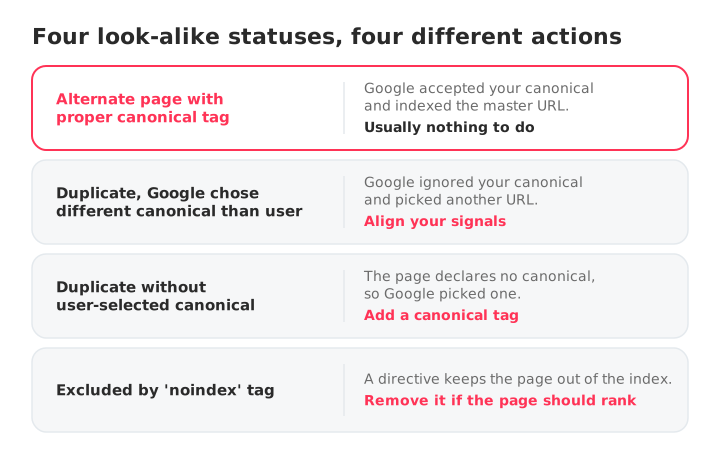
- Alternate page with proper canonical tag: Google agrees with your canonical and indexes the master URL. Usually nothing to do.
- Duplicate, Google chose different canonical than user: Google ignored your canonical and picked another URL. Find out why and align your signals.
- Duplicate without user-selected canonical: the page has no canonical, so Google picked one for you. Add a canonical to take control.
- Excluded by 'noindex' tag: a directive keeps the page out of the index. Use noindex for pages that should never appear in search, not for duplicates.
How to prevent it in the future
To keep canonical issues from creeping back in with every site update:
- Make a self-referencing canonical the default on every indexable page.
- Keep URL structures clean to limit unnecessary parameter variants.
- Include only canonical, indexable URLs in your XML sitemaps.
- Crawl the site after every template change, plugin update or migration and compare crawls to see which canonicals changed.
SEO Monitor alerts you when a canonical tag changes, breaks or disappears on your key pages, and also tracks their indexing status, so you hear about a bad canonical before Search Console does.
FAQs
Is "alternate page with proper canonical tag" an error?
No. It is an informational status confirming that Google respected your canonical tag and indexed the master version. It needs attention only if a page you want indexed on its own is flagged as an alternate, or if its canonical points to the wrong or an invalid URL.
Should I fix it?
Only if a primary page you want to rank is affected. If the flagged URLs are tracking parameters, filters, sorting options or alternative formats of an indexed page, no changes are needed.
Why is Google choosing a different canonical than the one I set?
Google treats rel=canonical as a strong hint, not a command. If your internal links, sitemap, redirects or hreflang tags point to a different URL than your canonical tag, Google may pick that one instead. Align all of those signals on the same master URL.
How do I set the correct canonical tag?
Add a single rel=canonical tag in the HTML head that points to the absolute URL of the master page. In WordPress SEO plugins, leave the canonical field empty to keep the default self-referencing canonical, unless you are intentionally consolidating a duplicate.
What's the difference between a URL and a canonical URL?
A URL is any web address that loads a page. The canonical URL is the version you designate as the primary one, the URL you want search engines to index and rank when several URLs show the same content.
Does this status hurt my rankings?
No. Consolidating duplicate URLs onto one canonical protects your rankings by focusing signals on a single page. It only costs traffic when a primary page is mistakenly treated as an alternate of another URL.
Author: David Kaufmann

I've spent the last 10+ years completely obsessed with SEO — and honestly, I wouldn't have it any other way.
My career hit a new level when I worked as a senior SEO specialist for Chess.com — one of the top 100 most visited websites on the entire internet. Operating at that scale, across millions of pages, dozens of languages, and one of the most competitive SERPs out there, taught me things no course or certification ever could. That experience changed my perspective on what great SEO really looks like — and it became the foundation for everything I've built since.
From that experience, I founded SEO Alive — an agency for brands that are serious about organic growth. We're not here to sell dashboards and monthly reports. We're here to build strategies that actually move the needle, combining the best of classical SEO with the exciting new world of Generative Engine Optimization (GEO) — making sure your brand shows up not just in Google's blue links, but inside the AI-generated answers that ChatGPT, Perplexity, and Google AI Overviews are delivering to millions of people every single day.
And because I couldn't find a tool that handled both of those worlds properly, I built one myself — SEOcrawl AI, an enterprise SEO intelligence platform that brings together rankings, technical audits, backlink monitoring, crawl health, and AI brand visibility tracking all in one place. It's the platform I always wished existed.
Discover more content about this author