Orphan Pages: What They Are and How to Find Them

For a website to work and to be able to display the pages it contains so that users can view them, it must have a proper linking structure that helps, first of all, users reach those pages with a single click, and also ensures they are crawled by Google's bots and spiders so they appear in search results. When a page is not integrated into the link structure, it is called an "orphan page".
But, what exactly is an orphan page? We are going to address this term in detail, along with the consequences it can have from an SEO perspective, why it happens, how to find these types of pages, and how to solve the problems they can cause. Let's get to it!
What are orphan pages?
Specifically, an orphan page is a page on a website that, while it may or may not be indexed by Google or another search engine, does not connect or link to the platform's page structure, becoming completely isolated.
In this way, that page is as if it were "floating" on the site without being reachable by users who might visit it, or by Google's bots to be shown in a search result, even if it is indexed. Even if a page is represented in the XML sitemap with its corresponding URL, there is no guarantee that orphan pages don't exist, because for whatever reason or human error, it can't be reached by the user or by search engine crawlers.
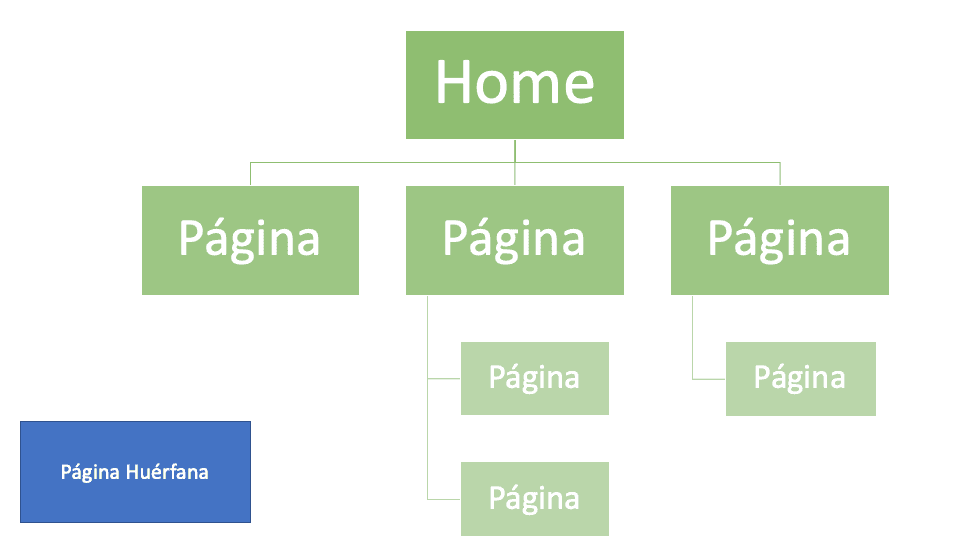
For example, there are two ways pages on a website are discovered:
-
through the crawler that finds all pages by following the links between them, and
-
through the list of URLs in the XML sitemap.
When an isolated orphan page exists, it is as if it were invisible, even if it is in the sitemap, because since it has no links pointing to it, it is not found.
This brings about a series of problems regarding:
-
traffic
-
loss of potential
-
SEO issues
-
visibility
-
authority, and
-
possible penalties
...among others that we will discuss in detail later on. For now, what is clear is that potential orphan pages, no matter how large or small a site is, must be corrected, which is possible and is a common maintenance practice.
Why does it happen that a website has orphan pages?
There are several reasons why a website has orphan pages, even without the owner or developer being aware of it or knowing about it at some point. Frequently, these types of pages, which are undesirable on a web platform, are due to changes made in a poor way, which is usually caused by human error.
Below, we show the main scenarios in which orphan pages are generated or caused on a website:
-
Sometimes, the internal linking of a website's pages is changed, which causes some URLs to be removed because they are no longer needed, are old, or due to site optimization. Many times, even when links are removed, the pages remain on the site floating without being completely removed.
-
A/B test pages that the end user does not come into contact with, which, after being used in the development of the site, remain there without being removed.
-
When a landing page is temporarily generated to attract users to become customers of a site, such as during promotional periods, Christmas, or others, and after that time has passed the page is deleted, but the indexed URL remains.
-
When a category is removed from the site menu, but is not redirected properly to another one created in its place, leaving the remaining page without links on the platform.
-
During a site migration, numerous orphan pages are often generated that change format, URL, and parameters, but are not removed and become disconnected and isolated from the site.
-
When a template is used to build a website, and default template pages are left behind that are later forgotten about and not removed.
On the other hand, there are two common causes of orphan pages that must be addressed and dealt with immediately; these are essentially duplicate pages that should consistently redirect automatically to a single URL. Specifically, we are talking about consistent use of HTTPS and HTTP on canonical and non-canonical pages, as well as the use of trailing slashes.
Otherwise, it is likely that some versions of the page are not linked and, as a result, become orphans. In this case, the fact that they are orphans is not the main problem but rather the fact that they are duplicates and are going to cause penalty or indexing loss issues, among others, which translate in Google as copied or low-quality content. We will address this later in the section on solving orphan pages.
Do orphan pages benefit or harm SEO?
Orphan pages represent a problem from an SEO point of view, as well as for visibility, authority, content loss, and traffic, depending on the quantity of them that exist on a platform. That is, a platform having one, two, or a few orphan pages might not cause any problem, but when they make up a large percentage of the site, that is where the issues begin.
Optimizing a site so that it doesn't have any orphan pages is important for SEO and in other aspects, and it could never be said that they benefit the site; rather, they harm it when there are too many.
First, search engines can't find orphan pages through links, so orphan pages are often not indexed and never appear in search results, affecting their traffic, visibility, and potential, but we will address that in more detail later in its own section.
General problems caused by orphan pages
Below are some general issues caused by orphan pages, especially when they cover a significant part of the site's link structure and URLs:
-
User experience: orphan pages, unlikely as it may seem, greatly affect the user experience of a site, since users cannot naturally visit a page through a menu or a link of interest that takes them to what they are looking for, even if the page exists and has quality content.
-
Authority: if important pages become orphans and lose their linking to the other URLs on the site, all the authority they might have is wasted, and that directly affects the ranking in Google search results, since it is an important SEO factor in the way the search engine orders results for a specific keyword.
-
Context: the internal linking of a site gives context to Google's crawlers to know how to index the page and for which searches it is important and relevant. Orphan pages cause the site and the pages themselves to lose context and semantic meaning, in case they are indexed.
However, when orphan pages are present in large quantities, their impact is much more noticeable when it comes to ranking, traffic, and crawling, so these are problems that must be addressed separately and more extensively.
Problem of page with low visibility and traffic
Orphan pages have a notable negative influence when it comes directly to the ranking or positioning of the site and the specific page affected, as well as its traffic. And that is because, as mentioned earlier, an orphan page is isolated and becomes invisible, both to the user who cannot naturally find it on the site through a button or click, and also to Google's crawlers or those of other search engines.
This clearly affects the traffic of the site and page, as well as its visibility, by not receiving many users and also due to the poor or non-existent place that orphan pages have in search results. As a consequence, one deals with a total loss of potential for the site and page, especially if it includes quality content about products, services, and other topics. The impact on traffic and visibility also results in a loss of authority and relevance for a site with respect to its niche or industry compared to competitors.
Problem of crawling loss
Google as a search engine indexes the pages of a site according to what is known as crawl budget or Crawl Budget, which can be described as the time the search engine's crawlers or spiders will spend finding pages to index. The more pages a site has, the more time it will require, that is, more crawl budget.
This is where the optimization of the website's structure, architecture, and other elements comes into play, such as orphan pages. If a site has irrelevant orphan pages, it will equally consume crawl budget, which is wasted and could cause pages with good health and content not to be indexed, affecting search results and traffic. In short, orphan pages represent a waste of resources that Google is not willing to spend.
Difference between orphan pages and Dead End pages
When it comes to SEO, the term orphan page** can be confused with the term dead end page or "Dead End"**, because they represent similar problems, but they are not the same. We have already defined earlier what Orphan Pages are, let's move on with dead ends:
A dead end page is a page that is not linked to any other from the site's internal linking, nor to any other external web platform, that is, once you land on it, you cannot do anything except close it and leave.
When the crawlers of a search engine like Google fall on a dead end page, they have nowhere to go, and from there comes its name, which draws an analogy to a dead-end street.
How to find orphan pages on your site?
To begin solving issues related to orphan pages or Orphan Pages, the first thing we have to do is find them, since obviously they are not shown at first glance either as a user of the site or as a developer. Fortunately, different tools such as SEO software can be used that analyze our entire website structure in detail, obtaining through the server logs the complete picture of all of them.
If you need a powerful SEO Software that helps you not only to locate orphan pages but also to boost and improve your SEO strategy, don't hesitate to check out SEOcrawl AI's in-house developed program!
Recognizing orphan pages with Screaming Frog
As we mentioned, there are several programs on the market that help you identify these orphan pages; we are going to focus on explaining in a simple way how to do it with one of the best known, Screaming Frog.
Screaming Frog has two different programs, the one best known to everyone, which crawls the entire website following the internal links it finds, and log analyser, which analyzes the server's access logs, that is, the records that remain when Googlebot (or another user agent) enters to visit any of our pages.
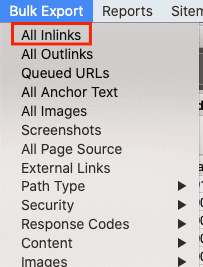
With the first one, we are going to extract a file that lists the total URLs that the crawler finds while navigating; it will be an Excel file that we can find in the reports section under "all inlinks":
Well, once we have this file, we take the logs from our server, which will normally be a compressed file of the aforementioned records, and we load it into Screaming Frog's log analyser, so that here we will have a panel where all the URLs that Googlebot has visited during the time period we load will appear, whether they are linked or not.
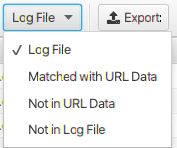
The last step will be to load the Excel file from the previous step into the log analyser's enabled section for that purpose, and a new tab will be enabled when we do so with the following options:
-
Matched with URL data: This will be the set of URLs that are internally linked and have been visited by Google.
-
Not in log file: Those URLs that are linked but for some reason are not receiving events (visits) from Google.
-
Not in URL data: This is the group we are interested in in this case; these are URLs that Google is visiting, leaving a record in the logs, but that the crawler has not been able to find when doing the simulation, because they are not internally linked, that is, they are our sought-after Orphan Pages.
From this third group, we will extract the list of pages that we will catalog as orphans, with those that return a 200 status code being fundamentally the object of our optimization.
How to solve the orphan pages problem?
In general and manually, there are four things that can be done if you have URLs that are not integrated into the internal linking, where some decisions must be made:
-
First, if after a migration there are orphan pages, as there likely will be, and they are reviewed and many of them have little relevant, no, or duplicate content, the best thing to do is delete them and, where appropriate, add a 301 redirect to similar or featured pages on the site with more authority.
-
Second, if for some reason you want to keep an orphan page due to good content, authority, and traffic, the next step is to link it from a site URL that has related content, and that is easy to reach by users and by Google. Of course, it should be noted that the page's URL must be included in the sitemap.
-
Third, if numerous orphan pages appear but their nature is temporary and their content has already expired because it included promotions and content related to a specific time, let's do the same as in the previous step and link the page to another internal one with relevance and that is accessible. However, in this case we make it so that URL is not indexed by including a "noindex" meta tag so that it is not taken into account by crawlers.
-
Finally, in the case of orphan pages with duplicate or nearly duplicate content, it would be worth considering deleting that page and including the content in another to not lose it and continue leveraging its general potential.
Conclusion
Orphan pages are a natural element that will appear on a website for various reasons, and when they are not excessive or their quantity does not grow exponentially, they do not represent any problem.
On the other hand, when a large percentage of a website and its internal linking is made up of pages of this type, it can generate many problems regarding crawling, ranking, and traffic related to SEO, as well as authority, user experience, and other issues that need to be addressed.
The good news is that orphan pages can be solved in different ways, but always in a process of analysis, what you have to ask yourself is whether each specific orphan page is relevant for ranking, for content, and can be linked to another, and when it is not the case, simply delete them.
And you, dear reader... did you know about the existence of orphan pages? Have you come across this element in any of your projects or those of your clients? Leave us a comment and we will get back to you about it. Thank you very much and see you next time!
Author: David Kaufmann

I've spent the last 10+ years completely obsessed with SEO — and honestly, I wouldn't have it any other way.
My career hit a new level when I worked as a senior SEO specialist for Chess.com — one of the top 100 most visited websites on the entire internet. Operating at that scale, across millions of pages, dozens of languages, and one of the most competitive SERPs out there, taught me things no course or certification ever could. That experience changed my perspective on what great SEO really looks like — and it became the foundation for everything I've built since.
From that experience, I founded SEO Alive — an agency for brands that are serious about organic growth. We're not here to sell dashboards and monthly reports. We're here to build strategies that actually move the needle, combining the best of classical SEO with the exciting new world of Generative Engine Optimization (GEO) — making sure your brand shows up not just in Google's blue links, but inside the AI-generated answers that ChatGPT, Perplexity, and Google AI Overviews are delivering to millions of people every single day.
And because I couldn't find a tool that handled both of those worlds properly, I built one myself — SEOcrawl AI, an enterprise SEO intelligence platform that brings together rankings, technical audits, backlink monitoring, crawl health, and AI brand visibility tracking all in one place. It's the platform I always wished existed.
Discover more content about this author
On-page SEO is everything you control on a page: content, title, meta description, headings, URL, images and internal links. Here is a checklist element by element, an audit process and what changes with AI Overviews and AI Mode.