


Discovered – Currently Not Indexed: What It Means & How to Fix It
Google knows your URL exists and hasn't visited it yet. Here's how to tell whether to wait or act, and which fixes to try first on a small site and on a large one.
Discovered – currently not indexed means Google found the URL but hasn't crawled it yet. That's how Google's Page indexing report help puts it. Google usually planned the crawl and then rescheduled it, rather than risk overloading your site, which is why the last crawl date is empty in the report.
It's a crawl-priority status, not a verdict on your content, because Google hasn't read the page yet. Below you'll see how it differs from "Crawled", what we found when we checked our own site, and a fix list ordered by site size. New to the report? Start with this Google Search Console guide.
What "Discovered – currently not indexed" means
Google moves a URL through four stages: it finds it, crawls it, indexes it and then can show it in results. Two Search Console statuses describe a URL that stopped on the way.
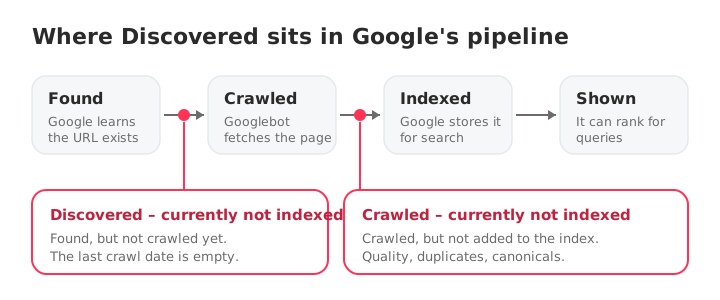
A URL reaches "found" through your sitemap or through links from other pages. Google then decides when to crawl it. "Discovered" means that decision hasn't happened yet.
How it differs from "Crawled – currently not indexed"
The two statuses sound alike and need different fixes.
| Discovered – currently not indexed | Crawled – currently not indexed | |
|---|---|---|
| Crawled by Google? | No | Yes |
| Last crawl date | Empty | A date |
| Has Google read the page? | No | Yes |
| Usual reason | Crawl postponed or low priority | Google read the page and skipped it |
| Look first at | Internal links, sitemap, crawl capacity | Content quality, duplicates, canonicals |
The full diagnosis of the second status is in the Crawled – currently not indexed guide.
What the list looks like on a real site
We checked seocrawl.ai in SEOcrawl's Indexation report. Of the 1,000 URLs SEOcrawl tracks (our sitemap declares 6,310), 823 are indexed, or 82.3%. 128 sit in "Crawled – currently not indexed" and 14 in "Discovered – currently not indexed."
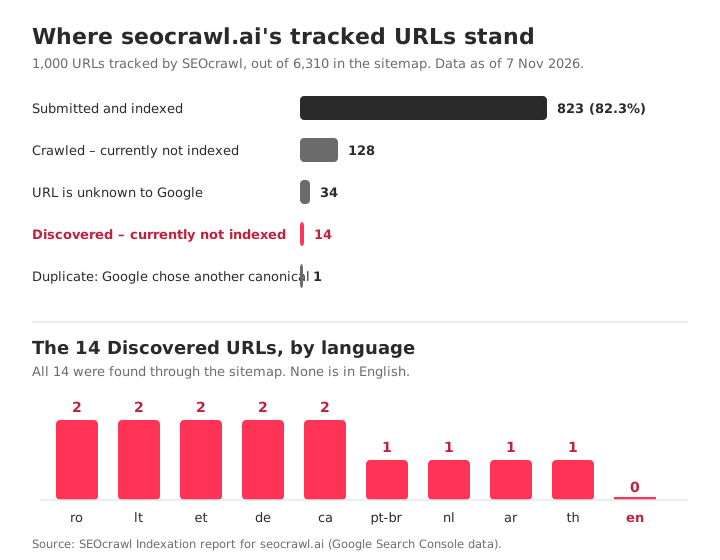
What the 14 have in common is the useful part:
- Every one is a translated page: Arabic, Catalan, German, Estonian, Lithuanian, Dutch, Portuguese (Brazil), Romanian and Thai. None is in English.
- Google found all 14 through the sitemap, not through a link from another page.
- One of them shows an older crawl date (9 May 2026), so the status describes where a URL stands now, not that Google has never visited it.
That's a pattern to check, not a diagnosis. A page that exists in 26 languages and is reachable mostly through the sitemap is a prime candidate for weak internal linking, so internal links are the first thing to look at. The lesson holds on any site: don't read the list URL by URL. Grouped by language, 14 URLs became one question.
The numbers cover the 1,000 URLs SEOcrawl tracks, a sample of the whole sitemap. The bigger group, 128 URLs, is the other status, and it has its own guide.
Why Google postpones a crawl
Google's crawl budget guide explains how Google decides how much to crawl: a capacity limit your server can take, and demand for your URLs. Most Discovered URLs trace back to one of these five causes.
- Crawl capacity. Google says the limit goes down when your site slows down or returns server errors. A slow server means fewer crawls.
- Low crawl demand. Demand depends on a site's size, update frequency, page quality and relevance. A URL with few or no internal links gives Google little reason to come back soon.
- Crawl waste. Duplicate URLs, parameters, facets, long redirect chains and soft 404s compete with your real pages. Google notes that soft 404s keep being crawled and waste budget, and that it still requests a noindex page before dropping it.
- Sitemap-only discovery. A sitemap tells Google a URL exists. It doesn't make the URL a priority, and Google treats it as a hint. Pages found only there are the first to wait.
- A new site or section. Every site starts with the same default, conservative capacity limit, which grows as the site proves healthy.
Crawl budget itself only needs your attention on very large sites. Google's rough estimate: 1,000,000+ unique pages updated about weekly, or 10,000+ pages changing daily. On smaller sites, causes 2 and 4 are far more common.
Is it a problem? Three questions before you fix anything
- Should this URL be indexed at all? If it's a filtered view, an internal search page or a test URL, leaving it out is fine. To make that explicit, noindex it or return a 404 or 410 (see Excluded by 'noindex' tag).
- How many URLs, and which pattern? Google says that with fewer than 500 pages you probably don't need this report. The list is also limited to 1,000 rows, so on a big site it's a sample.
- Are they new? A URL published last week isn't a problem yet. Google's own timelines are in the table below.
How to fix it, by site size
The right first move depends on how big your site is, so start in the right column.
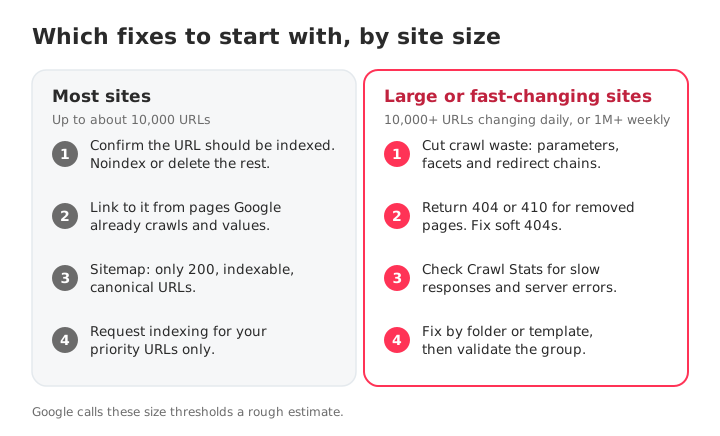
Most sites: up to about 10,000 URLs
- Confirm the URL deserves indexing. If it doesn't, noindex or delete it and take it off your list.
- Link to it from pages Google already crawls. Add contextual links, with descriptive anchors, from indexed pages that get traffic. Any crawler can list your orphan pages by filtering for zero internal links, and this internal linking guide has the full method.
- Keep the sitemap clean. Include only URLs that return 200, are indexable and are the canonical version, with an accurate
lastmod. Google ignores priority and changefreq. If you need your file first, find your sitemap. If Search Console says it can't find one, see No referring sitemaps detected. - Request indexing for a handful of priority URLs. Open the URL Inspection tool and click Request indexing. Google applies a quota and says repeat requests don't speed anything up, so keep it for the pages that matter most.
Large or fast-changing sites: 10,000+ URLs changing daily, or 1M+ weekly
- Cut crawl waste. Block the URL spaces with no search value (parameters, facets, internal search) in robots.txt, and consolidate duplicates with canonicals and 301 redirects. Don't rely on noindex to save budget: Google still requests those pages.
- Return 404 or 410 for removed pages, and fix soft 404s. Google calls a 404 a strong signal not to crawl a URL again, while blocked URLs stay in the queue longer. Shorten any long redirect chain.
- Check Crawl Stats. Under Settings, the Crawl Stats report shows response times and server errors. If they're high, Google lowers your capacity limit, and no content fix will help until the server does.
- Fix by folder or template, then validate the group. Make one decision per pattern, build a sitemap with only the fixed URLs and click Validate fix. Learn more about crawl budget if your site is in this range.
Wait or act?
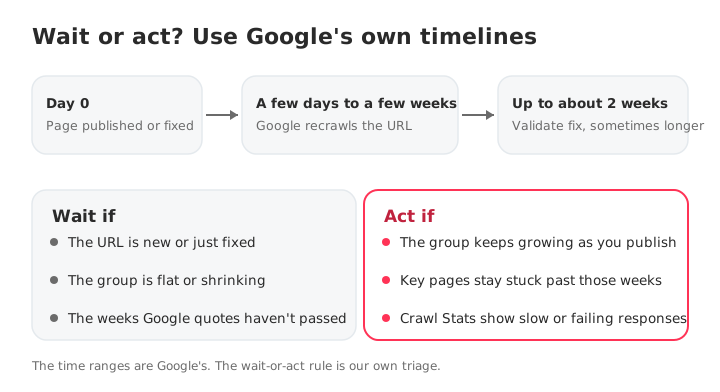
The hardest part isn't the fix, it's knowing when to stop waiting. Use Google's own ranges, and your own trend.
| What you did | What Google says | Source |
|---|---|---|
| Asked Google to recrawl | A few days to a few weeks | Ask Google to recrawl |
| Request indexing | Typically a day or so, up to a week or two, with a daily limit | URL Inspection help |
| Validate fix | Up to about two weeks, sometimes much longer | Page indexing help |
The time ranges are Google's. The wait-or-act rule is ours: wait while the URL is new and the group is flat or shrinking, and act when the group keeps growing or your key pages stay stuck after those weeks.
How to monitor it over time
Search Console shows the latest state of each URL and a list capped at 1,000 rows, so build your own routine:
- Once a month, export the list and compare it with the previous one. Is the group growing, flat or shrinking?
- Group by pattern (language, folder, template) before you look at single URLs.
- Check how Google found each URL. A list that is all "sitemap" and no "referring page," as in our 14 URLs, points straight at internal linking.
SEOcrawl AI's Indexation view gives you that list ready to use: the URLs in each coverage state, with the last crawl date, Google's canonical versus the declared one, and whether each URL was found through the sitemap or a referring page. The Crawler shows each page's crawl depth and finds orphan pages, and SEO Monitor alerts you when a key page gains a noindex, changes its canonical, returns a 404 or leaves the sitemap.
You can also skip the dashboard. With the SEOcrawl AI MCP connected to Claude or ChatGPT, ask: "List the URLs in Discovered – currently not indexed and group them by folder." Here's the step-by-step guide to connect Search Console to Claude and ChatGPT.
FAQs
What does "Discovered – currently not indexed" mean?
It means Google found your URL but hasn't crawled it yet. Google usually planned the crawl and then rescheduled it, which is why the last crawl date is empty (Page indexing help). Google hasn't read the page, so the status says nothing about its quality. It isn't a penalty.
How long does "Discovered – currently not indexed" last?
Google doesn't publish a time for this status. It does say a recrawl you ask for takes a few days to a few weeks, and a Validate fix takes up to about two weeks, sometimes much longer. A new URL can simply need those weeks. If the group keeps growing as you publish, stop waiting and act.
Does requesting indexing fix it?
It can help for a handful of priority URLs, because it asks Google to queue the page. It doesn't remove the cause, so a page can come back to the same status. Requests are subject to a daily quota, and Google says sending the same URL several times doesn't speed anything up. Use it after you improve internal links, never as a bulk tool.
Is it a penalty?
No. Manual actions appear in their own report. This status means Google found the URL and hasn't crawled it yet, so it hasn't evaluated the page. The cause is usually crawl priority: weak internal links, a slow server, or a pile of low-value URLs competing for crawls.
Why are so many of my pages discovered but not indexed?
A large count usually points to a pattern, not to single pages: URL parameters or facets, duplicates, a sitemap with URLs that shouldn't be there, weak internal links to a whole section, or a server that slows Googlebot down. Group the URLs by folder, language or template before you look at any single one.
Do I need to worry about it on a small site?
Usually not. Google says that if your site has fewer than 500 pages, you probably don't need the Page indexing report at all. A few new URLs in this status mostly need time and a few internal links from pages Google already crawls.
How can SEOcrawl AI help with Discovered URLs?
SEOcrawl AI's Indexation view lists the URLs stuck in each Google coverage state, with the last crawl date, Google's canonical versus the declared one, and whether Google found each URL through the sitemap or a referring page. You can also ask for that list from Claude or ChatGPT through the SEOcrawl AI MCP and group it by folder.
See more SEOcrawl AI on Google
Choose us as a preferred source and you'll see more of our articles in Google's Top Stories.
Author: David Kaufmann

I've spent the last 10+ years completely obsessed with SEO — and honestly, I wouldn't have it any other way.
My career hit a new level when I worked as a senior SEO specialist for Chess.com — one of the top 100 most visited websites on the entire internet. Operating at that scale, across millions of pages, dozens of languages, and one of the most competitive SERPs out there, taught me things no course or certification ever could. That experience changed my perspective on what great SEO really looks like — and it became the foundation for everything I've built since.
From that experience, I founded SEO Alive — an agency for brands that are serious about organic growth. We're not here to sell dashboards and monthly reports. We're here to build strategies that actually move the needle, combining the best of classical SEO with the exciting new world of Generative Engine Optimization (GEO) — making sure your brand shows up not just in Google's blue links, but inside the AI-generated answers that ChatGPT, Perplexity, and Google AI Overviews are delivering to millions of people every single day.
And because I couldn't find a tool that handled both of those worlds properly, I built one myself — SEOcrawl AI, an enterprise SEO intelligence platform that brings together rankings, technical audits, backlink monitoring, crawl health, and AI brand visibility tracking all in one place. It's the platform I always wished existed.
Discover more content about this author

Until November 30, the first year of any SEOcrawl AI annual plan is 50% off with code BLACKFRIDAY2026. Here is what you get, what every plan's prompts cover, and how to see where ChatGPT, Gemini, Claude and Perplexity mention you in 15 minutes.