What Is a Product Listing Page (PLP)? Meaning, Examples and SEO
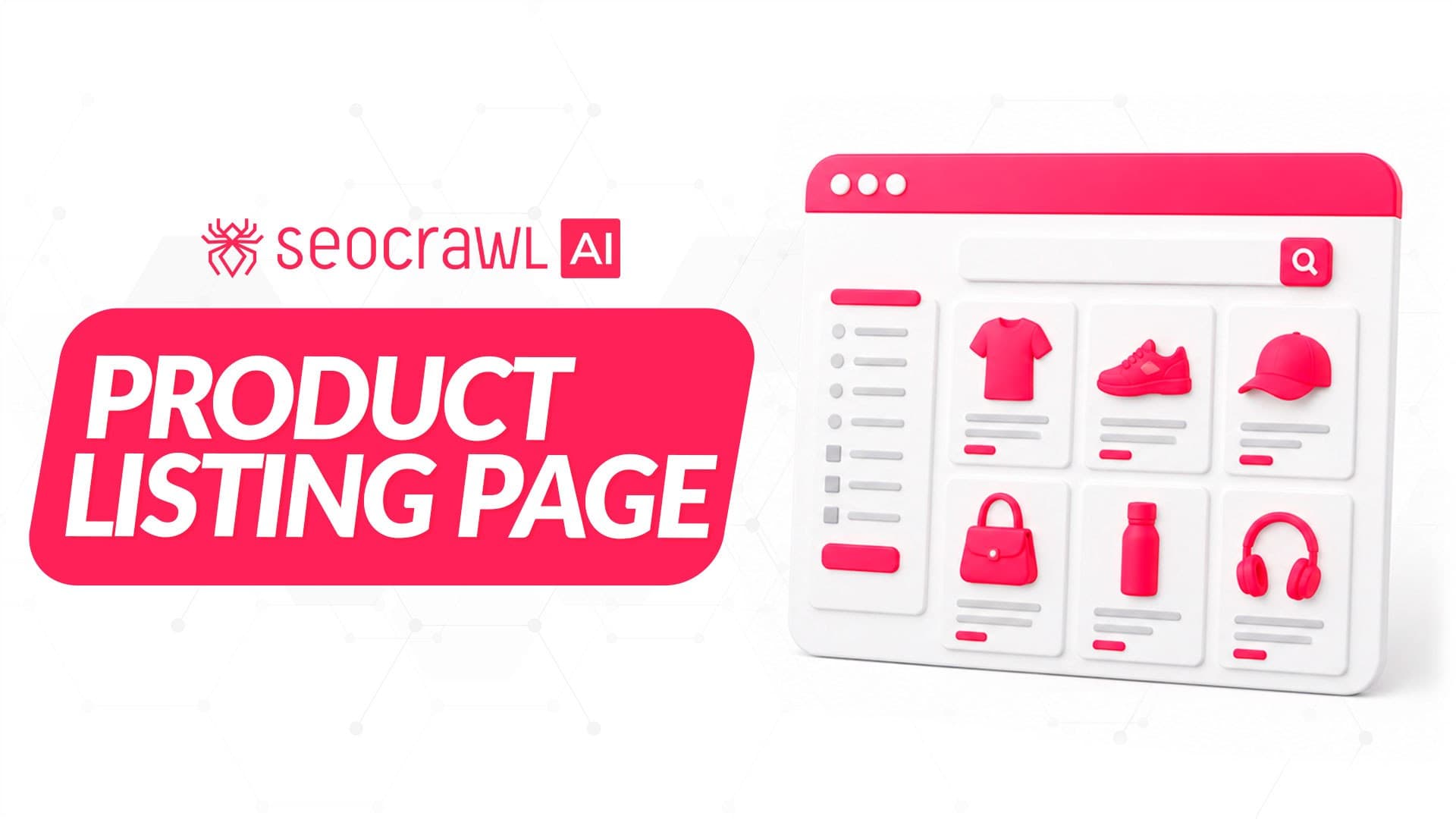
Every online store runs on listing pages, and two very different visitors read them: shoppers deciding what to buy and Googlebot deciding what to crawl. They need different things from the same page.
A product listing page (PLP) is where an online store lays out a whole category at once. Shoppers use it to compare, and Google uses it to find your product pages. The same filters that help shoppers can also create thousands of near-duplicate URLs.
Below: the PLP vs PDP split, the parts shoppers use, and Google's rules for listings. For the wider picture, see this guide to ecommerce SEO.
What is a product listing page?
A product listing page is any page that lists multiple products and sends the shopper on to a single one. A PLP covers more page types than the word "category" suggests, as a generic apparel store shows:
- Category page:
/women/shoes - Subcategory page:
/women/shoes/running - Collection page:
/summer-sale, grouped by campaign rather than by product type - Internal search results:
/search?q=sandals
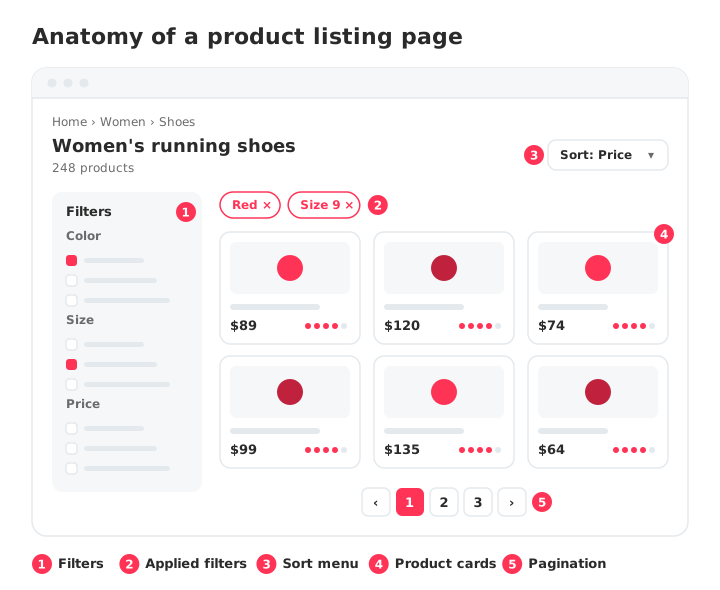
All four share one template: a product grid, filters, a sort menu and pagination.
PLP vs PDP: what's the difference?
A PLP lists many products so the shopper can choose; a product detail page (PDP), also called a product display page, presents one product so the shopper can buy it. Here is how they split the work:
| PLP (product listing page) | PDP (product detail page) | |
|---|---|---|
| Purpose | Help shoppers browse, filter and compare | Help shoppers decide on one item |
| Content | Product cards, filters, sorting, pagination | Photos, description, specs, price, reviews, add to cart |
| Typical search | Broad: "women's running shoes" | Specific: brand plus model name |
| Role in conversion | Moves the shopper to the right product | Closes the sale |
| Role in SEO | Ranks for category terms and leads Google to every product | Ranks for product and model terms |
Google's guide to ecommerce site structure warns that if category pages don't link directly to all products, Googlebot may not find them, and that it generally doesn't use a site's search box to discover pages.
The same running shoe appears as one card on /women/shoes/running and on its own URL: the card wins the click, the product page wins the sale.
What makes a product listing page convert
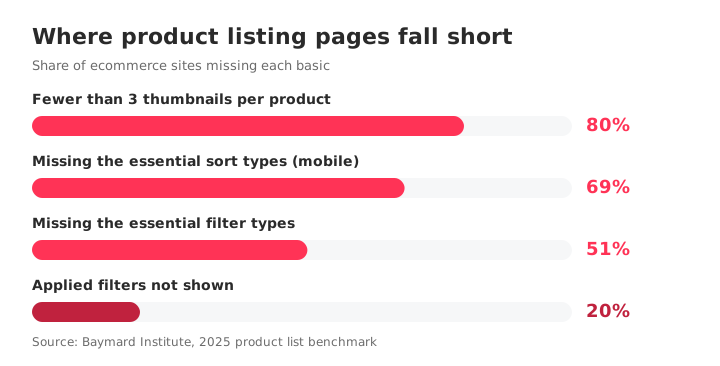
A PLP converts when shoppers can cut a large catalog down to a few relevant products fast, through filters, sorting, product cards and pagination. Most stores still get these wrong: Baymard Institute's 2025 product list benchmark rates 58% of sites on desktop and 78% on mobile as "poor" to "mediocre".
Where each component falls short:
- Filters. 51% of sites lack the five essential filter types (price, user rating, color, size and brand). Baymard's 2023 research also found 61% don't promote their important filters at all.
- Applied filters. 20% of sites don't show which filters are active. Show them as removable chips above the grid.
- Sorting. 68% of desktop sites and 69% of mobile sites lack the four essential sort types. Offer the orders people actually choose by, such as price, rating, best selling and newest.
- Product cards. 80% of sites don't show three or more thumbnails per product in the list. Add them, plus price, rating and color swatches.
- Pagination or load more. Pick what your shoppers prefer, but make it crawlable (more on that below).
PLP SEO: how to get listing pages indexed without the filter mess
PLP SEO means getting the listing pages you want indexed while keeping filter and sort variations from soaking up Google's crawling. Google calls faceted navigation "by far the most common source" of the overcrawl issues site owners report (Crawling December, 2024).
Faceted navigation and URL parameters
Faceted navigation, a PLP's filter panel, can turn every combination of values into a URL. Google's faceted navigation documentation says parameter-based facet URLs can create an infinite URL space. The result is overcrawling and slower discovery of your new URLs.
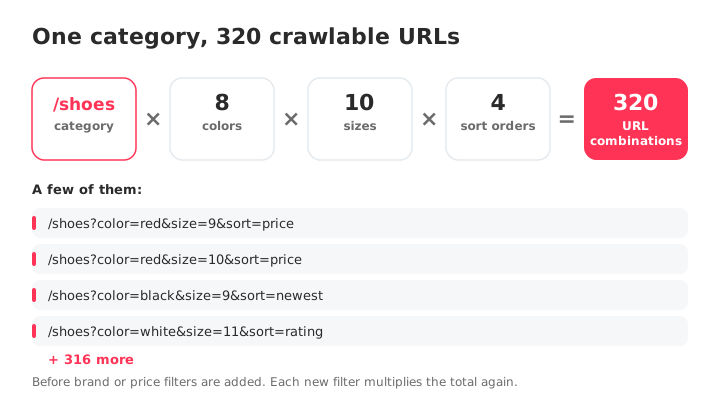
Suppose /shoes offers 8 colors, 10 sizes and 4 sort orders. Picking one value of each already gives 320 URLs for one category, before brand or price enter the mix; /shoes?color=red&size=9&sort=price is one of them.
Google's rule depends on whether those URLs need to rank:
- They don't need to rank: block them with robots.txt or move the filters into URL fragments (
#), keeping product pages and one unfiltered listing crawlable. - Some do need to rank, such as "red running shoes": use the standard
&separator for parameters and, for path-based filters, a fixed filter order with no duplicates.
Does this apply to a small store? Google's crawl budget guidance targets sites with over a million unique pages changing weekly, more than 10,000 pages changing daily, or many URLs in "Discovered - currently not indexed". Below that, duplicate URLs (what Google calls "perceived inventory") are still the crawl factor you control most.
How Google decides what to crawl on your site is covered in this guide to crawl budget.
How to set canonical tags on filtered and sorted PLPs
On a filtered or sorted PLP, a rel=canonical tag (a line in the page's HTML that names the preferred version of a URL) pointing to the unfiltered page is a hint, not a block. It may reduce crawling of filtered versions over time, but Google's faceted navigation documentation rates canonical and nofollow as "generally less effective in the long term" than robots.txt or URL fragments.
For true duplicates, Google's guide on canonical URLs rates redirects and rel=canonical as strong signals and sitemap inclusion as a weak one; the signals add up. Link internally to the canonical URL too.
Sort orders get their own rule: Google's pagination guidance recommends keeping filter and alternative sort-order variants such as ?order=price out of the index with noindex or robots.txt.
How the tag itself works is explained in the canonical tag guide.
How to paginate a PLP: pagination, load more and infinite scroll
Paginate a PLP so every page has its own crawlable address: a unique URL such as ?page=2, a canonical pointing to itself and a plain <a href> link to the next page.
Google adds two don'ts: don't canonicalize page 2 and beyond to page 1, and don't use # fragments for page numbers.
Load more and infinite scroll need the same plumbing. Google's crawlers don't click buttons and generally don't run JavaScript that waits for a user action, so products behind a JavaScript-only button stay hidden unless the page also exposes <a href> links (or a sitemap or Merchant Center feed lists them).
- Do: page 3 of
/women/shoes/runninglives at?page=3, declares itself as canonical and links to?page=4with<a href>. - Don't: page 3 sets its canonical to page 1, and the next batch only appears through a "Load more" button that runs JavaScript.
The first lets Google reach every product past page 2; the second calls page 3 a copy of page 1 and leaves no link to follow.
How to link to and from your PLPs
Link to your PLPs from the main menu and breadcrumbs, and from each PLP to every product it lists. Google's ecommerce site structure guide says it infers importance from link depth and the number of internal links, and recommends a path from menus to categories, then subcategories, then all products.
That makes the PLP the hub that passes links on to your products. The general rules live in this internal linking guide.
Common product listing page mistakes
Most PLP mistakes treat a filter, a canonical or a script as a design detail:
- Page 2+ canonicalized to page 1. Fix: a self-referencing canonical on every page.
- Canonical as the only facet control. Fix: robots.txt or
#fragments for facets that don't need to rank. - Nofollow on some filter links. It only works if every anchor to that URL, internal and external, carries it. Fix: robots.txt or fragments.
- Empty filter pages that redirect. No-result combinations, duplicate filters and nonexistent page numbers should return HTTP 404 at that URL instead of redirecting.
- JavaScript-only "Load more". Fix: crawlable
<a href>pagination behind the button. - robots.txt used to pick a canonical. Google may still index a blocked URL without its content, and noindex isn't recommended for this either. Fix: rel=canonical or redirects.
- Hidden applied filters. Fix: removable chips above the grid.
How to monitor your PLPs in Google Search Console
Monitor PLPs in Search Console's Page indexing report, where filtered listings often show up under these statuses:
- Crawled - currently not indexed: Google crawled the URL but didn't index it; it may be indexed later, and resubmitting isn't needed.
- Duplicate, Google chose different canonical than user: Google picked another URL over the one you declared.
- Duplicate without user-selected canonical: you declared none, and Google chose another URL.
Filtered PLPs that point to their unfiltered page with a canonical usually appear as Alternate page with proper canonical tag, which is often the expected result.
On large stores, the report's example list stops at 1,000 URLs, so thousands of facet URLs can't all be seen there. Grouping listing pages by URL pattern lets you measure them as one set instead of URL by URL.
SEOcrawl AI already does that grouping. Its Tag Evolution view in the SEO Dashboard measures URLs and keywords by group, so a "Category pages" tag shows PLP clicks and impressions apart from product pages, with your Search Console data kept beyond Google's 16 months. SEO Monitor alerts you when a template change touches canonical tags, indexing directives, robots.txt or status codes.
Through the SEOcrawl AI MCP Server (MCP, or Model Context Protocol, is the standard that lets an AI assistant query outside tools), your AI assistant can pull index coverage by Search Console status and inspect individual URLs. The platform covers classic SEO (Search Console and GA4) and GEO: your brand's visibility in ChatGPT, Claude, Gemini, Perplexity and Copilot.
Next step: tag your category pages and track them apart from product pages in the SEO Dashboard, with a 14-day free trial.
FAQs
What is a product listing page (PLP)?
A product listing page is any page of an online store that lists several products and sends the shopper on to a single one: a category, subcategory, collection or internal search results page. It usually combines a product grid, filters, a sort menu and pagination.
PLP vs PDP: what's the difference?
A PLP lists many products so the shopper can compare and choose; a PDP (product detail page) presents one product so the shopper can buy it. PLPs rank for broad category searches and lead Google to every product; PDPs rank for product and model searches and close the sale.
What does PLP mean in ecommerce?
In ecommerce, PLP stands for product listing page, the page that lists products from a category, collection or search. You'll usually see it paired with PDP in briefs, analytics setups and A/B tests, where teams split traffic and conversion by page type. Outside retail it can mean other things, such as a personalized learning plan in education.
How do I optimize a PLP for SEO?
Keep the listing pages you want to rank crawlable and indexable, and block filter and sort variations that don't need to rank with robots.txt or URL fragments. Give every paginated page its own URL and a self-referencing canonical, link to each PLP from menus and breadcrumbs, and link from each PLP to every product it lists.
How can I track product listing pages separately in Search Console?
Group your PLP URLs by a pattern they share, such as /category/ or /c/, and measure that group instead of reading pages one by one. With SEOcrawl AI, your AI assistant can use the MCP Server to create a rule that auto-tags every URL matching the pattern, including future ones, then pull the top pages in that tag with their clicks, impressions and position.
Author: David Kaufmann

I've spent the last 10+ years completely obsessed with SEO — and honestly, I wouldn't have it any other way.
My career hit a new level when I worked as a senior SEO specialist for Chess.com — one of the top 100 most visited websites on the entire internet. Operating at that scale, across millions of pages, dozens of languages, and one of the most competitive SERPs out there, taught me things no course or certification ever could. That experience changed my perspective on what great SEO really looks like — and it became the foundation for everything I've built since.
From that experience, I founded SEO Alive — an agency for brands that are serious about organic growth. We're not here to sell dashboards and monthly reports. We're here to build strategies that actually move the needle, combining the best of classical SEO with the exciting new world of Generative Engine Optimization (GEO) — making sure your brand shows up not just in Google's blue links, but inside the AI-generated answers that ChatGPT, Perplexity, and Google AI Overviews are delivering to millions of people every single day.
And because I couldn't find a tool that handled both of those worlds properly, I built one myself — SEOcrawl AI, an enterprise SEO intelligence platform that brings together rankings, technical audits, backlink monitoring, crawl health, and AI brand visibility tracking all in one place. It's the platform I always wished existed.
Discover more content about this author