Canonical Tag: What It Is and How to Use It
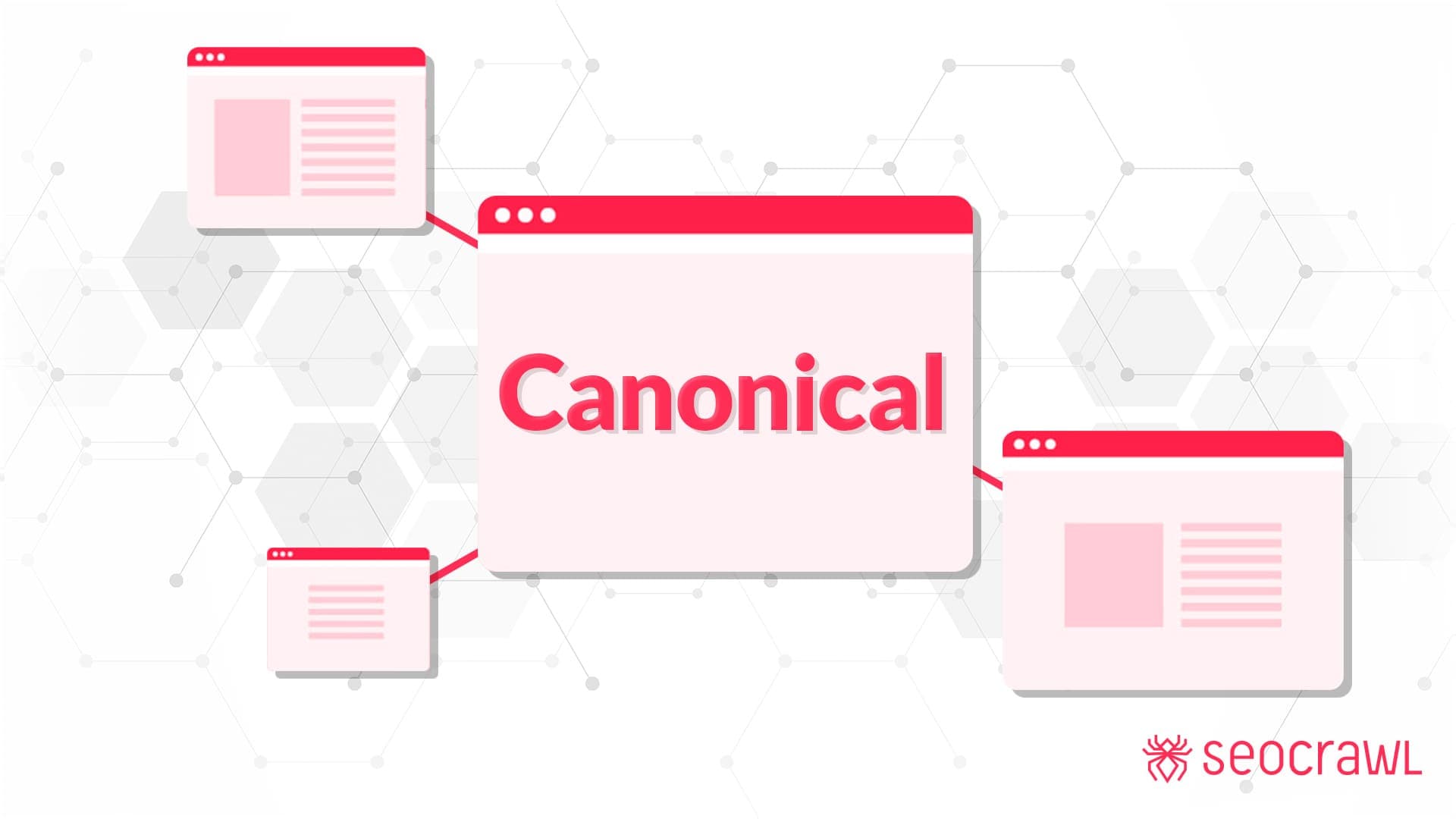
When you own one or several websites, whether they are focused on products, services, or sections of different kinds, it is common for many pages on the platform to be similar or almost identical, for a variety of reasons. This is especially frequent in ecommerce, but we have also detected it in our consulting work on blog tags and content of different types.
It is easy to imagine that any website could run into duplicate content issues. Google penalizes sites with duplicate content, and this undoubtedly affects their ranking in search results.
So how is it that websites can have duplicate content and yet their webmasters do not have to worry about being penalized?
The answer lies in what is known as the canonical attribute or canonical link, which we will discuss in detail in the following sections, covering its definition, purpose, benefits, how to apply it, when it should be used, and the potential drawbacks associated with the canonical attribute when it is used to avoid possible penalties for duplicate content.
What is a canonical link and the canonical attribute?
Generally speaking, a canonical link is one that, through a tag or attribute, is described as the "main" or "original" link on a website, allowing you to point URLs of pages with similar content to it. Thanks to this, the link is perceived as the preferred or priority version by Google's bots or the search algorithms.
This way, content that might be seen as duplicated can be handled correctly and relatively easily. If it were not described as canonical, it could affect the platform's ranking and lead to penalties. This can happen even when the duplicated content has not been placed deliberately, but rather appears naturally and organically through product sales, service offerings, related sections, and so on.
From a technical standpoint, a canonical URL is a link written in HTML code that incorporates the canonical tag, giving it the canonical attribute. This makes it seen as the main or source address by Google's bots, as mentioned above, preventing similar links from being considered repeated or duplicated.
Below is an example showing how we declare a URL as canonical or main:
<link rel="canonical" href="/en/">
The origin of canonical links and their SEO benefit
The use of canonical links began in 2009, when the three main internet search companies, Google, Bing, and Yahoo, jointly introduced the canonical attribute.
Logically, the canonical link has great potential from an SEO point of view, since it helps us avoid the penalties mentioned above and signals our most important URLs to Google.
For that reason, when it comes to a site's SEO and the application of related strategies, the inclusion of canonical links is always part of the plan, especially for a large site with a significant number of URLs that might be identical.
How to make a URL canonical
When you have a website, or are in the process of optimizing one, and you find that there are a large number of similar URLs, you should begin a canonicalization process. This consists of choosing which URL is the best and giving it the canonical attribute.
Sometimes choosing the best URL is straightforward, because it has the most optimized content and technical structure. However, in other cases the choice can be more complex, especially when the pages are very similar and it is hard to tell them apart.
Either way, here is a simple recommendation: it is always better to choose a canonical URL when you have similar sections or pages. Otherwise, there could be negative consequences regarding your rankings and penalties that can permanently affect traffic.
To make a URL canonical, the first step is to compare the URLs that may be similar. This is common in ecommerce sites, where users reach products and service listings in different ways, which can result in URLs like these:
-
https://example.com/wordpress/seoplugin/ -
https://example.com/wordpress/pluginseo/
Since both URLs have value for the site or lead to the same product or page, what you need to do is choose which of the two is more relevant, as follows:
-
Choose the most relevant URL, based on visits, traffic, and authority.
-
Once the link is chosen, add the canonical attribute from the non-canonical page pointing to the canonical one. It should look something like this:
<link rel="canonical" href="https://example.com/wordpress/seo-plugin/">
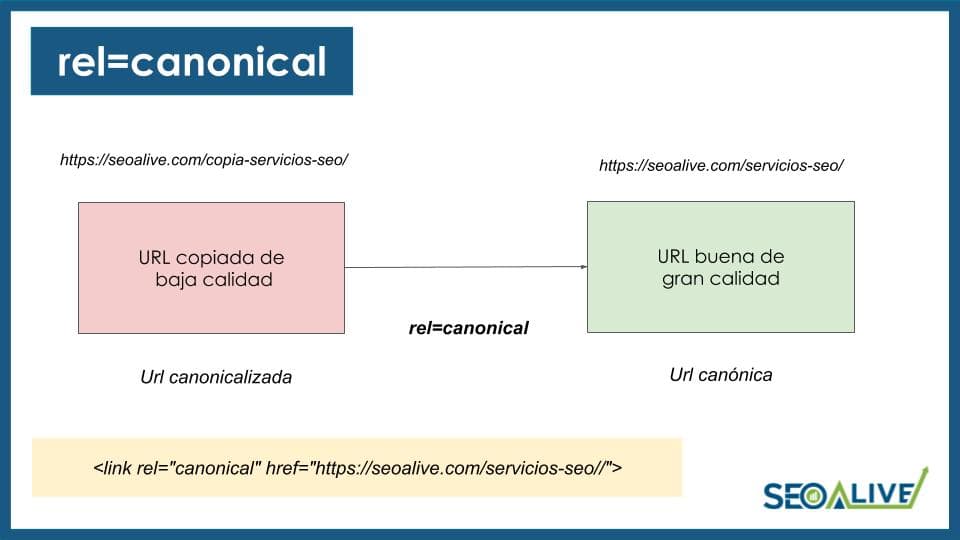
What we achieve with this is telling Google which URL is the canonicalized one (the one we treat as a copy of the original) and which is the canonical URL, that is, the original. This link is placed on the "copy" URL and points to the original URL.
In other words, it would follow this scheme:
When is it advisable to use canonical URLs
When you have websites with many pages or sections such as products, services, and other information and posts, it is very likely that some of those pages and URLs will be very similar, which makes using canonical URLs highly advisable.
However, in those cases you can also use real 301 redirects instead of canonical tags. This is especially useful when the redirects are going to be permanent and there is a site migration. That said, in cases of technical problems or penalties, setting canonical tags is always the next most recommended option.
It is even possible to use canonical tags on URLs across different sites, such as content that is republished without modification on other platforms, with appropriate permission, always pointing to the original to avoid penalties.
Important note about rel=canonical
Just because we saved this for the end does not make it any less important. We must be clear that the canonical attribute is a SUGGESTION to Google, not a directive. This means that Google may ignore it if the signals we send on the rest of the site contradict how we have defined it.
In other words, if we set a canonical from URL A to URL B but internally all the links point to A, and the external links also point to A, Google may ignore that canonical and treat A as the good one. B would then be a copy of A and potentially subject to penalties.
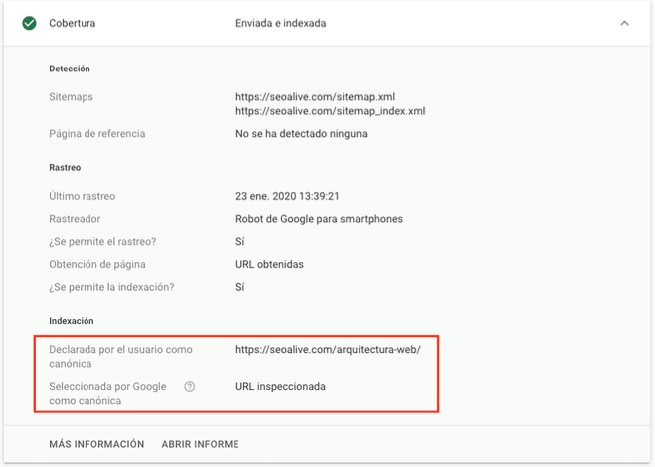
To find out which URL Google treats as the original and which as the canonical, we have to go into Search Console, add the URL to the inspector, and review the information provided by Google Search Console
And there we get the following data:
Common mistakes with canonical URLs
There are various issues and frequently made mistakes related to canonical URLs, which become common and especially show up when this tool is misused, for example:
-
You should not canonicalize a paginated archive to Page 1. Likewise, the canonical tag of a page should point to that same page, for example: from Page 2 to Page 2, otherwise search engines may have trouble indexing deeper page archives.
-
You must make canonical URLs exclusive and unique, even if that means switching protocols from HTTP to HTTPS.
-
You must base the canonical tag on the required URL**, without using variables and in a direct way**.
-
When a page has multiple related canonical URLs, it can be counterproductive and unpredictable. Let us not forget that Google has to understand our website quickly and clearly, so let us make it easy.
-
Another important mistake can come from using the canonical attribute in the body instead of in the /head or header. Google recommends in its official communications to use the attribute in the head as early as possible, to avoid problems when parsing all the content, since it might not be detected.
-
Using noindex and rel=canonical together. John Mueller specifically addressed this in one of his many hangouts, explaining that both signals are contradictory and will confuse Google, which will take the canonical attribute over the noindex. So we should NEVER use them together.
-
Pointing canonical attributes to 404 pages or 30x pages. Let us think about it for a moment: if we add an attribute to URL A, pointing to B, which returns an error or makes a redirect, are we not sending wrong signals to Google? We are telling it that the "original" URL is an error page or a redirect... it does not make sense.
Advanced uses of the canonical attribute
The canonical attribute can have other functions and advanced uses, such as:
- HTTP header canonical link: these kinds of headers can be very useful when it comes to canonicalizing PDF documents, since they are not HTML, so we have to opt for this option if we want to canonicalize them. It would look like this:
Link: <http://www.example.com/downloads/seoguide.pdf>; rel="canonical"
-
Using canonical on pages that are not that similar: it is actually possible to use canonical tags on pages that are not really identical, even quite different. While this may help the site's overall authority, it is not recommended, because Google can detect misuse of canonicals, penalize the site, and then ignore its actual canonical URLs.
-
Using the canonical attribute together with Hreflang: you can use strategies involving Hreflang at the same time as the canonical tag, with good results if applied properly. However, you must be very clear that when using Hreflang, the language implementation of the canonicals must be perfect, always pointing to themselves to avoid unpredictable issues or conflicts that can cause more harm than good for both strategies.
Do you still have any questions about this fascinating SEO tag? We will be happy to help!
Author: David Kaufmann

I've spent the last 10+ years completely obsessed with SEO — and honestly, I wouldn't have it any other way.
My career hit a new level when I worked as a senior SEO specialist for Chess.com — one of the top 100 most visited websites on the entire internet. Operating at that scale, across millions of pages, dozens of languages, and one of the most competitive SERPs out there, taught me things no course or certification ever could. That experience changed my perspective on what great SEO really looks like — and it became the foundation for everything I've built since.
From that experience, I founded SEO Alive — an agency for brands that are serious about organic growth. We're not here to sell dashboards and monthly reports. We're here to build strategies that actually move the needle, combining the best of classical SEO with the exciting new world of Generative Engine Optimization (GEO) — making sure your brand shows up not just in Google's blue links, but inside the AI-generated answers that ChatGPT, Perplexity, and Google AI Overviews are delivering to millions of people every single day.
And because I couldn't find a tool that handled both of those worlds properly, I built one myself — SEOcrawl AI, an enterprise SEO intelligence platform that brings together rankings, technical audits, backlink monitoring, crawl health, and AI brand visibility tracking all in one place. It's the platform I always wished existed.
Discover more content about this author
On-page SEO is everything you control on a page: content, title, meta description, headings, URL, images and internal links. Here is a checklist element by element, an audit process and what changes with AI Overviews and AI Mode.