What is the noindex tag and how does it work?

The noindex is one of the most important SEO meta tags. If you still aren't quite sure what it is or how it works, you're in luck — today we'll walk you through what the noindex tag is and what it's good for in SEO.
Let's dive in.
What is the noindex meta tag?
The noindex meta tag is an HTML tag placed in the head of a web page to tell search engines that the page they are crawling should not be indexed. In other words, the tag still allows crawling of a page but blocks its indexation.
Why is it important for SEO?
As we just mentioned, this meta tag lets you control indexation, which, as you know, is one of the pillars of SEO. Any URL you noindex will show up as excluded in Google Search Console's Page Indexing report.
In the SEO world it's mainly used to prevent Google from "filing away" thin content pages on your site, such as:
- Pages with duplicate content
- Thin categories or pages with very little content
- Internal search results
- Filters or combinations of filters
With this directive, bots can still crawl and analyze every link they find on those pages, but without indexing them.
How do you add noindex to a page?
Good news for everyone who hates dealing with code:
<meta name="robots" content="noindex">
That's it? Yes, that's literally all. You just drop that snippet inside the <head> of your page and, the next time Google visits, it will realize the page shouldn't be indexed.
Just in case you don't want to take our word for it, here's the official Google documentation on the topic.
It's also worth noting that this meta tag can target any bot — just use the bot's name instead of the generic robots attribute (as in the example above). For example, if you wanted the rule to apply only to Googlebot, you'd write:
<meta name="googlebot" content="noindex">
You can add as many noindex meta tags as you want, as long as they don't contradict each other.
"But I'm on WordPress and I don't know how to add that code…" Don't worry, we've got you covered.
How do you set a page to noindex in WordPress?
Inside WordPress it's almost even simpler. Just open the page you want to noindex and flip the toggle from the SEO section.
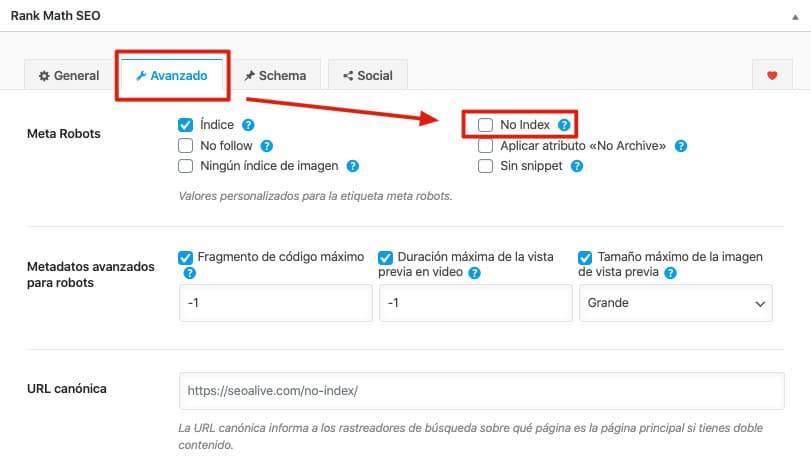
In our case we use Rank Math (one of the best SEO plugins), so inside the page you'd go to Rank Math SEO > Advanced > No Index.
If you use Yoast, which is also one of the most popular plugins, inside the page you'd go to Yoast SEO > Advanced (the cogwheel icon) > No (on the "Allow search engines to show this Page in search results?" dropdown).
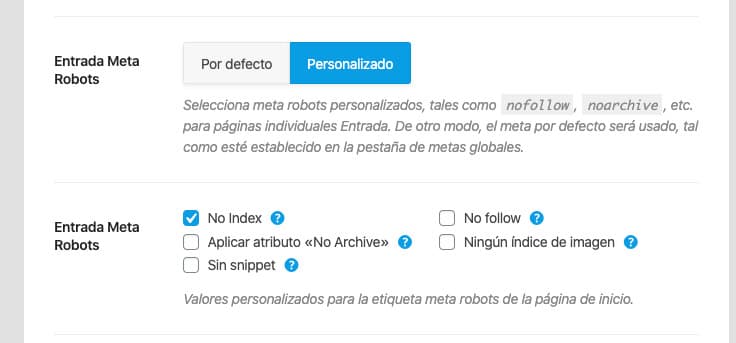
You can also apply these changes in bulk from each plugin's SEO settings. For Rank Math, head to Rank Math > Titles & Meta > Content types (pick the one you want) > Post Meta Robots > Custom > Noindex.
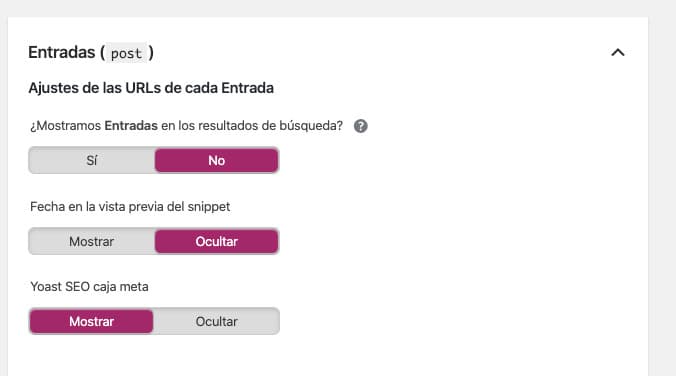
For Yoast, go to SEO > Search Appearance > Content types > Show (content type) in search results? > No.
Types of noindex
Within the noindex meta tag, there are different configurations you can pick depending on what you're trying to achieve.
noindex, follow
This is one of the most common setups in SEO. With this configuration you're telling bots via noindex that they shouldn't show that page in the search results, and via follow that they should still crawl every link on the page.
The snippet to implement it is:
<meta name="robots" content="noindex, follow">
Reminder: if you're on WordPress, you can manage this easily from the page settings or the plugin's global settings.
noindex, nofollow
This setup isn't as common, but it's available. Here you're telling bots not to index the page with the noindex, and — this is where it differs from the previous option — with the nofollow you're ordering the bot not to crawl the links on the page it's sitting on either.
The snippet to implement it is:
<meta name="robots" content="noindex, nofollow">
Common mistakes
To wrap things up, let's go over a couple of the typical mistakes people run into with the noindex meta tag so you don't trip where most people do.
The submitted URL contains a "noindex" tag
This is a very common error reported in Google Search Console.
It happens when URLs with the noindex meta tag are being submitted to Google via the sitemap.
In other words, on one hand you're sending Google a URL in the sitemap to get it indexed faster and, on the other hand, you're telling it not to index that same URL. It doesn't really add up, does it?
How to fix it:
- Either remove those URLs from the sitemap, or
- Remove the noindex tag from those URLs.
The right call depends on what you want those pages to do.
Staging / pre-production environments
Have you ever redesigned your site? Chances are you've had to create a "copy" of your website on another domain, or even inside the same one (the classic domain.com/new).
But what happens if that site is open to the public? Or what if Google stumbles onto it?
The most likely outcome is that Google starts indexing everything, and in no time you'll have your new site indexed and duplicated.
How do we fix that?
Easy. Our first recommendation is to password-protect your test environment. If you don't want to, you can always set the site to noindex and block it via robots.txt. That combination is a good safety net against disasters.
Conclusion
As you can see, the noindex meta tag has a lot to offer.
Since it's a directive, Google will respect it and won't index the page, but it will still crawl it. For that reason, we recommend using it for the cases we've covered but not as a way to save crawl budget.
If you have any questions, drop them in the comments :)
Author: David Kaufmann

I've spent the last 10+ years completely obsessed with SEO — and honestly, I wouldn't have it any other way.
My career hit a new level when I worked as a senior SEO specialist for Chess.com — one of the top 100 most visited websites on the entire internet. Operating at that scale, across millions of pages, dozens of languages, and one of the most competitive SERPs out there, taught me things no course or certification ever could. That experience changed my perspective on what great SEO really looks like — and it became the foundation for everything I've built since.
From that experience, I founded SEO Alive — an agency for brands that are serious about organic growth. We're not here to sell dashboards and monthly reports. We're here to build strategies that actually move the needle, combining the best of classical SEO with the exciting new world of Generative Engine Optimization (GEO) — making sure your brand shows up not just in Google's blue links, but inside the AI-generated answers that ChatGPT, Perplexity, and Google AI Overviews are delivering to millions of people every single day.
And because I couldn't find a tool that handled both of those worlds properly, I built one myself — SEOcrawl AI, an enterprise SEO intelligence platform that brings together rankings, technical audits, backlink monitoring, crawl health, and AI brand visibility tracking all in one place. It's the platform I always wished existed.
Discover more content about this author