No Referring Sitemaps Detected: What It Means & How to Fix It
Your page is in the sitemap, yet Google Search Console says no sitemap points to it. Here's when to act and when to leave it alone.
No referring sitemaps detected is a notice, not an error. It means Google couldn't tie the page to any sitemap it knows about. If the page is indexed, you usually don't need to do anything. If it isn't, the fix takes four steps. New to the tool? Start with this Google Search Console guide.
What does "No referring sitemaps detected" mean?
Google's URL Inspection help defines it in one line: "Google couldn't identify a sitemap that refers to this page."
Where the message appears
In the URL Inspection tool, expand Page indexing. The message sits under Discovery, next to Sitemaps, together with Referring page: that block shows how Google found the URL. A sitemap is only one route; internal links, external links and direct submission are the others.
A notice, not an error
The message describes discovery, not indexing. A page with no referring sitemap can still be crawled, indexed and ranked, because Google may have reached it through links instead.
Does it affect indexing?
No, in most cases. Google calls submitting a sitemap "merely a hint" in Build and submit a sitemap: it doesn't guarantee that Google will even download the file. Whether a page gets into the index depends on the page itself. More on that in this guide to how Google indexes pages.
The sitemap matters more in three cases, per Google's Learn about sitemaps:
- New sites with few external links.
- Large sites, where it's hard to make sure every page has at least one internal link.
- Orphan pages that no other page links to.
Moving a site? A sitemap helps Google find the new URLs; follow an SEO checklist for a website migration.
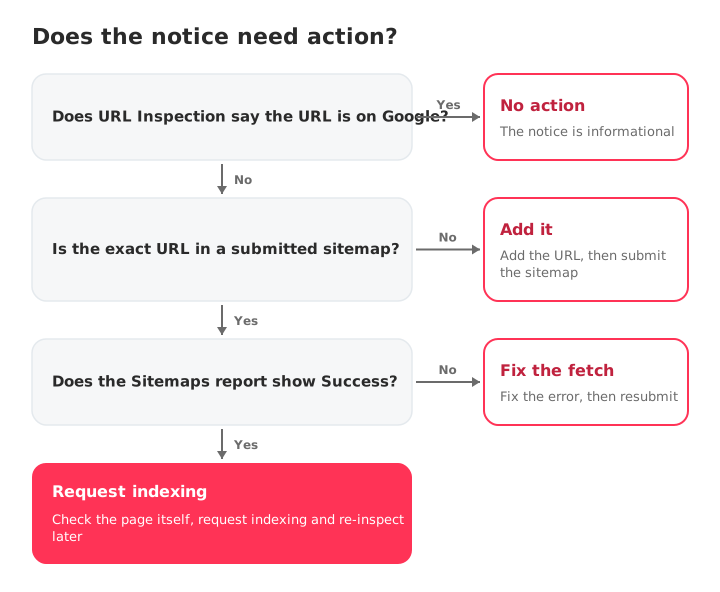
Why it shows up, even on submitted and indexed pages
Four causes explain almost every case:
- The URL isn't in any sitemap you submitted or referenced in robots.txt, so Google only knows it from links.
- The sitemap hasn't been processed yet. In the Sitemaps report, type "Unknown" can mean exactly that.
- A URL mismatch: the sitemap lists a different version of the address, such as a trailing slash, http instead of https or www instead of non-www.
- A reporting gap Google acknowledges: "In a few cases, we don't report the sitemap for a page that was submitted in a sitemap." (URL Inspection help)
So the notice can appear on an indexed page even when the sitemap was submitted successfully.
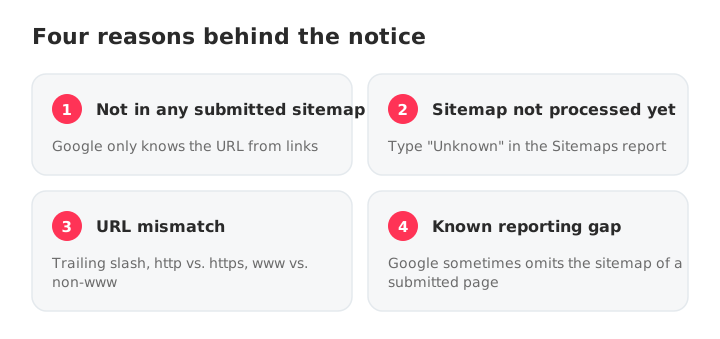
Is the page actually indexed? Three ways to check
The notice only matters if the page is missing from the index, so check that first:
- URL Inspection: it tells you whether the URL is on Google. If you see "Temporary processing error" in the sitemap field, Google's reporting couldn't retrieve sitemap data, so run the inspection again. Note that the live test "does not check for the presence of the URL in any sitemaps".
- Page indexing report, filtered to All submitted pages. Google counts a URL as submitted by a sitemap "even if it was also discovered through some other mechanism" (Page indexing report help).
- A Google search for the exact URL.
How to fix it when the page isn't indexed
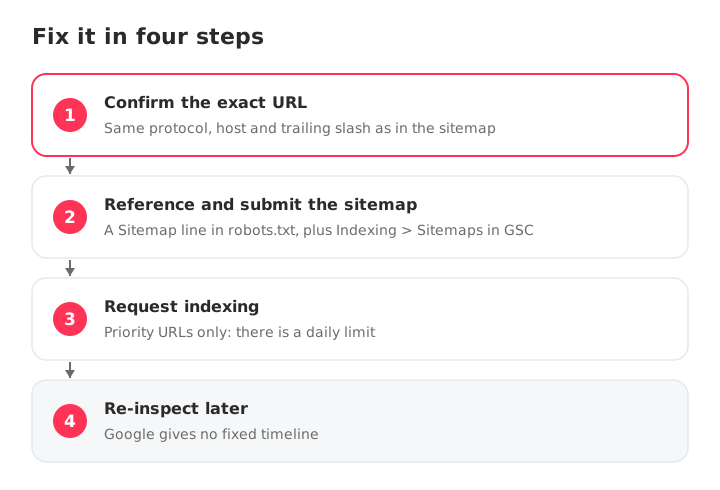
If the page is missing from the index and you want it there, work through these four steps:
- Confirm the exact URL is in your sitemap. Same protocol, same host, same trailing slash. WordPress without an SEO plugin serves /wp-sitemap.xml (since version 5.5); with a plugin, the Sitemap line in robots.txt points to it. Not sure where it lives? Here's how to find a sitemap.
- Reference the sitemap in robots.txt and submit it in GSC. Add a line such as
Sitemap: https://www.example.com/sitemap.xml(robots.txt spec), then submit the same URL in Indexing > Sitemaps so you can track its status. - Request indexing in URL Inspection for your priority URLs. There's a daily limit, and a request doesn't guarantee indexing.
- Re-inspect later. Google gives no fixed timeline for processing a sitemap or recrawling a page.
Sitemap best practices worth keeping
A clean sitemap keeps the notice rare and makes it easy to read when it shows up:
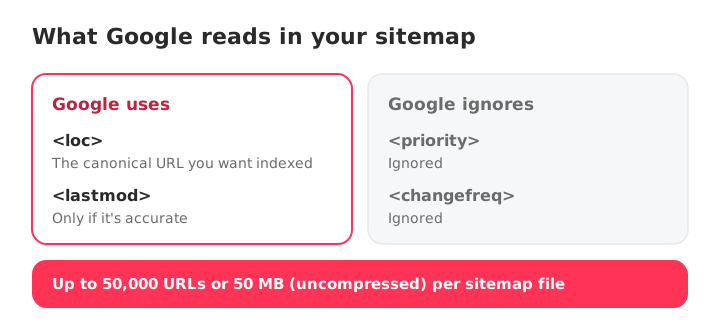
- Generate it automatically and include only canonical, indexable URLs that return 200.
- Stay under 50,000 URLs or 50 MB (uncompressed) per file, as Google's sitemap guidelines require.
- Split large sites with a sitemap index. Crawl budget only becomes a concern at scale.
- Keep lastmod accurate. Google ignores priority and changefreq, and only trusts lastmod when it's consistently and verifiably accurate.
When can you ignore it?
Ignore it when the page is indexed, ranking or well linked. Google even says a well-linked site of about 500 pages or fewer may not need a sitemap at all (Learn about sitemaps).
Not indexed? The sitemap is rarely the real cause. Check the page's indexing status instead, for example Crawled – currently not indexed.
Check your sitemap with SEOcrawl AI
SEOcrawl AI, the SEO and GEO intelligence platform, has a free Sitemap Checker: paste a sitemap or homepage URL and it checks every listed URL for status codes, broken links, redirect chains and XML structure errors, up to 100 URLs per check. It's a quick way to confirm the sitemap only lists the canonical, 200 URLs you want indexed.
For index coverage across a whole property, run the Google Search Console audit: one prompt in Claude, ChatGPT or Cursor pulls your Search Console data through the SEOcrawl AI MCP server and lists the URLs left out of the index under each status.
FAQs
What does "No referring sitemaps detected" mean?
It means the URL Inspection tool couldn't link the page to any sitemap Google knows about. Google's help defines it as "Google couldn't identify a sitemap that refers to this page." It's a notice about how Google discovered the URL, not an error, and it doesn't stop the page from being indexed.
Is "No referring sitemaps detected" a problem?
Usually not. If URL Inspection says the URL is on Google, you don't need to act. It matters more when the page isn't indexed, on new sites with few external links and on orphan pages that no other page links to.
Why does it appear on a page that is in my submitted sitemap?
Either the sitemap hasn't been processed yet, the URL in the sitemap doesn't match exactly (trailing slash, http/https, www/non-www), or it's a known reporting gap: Google says that in a few cases it doesn't report the sitemap for a page that was submitted in one.
What does an empty "Referring page" mean in URL Inspection?
It doesn't mean no page links to yours. Google's URL Inspection help says that when this value is absent, it doesn't mean that no referring page exists, just that the information might not be available to the tool at that time. Judge the page by its indexing status instead.
Why is Google not reading my sitemap?
Usually a wrong sitemap URL, a robots.txt block, a non-200 status or processing that is still pending. If a fetch fails, Google retries for a few days and then stops, so fix the problem and resubmit. This robots.txt guide helps you rule out a block.
How do I submit a sitemap to Google Search Console?
Open Indexing > Sitemaps, paste the sitemap URL and click Submit. A Sitemap line in robots.txt also works, but the Sitemaps report won't list it, so submit it there too if you want to track its status and errors.
Author: David Kaufmann

I've spent the last 10+ years completely obsessed with SEO — and honestly, I wouldn't have it any other way.
My career hit a new level when I worked as a senior SEO specialist for Chess.com — one of the top 100 most visited websites on the entire internet. Operating at that scale, across millions of pages, dozens of languages, and one of the most competitive SERPs out there, taught me things no course or certification ever could. That experience changed my perspective on what great SEO really looks like — and it became the foundation for everything I've built since.
From that experience, I founded SEO Alive — an agency for brands that are serious about organic growth. We're not here to sell dashboards and monthly reports. We're here to build strategies that actually move the needle, combining the best of classical SEO with the exciting new world of Generative Engine Optimization (GEO) — making sure your brand shows up not just in Google's blue links, but inside the AI-generated answers that ChatGPT, Perplexity, and Google AI Overviews are delivering to millions of people every single day.
And because I couldn't find a tool that handled both of those worlds properly, I built one myself — SEOcrawl AI, an enterprise SEO intelligence platform that brings together rankings, technical audits, backlink monitoring, crawl health, and AI brand visibility tracking all in one place. It's the platform I always wished existed.
Discover more content about this author

On-page SEO is everything you control on a page: content, title, meta description, headings, URL, images and internal links. Here is a checklist element by element, an audit process and what changes with AI Overviews and AI Mode.