


Google Search Console MCP: How to Connect GSC to Claude & ChatGPT (Setup Guide)
Connect Google Search Console to Claude or ChatGPT and ask about your clicks, queries and pages in plain language. Here's the shortest route, step by step.
A Google Search Console MCP connects your Search Console data to an AI assistant, so you can ask "which pages lost clicks this month?" and get the answer in the chat, with the numbers behind it, instead of exporting reports and building a spreadsheet.
As far as we could verify, Google doesn't publish an official Search Console MCP server (it does publish one for Google Analytics), so every option you can connect today is third-party. This guide shows the route we built and use ourselves: four steps, no Google Cloud project, no config file. It also explains what the manual route involves, so you can decide which one fits you. If you're new to the data itself, start with our Google Search Console guide.
What an MCP server is, and why use one with Search Console
MCP (Model Context Protocol) is an open standard, introduced by Anthropic in late 2024, that lets AI assistants like Claude and ChatGPT call external tools and data sources. An MCP server is the tool on the other side: it exposes your data, and the assistant decides when to call it.
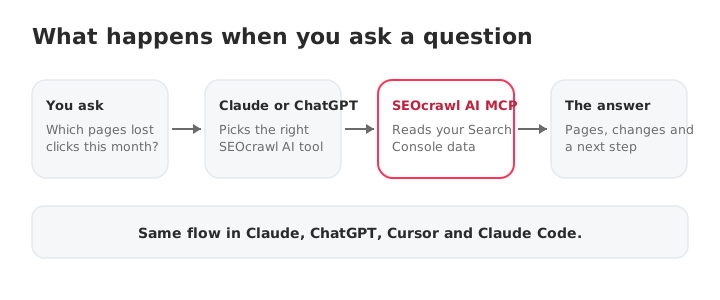
For Search Console, that changes the work in three ways:
- You skip the exports. The assistant queries the data and shows the result.
- You ask follow-ups. "Why did that page drop?" becomes the next message, not the next report.
- You can chain steps. Find the drop, check whether Google still indexes the page, and open a task, all in one conversation.
Two routes: by hand or with SEOcrawl AI
There are two ways to connect Search Console to an assistant. Both are legitimate, and they trade your time for control.
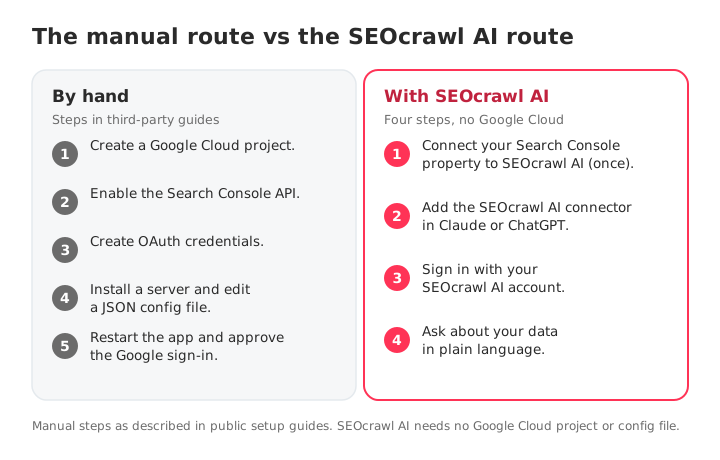
| By hand (open-source server) | SEOcrawl AI MCP | |
|---|---|---|
| What you set up | A Google Cloud project, the Search Console API, OAuth credentials or a service account, a server and a JSON config | Nothing in Google Cloud. You add one connector and sign in |
| Where it runs | On your computer, for the client you configured | Hosted at https://mcp.seocrawl.ai, the same endpoint for every client |
| Works in ChatGPT | Not from a local server, because ChatGPT needs a remote one | Yes |
| Data beyond Search Console | Only what that server covers | GA4, index coverage with live URL inspection, site audits, AI visibility and tasks in the same connector |
| Upkeep | You maintain credentials, config and updates | Handled for you |
| Cost | Free in money, paid in time | Included on every SEOcrawl AI plan, with a monthly MCP credit pool |
Choose the manual route if you want full control and don't mind maintaining it. Choose SEOcrawl AI if you want to be asking questions in a few minutes, use ChatGPT too, or need GA4, indexation and AI visibility next to Search Console.
Before you start
You need three things:
- A SEOcrawl AI account with your Search Console property connected. If you already see your data in the app, this is done.
- Claude or ChatGPT, on a plan that lets you add connectors. Menu names change as these apps update.
- Two minutes. The endpoint is the same for everyone:
https://mcp.seocrawl.ai. There's nothing to switch on in your account first.
How to connect Search Console to Claude
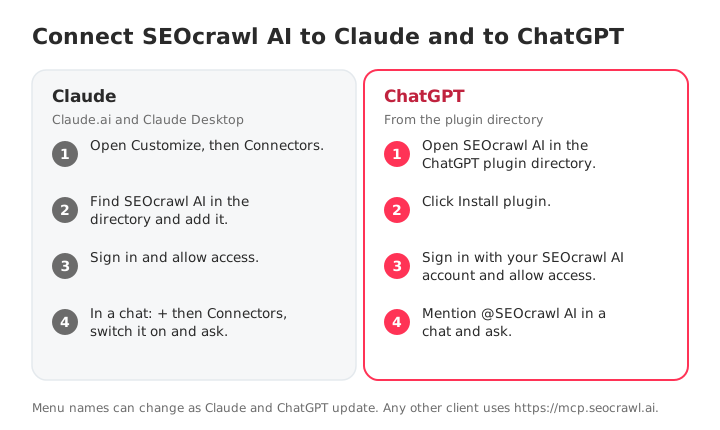
SEOcrawl AI is listed in Claude's connector directory (as a community connector from SEOcrawl SL), so there's no server URL to copy.
- Open Claude (Claude.ai or Claude Desktop) and go to Customize › Connectors. Older guides say Settings › Connectors, which now redirects there.
- Search for SEOcrawl AI in the directory and add it.
- Sign in with your SEOcrawl AI account and allow access when Claude asks.
- Switch it on in a chat. Click + › Connectors, make sure SEOcrawl AI is on, and ask your first question, for example: "Which Search Console properties can you see?"
If Claude lists your properties, you're connected. Prefer a custom connector? In Customize › Connectors click + Add › Add custom connector and paste https://mcp.seocrawl.ai. In Claude Code, run claude mcp add --transport http seocrawl https://mcp.seocrawl.ai.
How to connect Search Console to ChatGPT
ChatGPT connects to remote MCP servers, which is why a hosted endpoint matters here. SEOcrawl AI is listed in ChatGPT's plugin directory, so you install it from there.
- Open SEOcrawl AI in ChatGPT's plugin directory. Search for "SEOcrawl AI" or use the direct link.
- Click Install plugin.
- Sign in with your SEOcrawl AI account and allow access.
- Start a chat, mention @SEOcrawl AI and ask: "Which Search Console properties can you see?"
Plugin and menu names change often in ChatGPT. If you don't see the plugin, check what your plan offers. ChatGPT's developer mode also lets you add a remote MCP server by URL, and https://mcp.seocrawl.ai is the one to use.
10 prompts to try first
Start with a property check, then work down the list. Each prompt maps to a tool the assistant calls for you, so you know what's behind the answer.
| # | Prompt | What the assistant uses |
|---|---|---|
| 1 | "Which Search Console properties can you see?" | list_properties |
| 2 | "Compare clicks, impressions, CTR and position for the last 28 days against the previous 28." | compare_date_ranges |
| 3 | "Which pages lost the most clicks this month, and which queries drove the drop?" | list_winners_losers, list_keywords_for_page |
| 4 | "Show the queries ranking in positions 5 to 15 with the most impressions and a low CTR." | get_top_keywords |
| 5 | "Which of my pages compete for the keyword seo dashboard?" | list_pages_for_keyword |
| 6 | "Split my clicks into branded and non-branded." | get_gsc_summary |
| 7 | "How many of my URLs does Google index, and which are stuck in Discovered – currently not indexed?" | get_indexation_summary, list_indexation_pages |
| 8 | "Inspect this URL and tell me whether Google can index it." | get_url_inspection |
| 9 | "How much traffic do ChatGPT, Perplexity and Gemini send me? (needs GA4 connected)" | get_ga4_ai_referrers |
| 10 | "Turn the three biggest drops into tasks for my team." | create_task |
Prompt 6 uses the Brand tag you set on the property, so set it once first. Prompt 7 pairs with our guide to Discovered – currently not indexed.
What an answer looks like
We ran the check behind prompt 3 on seocrawl.ai on 8 November 2026: the last 28 days (12 Oct to 8 Nov) against the previous 28 (14 Sep to 11 Oct). Search Console data was complete through 5 November, which is the lag from the list above in action. These are the five pages with the biggest click drops, each with its change:
| Page | Clicks (last 28 days) | Clicks (previous 28) | Change |
|---|---|---|---|
| /blog/how-to-find-a-sitemap | 318 | 395 | -77 (-19.5%) |
| /blog/ai-overview-ranking-factors | 35 | 104 | -69 (-66.4%) |
| /id/ai-tracker | 25 | 90 | -65 (-72.2%) |
| /id/prompt-tracking/chatgpt | 1 | 48 | -47 (-97.9%) |
| /id/prompt-tracking/claude | 6 | 43 | -37 (-86.1%) |
Look at the pattern, not just the rows: three of the five are Indonesian pages. That's the follow-up you'd ask next: "Show me all /id/ pages and their trend." This is where talking to your data beats a static report.
Limits and good practice
An assistant can only be as right as the data underneath. Keep these in mind:
- The data has a lag. Google says the newest data can be preliminary and may change within hours, and Search Console runs about two days behind. Ask for the latest data date, and leave the last few days out of week-over-week comparisons.
- Some queries are anonymized. Google omits rare queries, so query-level totals can be lower than the page-level totals. Compare like with like.
- History is limited. Search Console keeps 16 months. SEOcrawl AI keeps up to 24 months of your data, so ask for year-over-year comparisons through it.
- Calls use credits. Each MCP call uses 1 to 6 credits depending on the tool, from a monthly pool of 30,000 on Starter to unlimited on Enterprise, and a daily cap of 10% of the monthly pool keeps a runaway agent from burning it all. A few tools, including the health check, are free. Ask for the summary first, then drill down.
- Writing is different from reading. The connector can also create tasks, tags and annotations. Review any action that writes before you approve it.
- Verify before you act. Ask the assistant which tool it called and over which dates. If a number looks off, check it in the dashboard.
Troubleshooting
| Symptom | Likely cause | Fix |
|---|---|---|
| Sign-in fails or loops | An old session or the wrong account | Sign out of SEOcrawl AI, then reconnect the connector and sign in with the account that owns the property |
| "No properties" or no data | The property isn't connected in SEOcrawl AI | Connect Search Console in the app first, then ask to list properties again |
| Wrong site's numbers | Several properties in the account | Name the property in the prompt. Domain properties start with sc-domain: |
| Tools don't appear | The client didn't load the tools | Remove and re-add the connector, then start a new chat |
| "Credit" or "limit" errors | The monthly pool or the daily cap (10% of the pool) | Narrow the question, try again tomorrow if you hit the daily cap, or check your plan's credit pool |
| Numbers look stale | Search Console lag | Ask for the latest data date. It usually trails by a couple of days |
| You suspect a data source is down | A backend surface is degraded | Ask the assistant to run SEOcrawl AI's health check. It's free and shows each source's status |
Go further with GA4, indexation and AI visibility
The same connector goes beyond Search Console. With SEOcrawl AI's MCP you can read GA4 sessions and conversions, check index coverage and inspect any URL, run and compare site audit crawls, and read per-engine AI visibility for your tracked prompts, all in the same chat. If you build on the data directly, see our Google Search Console API page, and if you filter in the report itself, our Search Console regex guide.
FAQs
Does Google Search Console have an MCP?
As far as we could verify, Google doesn't publish an official MCP server for Search Console. It does publish one for Google Analytics. Every Search Console MCP you can connect today is third-party and sits on top of Google's Search Console API. SEOcrawl AI is one of them, hosted at https://mcp.seocrawl.ai.
Is there a free GSC MCP server?
Yes. Open-source servers are free to download, and Google doesn't charge for the Search Console API. The cost is your time: you create the Google Cloud project, credentials and config yourself and maintain them. SEOcrawl AI includes MCP access on every plan, with a monthly pool of MCP credits that grows with the plan.
Can ChatGPT read my Search Console data?
Yes, through an MCP connector. ChatGPT needs a remote server it can reach over the internet, which is why a hosted connector such as SEOcrawl AI works there while a server running on your own computer doesn't. In ChatGPT you install it from the plugin directory.
Is it safe to connect Search Console to an AI assistant?
It's as safe as the connector you choose and the permissions you approve. With SEOcrawl AI you sign in with your SEOcrawl AI account, and the assistant only sees the properties in that account. The connector can also create tasks, tags and annotations, so review any action that writes before you approve it, and keep read-only questions for your first sessions. ChatGPT's listing also notes that ChatGPT can share relevant chats and memories with the app for context, so read the connector's privacy policy first.
Which AI clients work with a Search Console MCP?
Any client that supports the open Model Context Protocol. SEOcrawl AI works with Claude (Claude.ai and Claude Desktop), ChatGPT, Cursor and Claude Code, using the same endpoint, https://mcp.seocrawl.ai, in each.
How fresh is the data my assistant sees?
As fresh as Search Console. Google says the newest data can be preliminary and may change within hours, and Search Console data is typically a couple of days behind. Ask your assistant for the latest data date before you compare periods.
Why does my assistant say it has no data?
Almost always one of three things: the Search Console property isn't connected inside SEOcrawl AI yet, you picked the wrong property (a domain property starts with sc-domain:), or the connector needs reconnecting. Ask your assistant to list your properties first, and run the free health check to see whether every data source is up.
See more SEOcrawl AI on Google
Choose us as a preferred source and you'll see more of our articles in Google's Top Stories.
Author: David Kaufmann

I've spent the last 10+ years completely obsessed with SEO — and honestly, I wouldn't have it any other way.
My career hit a new level when I worked as a senior SEO specialist for Chess.com — one of the top 100 most visited websites on the entire internet. Operating at that scale, across millions of pages, dozens of languages, and one of the most competitive SERPs out there, taught me things no course or certification ever could. That experience changed my perspective on what great SEO really looks like — and it became the foundation for everything I've built since.
From that experience, I founded SEO Alive — an agency for brands that are serious about organic growth. We're not here to sell dashboards and monthly reports. We're here to build strategies that actually move the needle, combining the best of classical SEO with the exciting new world of Generative Engine Optimization (GEO) — making sure your brand shows up not just in Google's blue links, but inside the AI-generated answers that ChatGPT, Perplexity, and Google AI Overviews are delivering to millions of people every single day.
And because I couldn't find a tool that handled both of those worlds properly, I built one myself — SEOcrawl AI, an enterprise SEO intelligence platform that brings together rankings, technical audits, backlink monitoring, crawl health, and AI brand visibility tracking all in one place. It's the platform I always wished existed.
Discover more content about this author

Until November 30, the first year of any SEOcrawl AI annual plan is 50% off with code BLACKFRIDAY2026. Here is what you get, what every plan's prompts cover, and how to see where ChatGPT, Gemini, Claude and Perplexity mention you in 15 minutes.