Redirect Error in Google Search Console: Causes and Fixes
You opened the Page indexing report in Search Console and found URLs listed under "Redirect error." Unlike most statuses there, this one is a real problem.
Here is the short version: Google tried to follow a redirect on your URL and could not reach a working page. Until you fix it, that URL stays out of the index, and so does whatever content you meant to send it to.
The good news is that redirect errors are usually quick to diagnose once you know what to look for. This guide covers what the status means, the causes Google lists, how to trace each one, and how to fix and validate them.
What a Redirect error means in Search Console
Redirect error is a reason in the Why pages aren't indexed table of the Google Search Console Page indexing report. It appears when Googlebot follows a redirect from your URL but never lands on a destination it can crawl, so neither the original URL nor the target gets indexed through that path.
It's easy to confuse with "Page with redirect," so let's be clear: that status is normal. It means the redirect worked: the URL isn't indexed because it points somewhere else, and Google evaluates the target on its own. A Redirect error means the redirect itself failed.
You'll find it under Indexing › Pages. Click the "Redirect error" row to see the affected URLs and use Export to download the full list.
Common causes of a Redirect error
Google's Page indexing report documentation lists four situations behind this status. Two more show up often in practice.
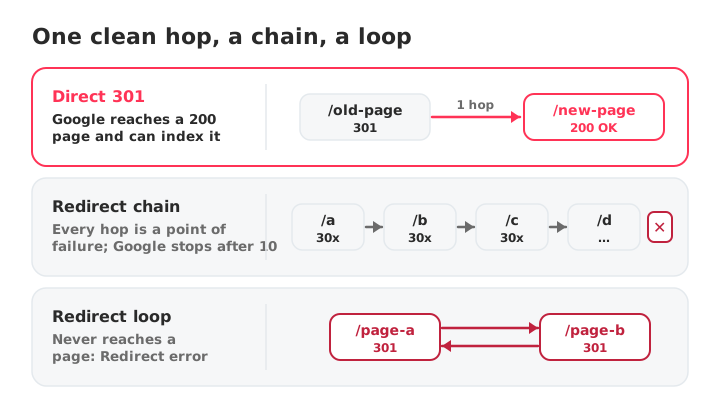
1. A redirect chain that is too long
Every URL that redirects to another adds a hop. Google's crawlers follow up to 10 redirect hops, according to Google's crawling documentation. Past that, Googlebot gives up and Search Console reports a redirect error. Chains usually grow over time: an HTTP to HTTPS rule, then a www rule, then a trailing-slash rule, then a site migration on top.
2. A redirect loop
URL A redirects to URL B, and URL B redirects back to URL A (or to anything that leads back to A). The chain never resolves, so no page is ever reached. Loops often come from two rules that contradict each other, such as one forcing a trailing slash and another removing it.
3. A redirect URL that exceeds the maximum length
If a redirect rule keeps appending something to the URL, for example a parameter or a path segment on every hop, the address grows until it passes the maximum URL length and the chain fails.
4. A bad or empty URL in the chain
A typo such as htp:// instead of http://, a relative path that resolves to the wrong place, or an empty Location header breaks the redirect at that hop.
5. A destination Google can't crawl
If the final URL is blocked by robots.txt, Googlebot can't fetch it. Check that the target of every redirect is crawlable, not only that it exists.
6. Conflicting redirect rules in different places
Redirects set in your CMS, a plugin, the web server and a CDN can stack or fight each other. A rule added in one layer may send the URL back to a rule in another, which is how most chains and loops are born.
How to diagnose a Redirect error
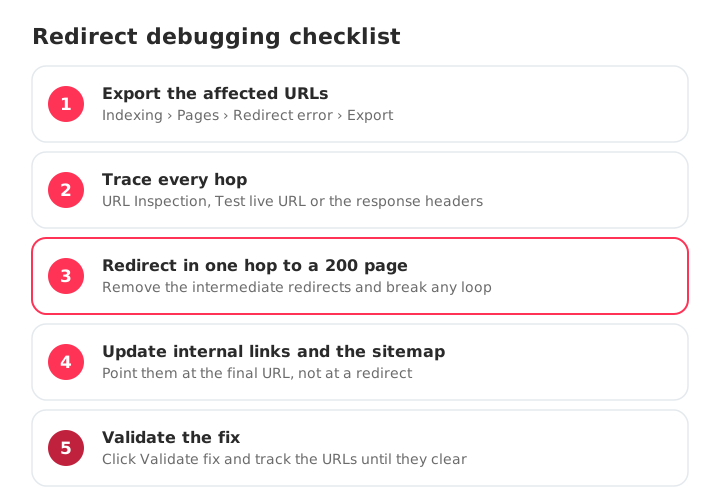
Start with the exact URLs Search Console flags, then trace what happens when each one is requested.
Use URL Inspection
Paste an affected URL into the inspection bar at the top of Search Console. The Page indexing section shows when Google last crawled it and whether the page fetch succeeded. Click Test live URL to check the current behavior, since the report can lag behind your fixes.
Trace the full redirect path
Request the URL and follow every hop. From a terminal:
curl -sIL https://example.com/old-page | grep -iE "^(HTTP|location)"
The output lists each status code and Location header in order. You're looking for more than one hop, a URL that appears twice (a loop), a malformed Location, or a last response that isn't 200.
If you'd rather not use a terminal, the free SEO audit on the SEOcrawl AI Crawler page counts the redirect hops of any URL, and the fetch_url tool of the SEOcrawl AI MCP server returns the final URL, the status code and the full redirect chain straight in Claude, ChatGPT or Cursor.
Check the final response code
Confirm that the last URL in the path returns 200, not another 3xx, a 4xx or a 5xx. When the chain ends on an error, the problem sits at the destination: see our guides on Not found (404) and Blocked due to other 4xx issue.
How to fix each cause
The fix is almost always the same idea: send the original URL to its final destination in one clean hop.
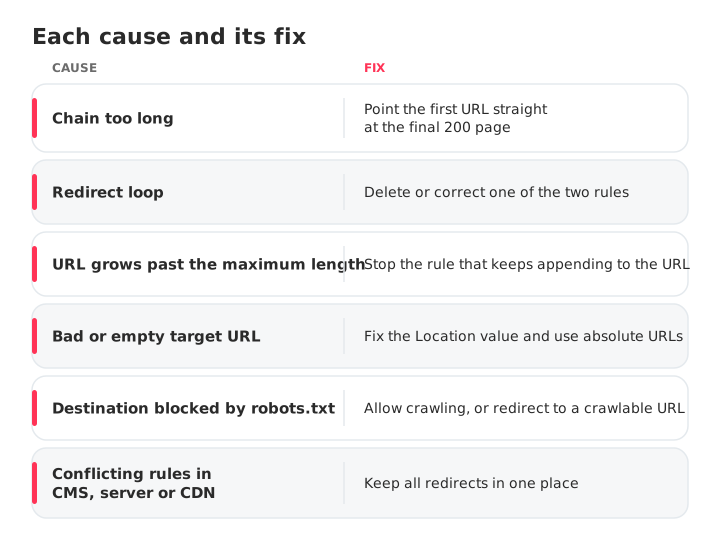
- Chain too long: point the first URL directly at the final 200 URL and remove the hops in between. If several old URLs feed the same chain, update each of them.
- Redirect loop: find the two rules pointing at each other and delete or correct one, so the path ends on a real page.
- URL too long: fix the rule that keeps appending to the URL, then confirm the destination loads.
- Bad or empty target: correct the typo or the empty
Locationvalue and use absolute URLs. - Destination blocked by robots.txt: allow crawling of the destination, or redirect to a URL that isn't blocked.
- Conflicting rules: keep redirects in one place, so your CMS, server and CDN don't overwrite each other.
Then update your internal links so they point at the final URL instead of a redirecting one, and list only final URLs in your XML sitemap. The Crawler flags both cases across the whole site: internal links that return a 3xx and sitemaps that list a redirecting URL. To check a sitemap on its own, run it through the free sitemap checker, which validates status codes and redirect chains for every URL it lists.
Redirect best practices
A few habits prevent most redirect errors before they happen.
- Use the right status code. A 301 redirect (or 308) is a strong signal that the target should be indexed: use it for permanent moves. A 302 redirect (or 307) is a weak signal that keeps the original URL in results: use it only when the move is temporary.
- Prefer server-side redirects. Google follows instant meta refresh and JavaScript redirects too, but advises using JavaScript only when server-side or meta refresh redirects aren't possible.
- Keep chains short. One hop is ideal. Every extra hop slows users down, spends crawl budget and adds a point of failure.
- Always redirect to a URL that returns 200, never to another redirect.
- Update internal links and sitemaps to final URLs, so Google and your visitors skip the redirect entirely.
- Re-check after every migration or change to your CMS, server or CDN rules, which is when new chains and loops appear.
How to validate the fix
Once the redirect resolves in one hop to a 200 page:
- Run URL Inspection on an affected URL and click Test live URL to confirm Google now reaches the destination.
- Click Request indexing for your most important URLs.
- In the Page indexing report, open the Redirect error issue and click Validate fix so Google recrawls every affected URL.
- Watch the validation status. It can take days or a couple of weeks; URLs leave the issue as they are recrawled.
Stay ahead of redirect errors
Redirect errors rarely announce themselves. They appear in the Page indexing report, and on a large site they can sit unnoticed until traffic drops. Checking Search Console by hand for every property is slow work that is easy to skip.
SEOcrawl AI's Indexation view groups your URLs by Search Console coverage state, so you can see which URLs fall into an error state and track how the count changes over time. You can tag the affected URLs by rules, by hand or through the MCP server, and work through them until each one is resolved. If you work with an AI assistant, the Google Search Console audit checks your index coverage from a single prompt and opens a task for every fix.
FAQs
What causes a Redirect error in Google Search Console?
Google names four causes: a redirect chain that is too long, a redirect loop, a redirect URL that eventually exceeds the maximum URL length, and a bad or empty URL in the chain. In each case Googlebot cannot reach a working final page.
How do I fix a Redirect error?
Send the original URL to its final destination in a single hop. Remove intermediate redirects, break any loop, and make sure the last URL returns a 200 status. Update internal links to point at the destination, then run URL Inspection and click Validate fix in the Page indexing report.
What is a redirect chain and a redirect loop?
A redirect chain is a series of redirects, where URL A goes to B, B goes to C and so on before reaching the final page. A redirect loop is a chain that never ends because the URLs point back at each other. Both can stop Google from reaching a page to index.
301 vs 302: which should I use?
Use a 301 (or 308) for a permanent move: Google takes it as a strong signal to index the target. Use a 302 (or 307) only for a temporary move, when you want the original URL to stay in search results.
Is "Page with redirect" the same as a Redirect error?
No. "Page with redirect" means the redirect worked: the URL is not indexed because it points to another page. A Redirect error means Google tried to follow the redirect and never reached a working page.
How long does it take for a Redirect error to clear?
After you click Validate fix, Google recrawls the affected URLs over the following days, sometimes up to two weeks. The status updates as each URL is processed, so you don't need to request indexing for every URL by hand.
Author: David Kaufmann

I've spent the last 10+ years completely obsessed with SEO — and honestly, I wouldn't have it any other way.
My career hit a new level when I worked as a senior SEO specialist for Chess.com — one of the top 100 most visited websites on the entire internet. Operating at that scale, across millions of pages, dozens of languages, and one of the most competitive SERPs out there, taught me things no course or certification ever could. That experience changed my perspective on what great SEO really looks like — and it became the foundation for everything I've built since.
From that experience, I founded SEO Alive — an agency for brands that are serious about organic growth. We're not here to sell dashboards and monthly reports. We're here to build strategies that actually move the needle, combining the best of classical SEO with the exciting new world of Generative Engine Optimization (GEO) — making sure your brand shows up not just in Google's blue links, but inside the AI-generated answers that ChatGPT, Perplexity, and Google AI Overviews are delivering to millions of people every single day.
And because I couldn't find a tool that handled both of those worlds properly, I built one myself — SEOcrawl AI, an enterprise SEO intelligence platform that brings together rankings, technical audits, backlink monitoring, crawl health, and AI brand visibility tracking all in one place. It's the platform I always wished existed.
Discover more content about this author
CTR tells you how many of the people who saw your result actually clicked. Here's the formula, what a good CTR looks like in 2026 by channel and by Google position, and how to get more clicks from the rankings you already have.
Seeing "Alternate page with proper canonical tag" in Search Console? Most of the time Google is doing exactly what you asked. Here's how to tell the normal cases from the real problems, and how to fix the ones that matter.