Blocked Due to Other 4xx Issue: How to Fix It
You open Search Console, and there it is: Not indexed: "Blocked due to other 4xx issue." No status code, no affected file, no obvious cause.
This guide explains exactly which errors trigger the label, how to find the real status code behind it, and how to fix each cause — including the diagnostic steps most write-ups skip. For where this report sits in the wider tool, see our complete Google Search Console guide.
What "blocked due to other 4xx issue" actually means
"Blocked due to other 4xx issue" means Googlebot requested a URL and got a 4xx (client-side) response that Search Console doesn't already break out into its own category.
Because Google couldn't retrieve the page, it won't index it. In these cases, the URL stays out of search results until it returns a successful status.
The word "other" is doing the work here. Search Console already has dedicated labels for the three most common 4xx codes:
- 401 → "Blocked due to unauthorized request (401)."
- 403 → "Blocked due to access forbidden (403)."
- 404 → "Not found (404)."
So "other 4xx" becomes the umbrella for everything else in the 4xx range: 400, 405, 408, 410, 429 and similar codes. The message is vague because Google knows a 4xx happened, but it's not one they have labeled.
Which 4xx status codes trigger this error
These are the codes that most often land under this label. You need to identify which one your server is actually returning before you can fix anything.
| Code | Name | Typical trigger |
|---|---|---|
| 400 | Bad Request | Malformed URL, invalid characters, corrupted request |
| 405 | Method Not Allowed | Server rejects the request method (e.g. GET disabled on that path) |
| 406 | Not Acceptable | Content negotiation mismatch |
| 408 | Request Timeout | Server too slow to respond within its window |
| 410 | Gone | Page permanently removed (see note below) |
| 411 / 412 / 421 / 422 | Various | Length / precondition / misdirected / unprocessable request issues |
| 429 | Too Many Requests | Rate limiting (a very common cause on larger or aggressively protected sites) |
| 451 | Unavailable for Legal Reasons | Geo / legal blocking |
| 418 | I'm a teapot | A joke status defined in an RFC (rare, but a real code some setups occasionally return) |
A note on 410 (Gone): if a page is intentionally removed for good, a 410 is the correct response and you shouldn't "fix" it. Just make sure it isn't a page you actually want indexed.
What causes 4xx errors for Googlebot
Most cases trace back to one of these five causes:
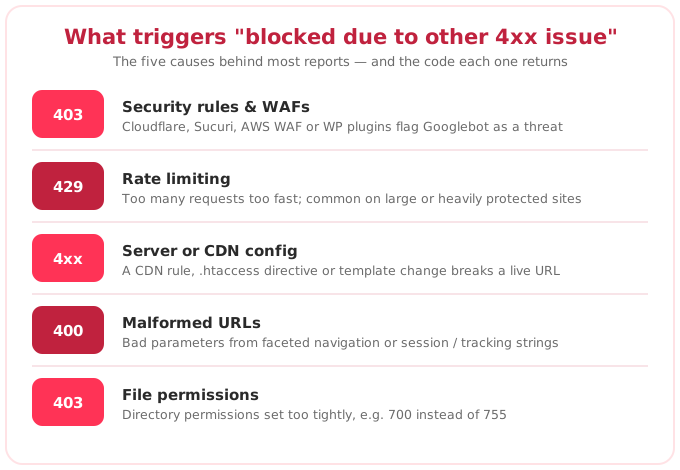
- Security rules and WAFs. Firewalls like Cloudflare, Sucuri or AWS WAF sometimes misidentify Googlebot as a threat and return a 403 or block the request. Security plugins on WordPress can do the same.
- Rate limiting (429). The server returns 429 when it decides too many requests have come in too fast, and Google won't index a page it keeps getting rate-limited on.
- Server or CDN configuration. A CDN rule, an .htaccess directive, or a template change can start returning a 4xx on URLs that render fine in your browser.
- Malformed URLs (400). A 400 means the server couldn't understand the request — often an incorrect URL structure or bad parameters. This is common with faceted navigation and session / tracking parameters.
- File permissions. Directory permissions set too tightly (e.g. 700 instead of 755) can trigger a 403.
A useful tell: because these are client-side responses tied to how the request is made, you often won't see the same error in your own browser — which is exactly why the report feels so opaque.
How to find the exact 4xx status code Google hit
Search Console tells you a page is affected but not which 4xx code it returned. You have to find that yourself. Work through this sequence:
- List the affected URLs. In Search Console, go to Indexing → Pages, scroll to "Why pages aren't indexed," and click "Blocked due to other 4xx issue" to see the full list. These live under the Pages section → Not indexed tab.
- Inspect a URL. Click a URL, then Test live URL in the URL Inspection tool. It shows exactly what Googlebot saw, including the HTTP response and any redirects.
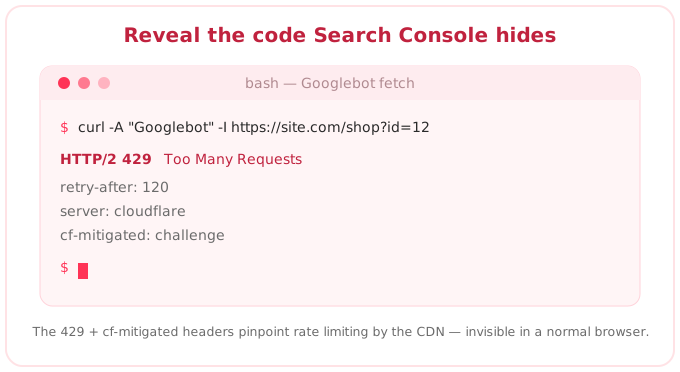
- Fetch as Googlebot. Because the error is often user-agent-specific, reproduce it with the Googlebot user agent. In Chrome DevTools, open the Network conditions tab, uncheck "Use browser default," and select "Googlebot Smartphone," then reload and read the status code. You can also run
curl -A "Googlebot" -I https://yoururlfrom a terminal. - Check server logs. Logs show the real status code your server returned to Google's IPs, which is the ground truth when DevTools and the browser disagree.
- Verify it's really Googlebot. If a WAF is blocking, confirm the requesting IP actually belongs to Google before you widen access, so you don't open the door to spoofed bots.
How to fix each 4xx error, code by code
Once you know the code, the fix follows from it:
| 4xx code | Likely cause | How to fix |
|---|---|---|
| 403 | WAF or firewall blocking Googlebot | Allowlist verified Googlebot, or adjust the rule that's catching it. Fix file permissions if that's the cause. |
| 429 | Rate limiting | Raise or tune the rate limit for verified search bots, and check whether a plugin or CDN is throttling crawls. |
| 400 | Malformed URL | Correct the URL structure, stop generating invalid parameter combinations, and canonicalize parameterized URLs. |
| 405 / 406 / 408 | Server rule, content negotiation, or timeout | Fix the server-side rule, content negotiation, or timeout behavior for the affected paths. |
| 410 (shouldn't be gone) | Page removed by mistake | Restore the page, or 301-redirect it to the closest equivalent if it has value and backlinks. |
| 404 / 410 (intentional) | URL is genuinely dead | Leave it as is. These aren't errors to fix. Block crawl waste with robots.txt if the volume is high. |
How to validate the 4xx fix in Search Console
After fixing the root cause, return to the "Blocked due to other 4xx issue" report and click Validate fix.
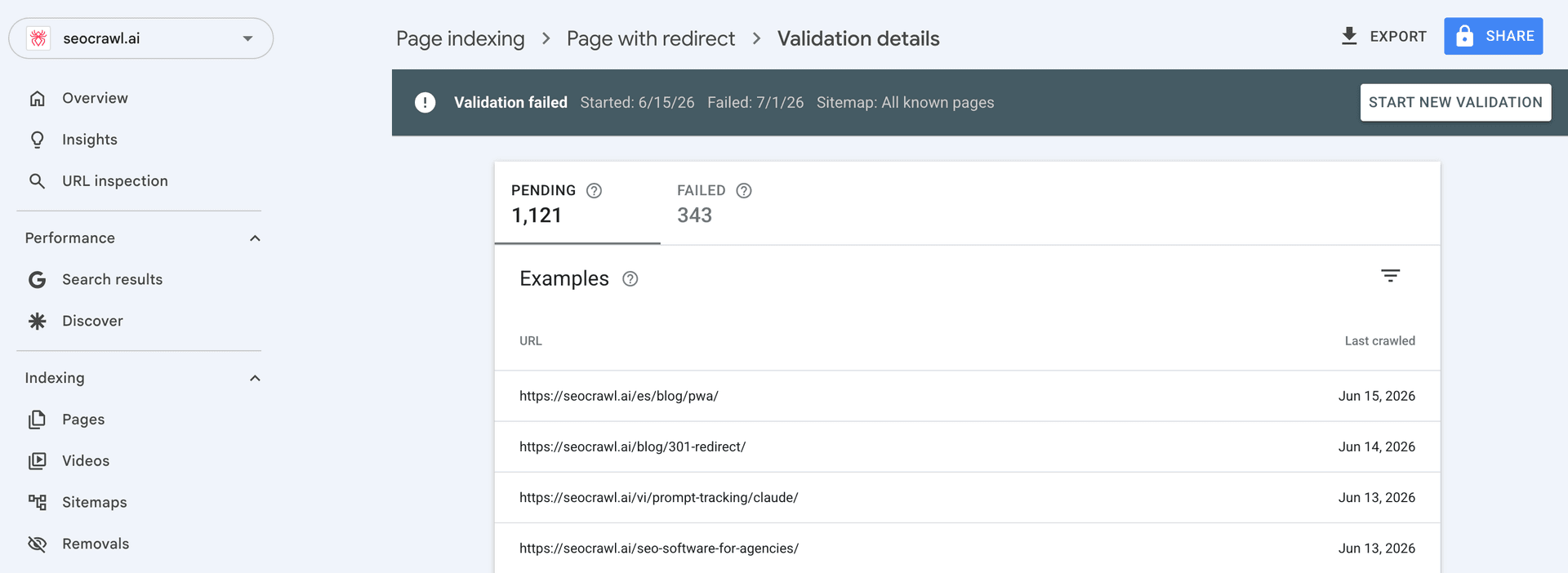
Google will recrawl the affected URLs; recrawling corrected URLs typically takes a few days to a few weeks depending on crawl budget.
The report updates as Google re-attempts each URL, so recent fixes won't show instantly. Keep the URL Inspection tool handy to confirm each page now returns a 200 before you rely on the validation.
Finding 4xx-affected URLs at scale with SEOcrawl AI
Search Console shows the issue but makes you inspect URLs one at a time. SEOcrawl AI pulls your Search Console coverage data and surfaces indexation states across the whole site, so you can spot affected URLs in bulk instead of clicking through them individually.
Our MCP server lets you read the full index-coverage breakdown by state and filter crawled pages by status code (for example, everything returning a 404) directly from Claude or ChatGPT, and tag them by rules, manually, or over MCP. Pair that with scheduled crawls and alerts so you catch a spike in 4xx URLs before it dents your rankings.
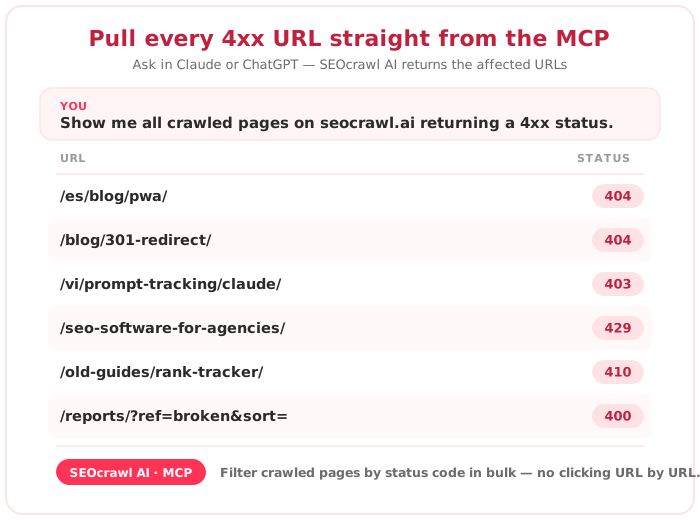
Find every 4xx-affected URL in one place. Instead of clicking through Search Console URL by URL, SEOcrawl AI shows your full index-coverage breakdown and lets you filter crawled pages by status code straight from Claude or ChatGPT. Try SEOcrawl AI.
FAQs
What does a 4xx error mean?
A 4xx error is a client-side HTTP status, meaning the request itself couldn't be fulfilled: the page isn't found, access is refused, the request is malformed, or the server is rate-limiting it.
The 4xx family includes 400 (bad request), 403 (forbidden), 404 (not found), 410 (gone) and 429 (too many requests), among others. For SEO, any 4xx on a page you want indexed is a problem, because Google can't retrieve the content to rank it.
Are 4xx errors bad for SEO?
They are when they hit pages you want in the index. A page returning a 4xx can't be crawled, so it won't be indexed or ranked, and you lose the traffic it would have earned.
At scale, widespread 4xx errors also waste crawl budget and can signal poor site maintenance. Intentional 404s and 410s on genuinely dead URLs are normal; the problem is 4xx responses on pages that should be live.
What is a 4xx error in SEO?
In SEO terms, a 4xx error is any client-side response that stops search engines from accessing a URL. The ones that matter most are 404s (broken or removed pages), 403s (access blocked, often by a firewall) and the codes behind "blocked due to other 4xx issue" like 400, 429 and 410.
How do I find which 4xx Google hit?
Search Console doesn't name the code, so inspect it yourself. Open the affected URL in the URL Inspection tool and run Test live URL to see the response, or fetch the page with the Googlebot user agent (in Chrome DevTools' Network conditions panel, or with curl -A "Googlebot" -I [url]).
Server logs give the definitive status code your server returned to Google. To do this across many URLs at once, SEOcrawl AI lets you filter crawled pages by status code in bulk.
Author: David Kaufmann

I've spent the last 10+ years completely obsessed with SEO — and honestly, I wouldn't have it any other way.
My career hit a new level when I worked as a senior SEO specialist for Chess.com — one of the top 100 most visited websites on the entire internet. Operating at that scale, across millions of pages, dozens of languages, and one of the most competitive SERPs out there, taught me things no course or certification ever could. That experience changed my perspective on what great SEO really looks like — and it became the foundation for everything I've built since.
From that experience, I founded SEO Alive — an agency for brands that are serious about organic growth. We're not here to sell dashboards and monthly reports. We're here to build strategies that actually move the needle, combining the best of classical SEO with the exciting new world of Generative Engine Optimization (GEO) — making sure your brand shows up not just in Google's blue links, but inside the AI-generated answers that ChatGPT, Perplexity, and Google AI Overviews are delivering to millions of people every single day.
And because I couldn't find a tool that handled both of those worlds properly, I built one myself — SEOcrawl AI, an enterprise SEO intelligence platform that brings together rankings, technical audits, backlink monitoring, crawl health, and AI brand visibility tracking all in one place. It's the platform I always wished existed.
Discover more content about this author
Seeing "Alternate page with proper canonical tag" in Search Console? Most of the time Google is doing exactly what you asked. Here's how to tell the normal cases from the real problems, and how to fix the ones that matter.