How Often Should You Update Website Content?

Our work tells us there's no magic number, but a signal to watch and a way to act on it.
How often a page needs updating depends on its topic and on whether it's losing ground, not on a date in the calendar. Some pages need a refresh every few months, others hold up for years.
Anyone who gives you a universal cadence ("refresh everything every 90 days") is selling a rule that doesn't exist. Google's preference for fresh content is topic-dependent, a behaviour it has described since 2007 as Query Deserves Freshness: for queries where people expect the latest information, it leans toward newer or recently updated pages.
A page from 2022 that you genuinely updated this year is fresh. A page published last month that still cites 2023 numbers is not. So the trigger to update isn't just the calendar, but also decline and staleness.
Why updating content helps SEO
- On queries where recency matters, an accurate, recently improved page is more likely to hold or regain position than a stale one.
- A page that already ranks has history, backlinks, and internal signals working for it. Refreshing it usually delivers gains sooner than publishing a brand-new URL from zero.
- What readers expect from a query shifts over time. Updating keeps the page matching what people actually want now, not what they wanted three years ago.
- Answer engines cite current, accurate sources, so keeping a page fresh makes you even more visible beyond the blue links.
What content decay looks like (and how to spot it)
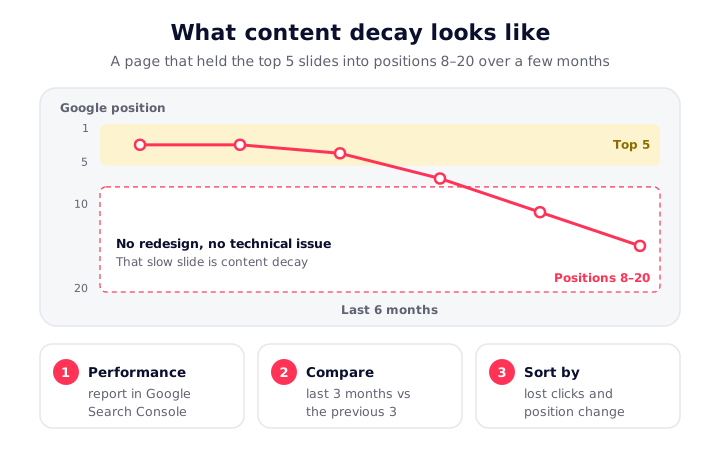
Content decay is the slow decline in clicks and rankings of a page that used to perform well, with no technical cause behind it.
The classic pattern is a page sliding out of the top 5 into positions 8 to 20 over a couple of months, with no redesign or technical issue to explain it. Falling clicks or impressions on a page that used to be steady is the same warning in a different shape.
To find it, use the free tool you already have. In the Google Search Console Performance report, compare the last 3 months to the previous 3, then sort your pages and queries by lost clicks and look at the position change per page. Anything with a real drop and no technical cause is a refresh candidate. Outdated stats, old screenshots, broken links, and a competitor who just published something better are the usual culprits.
Which pages to prioritize
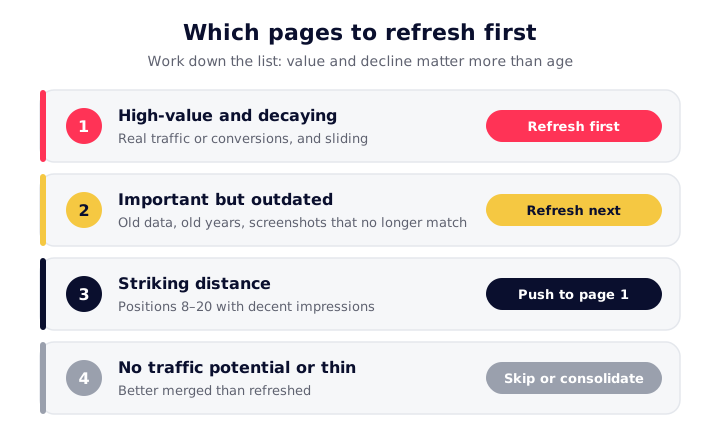
If you notice a sharp decline on your site, here's how to proceed:
- High-value and decaying: pages that drive real traffic or conversions and are sliding. These first, always.
- Important but outdated: evergreen pages citing old data, old years, or screenshots that no longer match the product.
- Striking distance: pages sitting at positions 8 to 20 with decent impressions, where a focused refresh can push them onto page 1.
- Skip or consolidate: pages with no real traffic potential, or thin pages that are better merged than refreshed.
When nothing looks wrong, how often should you update?
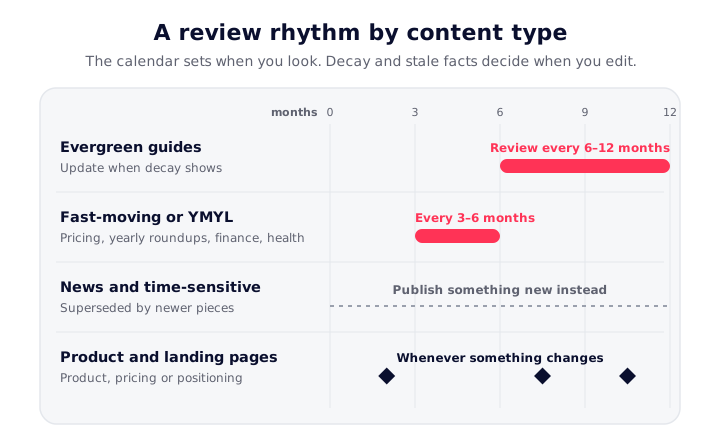
Even when nothing is decaying, it pays to look at your pages on a schedule. Think of this as a review rhythm, not a schedule to edit everything on:
- Evergreen guides and definitions: review every 6 to 12 months, update when decay actually shows.
- Fast-moving, dated, or YMYL topics (pricing, "2026" roundups, tool comparisons, finance, health): every 3 to 6 months, or the moment the facts change.
- News and time-sensitive posts: not really "updated" so much as superseded by newer pieces.
- Product and landing pages: whenever the product, pricing, or positioning changes.
How to update effectively (and avoid pointless edits)
A real update means substantive change: fresh data, a new section that answers a question the page was missing, updated examples and screenshots, tighter on-page SEO and better internal links, and a realignment to current intent. Adding or reworking a meaningful share of the page is the point, not swapping one sentence.
Two cautions:
- Don't over-edit. Changing too much can disrupt the ranking signals a page has built up, so keep the URL stable and expand rather than gut.
- The date-change myth. Bumping the "last updated" date on its own does nothing. Google's own guidance on helpful content flags changing dates to make pages seem fresh when the content hasn't substantially changed. Update the date after you've genuinely improved the page, then request re-indexing through URL Inspection so the change gets picked up.
Catch decaying pages before the quarterly review
The hard part isn't updating a page, it's knowing which pages are quietly decaying before a quarterly review catches it. That's where SEOcrawl AI fits.
Its SEO Dashboard reads your Search Console data and surfaces the winners and losers between periods automatically, flagging the keywords and URLs losing traffic so you refresh the right pages instead of guessing. Position history per page shows the slide as it happens rather than months later.
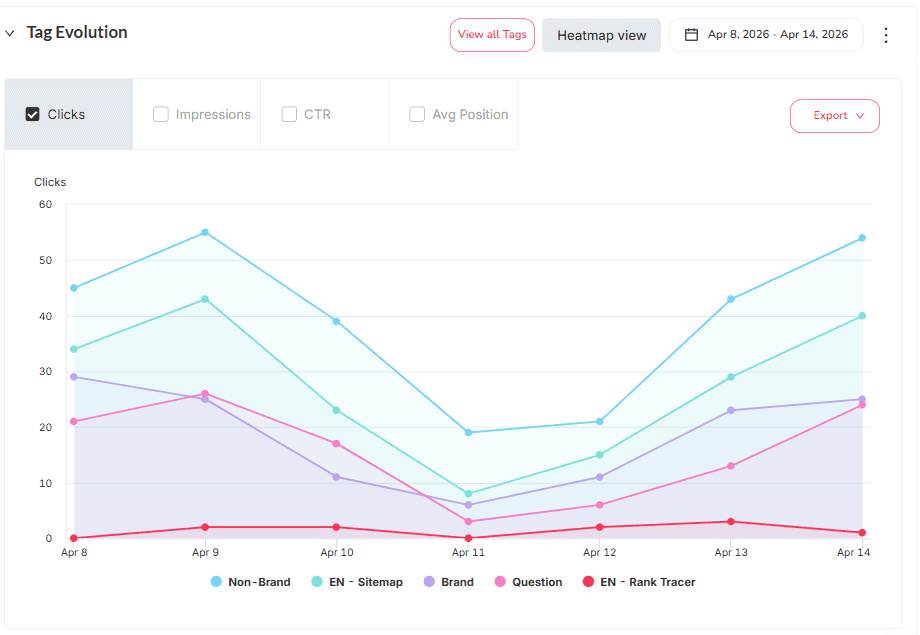
You can also tag or cluster pages by rules, by hand, or through the SEOcrawl AI MCP to watch a whole content category at once. Pair that with the click-through rate view to catch pages that still rank but have stopped earning clicks, another refresh trigger hiding in plain sight.
FAQs
How often should I update website content?
There's no fixed interval. Review evergreen pages every 6 to 12 months and fast-moving or dated pages every 3 to 6 months, but update any page the moment it shows decay or its facts go stale. The calendar sets a review rhythm; the actual trigger is decline plus outdated information.
Does updating content help SEO?
Yes, when the update is substantive. Refreshing a page that already ranks restores freshness, reverses decay, and realigns it with current search intent, and it usually pays off faster than publishing a new page because the URL already has authority and links.
How do I know which pages to update?
Compare the last 3 months to the previous 3 in Google Search Console, then prioritize high-value pages losing clicks or slipping from the top 5 into positions 8 to 20. Layer in pages with outdated stats or screenshots. Tools that flag winners and losers automatically make this a weekly habit instead of a quarterly scramble.
Does changing the date help rankings?
Not on its own. Google can detect a date change that hides no real improvement, so cosmetic edits don't move rankings. Make substantive changes first, then update the date and request re-indexing.
Author: David Kaufmann

I've spent the last 10+ years completely obsessed with SEO — and honestly, I wouldn't have it any other way.
My career hit a new level when I worked as a senior SEO specialist for Chess.com — one of the top 100 most visited websites on the entire internet. Operating at that scale, across millions of pages, dozens of languages, and one of the most competitive SERPs out there, taught me things no course or certification ever could. That experience changed my perspective on what great SEO really looks like — and it became the foundation for everything I've built since.
From that experience, I founded SEO Alive — an agency for brands that are serious about organic growth. We're not here to sell dashboards and monthly reports. We're here to build strategies that actually move the needle, combining the best of classical SEO with the exciting new world of Generative Engine Optimization (GEO) — making sure your brand shows up not just in Google's blue links, but inside the AI-generated answers that ChatGPT, Perplexity, and Google AI Overviews are delivering to millions of people every single day.
And because I couldn't find a tool that handled both of those worlds properly, I built one myself — SEOcrawl AI, an enterprise SEO intelligence platform that brings together rankings, technical audits, backlink monitoring, crawl health, and AI brand visibility tracking all in one place. It's the platform I always wished existed.
Discover more content about this author