.htaccess: Complete Guide for SEO

In SEO we must learn how to manage certain directives in order to communicate what we want to the developer and ensure that the implementation is successful for the project.
That said, many websites manage the most common directives through the .htaccess file. To learn a little more in detail about this file and the best tricks for optimizing it for search engines, please keep reading.
What is the .htaccess file?
The .htaccess file is short for Hypertext Access. It is a hypertext access file that gets its name from the directory configuration file on Apache servers and is used to collect the server's main directives.
The name starts with a "." due to Unix systems, where such files are identified as hidden. That is why we must pay attention when renaming it on Windows to avoid problems.
The file is created locally, saved in text format (.txt) — never Word format — and uploaded to the server via FTP, placing it in the folder where it needs to be used.
How does it work?
You must take into account the behaviors of this file and all its particularities:
- The behavior of this file is hierarchical across the website's directory tree, which means that if you have a file in the root directory of the site, the directives will affect all folders. There is therefore not a single htaccess file; there can be one per directory if necessary.
- Every time a user accesses a web page, the server scans these documents and the directives they contain. Therefore, it is essential that they are perfectly configured and contain no errors, to avoid incidents.
- Before making any changes, make sure you do so on a copy of the .htaccess document because if you edit it badly you may have problems afterwards.
- Comments in the file are always introduced with a hash "#".
How to optimize the htaccess file for SEO?
Through certain directives we can indicate what we want to ask the server to do, and thus optimize various areas. From the htaccess we can:
Redirect a subdomain to a subfolder
This will be very useful when we need to remove a subdomain and make it part of a domain's folder. For example: hola.example.com redirected to www.example.com/hola
301 and 302 redirects
In the file the old URLs are included along with the ones to which the redirect should go.
# File redirection
Redirect /old-page.html https://www.new-page.html
Password protection
Certain areas of a website can be protected with a password:
# Simple password protection via .htaccess
AuthType Basic
AuthName "Protected area"
AuthUserFile /<absolute path to password file>/.htpasswd
AuthPGAuthoritative Off
require user User1 User2 User3
Folder access control
Through directives you can manage access (deny or allow) to certain folders for all users or through a specific IP:
# File for IP access regulation
Order deny,allow
Deny from .aol.com
Deny from 192.168
Allow from 192.168.220.102
Indicate the main domain
Using the 301 redirect rule to domain.com or www.domain.com
RewriteEngine on

RewriteCond %{HTTP_HOST} ^www\.

RewriteCond %{HTTPS}s ^on(s)|off

RewriteCond http%1://%{HTTP_HOST} ^(https?://)(www\.)?(.+)$

RewriteRule ^ %1%3%{REQUEST_URI} [R=301,L]
Redirects to the secure version
Redirects of the website to the secure protocol:
httpsRewriteEngine On
RewriteCond %{HTTPS} off
RewriteRule ^(.*)$ https://%{HTTP_HOST}%{REQUEST_URI} [L,R=301]
Change the default page
On some websites, the default page is named /index, which is not SEO-friendly. It can be changed so it doesn't show.
DirectoryIndex example-page.php
Increase the PHP memory limit
The use of PHP applications has a certain limit because scripts take up memory on the server. Using the following command you can increase the capacity:
# PHP Memory Limit
php_value memory_limit 128M
Change the server's time zone
You can set the correct time zone with the following command:
#Set the default time zone
SetEnv TZ America / Washington
Document encoding
You can specify the encoding type for each document type. For UTF-8 encoding you need to enter this command:
# Specify character encoding
AddDefaultCharset utf-8
Force caching of your website
By changing the number of seconds in the caching frequency we make it easier, when the user visits us, for the page to load faster since most of the elements that haven't been modified are already cached. This mainly helps us improve image loading.
<IfModule mod_expires.c>
ExpiresActive On
ExpiresByType image/gif A432000
ExpiresByType image/jpg A432000
ExpiresByType image/jpeg A432000
ExpiresByType image/png A432000
ExpiresByType image/ico A432000
ExpiresByType image/bmp A432000
ExpiresByType text/css A432000
ExpiresByType text/javascript A432000
ExpiresByType application/javascript A432000
ExpiresByType application/x-javascript A432000
</ifmodule>
Customize 404 error pages
When this error occurs because the user reaches a page that is not found, the htaccess file can display these optimized 404 error pages. Often they are one of the most overlooked pages and can make the difference between retaining the user or making them leave.
# Custom error message at local location
ErrorDocument 404 /access-path/404.html
Security
Through this file you can block access to certain spam bots:
RewriteEngine on

RewriteCond %{HTTP_REFERER} buttons-for-website\.com [NC,OR]

RewriteCond %{HTTP_REFERER} darodar\.com [NC,OR]
Hotlinking
You can also block unethical techniques such as hotlinking: This technique consists of displaying content hosted on your server but on a different website, so that even though the visitor is on another site, it is your server that bears the load of displaying that content, usually videos or photos.
# Prevent hotlinking
RewriteEngine on
RewriteCond %{HTTP_REFERER} !^$
RewriteCond %{HTTP_REFERER} !^http://your-domain/.*$ [NC] [OR]
RewriteCond %{HTTP_REFERER} !^http://www.your-domain/.*$ [NC] [OR]
RewriteRule .*\.(gif|GIF|jpg|JPG|bmp|BMP|wav|mp3|wmv|avi|mpeg)$ - [F]
Create friendly URLs
It is possible to remove the default parameters from URLs and disguise them so they look friendlier and help rank better in search results. For example: https://www.example.com/index.php?parameter=blog looks better as https://www.example.com/blog
RewriteEngine On

RewriteRule ^shop/([^/]*)/([^/]*)/$ /index.php?category=$1&product=$2 [L]
Compress files to improve browsing
Through a rule in the htaccess you can compress your website's js, css, html and text files so that they take up less space during loading. This will make it easier for mobile users to consume less data while browsing. Let's remember the importance of WPO for SEO!
<ifmodule>
AddOutputFilterByType DEFLATE text/html text/plain text/xml text/css text/javascript application/x-javascript
</ifmodule>
Gzip compression
Compress your files on the server to achieve a faster download and improve the quality of browsing.
AddOutputFilterByType DEFLATE text/html text/plain text/xml application/xml application/xhtml+xml text/javascript text/css application/x-javascript
BrowserMatch ^Mozilla/4 gzip-only-text/html
BrowserMatch ^Mozilla/4.0[678] no-gzip
BrowserMatch bMSIE !no-gzip !gzip-only-text/html
Prevent file indexing
We may find that, despite having blocked certain URLs or folders from the robots.txt file, Google still indexes them. By entering the following command we will achieve a complete block:
<Files ~ «\.pdf$»>

Header set X-Robots-Tag «noindex, follow»

</Files>
Enable Keep-Alive
Enabling this allows a continuous connection to the server instead of starting a connection every time the page loads. With keep-alive we ensure fast downloads of the website.
<ifModule mod_headers.c>
Header set Connection keep-alive
</ifModule>
Now that you have seen all the possibilities you have with the htaccess file, you are free to implement them. These rules are valid whether you have WordPress as a CMS, your own code, or any other system.
It is true that if you have a WordPress project, your life will be simpler, since you can edit the htaccess file directly in the editor. Even so, be very careful because this is not just another plugin and it is very easy to break the site! We'll tell you how to do it!
Editing the htaccess file in WordPress
If you use WordPress, we recommend installing the Rank Math plugin, which will allow you to edit it easily and quickly.
You just have to go to Rank Math > General Settings > Edit .htaccess
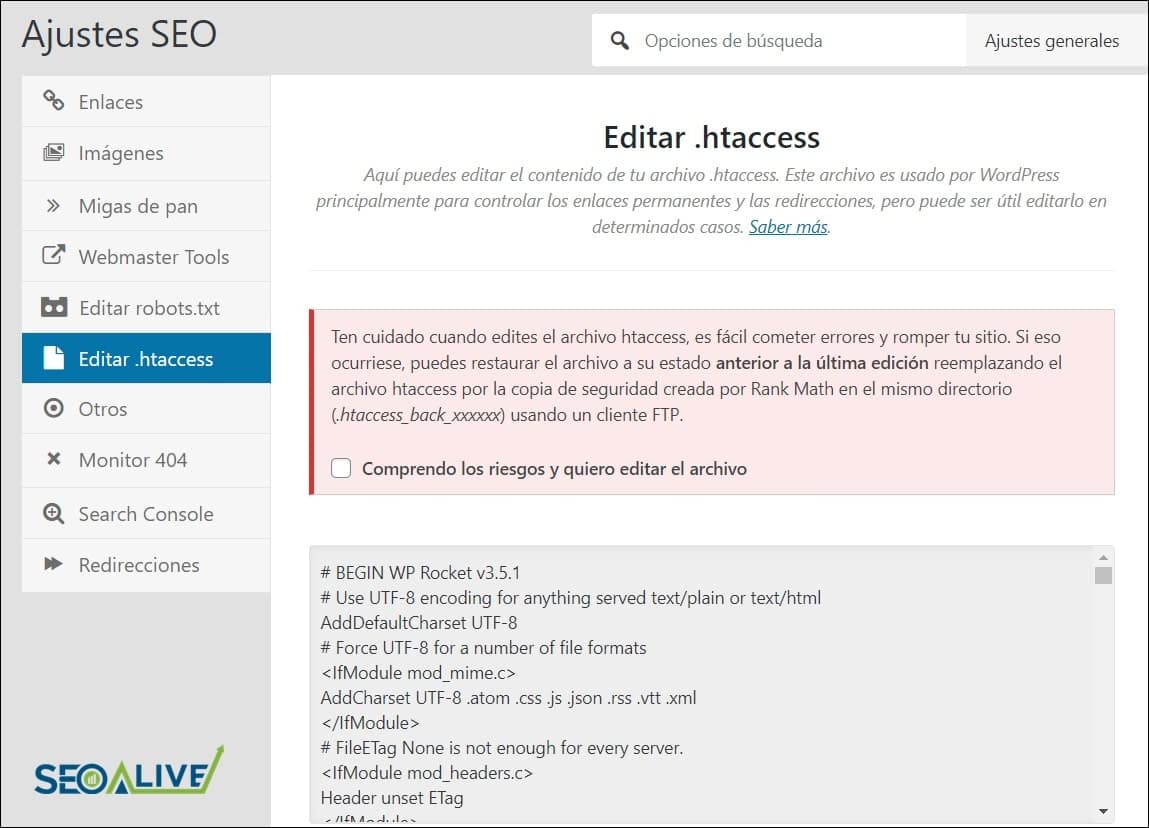
Editing the htaccess file from WordPress is very simple so remember to be careful!
Do you still have any questions? Leave us a comment and we'll be happy to take a look!
Sources consulted:
- CDmon: Information and uses of the .htaccess file - Computerhoy: What is .htaccess, what is it for and fundamental codes - Ionos: Ten tricks for configuring .htaccess that anyone should know - HelpOne: What is .htaccess? - Hostinger: What is the .htaccess file?
Author: David Kaufmann

I've spent the last 10+ years completely obsessed with SEO — and honestly, I wouldn't have it any other way.
My career hit a new level when I worked as a senior SEO specialist for Chess.com — one of the top 100 most visited websites on the entire internet. Operating at that scale, across millions of pages, dozens of languages, and one of the most competitive SERPs out there, taught me things no course or certification ever could. That experience changed my perspective on what great SEO really looks like — and it became the foundation for everything I've built since.
From that experience, I founded SEO Alive — an agency for brands that are serious about organic growth. We're not here to sell dashboards and monthly reports. We're here to build strategies that actually move the needle, combining the best of classical SEO with the exciting new world of Generative Engine Optimization (GEO) — making sure your brand shows up not just in Google's blue links, but inside the AI-generated answers that ChatGPT, Perplexity, and Google AI Overviews are delivering to millions of people every single day.
And because I couldn't find a tool that handled both of those worlds properly, I built one myself — SEOcrawl AI, an enterprise SEO intelligence platform that brings together rankings, technical audits, backlink monitoring, crawl health, and AI brand visibility tracking all in one place. It's the platform I always wished existed.
Discover more content about this author