Essential SEO Checklist for a Website Migration

Without a doubt, website migrations are usually one of the biggest challenges an SEO can face. It doesn't matter if you've already cut your teeth and have experience relaunching sites that involve migrations along the way; this is such a delicate task that it demands your full attention to make sure everything goes smoothly.
What is a website migration?
For anyone unfamiliar with the term, we'll try to explain it as simply as possible: it's the process of updating a website in which a change to the URL architecture becomes necessary.
There are many and very different reasons why a client or an SEO agency may decide to go through a migration. Whatever the case, the reason itself needs to carry significant weight, since this action is risky and can lead to a dramatic drop in rankings and organic traffic from what you started with.
Is it important to apply an SEO strategy during migrations?
Although we already gave you the short answer in the paragraph above, let's dig a little deeper into why solid planning and execution of a website migration is essential from an SEO point of view.
If you work on the SEO of a site, you'll understand perfectly that there are certain organic ranking signals that search engines follow and/or take into account when distributing the ranking of the URLs they've indexed.
If we don't keep those SEO signals crystal clear, Google's bots won't know what they should or shouldn't index, which means they may end up displaying pages we don't actually want to surface. That's why it's essential to be meticulous during a website migration; any confusing signal we send will hurt our site's rankings and organic traffic.
If you want to learn more about the importance of taking care of SEO signals during a migration, MJ Cachón explains on the Sistrix blog, in greater detail and through a case study, just how much they influence a migration.
Recommended article: The importance of SEO signals in a migration.
Types of website migrations
As we mentioned earlier, there are many reasons why a migration is considered. Among the most common causes, we can highlight:
CMS migration
One of the reasons why a migration is sometimes considered is a change of the CMS being used (for example, moving from WooCommerce to PrestaShop). This will involve a change in the URL structure, so it will be necessary to migrate from the old pages to the new ones.
Domain name change
Another type of migration is the one related to a domain name change. Whether it's due to brand reputation decisions or any other reason, we may need to migrate URLs from a domain with name 'A' to the most equivalent pages of a new domain with name 'B'.
Migration from HTTP to HTTPS
For some time now, Google has recommended securing websites under the HTTPS protocol. This scenario, although initially easier to execute, requires caution and attention to detail, since redirect loops can arise that make the site inaccessible and cause a free fall in organic traffic.
Consolidating several domains into a single website
Another common case is the transfer of several domains into just one. The reasons behind this decision vary, although the most common is to strengthen a single website by merging multiple domains that may have been inherited.
Switching to a new hosting provider
This case can happen for a wide range of reasons. Perhaps you're not satisfied with the services your current provider offers, or the new one gives you better solutions that fit your website's current situation... Whatever the reason, you'll have to go through a web hosting migration process.
Recommended article: How to choose a good SEO hosting provider
SEO checklist for planning a migration
Before kicking off the website migration process, there's something basic that should always be communicated: inform everyone involved with production, maintenance, and content creation on the site. It seems obvious, but if any link in the chain isn't aware of this action, it can end up harming the overall work and undoing everything.
It would also be advisable to notify your users that you're making a change to the website. If any issues arise during this process, it's reassuring for them to understand what's happening and that it's a temporary situation. In this sense, if the page goes down (deliberately or not), the ideal thing is to build a page displaying that information. Also, remember to include a 503 status code to tell search engines that the site isn't available at that moment and to please come back later.
In addition, when planning an SEO migration, you should pay attention to the following aspects:
Define the goal you want to reach
As you'll have noticed, each type of migration responds to a specific objective. Be very clear about yours (improving your site's speed, redesigning your brand identity, making your website a secure environment, etc.), and based on that, take note of every challenge you face or might face, as well as the opportunities you believe can be implemented. This way, you'll have greater control over how to act if any risk threatens the website migration.
When carrying out any website migration, regardless of its type, there are a series of essential tasks we must execute as a checklist:
STEP 1: Data collection before the migration:
Analytics > Extract SEO metrics from Google Analytics and Google Search Console for your project so you can compare how things looked before and after the migration. Some important data points you'll want to track are:
-
Organic sessions per URL
-
Number of indexed pages and existing errors
-
Impressions vs. clicks per query
-
Page load time...
The more complete your dashboard, the better you'll be able to measure and monitor the process during and after the migration.
Gather keyword rankings > by this we mean obtaining and storing in your control sheet both the tracked keywords (because they're core terms) and all the others that rank naturally for the URLs of your website.
Compile inbound and internal links > Having this baseline information lets you minimize future 301 redirects and unnecessary 404s. You'll be able to request, on one hand, that the owners of the websites linking to you update the old links to the new ones, and your SEO team will also be able to update any links that have become outdated.
STEP 2: Analyze and audit the SEO of the test website
In this regard, it's important to make sure at least the following requirements are properly implemented:
Include in the syntax of the robots.txt file the directive to block crawler access to the entire domain. Example:
BLOCK ALL CRAWLER BOTS:
*User-agent: **
Disallow: /
Check that the URL structure is SEO-friendly. If you're going to make improvements, the least you can do is work on this, don't you think?
Verify that the new meta data is correct and aligned with the keywords you want to rank for.
Don't forget to check that all canonicals point to the URL you consider to be the original version.
Review that each page's meta robots tags include the 'noindex' attribute in the HTML head.
Implement a correct heading hierarchy, making sure at the very least there is one textual H1 that includes the main keyword you want to rank for on the SERPs**.**
Don't forget to review pagination settings, if any, to avoid leaving important legacy content un-migrated.
Inspect whether the hreflang tag is properly implemented (as long as we're talking about projects with international domains).
Monitor every aspect related to WPO or site performance.
Check that the new internal links only contain URLs with a 200-OK status.
Make sure the new sitemap.xml only contains URLs that return 200-OK and that it lists each and every one of the pages we do want to rank for.
Think mobile: never forget the configuration for these types of devices (AMP, for example), as well as the development done to display the site on smartphones. In fact, this point, even though we've left it for last, is the most important. We have to stop thinking about desktop and start from the premise that SEO must be done and reviewed from the mobile view. A while ago, Google made it clear that it would prioritize the mobile view when crawling and indexing URLs. In fact, they've already announced that their URL crawl will always be mobile-first starting September 2020.
STEP 3 - Create a redirect map:
It's time to start working on the pairings of old and new URLs. To carry out this process, you'll need to view and extract the old web pages as well as the new ones. Once this first step is done, you'll need to line them up in two columns of an Excel or Google Sheet to know where the original pages should redirect.
This will be the foundation of your migration, so you'll need to build it taking your time to make sure you provide the best solution for each URL.
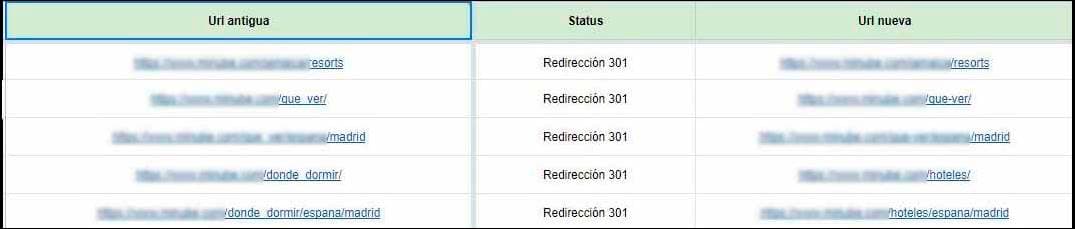
Once you have this 301 redirect map complete, test it before migration day. It's worth checking multiple times, if necessary, to make sure the redirects work and point to the new pages we've selected.
STEP 4 - Get everything ready in Google Search Console:
Even though it won't start working until the new website is accessible to Google's bots, you need to get ahead of it and start preparing the property. That way, it will be able to collect accurate data from the new website, logging any errors that need to be fixed as soon as possible.
STEP 5 - Don't lose sight of your PPC campaigns:
Quite often we focus only on meeting SEO requirements to guarantee a successful migration. However, if you have active PPC ads, you need to notify the team of the URL change so the links can be updated to point to the correct URLs. Leaving it up to 'fate' can end up costing the client dearly. In the best-case scenario, there will be a 301 redirect; in the worst, it may point to a 404 and ruin the campaign. The best practice, in any case, is to pause them until you've verified that everything is working properly.
Track before, during, and after the migration
Whenever changes are made, there's always a chance that something will go wrong. And a website migration is no exception. That's why full coordination and communication between the teams involved is essential, so that, from an SEO standpoint, we know the status at every moment, can check that everything is fine, and can monitor progress based on reliable information.
Not to scare you, but when there's a website migration process, it almost always seems like Murphy's Law decides to pay us a visit. Keep in mind that if something has the chance of going wrong, then it will go wrong. That's why controlling as much as possible before, during, and after is a recommendation you should put into practice on every single migration you work on.
Once the new website has gone live and been indexed, it's advisable to perform regular checks during its first month of life. We have to understand that Google doesn't necessarily crawl and recognize all the changes overnight. It will crawl progressively, indexing little by little at times, so errors may surface even weeks after the day the site was migrated.
Common mistakes in an SEO-friendly website migration
-
Not backing up the original website. You can always go back to this version if something in the migration fails and you think the fix is going to drag on.
-
Indexing problems. Here, some of the most frequent errors come into play:
Robots.txt with directives that allow the bots to enter your domain while you're testing.
- Not including the 'noindex' attribute in the meta-robots of pages to block access at that level as well.
Whenever possible, the ideal is to block access by IP or with a password. And, if that's not possible, the best practice is to make sure both the robots.txt file and the meta-robots tag prevent search engine access.
Once you've migrated and verified that everything is initially OK, remove these restrictions so Google can crawl and index the changes.
Don't forget these little tips either:
-
Doing it on a Friday or during a period when the website has the most organic traffic can be fatal. Always remember Murphy's Law... be cautious and don't gamble unless it's strictly necessary.
-
Not implementing Google Analytics in the HTML of the new domain can leave your reports at zero. In that case, you'll see the problem very clearly: the graph will look something like a 'flatline'. If you see that, double-check that Analytics has been installed and that it's been done correctly.
-
Not monitoring the process always leaves loose ends. If you don't know what changes you've made and when you made them, how will you manage to fix issues as soon as they arise? Logging every action you take is essential for website migrations and for everything else.
When it comes to website migrations, we could spend hours talking. But with these initial guidelines, we think you have more than enough to get started, don't you?
You know we love it when you share your point of view, add your impressions and thoughts. Don't stop doing it here either.
Write to us whenever you want in the comments section, please!
Author: David Kaufmann

I've spent the last 10+ years completely obsessed with SEO — and honestly, I wouldn't have it any other way.
My career hit a new level when I worked as a senior SEO specialist for Chess.com — one of the top 100 most visited websites on the entire internet. Operating at that scale, across millions of pages, dozens of languages, and one of the most competitive SERPs out there, taught me things no course or certification ever could. That experience changed my perspective on what great SEO really looks like — and it became the foundation for everything I've built since.
From that experience, I founded SEO Alive — an agency for brands that are serious about organic growth. We're not here to sell dashboards and monthly reports. We're here to build strategies that actually move the needle, combining the best of classical SEO with the exciting new world of Generative Engine Optimization (GEO) — making sure your brand shows up not just in Google's blue links, but inside the AI-generated answers that ChatGPT, Perplexity, and Google AI Overviews are delivering to millions of people every single day.
And because I couldn't find a tool that handled both of those worlds properly, I built one myself — SEOcrawl AI, an enterprise SEO intelligence platform that brings together rankings, technical audits, backlink monitoring, crawl health, and AI brand visibility tracking all in one place. It's the platform I always wished existed.
Discover more content about this author
On-page SEO is everything you control on a page: content, title, meta description, headings, URL, images and internal links. Here is a checklist element by element, an audit process and what changes with AI Overviews and AI Mode.