WooCommerce SEO
SEO for WooCommerce is important because this famous plugin that turns your WordPress into a complete online store is used more and more around the world. As a result, it keeps evolving and more and more companies are developing templates and add-ons that let you customize and improve your e-commerce site. In this article, we want to give you the best tips and techniques to apply in order to boost the SEO of your WooCommerce online store. Are you going to miss it?
Improve the SEO of your WooCommerce online store
Because of its ever more widespread use, it is becoming increasingly essential to optimize your WooCommerce website to reach the top positions in the search results. Like any other CMS, it has its pros and cons, as well as its own technical limitations. But what is clear is that improving SEO on WooCommerce is something you absolutely have to do to get your store selling.
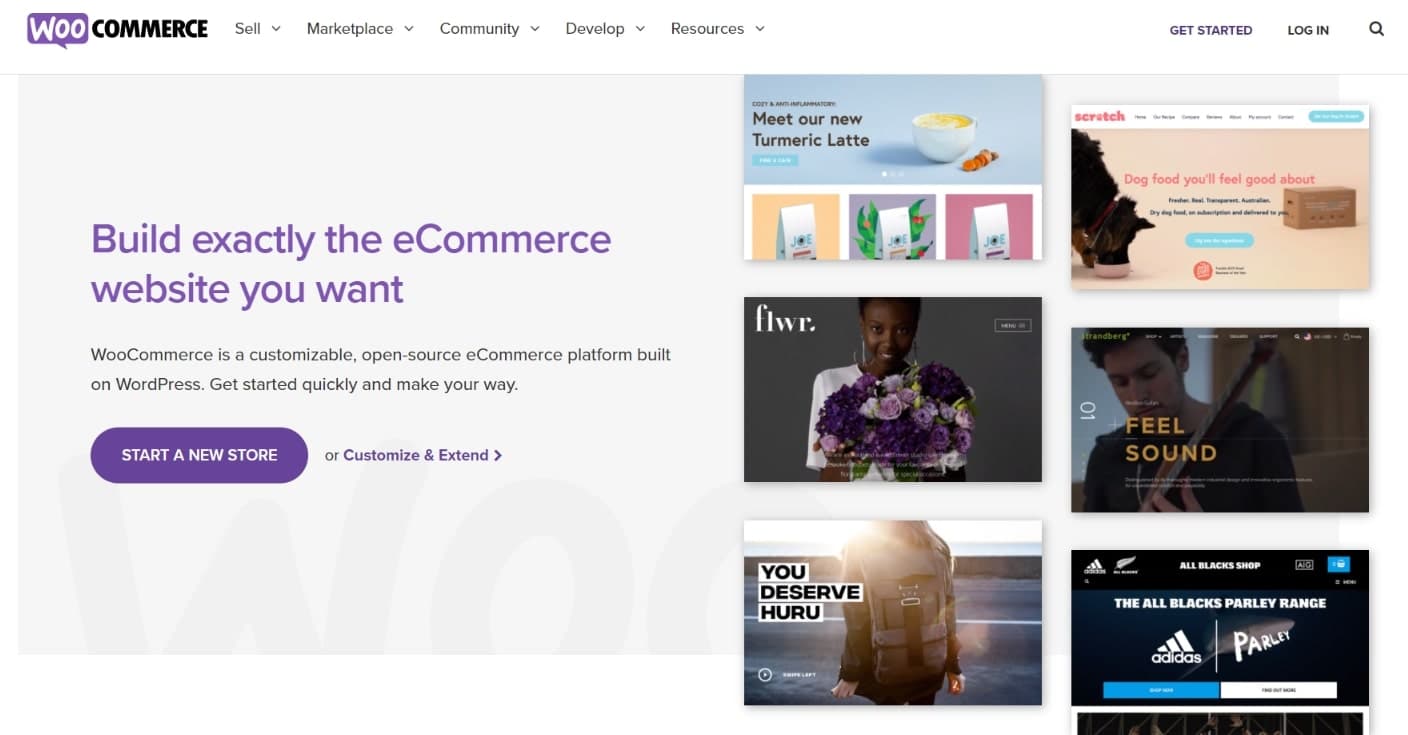
Cover page of the official WooCommerce website
Tips to optimize WooCommerce
Let's take a look at what we can do when it comes to improving WooCommerce SEO, since there are many aspects to consider. We know that SEO, as a discipline, is very broad and there are general factors to review, as well as others specific to the chosen CMS (in this case WooCommerce running on WordPress). Let's dive in!
Keyword research
Every web project starts with a keyword research, and a store built on WooCommerce is no exception. Before you jump into building a website, you need to know what and how users search around that topic.
We are sure you know your product perfectly, but it is worth exploring how your potential customers search for it and what questions you should answer in each section of your website.
SEO for WooCommerce and any other platform is based on this principle: offering the user what they are looking for. There are many tools to do keyword research, some give you search volume and others don't. These are some of them, both free and paid:
- Google Ads Keyword Planner
- Google Trends
- Keywords Everywhere
- Ahrefs
- SEMrush
- Keywordtool.io
Build your website structure
You already have your keywords and it is time to think about structuring your content. The first thing you will need to do is distinguish between transactional and informational keywords. Thanks to this, you will be able to prioritize your categories and subcategories and, at the same time, group your products.
Having a correct information structure is essential for SEO. It is the foundation on which our future growth will be built.
Don't forget friendly URLs in WooCommerce
URLs in WooCommerce have certain characteristics and limitations that can sometimes prevent us from generating a URL structure the way we want. Imagine an online gift store. Surely, on more than one online store you have seen the following category path:
https://yourgiftstore.com/product-category/personalized-gifts/
We can choose to leave the structure like this, although at first glance it doesn't seem the most optimal. Many people choose to change the name of that section so that a /shop/ appears instead.
It would look like this:
https://yourgiftstore.com/shop/personalized-gifts/
You can make this change in Settings > Permalinks and there, in the "Optional" section, you just have to replace what is written with the word "shop" or whatever you want to appear:
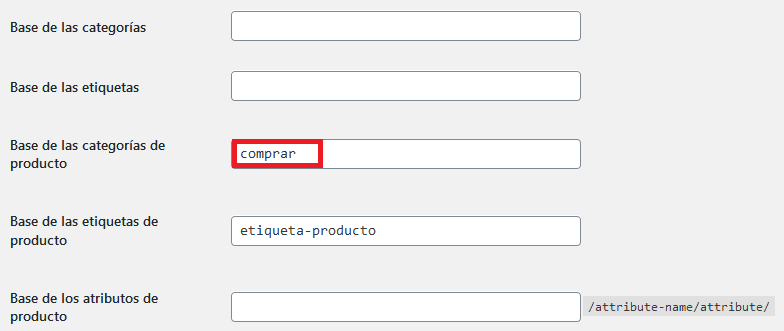
View of the WP settings panel for WooCommerce
Finally, we have the option to remove that intermediate section in the URL. This can be achieved thanks to the SEO plugin Rank Math, which allows us to check the "remove category base" option.
In our example, it would look like this:
https://yourgiftstore.com/personalized-gifts/
This last option is the one we like the most, what about you?
Category pages and their importance
We have already seen how to set up proper URLs for the categories of our store. But now it's time to optimize them to the max so they are able to attract traffic. To do this, we will need good descriptive text that answers the user's search, which you have already identified when doing your keyword research.
As a general rule, category pages target keywords with very high search volumes and with a rather generic search intent. For example, "personalized gifts" or "Valentine's Day gifts" are searches around which we could create categories. We can also (and it is recommended) go one step further and be more specific by targeting other long tail keywords with subcategories.
For example, and following the same topic, as a subcategory under "personalized gifts" we could have "personalized coffee mugs". This is a category that answers a much more specific search. Even though this search has lower volume, we are sure that the user is in a more advanced stage of the purchase funnel when they land on it.
For this subcategory, we could have a URL like this:
https://yourgiftstore.com/personalized-gifts/personalized-coffee-mugs/
Again, the website structure you have designed based on the keyword research will guide us and enable us to appear for a greater number of searches in an optimal way thanks to a correct content hierarchy.
Of course, here we cannot forget to fill in the titles and meta descriptions, which you will do thanks to one of the SEO plugins for WordPress that we mention later. On many online stores we can use calls to action in either of these two fields to encourage the user to click. For example, a good practice is to mention in one of them that you offer free shipping, if this is a differentiating value for you.

Example of an optimized "Snippet" for an online store
A good product page will make the difference
Your product page can drive sales on its own. If you correctly explain the features of your product, you show specialization in the sector, you make your differentiator clear, you have good UX and a competitive price, the sales will come. It sounds easy, but it is not.
The first thing you should do is avoid duplicate content. Create unique product descriptions and, if possible, use your own photographs. Just by doing this, you will already have an advantage over competitors who simply copy the descriptions directly from the manufacturer.
Don't forget CRO. This is the step after SEO, but it never hurts to remember it. It will be of no use to you to bring users to your website if they then run into obstacles that prevent the purchase.
Make it easy for them and get them to complete the transaction!
Watch out for duplicate content
We already said it in the previous point. But duplicate content in an online store doesn't just come from the wholesaler or manufacturer and the other competitors who have copied the same thing. There is also internal content that can end up cannibalizing itself, and to prevent this from happening, you have to pay attention to what you do when creating the content structure.
For example, you can't have a category in your gift store called "Star Wars Mugs" that contains only one product called "Star Wars Mug". In this case, you should forget about the category and find a place for the product in another section of your website.
The difficulties increase if you include tags on your products, since this can be another source of duplication and even thin content. And let's not forget the blog. A practice that is not recommended but quite common is doing a review of a product in the blog. What we achieve with this is cannibalizing the product page with the blog and attracting visitors to a landing page where it is much more difficult to end up converting the sale.
Loading speed to give users and Google what they want
Loading speed is extremely important in WooCommerce SEO. You already know that for some time now Google has been providing us with statistics on our Core Web Vitals and it is something to take into account.
But having a slow website won't just affect our rankings. What do you think will happen to users if your website takes 7 seconds to load? Exactly, they will leave.
You should take care of some of these points to improve your WPO and get your website to load like a rocket:
- A quality hosting. Hosting lays the foundations of our website and if, to save a few euros, we get it wrong on this point, we can end up regretting it.
- Use an optimized template that loads quickly. All WordPress theme developers promise to be very fast, but few achieve it. Do a detailed study of your needs before choosing a template.
- The fewer plugins, the better. Don't use any plugin that doesn't provide what you need. Having them will increase the number of server requests and slow down loading.
- Optimize images. Give them the appropriate format and, whenever possible, keep them under 100kb.
- Use a cache and compression plugin. We use WP Rocket and we think it's one of the best, but there are many more. By the way, we have a guide on how to configure WP Rocket in case you decide on this one.
SEO Plugins
You surely know that there are specific plugins that help you carry out certain configurations to optimize SEO for WooCommerce. Let's list some of them, surely you haven't tried them all:
- Yoast SEO: The big dominator of the segment for many years. Yoast popularized the famous little traffic light in your posts.
- Rank Math: The "heir" of Yoast. Rank Math came in strong, taking advantage of several bugs in updates from its main competitor. Recently they have released extra paid options.
- All in One SEO Pack: A very complete plugin, although in terms of visibility it has not managed to follow the path of Yoast and Rank Math. Many options that even make it complicated to configure.
- The SEO Framework: This is a lesser-known SEO plugin but very light and simple. It doesn't allow as many options as the previous ones, but it can be a good choice on small websites where you don't need major changes.
Constant analysis and tracking
It doesn't matter what SEO you do, if you don't measure your results you will never know what works and what doesn't. On one hand, you have Google's tools, with Search Console and Google Analytics at the top of the list. Thanks to them, you will know the evolution of your visits, you will be able to submit your sitemaps or detect possible coverage issues.
You also have paid external tools such as Sistrix, Ahrefs or SEMrush which are based on their own data sources to analyze your traffic, among many other features. But now there is a third way, you can analyze your evolution and even predict it, but with real data thanks to our SEO software (SEOCrawl). Using Search Console itself as a data source, you will get SEO Dashboards, country comparisons, you will detect cannibalizations or be able to analyze the effect your implementations have on the performance of your online store. It will be perfect for measuring and finding new insights to improve your WooCommerce SEO.
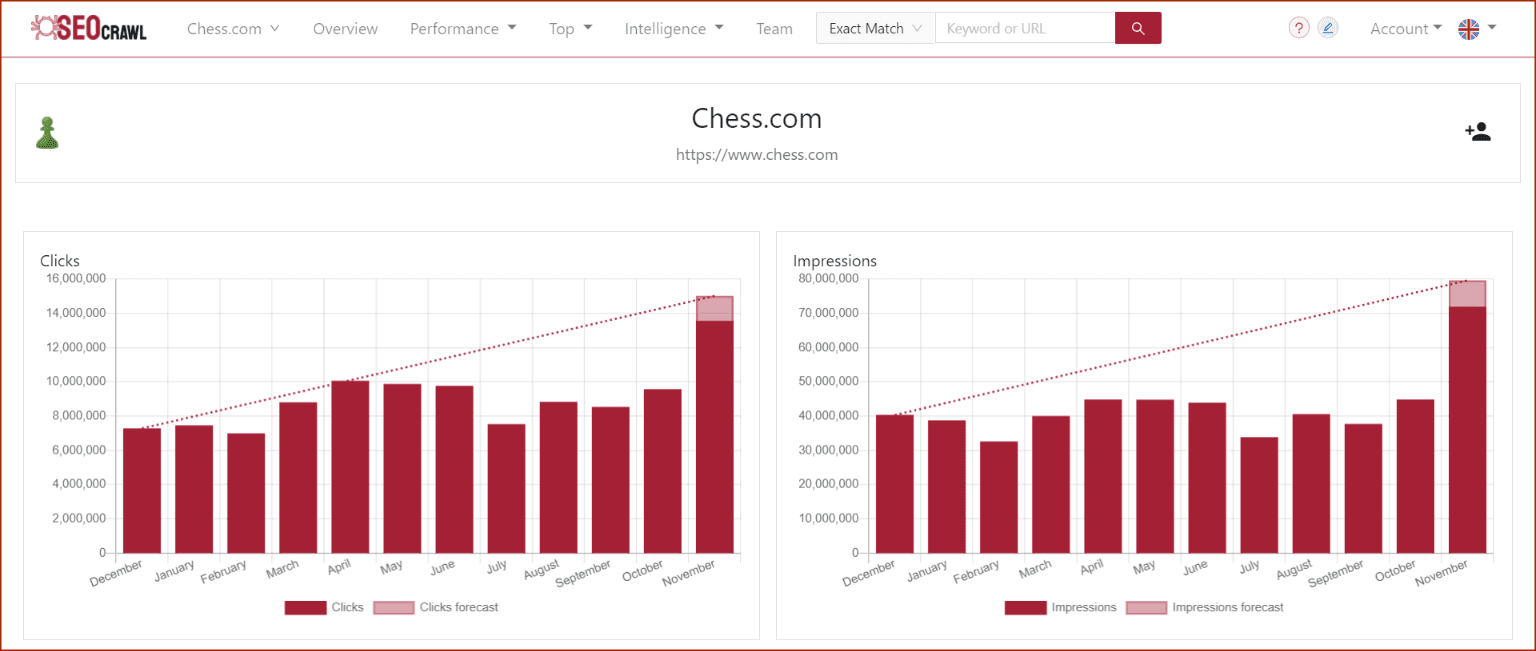
SEO data on SEOcrawl.com from Chess.com, our biggest client.
Alternatives to WooCommerce for online stores
WooCommerce is the most widely used e-commerce solution, but not the only one. Prestashop and Magento have always proven to be robust and stable solutions and, in recent times, Shopify has been growing a lot (it was already very important in the United States) and gaining market share due to its ease of use and the speed of setting up an online store.
Here is a list of worldwide usage based on data from the BuilthWith tool:
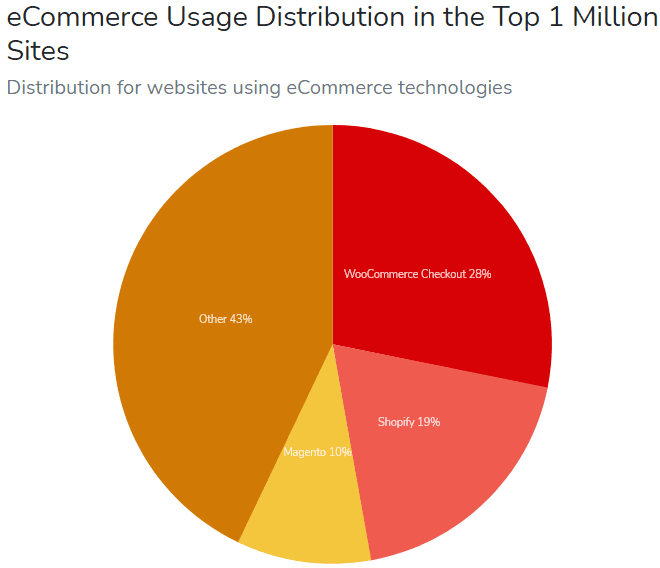
Chart of CMS usage distribution for e-commerce
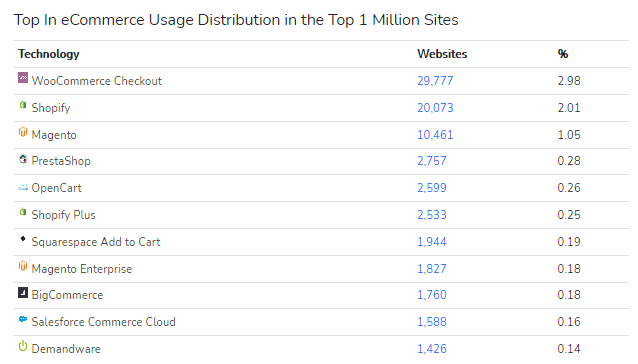
List of most used CMSs to create an online store within the top 1 million websites
Conclusions
As you have seen, SEO for WooCommerce doesn't differ much from what you can do for other e-commerce platforms like Prestashop. The basic notions and guidelines you have to follow don't change whether your project is built on one CMS or another. What you will have are specific configurations for each software and also technical specifications that you will have to take into account for the proper functioning of your online store. For example, it will be difficult for an online store built on shared hosting to run as smoothly whether it is a Magento or a WooCommerce.
Don't think about it any longer and start doing SEO for your online store today!
And you, what WooCommerce SEO actions work best for you? Leave us a comment and we will gladly reply!
Author: David Kaufmann

I've spent the last 10+ years completely obsessed with SEO — and honestly, I wouldn't have it any other way.
My career hit a new level when I worked as a senior SEO specialist for Chess.com — one of the top 100 most visited websites on the entire internet. Operating at that scale, across millions of pages, dozens of languages, and one of the most competitive SERPs out there, taught me things no course or certification ever could. That experience changed my perspective on what great SEO really looks like — and it became the foundation for everything I've built since.
From that experience, I founded SEO Alive — an agency for brands that are serious about organic growth. We're not here to sell dashboards and monthly reports. We're here to build strategies that actually move the needle, combining the best of classical SEO with the exciting new world of Generative Engine Optimization (GEO) — making sure your brand shows up not just in Google's blue links, but inside the AI-generated answers that ChatGPT, Perplexity, and Google AI Overviews are delivering to millions of people every single day.
And because I couldn't find a tool that handled both of those worlds properly, I built one myself — SEOcrawl AI, an enterprise SEO intelligence platform that brings together rankings, technical audits, backlink monitoring, crawl health, and AI brand visibility tracking all in one place. It's the platform I always wished existed.
Discover more content about this author
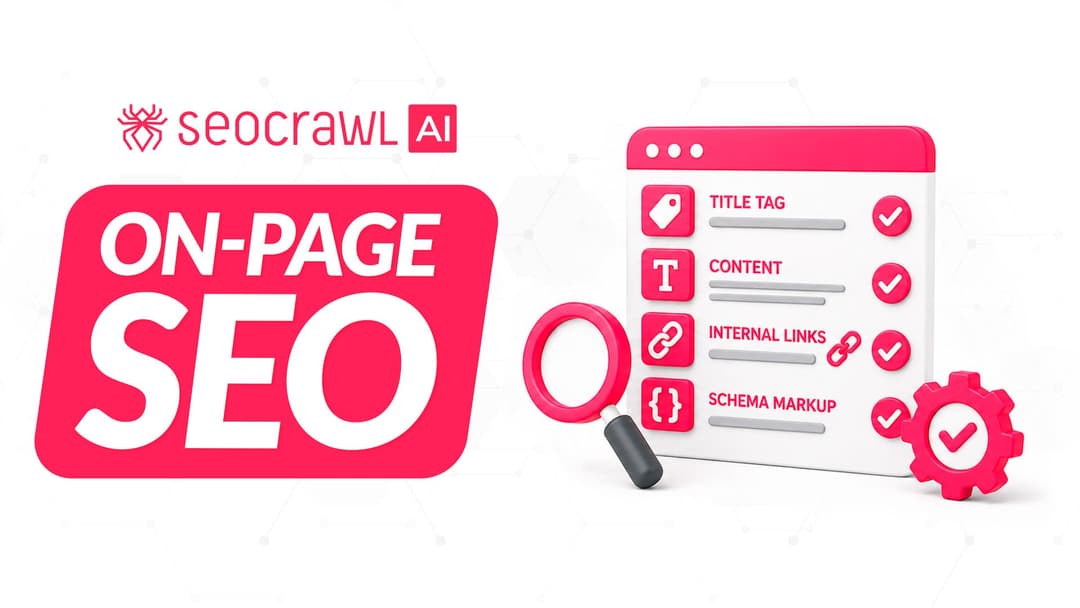
On-page SEO is everything you control on a page: content, title, meta description, headings, URL, images and internal links. Here is a checklist element by element, an audit process and what changes with AI Overviews and AI Mode.