Core Web Vitals

Google continues to relentlessly pursue ways to provide webmasters with the tools they need to optimize page load times. Not only because it benefits the cost of crawling and caching unoptimized resources, but also to improve the user experience when browsing the web.
This latter point is where Google is placing its focus, and for some years now it has been offering webmasters different tools for optimizing page load speed. Now it has once again pulled out of its sleeve 3 metrics that bring together the most common issues encountered when rendering HTML. We don't know whether the Core Web Vitals are here to stay, but for now we need to know them and dig deeper into their optimization. We all want to put our best face forward when "the boss" comes to visit.
The purpose of this article is to explain what Core Web Vitals are, how they work, and the importance they have on the speed and load times of a website. Let's get to it!
IMPORTANT (updated November 10, 2020): Google just announced that starting in May 2021, Core Web Vitals will be a very important ranking factor together with user experience. Article on the Google blog
What are Core Web Vitals?
Core Web Vitals are metrics created by Google to improve the user experience on websites. The wide variety of tools available to analyze load speed has been one of the factors Google considered in unifying all these metrics, in order to simplify a bit the complexity involved in optimizing load times. This initiative aims to make us focus on these "quality signals" which are so important to achieving an optimal user experience.
Google summarizes in a few words what the Core Web Vitals focus on:
-
Loading experience
-
Interactivity
-
Visual stability of page content
Largest Contentful Paint or LCP
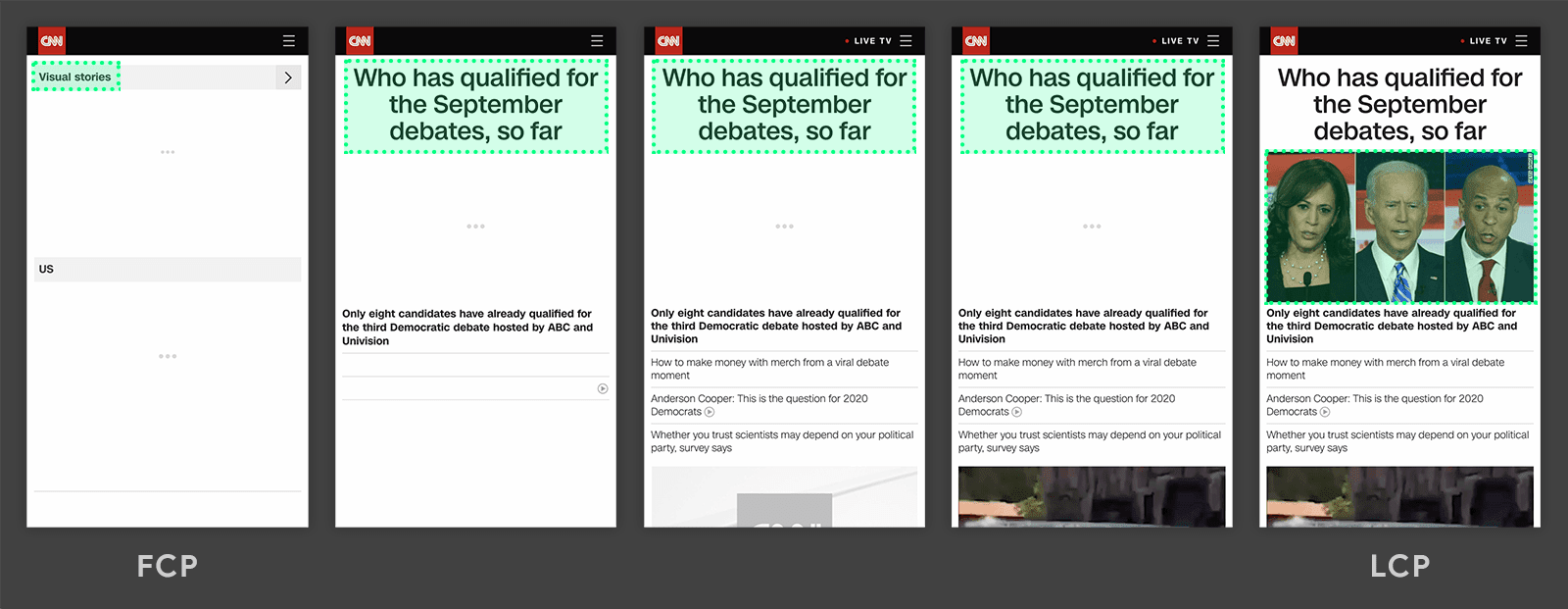
The LCP or Largest Contentful Paint is a metric that tells us the load time for the "largest" piece of content visible to the user to be available and useful. In other words, Google is saying that the elements placed in what we know as "Above the Fold" have to load quickly and be readable, and thus be available to the user so they can interact with them.
It should be clarified that the elements that appear when the user clicks on the screen or scrolls do not affect the LCP. The largest content can be a block of text, a video, an image, etc.
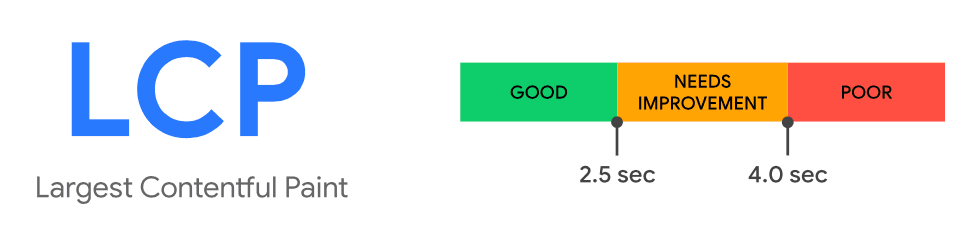
LCP status classification according to times. Image © web.dev
What time does Google consider optimal?
As we can see in the chart, Google considers that the maximum time to load the LCP and provide a good user experience is under 2.5 seconds. It's important to note that during loading, the LCP element may change.
How can I find out the LCP of a URL?
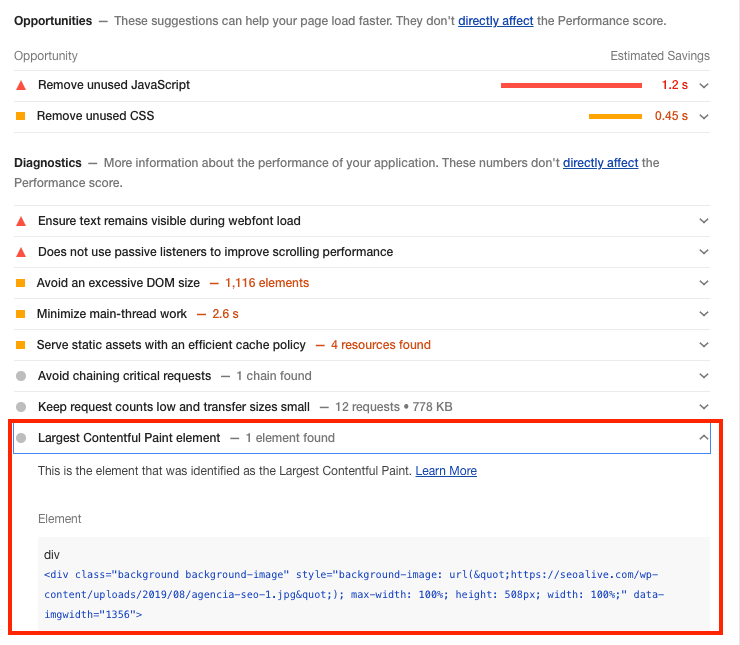
In the Chrome browser itself, through running a Lighthouse audit, we have the option to find out what Google considers to be the largest content to load. Here's how:
What factors can influence LCP loading?
Several actions influence the LCP load time being higher than expected. These elements or actions are:
-
Server response
-
Database queries
-
API responses that take time to resolve
-
CSS or JS that blocks rendering
-
Slowness in loading other resources
-
Unoptimized images
-
Etc.
First Input Delay or FID
The FID or First Input Delay is a metric that indicates how long the page takes to react when the user interacts with any of the elements.
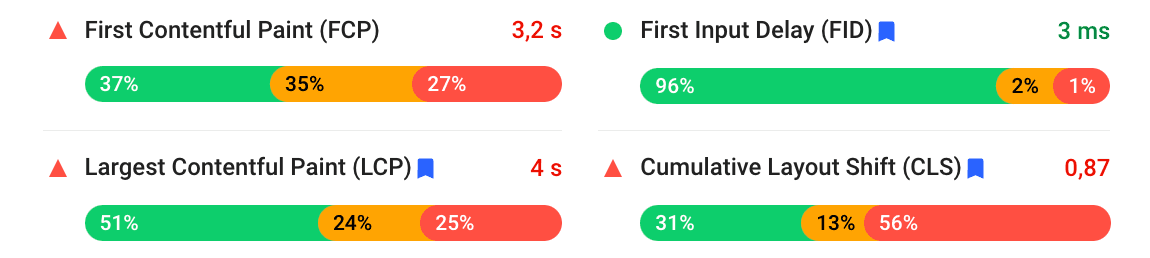
Metrics taken from Pagespeed
In the Pagespeed tool, which Google made available to everyone some time ago, we can see the reference to this metric. Values considered good should be below 100 ms.
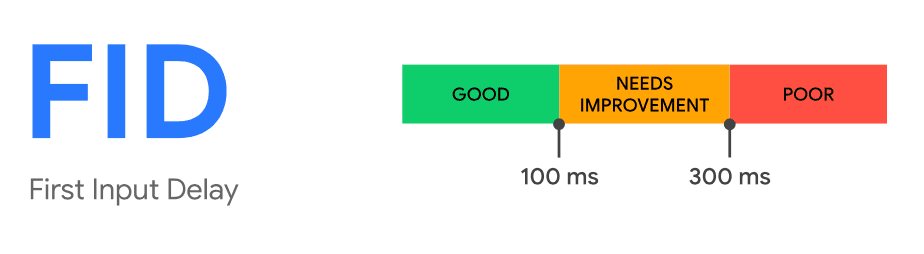
First Input Delay (FID) status classification according to times. Image © web.dev
The main causes of problems with this metric (FID) come from the execution of JavaScript, so we would need to identify which part of the code is causing the page to take time to react to interaction. I have personally experienced this problem with advertising JS loads.
Cumulative Layout Shift or CLS
The Cumulative Layout Shift is a metric that sets limits on the loading of elements that modify the display as they load. We are talking about providing stability to the elements on screen so that the view does not shift as other resources load.
Google considers (well, Google and every user) that it is very annoying that, when we have started interacting with a page (whether reading, scrolling, etc.), an element that loads later shifts the user's position relative to the content, forcing them to correct by scrolling.
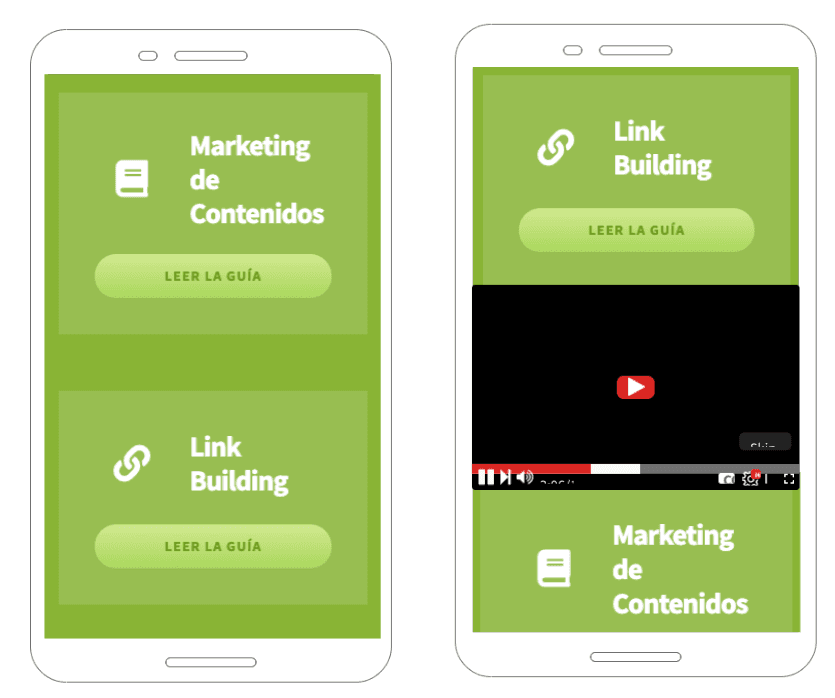
This example helps us better explain how this metric works. At first we see the content loaded on the left side. When Google talks about stability, it refers to the loading of a third element not shifting those previously loaded. As we see in the image on the right, loading the YouTube video has shifted the two blocks that were loaded initially.
Why are Core Web Vitals important?
Ever since we've coexisted with search engines, and more specifically with Google, it has been incorporating obligations for anyone who has a website and wants it to be one of the options in search results.
Improving accessibility from all devices, favoring secure browsing under a security protocol, or penalizing websites that used invasive advertising (interstitials), have been some of the battles of the tech giant.
These metrics are indicators Google gives us to point out which parts of the website may be a problem for the user but... Does that mean they're important?
Whether we understand websites from a "robots" point of view or from a "users" point of view, these metrics are indicators that our websites are not working as well as they should. We've already seen in several studies how influential load time is on conversion and on user patience. They currently don't influence rankings, but are we going to ignore these metrics?
For our part, we will certainly take them into account.
Do Core Web Vitals affect rankings?
As of today, all we know is that metrics for improving user experience are becoming increasingly important, and some of them are already being taken into account in search results. In the article from May 28 on the Google blog, it was announced that in 2021 it expects to roll out a new Update to incorporate several metrics related to user experience.
We only have to remember how it handled the Mobile First Index and the prior notices. In this case, referring again to the May article, it warns that there will be a prior notification of at least 6 months, so... Will there be an update by the end of next year?
Tools to Optimize Core Web Vitals
Now that we've talked about what Core Web Vitals are and the importance they will have in the coming months, it's time to start working on optimizing these metrics. Through different tools we will be able to tackle the problems that are detected and achieve a performance improvement.
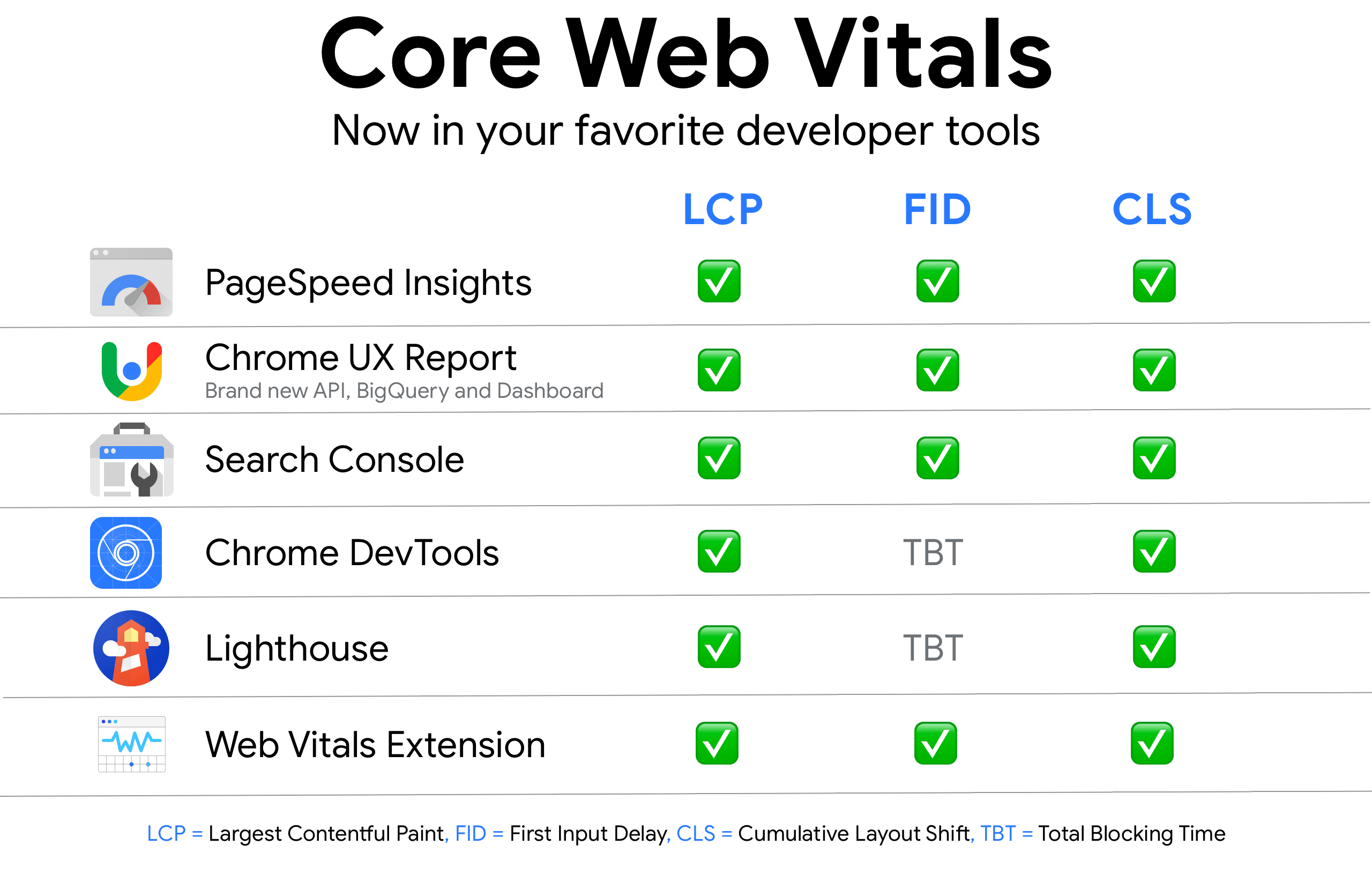
Lighthouse
Lighthouse is a powerful open-source tool that we find in Chrome. Through Lighthouse, we can audit our website, running different tests to obtain results on the shortcomings or parts of the page that need to be optimized. Among these parts are the Core Web Vitals metrics.
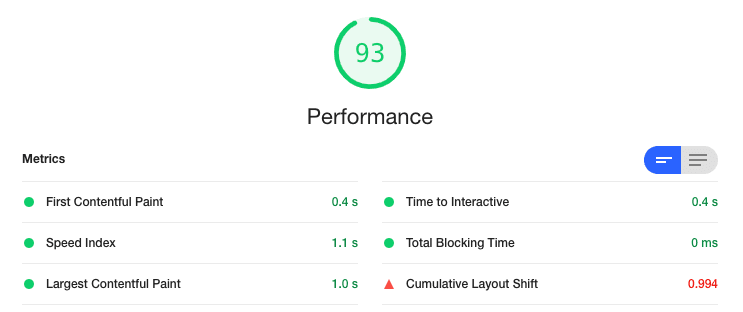
Image taken from the results of a Lighthouse audit
Page Speed Insights
Page Speed Insights is another option that Google provides us to obtain the performance data of our website. This tool even shows us graphs of the most important metrics and their status. Page Speed Insights is based on a user experience report whose objective is to obtain data in comparison with other websites.
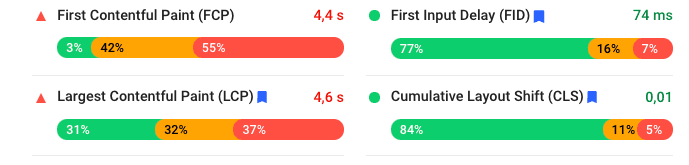
Metrics offered by Page Speed Insights
Chrome UX
Chrome User Experience Report is a set of data that Google provides on the behavior of users around the world through Chrome. To access this data you have to use Big Query, as well as have a Google Cloud account.
Through Google Data Studio, they have made access easier and have everything semi-ready for us in this Dashboard
Chrome Dev Tools
We can analyze Core Web Vitals metrics not only with Lighthouse; if we dive into Chrome's developer tools, we can reach the same conclusions. For example, in the "Performance" tab, if we make a recording or a new load, we can obtain valuable information about how our URL is behaving.
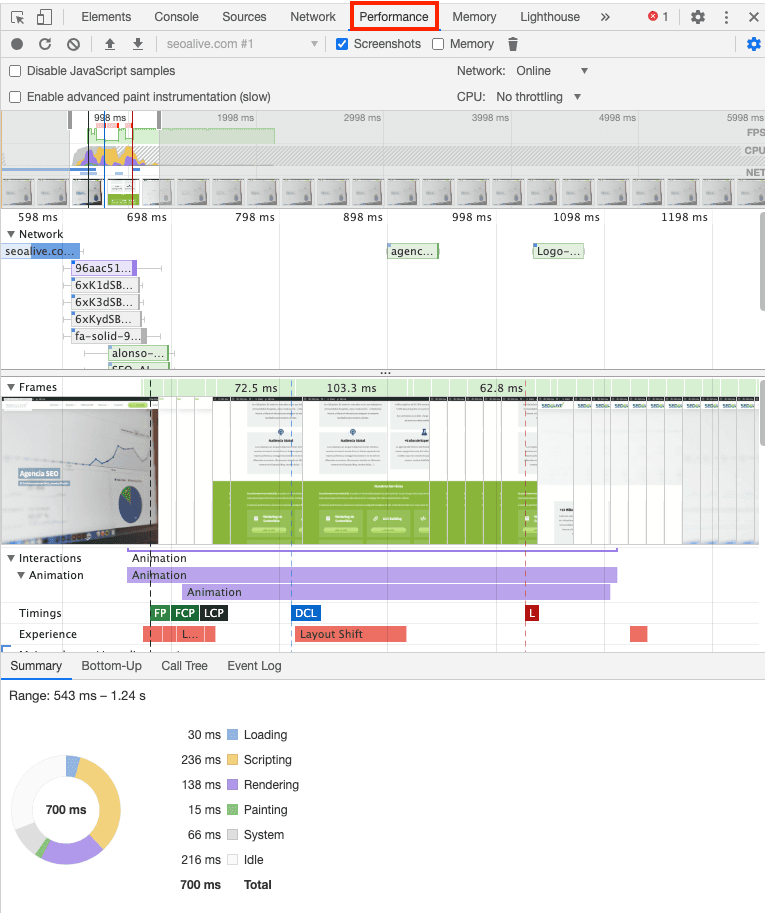
Screenshot taken in the Performance option of Chrome Dev Tools
Web.Dev
There's always an easier way to do things, at least when it comes to knowing our Core Web Vitals. On the official website, we have a page that details each metric and gives us an explanation of what it is and practices to improve it.
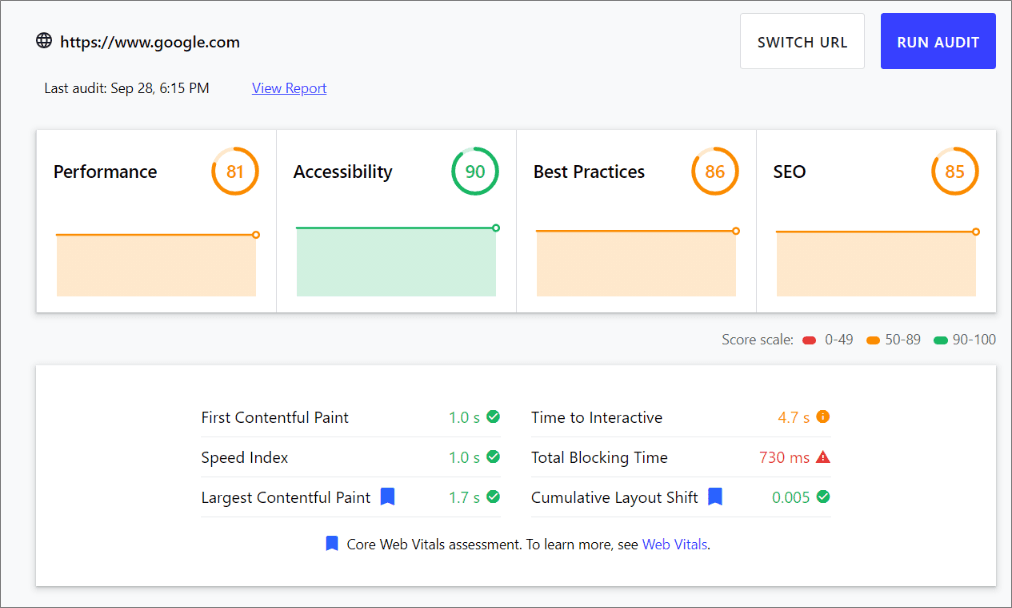
In addition, in the Chrome Store we have an extension that gives us this information when entering each URL:
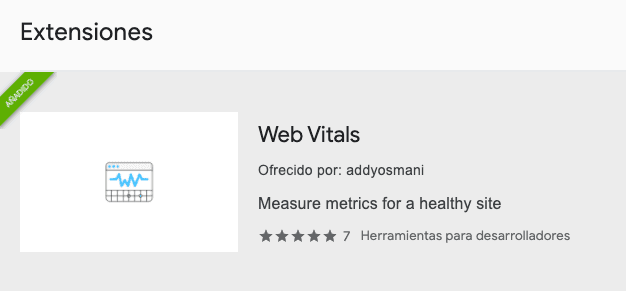
With a red or green indication we can see the status of our URL with respect to these metrics:
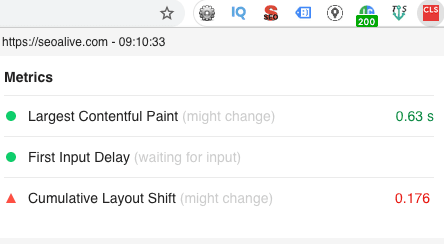
Screenshot of the results given by the Web Vitals extension
Search Console
Search Console is an indispensable tool for any webmaster. A feature has been added that helps us see which URLs have problems with these 3 metrics (LCP, FID and CLS). In the left-hand menu, we have the "Core Web Vitals" option. When we choose this option, two graphs will appear showing the results of URLs by device. If we choose the device (desktop or mobile), we will see in detail which URLs have problems.
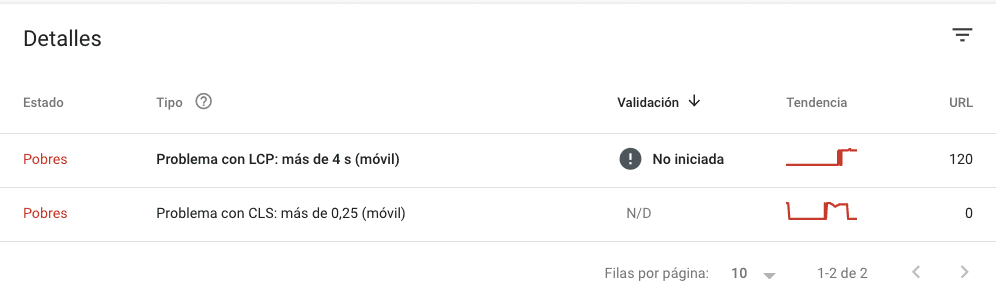
Don't be alarmed if you see a high number of URLs on the right; this is relatively normal, since problems usually occur by page types (for example blog posts) and working on one of them will get us the improvement across all of them.
Conclusions
This tour through Core Web Vitals aims to introduce us to metrics that will increasingly gain prominence, and we, whether SEOs or Webmasters, are going to live with them. From SEOcrawl AI, we want to recommend that you make use of all these tools we've provided you with, which will undoubtedly help you improve the WPO performance of your website.
*Do you accept the challenge of improving your site's speed? Run a test with any of the tools we've mentioned and send us a message with a screenshot. We'll give you a tip to improve it completely free! *
Author: David Kaufmann

I've spent the last 10+ years completely obsessed with SEO — and honestly, I wouldn't have it any other way.
My career hit a new level when I worked as a senior SEO specialist for Chess.com — one of the top 100 most visited websites on the entire internet. Operating at that scale, across millions of pages, dozens of languages, and one of the most competitive SERPs out there, taught me things no course or certification ever could. That experience changed my perspective on what great SEO really looks like — and it became the foundation for everything I've built since.
From that experience, I founded SEO Alive — an agency for brands that are serious about organic growth. We're not here to sell dashboards and monthly reports. We're here to build strategies that actually move the needle, combining the best of classical SEO with the exciting new world of Generative Engine Optimization (GEO) — making sure your brand shows up not just in Google's blue links, but inside the AI-generated answers that ChatGPT, Perplexity, and Google AI Overviews are delivering to millions of people every single day.
And because I couldn't find a tool that handled both of those worlds properly, I built one myself — SEOcrawl AI, an enterprise SEO intelligence platform that brings together rankings, technical audits, backlink monitoring, crawl health, and AI brand visibility tracking all in one place. It's the platform I always wished existed.
Discover more content about this author