The Definitive Guide to SEO for PrestaShop
Do you already have your store nicely set up on PrestaShop? Have you thought about SEO yet? Not yet? Had you completely forgotten? Oh no! Don't panic, at SEOcrawl AI we bring you a complete guide to doing SEO on PrestaShop so that you can focus on the most important points.
Let's get to it!
The pillars of SEO
Before diving headfirst into how to run an SEO strategy for your business on PrestaShop, it's really important that you know the basic pillars of SEO. You're lucky that we have this blog, and without going too far you can learn a lot from our guide to how to rank on Google.
Got it all? Great, let's continue.
Why is SEO important in PrestaShop?
You probably chose PrestaShop for its versatility when managing your online store or its ease of managing online and physical inventory. Unfortunately, we don't find as many conveniences when it comes to doing SEO on PrestaShop, since we often come across many shortcomings in the themes available for purchase or even in the CMS itself.
We're not saying all PrestaShop themes are badly configured, but in most cases, these themes are very visual while having major gaps regarding on-page SEO and WPO (not to mention the mobile side of things).
But don't worry, you don't need to close your online store—today at SEOcrawl AI we bring you the solution.
Key SEO factors for your PrestaShop
Alright, now the good part begins. Below, we present all the factors you should keep an eye on in your PrestaShop to make it as SEO-friendly as possible:
Title and meta description
Any respectable SEO has to keep both the title and meta description under control (if you don't know what they are, remember we have our post on SEO title and meta description).
These are the snippets of text that appear on Google's results pages:

To change them on products, you just need to go to any product and enter the SEO section:
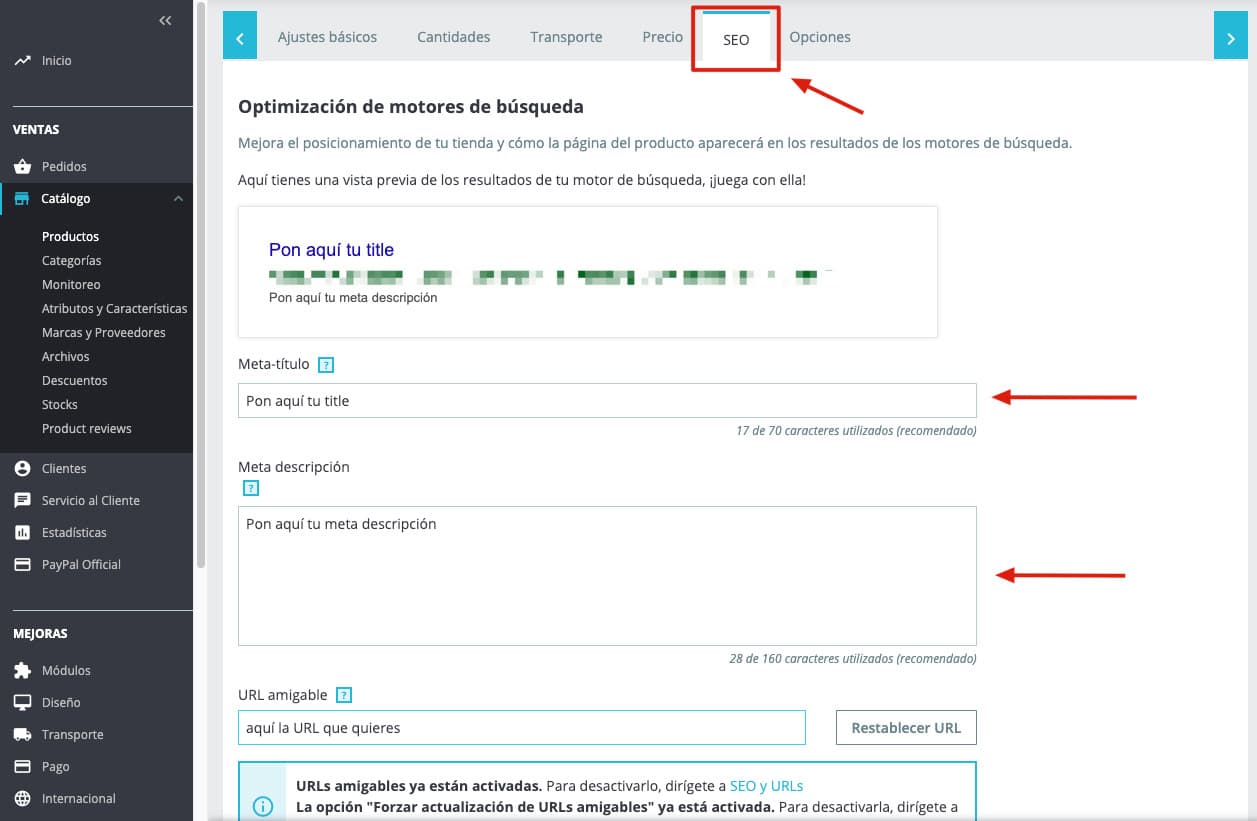
If instead you want to change the titles and meta descriptions of your PrestaShop pages, you'll need to go to:
-
Configure > Shop Parameters > Traffic and SEO for default pages.
-
Sales > Catalog > Categories to change them on categories.
SEO texts on categories
If you want to rank your category pages really well, the best thing is to add text.
You already know Google loves text. The problem is that if a user enters a category in your ecommerce and the first thing they see is all text and not a single product... they can get a bad impression and look for another page.
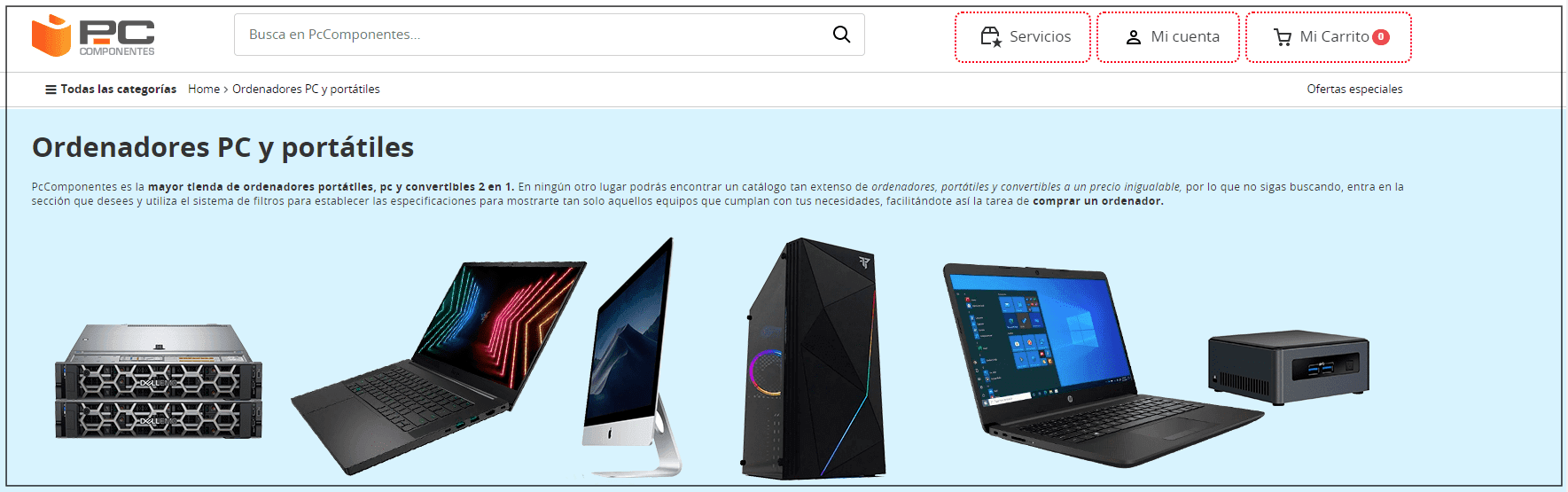
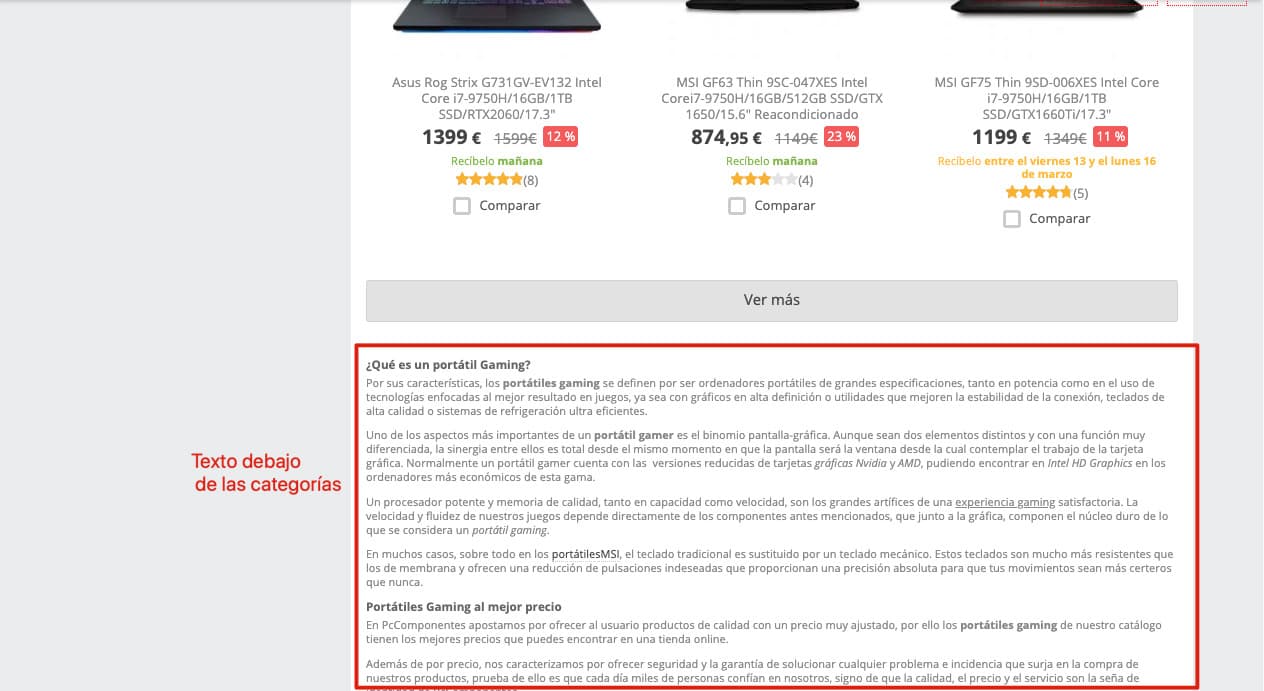
The solution for this is to add a short introductory text at the top of the category and then another text below the products. This technique is used by many ecommerces such as Pccomponentes:
By default, few themes offer the option to add texts at the top and at the bottom.
If you want to add this option to your PrestaShop store and your theme doesn't have it by default, you'll need to contact a developer specialized in this CMS or install the ContentBox module, which is free.
Image optimization in PrestaShop
This is the problem for 90% of ecommerce sites: all images are uploaded at maximum resolution regardless of the size at which they'll be displayed.
One of the best (and cheapest) techniques is to compress all images before uploading them using online tools such as Kraken.io, and then upload them to your PrestaShop.
Already uploaded all the images? Don't worry, we have a solution for you too:
Once we get to this point, we have two options:
-
Install a module like TinyPNG to compress all the images in your store.
-
Via FTP, download the folder with all images and compress them. Once compressed, re-upload them. This option is a little riskier since you're touching sensitive files, but it's just as effective.
(⚠ Before touching/modifying sensitive files, it's advisable to have a backup, just in case.)
Recommended guide: SEO for Images
Blog
If you want to rank for keywords that aren't only transactional, you need a blog.
With a blog you can complement your store and cover every search intent your buyer persona might have.
Within the PrestaShop addons store we can find numerous modules to create a blog inside our store and target those more informational keywords. But, from our point of view, after testing many of them, none come close to the versatility we can get in WordPress.
If we want to unite the best of both worlds, we recommend installing a WordPress installation inside a subfolder of your hosting (like /blog). This way you can have a PrestaShop at the web root and a WordPress in the subfolder.
SEO-friendly URLs
Just like in WordPress, within our PrestaShop we can set how we want our store's URLs to look. You'll find these options in Configure > Traffic & SEO:
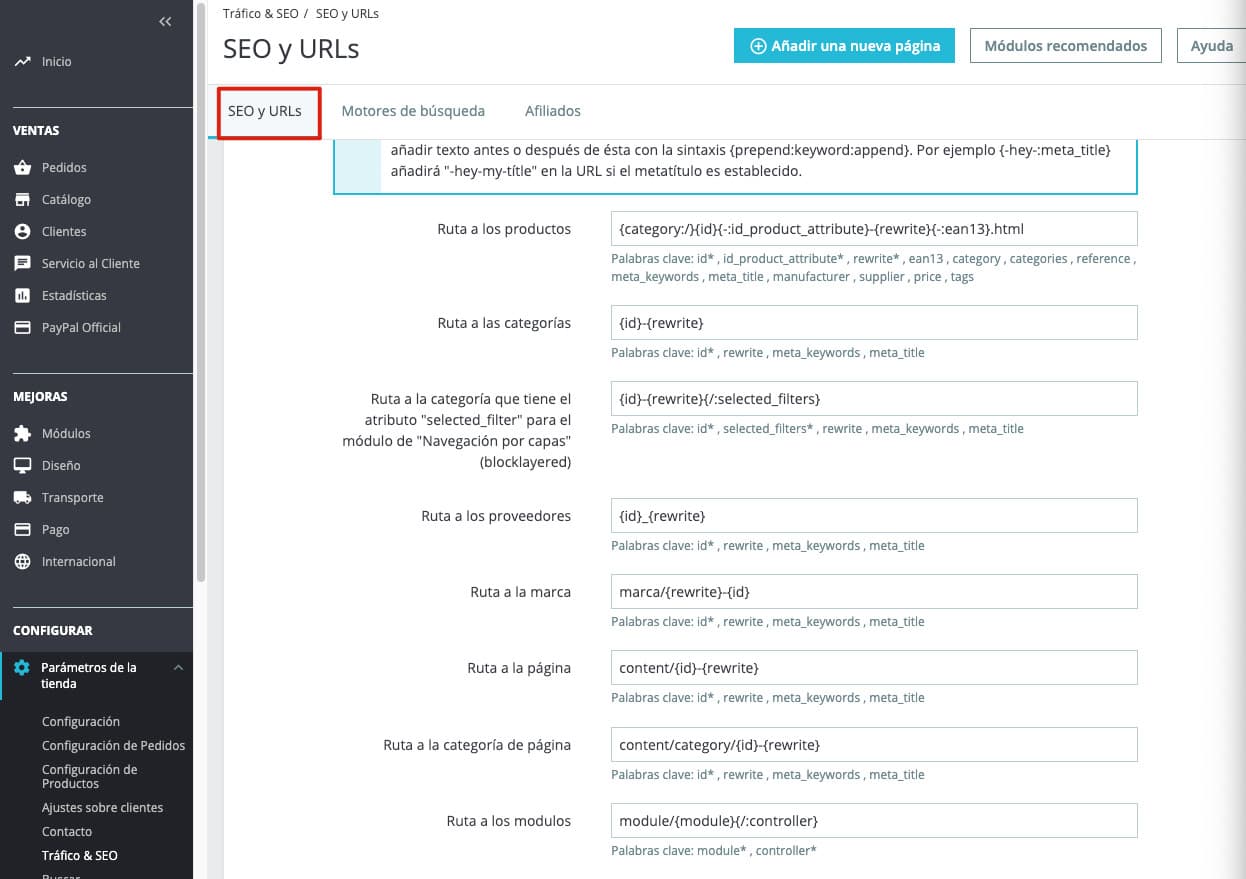
Inside this section you can change what parts you want to appear in the URL.
Our recommendation is to always try to keep URLs as clean as possible, meaning, remove everything that isn't mandatory (like IDs) or doesn't add value (the product name).
There are some addons that allow you to remove those IDs and get much cleaner URLs. We've had very negative experiences with removing IDs from URLs (bad redirects, site crashes, etc.), so we don't recommend removing them. If you want them to bother you as little as possible, what you have to do is move the IDs to the end of the URL.
HEADS UP: keep in mind that if these changes are made when the site is already indexed, you'll need to set up 301 redirects.
WPO
As we mentioned earlier, this section depends a lot on the theme we've chosen and how well it's built.
Even so, PrestaShop has some configurations you can apply to "lighten" the site. You'll find these options in Configure > Advanced Parameters > Performance. The options available are:
-
Combining, compressing, and caching CSS and JS files: this way we can reduce the size of these files by removing all the unnecessary code such as comments or line breaks.
-
Cache

With this option we can cache all the PHP code of our PrestaShop.
- Smarty Cache
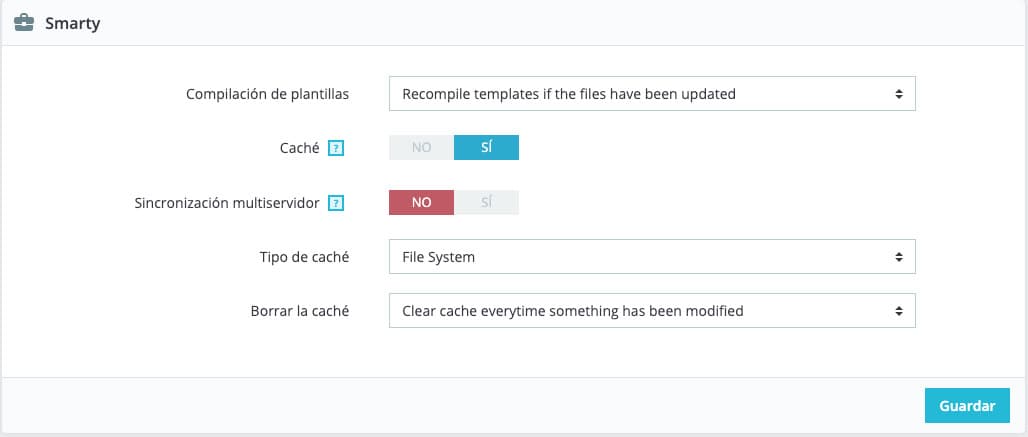
This option is used to cache our template files.
What we recommend is that you try each of these options separately and complement them with tools like PageSpeed or GTmetrix. This way you can see how these options affect your site and which you should enable or disable in your case.
Sitemap
Another of the most important aspects within our site so that Google can crawl it efficiently. There are many modules to generate sitemaps for our store. In our case we recommend the one that comes by default, which you'll find at Improve > Modules > Module Manager > Google sitemap. Once inside, you just need to select the frequency and the pages you don't want included.
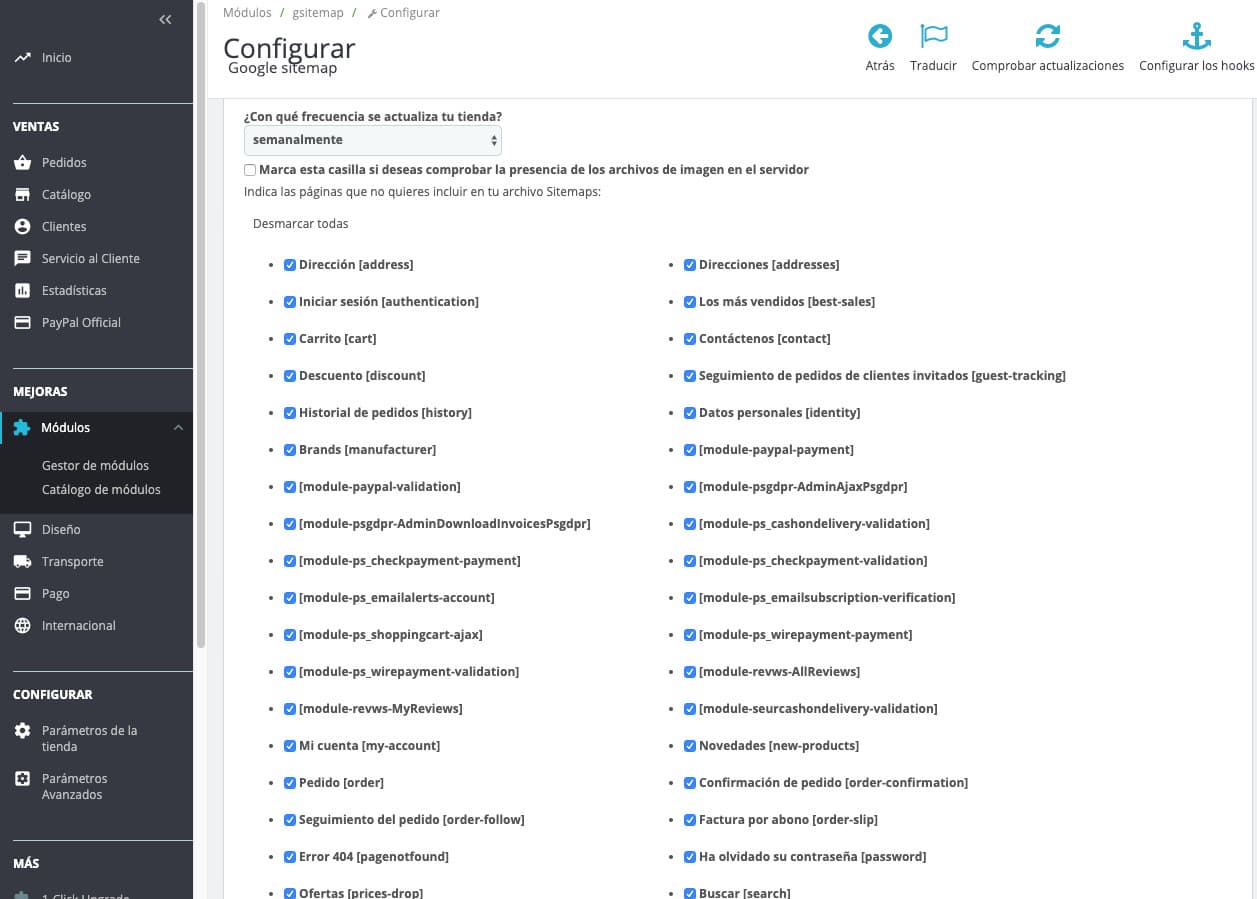
SEO modules for your PrestaShop
Finally, we've prepared a list of some paid modules we think you should take into account:
SEO Expert Module
In case your site is extremely large and you can't go changing titles and meta descriptions one by one, this module is the solution.
Basically, the SEO Expert Module lets you create patterns based on categories so these tags can be filled in automatically.
Pretty URLs Module - Remove IDs and numbers from URLs
If the IDs really bother you, even though we've recommended not removing them, this is your module.
Of the ones we've seen and tested, this is the best. Pretty Urls removes IDs from URLs and sets up the appropriate 301 redirects.
SEO Images Module (ALT Tags)
If images are important for your project's SEO but you've forgotten to fill in all the ALTs, the SEO Images Module is for you. Its functionality is similar to the SEO Expert Module: we choose a pattern so the ALTs of the images are automatically generated depending on the category.
Page Cache Ultimate Module
The Page Cache Ultimate module is an all-in-one module for WPO on your PrestaShop store. It might seem a bit expensive but it's worth it and, in our judgment, it's the best in its category.
Conclusion
We hope this guide has been helpful and that you can take advantage of all these tips to take the SEO of your PrestaShop to the next level.
There are many more SEO improvements you can make and, depending on each site, some will be more of a priority than others—that's up to your judgment as an SEO.
As always, remember that if you have any questions, we'll be waiting for you in the comments.
Author: David Kaufmann

I've spent the last 10+ years completely obsessed with SEO — and honestly, I wouldn't have it any other way.
My career hit a new level when I worked as a senior SEO specialist for Chess.com — one of the top 100 most visited websites on the entire internet. Operating at that scale, across millions of pages, dozens of languages, and one of the most competitive SERPs out there, taught me things no course or certification ever could. That experience changed my perspective on what great SEO really looks like — and it became the foundation for everything I've built since.
From that experience, I founded SEO Alive — an agency for brands that are serious about organic growth. We're not here to sell dashboards and monthly reports. We're here to build strategies that actually move the needle, combining the best of classical SEO with the exciting new world of Generative Engine Optimization (GEO) — making sure your brand shows up not just in Google's blue links, but inside the AI-generated answers that ChatGPT, Perplexity, and Google AI Overviews are delivering to millions of people every single day.
And because I couldn't find a tool that handled both of those worlds properly, I built one myself — SEOcrawl AI, an enterprise SEO intelligence platform that brings together rankings, technical audits, backlink monitoring, crawl health, and AI brand visibility tracking all in one place. It's the platform I always wished existed.
Discover more content about this author
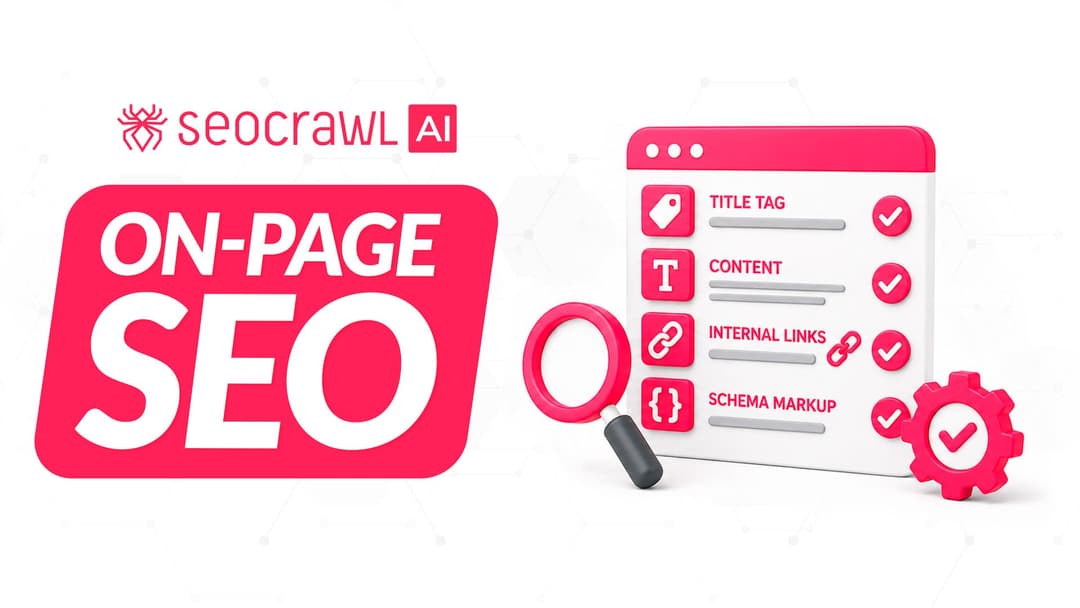
On-page SEO is everything you control on a page: content, title, meta description, headings, URL, images and internal links. Here is a checklist element by element, an audit process and what changes with AI Overviews and AI Mode.