Google Discover: What It Is, How It Works, and How to Get Featured
Google Discover is a personalized content feed built into the Google app that surfaces articles, videos, and news tailored to your interests, with no search query required. Unlike traditional search, Discover proactively brings content to you based on your activity history, location, and interactions with Google products.
Whether you're a user who wants to customize the feed or a publisher trying to tap into Discover's massive reach, this guide covers what Discover is, how it works, where to find it, how to shape it, and how to get your content featured and measure the traffic it sends.
What is Google Discover?
Discover is a feed, not a search engine. Open the Google app or a new tab in Chrome on your phone and you'll see a stream of cards, each a piece of content Google predicts matches your interests. You didn't ask for any of it.
Definition and core purpose
Google Discover's purpose is to help people find useful and interesting content without searching for it. It surfaces articles, videos, sports scores, and news based on what Google understands about your interests, refreshing throughout the day. For readers, it's a place to browse; for publishers, it's a channel that delivers traffic outside the query-and-answer model of Search.
How Google Discover differs from traditional search
Search is a pull: you type a query and Google answers it. Discover is a push: Google puts content in front of you before you search for anything. That single difference has a big consequence, Discover has no keywords. There's no query behind a Discover impression, so you can't optimize for a target term the way you would for Google Search. You optimize for topics, quality, and the visual that appears in the feed.
Brief history: from Google Feed to Discover
Discover started life as Google Feed, launched in 2017. On September 24, 2018, around Google Search's 20th birthday, Google rebranded the Feed to Discover, gave it a redesign, and began surfacing it directly on the mobile Google homepage rather than only inside the app. That move signaled how central the interest-based feed had become to how people use Google on mobile.
How Google Discover works: the algorithm explained
Because there's no query to match, Google decides what to show using what it knows about you plus the same content-quality systems it uses in Search.
Signals that power the feed
Discover draws on signals tied to your Google account and device, including your Web & App Activity, Location History, search history, and your interactions with Google products like YouTube and Maps. Together these let Google build a picture of the topics you care about and predict what you'll want to read next.
How Google understands your interests over time
The feed is driven by machine learning that adapts. Every time you tap a card, follow a topic, or dismiss a story, you feed the model more information. Over weeks it gets better at distinguishing a passing curiosity from a durable interest, which is why a new phone with a fresh account shows a generic feed that sharpens as you use it.
The role of E-E-A-T in content selection
Discover isn't a free-for-all. Google applies the same helpful, people-first and E-E-A-T signals (Experience, Expertise, Authoritativeness, Trustworthiness) it uses in Search to judge which content is worth surfacing. Pages that clearly demonstrate first-hand experience and subject authority are far more likely to be selected than thin or purely promotional content.
Why content appears without a direct search query
Put the two halves together, interest signals plus quality signals, and you have the whole model: Google matches high-quality content to people whose behavior suggests they'll find it valuable, then shows it proactively. No one searched; the system inferred the intent and acted on it.
Where to find Google Discover: access on Android, iOS, and desktop
Discover is fundamentally a mobile experience, but exactly where it shows up depends on your device.
Accessing Discover on Android
On most Android phones, Discover lives in two places: open the Google app and it's the default screen, and on many launchers you can swipe right from the main home screen to reach the leftmost panel, which shows the Discover feed. You'll need to be signed into your Google account to see a personalized feed.
Finding Discover on iPhone and iPad
On iOS there's no home-screen panel, so Discover lives inside the Google app. Install the Google app, sign in, and the feed appears on the app's home screen. Chrome on iOS can also surface Discover on the new-tab page for signed-in users.
Can you use Google Discover on desktop?
Not officially. Discover is a mobile-only feature, and there is no native desktop version in Chrome or on desktop google.com. If you need to view it on a computer, the only workarounds are mobile emulation through your browser's developer tools or simply checking on a phone or tablet, neither of which Google supports as a real desktop product.
Google Discover on Samsung Galaxy devices
Samsung Galaxy phones can show Discover as the leftmost home-screen panel, though some are configured to use Samsung Free or Samsung Daily there instead. You can switch the panel to Google Discover by long-pressing the home screen, opening the panels or home-screen settings, and selecting Google. The Google app route works on Samsung devices just as it does on other Android phones.
How to customize your Google Discover feed
You have more control over Discover than most people realize. A few minutes of training makes the feed noticeably more relevant.
Following and unfollowing topics and interests
You can explicitly follow topics you care about, so they appear more often, and unfollow ones you don't. Following a sports team, a publication, or a subject tells Google to prioritize that interest rather than waiting for it to infer the signal from your behavior.
Using the three-dot menu to train the feed
Every Discover card has a three-dot (or overflow) menu with options like More stories like this, Fewer stories like this, Not interested in [topic], and the ability to hide content from a specific source. These are the fastest way to correct the feed: a few taps reshape what you see the next time it refreshes.
Managing Web & App Activity settings
Because Discover relies on Web & App Activity, your feed is only as personalized as that setting allows. In your Google Account, under Data & privacy, you can review or pause Web & App Activity, doing so gives you more privacy but a less tailored feed.
How to turn off Google Discover entirely
To switch Discover off on Android, open the Google app > tap your profile icon > Settings > General, and toggle Discover off. On a Pixel or similar launcher you can also disable the leftmost home-screen panel in your launcher settings. On iOS you manage the same toggle inside the Google app. Turning Discover off hides the feed but doesn't erase your activity history.
Restoring hidden topics or languages
If you've muted too much, you can undo it. Discover's settings let you review and restore hidden topics and sources, and you can add or change the languages and regions Discover uses, useful for bilingual readers who want content in more than one language.
Why Google Discover matters for publishers and marketers
For anyone producing content, Discover is one of the largest and least-tapped audiences online.
Scale: Discover's reach vs. traditional organic search
Google's last public figure, from 2019, put Discover at over 800 million monthly users, and the audience has only grown since. More strikingly, Press Gazette reported that Discover now drives the majority of Google traffic for some news publishers. That's an audience reached with no search and no subscription, refreshed every time someone opens their phone.
Traffic characteristics: burst traffic and evergreen potential
Discover traffic behaves differently from Search. It tends to arrive in bursts: a single article can catch the feed and pull thousands of visits in a few days, then fade. But evergreen pieces can resurface repeatedly whenever the topic becomes relevant again, so the channel rewards both timely and lasting content.
How Discover traffic differs from Search traffic
Search visitors have stated intent, they typed something. Discover visitors are browsing, so they arrive with looser intent and often higher curiosity. That changes what works: strong hooks, visuals, and story-driven formats tend to earn engagement, while narrow transactional pages rarely surface at all.
Industries and content types that perform best
Discover leans toward interest-led niches, lifestyle, food, travel, health, entertainment, sports, and tech, where visual, story-driven content thrives. News and timely explainers spike fast; deep evergreen guides earn a longer tail. Highly commercial or purely promotional pages generally underperform.
How to optimize content for Google Discover
You can't target keywords, so optimization is about quality, presentation, and trust. Treat the following as a checklist.
Google's official eligibility requirements
Content is automatically eligible if it meets two conditions: it is indexed by Google, and it meets Discover's content policies (nothing misleading, dangerous, or otherwise in violation). No AMP, structured data, or special tag is required, and there's no form to submit.
Creating high-quality, people-first content
Write for people, not the feed. Discover favors content that shows real experience and expertise, answers a genuine need, and reads as trustworthy. This is the single biggest lever, thin or AI-spun filler rarely earns a place.
Image best practices: large images and max-image-preview
The card image is what sells the tap. Google explicitly recommends large, high-quality images at least 1,200 px wide, and you must enable large previews with the max-image-preview:large robots meta tag, without it, Discover can't show the big image. Get your broader image SEO right and this is largely handled.
Titles that drive curiosity without clickbait
Write titles that are accurate and compelling. Curiosity works; deception doesn't. Misleading or exaggerated headlines are a policy issue in Discover, not just a style choice, and they can get content suppressed.
Publishing frequency and content freshness
Consistency helps. A steady publishing cadence on topics you own gives Google more chances to match your content to interested readers, and freshness matters for timely subjects. Planning this into your editorial calendar keeps the pipeline full without sacrificing quality.
Structured data and technical SEO signals
While not required, a fast, mobile-friendly page with healthy Core Web Vitals supports the experience Discover users expect, and structured data strengthens your overall Search presence. Solid technical hygiene never hurts your Discover odds.
Building topical authority and E-E-A-T
Discover favors sites with demonstrated authority on a subject. A focused, deep body of work on a theme, with clear authorship and credentials, makes individual pieces far more likely to surface than the same content published by an anonymous, unfocused site.
Tracking Google Discover performance in Google Search Console
You can't improve what you can't measure, and Discover has its own report.
Enabling and reading the Discover report
The Discover performance report appears in Search Console on its own, below Search results, and it shows up automatically once your property passes a minimum impression threshold. There's no switch to turn it on; if you don't see it yet, you haven't earned enough Discover visibility.
Key metrics: impressions, clicks, and CTR
The report tracks three metrics over the last 16 months: impressions (your content scrolled into view), clicks, and CTR. You can group the data by page, country, appearance type, and day, which is how you find the specific articles that caught the feed.
Why data is often aggregated or delayed
Discover data is aggregated, and the most recent day or two is preliminary, shown as a dotted line on the chart. Don't react to a "drop" that's really just data still landing, and read trends across weeks rather than reacting to a single day.
Using Discover data to inform content strategy
Use the report to spot what worked: filter to your Discover winners, look at the topic, timing, and lead image they shared, and produce more in that vein. Because Search Console keeps only 16 months, storing the history elsewhere lets you compare year over year, more on that below.
For a step-by-step walkthrough of the report itself, see our guide to Google Discover in Search Console.
Common Google Discover problems and how to fix them
A few recurring issues account for most Discover frustration, on both the reader and publisher side.
| Problem | Common cause | Fix |
|---|---|---|
| Feed not showing up | Not signed in, Web & App Activity off, outdated app, or region unsupported | Sign in, enable Web & App Activity, update the Google app, confirm regional support |
| Feed shows irrelevant content | Model hasn't learned your interests yet | Follow topics, use Fewer stories like this, and give it time |
| Content not appearing despite optimization | Not indexed, policy violation, or simply not selected | Confirm indexing, check Security and Manual actions, keep improving quality |
| Discover stopped working after an update | App or account glitch | Update or reinstall the Google app, re-sign in, clear the app cache |
Google Discover feed not showing up
If the feed is blank, you're usually not signed in or Web & App Activity is disabled. Sign in, enable that setting, update the app, and confirm Discover is available in your region.
Feed showing irrelevant content
An irrelevant feed almost always means the model hasn't learned you yet. Actively follow topics and use the card menus, the feed corrects quickly once you give it signals.
Content not appearing in Discover despite optimization
For publishers, silence usually comes down to indexing, policy, or selection. Confirm the page is indexed, check Security and Manual actions for a Discover policy issue, and remember that eligibility is never a guarantee, keep raising quality and topical authority.
Google Discover not working after an update
If Discover breaks after an app or OS update, update or reinstall the Google app, sign back in, and clear the app cache. That resolves the large majority of post-update glitches.
Google Discover vs. other content discovery platforms
Discover isn't the only interest-based feed competing for attention. Knowing how it compares helps you decide where to invest.
Google Discover vs. Apple News
Apple News is a curated, app-based news product where much of the prominent placement is editorially selected and, for monetization, tied to Apple News+. Discover is algorithmic and open, any indexed, policy-compliant page can surface, with no application or partnership required. Discover's reach on Android is enormous; Apple News concentrates an engaged iOS audience.
Google Discover vs. social media feeds
Social feeds like Facebook and TikTok rank content largely on social graph and engagement velocity, and reach depends on followers and shares. Discover is interest- and quality-based and needs no audience, a brand-new site can appear if the content is strong and relevant. The trade-off: you have far less direct control over distribution than you do by posting to your own followers.
When to prioritize Discover over traditional SEO
Discover and Search aren't either/or. Prioritize Discover when your content is visual, timely, or interest-led and your niche skews mobile, and lean on traditional SEO when intent is explicit and transactional. The smartest approach treats Discover as an amplifier on top of a healthy SEO strategy, not a replacement for it.
Track Discover the easy way
For teams that want a longer, cleaner view than Search Console's 16 months, that history is built into SEOcrawl AI's Google Discover dashboard. Search Console's Discover report is thin and short-lived. SEOcrawl AI tracks Discover traffic, clicks and impressions over time in a view kept separate from Search, and stores your history without the 16-month cap, so you can see which articles keep getting picked up instead of guessing.
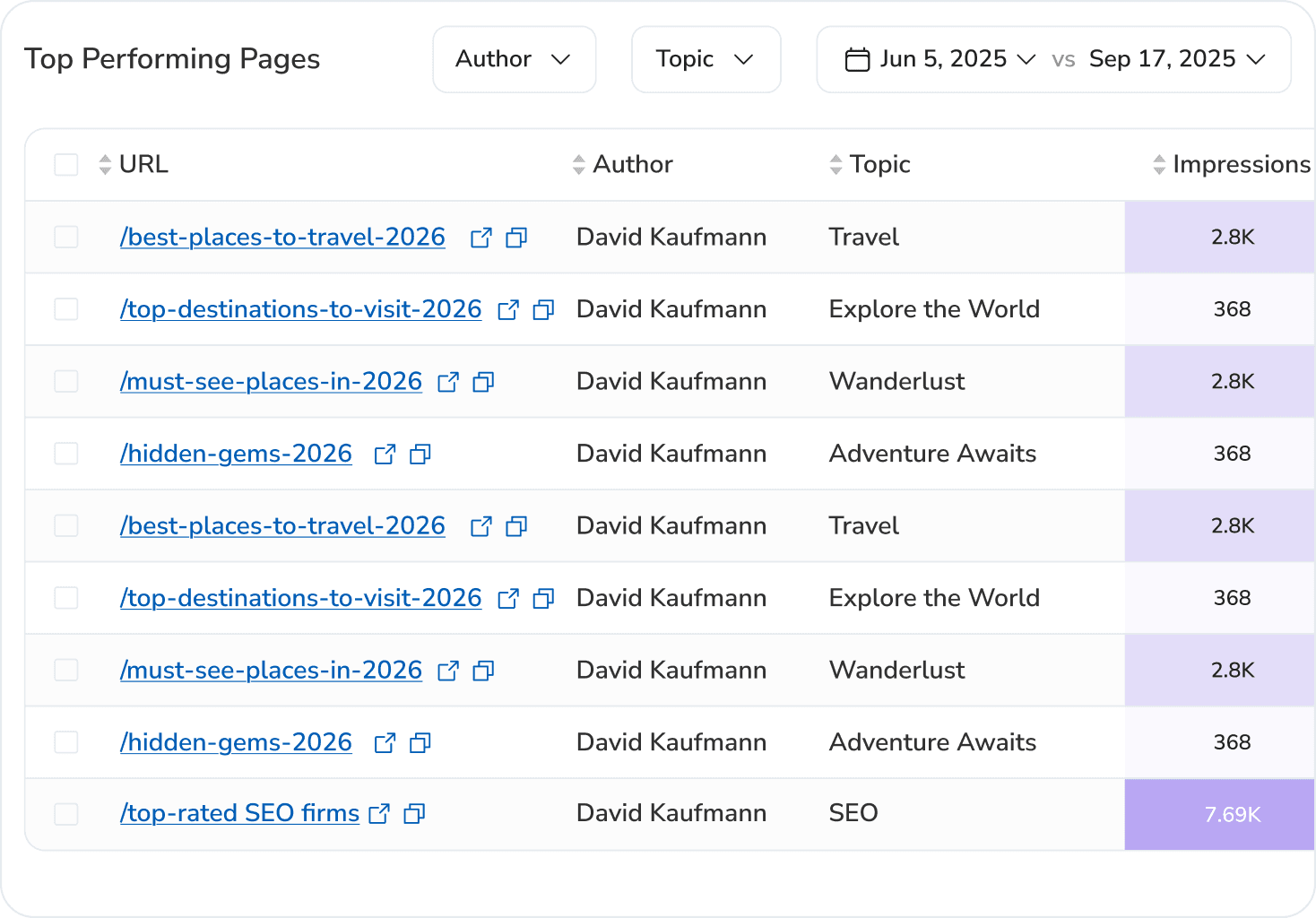
You can also group the pages behind your Discover traffic with tags and measure them as a set, and that tagging runs three ways: manually, through auto-tag rules that label pages as they appear, or straight from Claude or ChatGPT via the SEOcrawl AI MCP.
See your Discover traffic without the 16-month cliff. SEOcrawl AI stores your Discover history in a dedicated dashboard and lets you tag the pages behind it, so a group of articles stays measurable year over year. Try SEOcrawl AI or explore the Google Discover dashboard.
FAQs
What is Google Discover?
Google Discover is a personalized, query-free content feed in the Google app and on many Android home screens. It surfaces articles, videos, and news based on your interests and activity history, so content comes to you instead of you searching for it. For publishers, it's a traffic source that arrives with no keyword behind it.
How does Google Discover decide what content to show me?
It uses signals tied to your Google account, mainly Web & App Activity, Location History, search history, and your interactions with Google products, to infer your interests, then proactively surfaces content it predicts you'll want. It also applies the same helpful-content and E-E-A-T quality signals it uses in Search.
Can I use Google Discover on a desktop computer?
Not natively. Discover is a mobile feature, it lives in the Google app on Android and iOS and on the mobile Google homepage. There's no official desktop version, so on a computer you'd only see it through mobile emulation or by using a phone or tablet.
How do I turn off Google Discover?
On Android, open the Google app > profile icon > Settings > General, and toggle Discover off; on a Pixel-style launcher you can also disable the leftmost home-screen panel. On iOS, manage the same toggle inside the Google app. Turning it off hides the feed but doesn't delete your activity history.
How do I get my content featured in Google Discover?
Publish high-quality, people-first content with clear expertise and authorship, use large images (at least 1,200 px wide) enabled with max-image-preview:large, write accurate non-clickbait titles, and make sure the page is indexed and policy-compliant. Eligibility never guarantees appearance, Discover chooses what to show based on each user's interests.
Why is my Google Discover feed not working or not showing up?
The usual causes are not being signed in, Web & App Activity turned off, an outdated app, or regional limits. Sign in, enable Web & App Activity, update the app, and confirm your region supports Discover. For publishers, a missing report usually means the site hasn't crossed Discover's minimum impression threshold yet.
How can I track Google Discover traffic in Google Search Console?
Search Console has a dedicated Discover performance report showing impressions, clicks, and CTR for the last 16 months. It appears below Search results once a site crosses a minimum impression threshold. Data is aggregated and the most recent day or two is preliminary, so read trends rather than single days.
What types of content perform best on Google Discover?
Evergreen and trending content in interest-led niches like lifestyle, food, travel, health, and tech tends to perform well, especially visual, story-driven pieces with a strong lead image. News and timely explainers can spike quickly, while genuinely useful evergreen content can resurface long after it was published.
Author: David Kaufmann

I've spent the last 10+ years completely obsessed with SEO — and honestly, I wouldn't have it any other way.
My career hit a new level when I worked as a senior SEO specialist for Chess.com — one of the top 100 most visited websites on the entire internet. Operating at that scale, across millions of pages, dozens of languages, and one of the most competitive SERPs out there, taught me things no course or certification ever could. That experience changed my perspective on what great SEO really looks like — and it became the foundation for everything I've built since.
From that experience, I founded SEO Alive — an agency for brands that are serious about organic growth. We're not here to sell dashboards and monthly reports. We're here to build strategies that actually move the needle, combining the best of classical SEO with the exciting new world of Generative Engine Optimization (GEO) — making sure your brand shows up not just in Google's blue links, but inside the AI-generated answers that ChatGPT, Perplexity, and Google AI Overviews are delivering to millions of people every single day.
And because I couldn't find a tool that handled both of those worlds properly, I built one myself — SEOcrawl AI, an enterprise SEO intelligence platform that brings together rankings, technical audits, backlink monitoring, crawl health, and AI brand visibility tracking all in one place. It's the platform I always wished existed.
Discover more content about this author
On-page SEO is everything you control on a page: content, title, meta description, headings, URL, images and internal links. Here is a checklist element by element, an audit process and what changes with AI Overviews and AI Mode.