What Is llms.txt? The New AI Crawling Standard
AI-powered search tools like ChatGPT, Claude, and Perplexity are becoming primary research destinations. So how do you get your content in front of those models? Enter llms.txt: a lightweight, plain-text file you place at your website's root to give large language models a clean, curated map of your most important content.
Want to skip the manual work? Generate your site's llms.txt right here — free, no signup required:
What is llms.txt?
If you are optimizing your content for AI, you need to start implementing llms.txt on your site. This plain-text Markdown file is placed at the root of a website (accessible at yourdomain.com/llms.txt) to give AI models a curated, structured summary of your site's most important content and links.
Think of it as a welcome pack for AIs. Instead of letting an LLM fumble through your nav menus, cookie banners, and JavaScript-rendered pages trying to figure out what your site is about, llms.txt hands it a clean briefing document.
Why llms.txt exists
Because of the dangers of model hallucination, AI models are relying more and more on website content to generate answers, but they struggle to process most websites efficiently.
The problem is that modern web pages are built for humans. They're full of navigation bars, cookie consent banners, ads, scripts, and dynamic elements that AI models have to strip out before reaching the actual content. That process is both expensive and imprecise, and that is exactly why it leads to missed context and inaccurate citations.
llms.txt solves this by giving AI a direct, clean content summary with just the information an LLM needs to understand your site and use it responsibly at inference time.
How llms.txt works
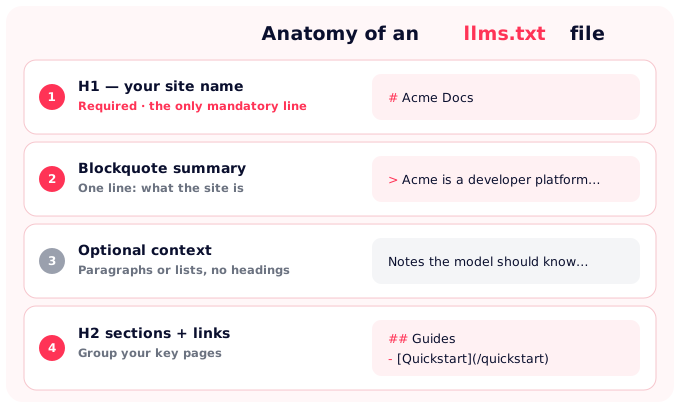
The llms.txt file uses Markdown, and the spec defines a specific structure:
- H1 title: the name of your project or site. This is the only required element.
- Blockquote: a short summary of what the site is and what the LLM should know upfront.
- Optional sections: additional context, written as Markdown paragraphs or lists (no extra headings).
- One or more H2 sections: each containing bullet-point links to key pages on your site, with optional descriptions.
A minimal file looks like this:
# Project Name

> A short summary of what this site is and what to know upfront.

Optional context paragraph with extra detail.

## Docs
- [Quickstart](https://example.com/quickstart): Get started in 5 minutes
- [API Reference](https://example.com/api): Full endpoint documentation

## Guides
- [Best Practices](https://example.com/best-practices): Recommended patterns
What about llms-full.txt? This is an optional companion file. While llms.txt is an index of links, llms-full.txt contains the actual concatenated Markdown content of all those pages. It is built for AI models that can handle larger context windows and need everything in one shot. Use llms-full.txt when your documentation is technical and dense.
llms.txt vs. robots.txt vs. sitemap.xml
These three files live at your domain root and influence how non-human visitors interact with your site, but they do fundamentally different things.
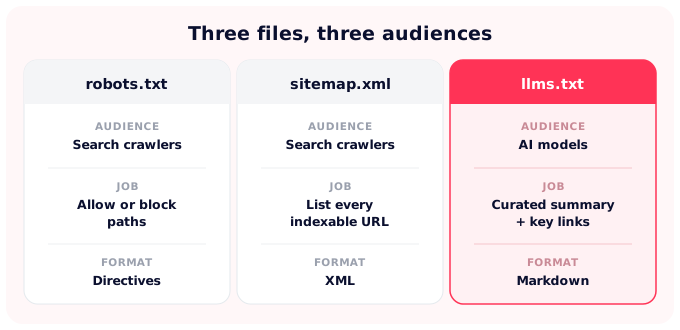
| File | Audience | What it does | Format |
|---|---|---|---|
| robots.txt | Search engine crawlers | Tells crawlers which paths they may or may not access | Plain-text directives |
| sitemap.xml | Search engine crawlers | Lists every indexable URL so engines can discover them | XML |
| llms.txt | AI models / LLMs | Hands a curated summary and key links for use at inference | Markdown |
Key takeaway: All three files can and should coexist. Adding an llms.txt file does not affect how Google crawls or indexes your site. It's an entirely separate signal for a different audience.
Should you use llms.txt? Honest pros and cons
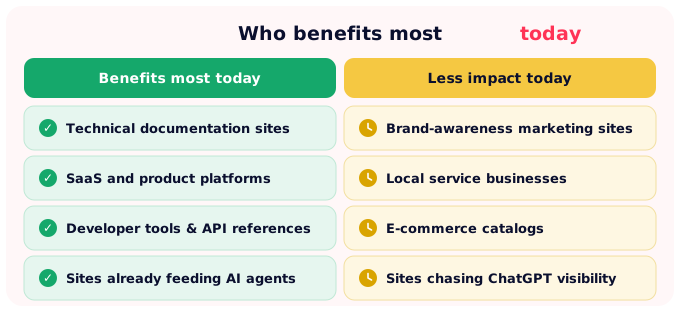
There is no need to oversell the impact of llms.txt. How useful it is depends on what kind of site you run. The file takes minutes to create and costs nothing, but the actual benefit today is concentrated in specific use cases. Here's where it makes sense and where it doesn't.
Arguments for implementing it:
- It costs almost nothing to create.
- Claude (which powers a disproportionate share of B2B agents and enterprise copilots) already uses it.
- As AI crawler adoption grows, you'll already be indexed correctly.
- It signals to the ecosystem that your site is AI-friendly, which may influence future ranking criteria.
- For technical documentation and SaaS product pages, the benefit is immediate and concrete.
Reasons to wait:
- ROI is genuinely unproven for most marketing sites today. If your goal is brand visibility in ChatGPT or Gemini, llms.txt isn't moving that needle right now.
- Maintaining an accurate llms.txt file takes ongoing effort — an outdated file may actively mislead AI models.
- The spec is a proposal, not a ratified standard. It could evolve.
Who benefits more from llms.txt today?
How to create an llms.txt file: step-by-step
Step 1: Audit your most important pages
This is not a sitemap, so don't try to index everything. Identify your highest-value pages: your product documentation, your key blog posts, your most authoritative long-form guides. Aim for the 10–20 URLs an AI would need to accurately represent your site.
Step 2: Write the H1, blockquote, and section links
Open a plain text editor. Follow the spec format: H1 with your site name, a blockquote summary, then H2 sections grouping your key links. Keep descriptions short and factual — one sentence per link is enough.
Step 3: Save as llms.txt and upload to your root directory
The file must be accessible at yourdomain.com/llms.txt: the same location as your robots.txt. No special server configuration required.
Step 4: Validate with the llmstxt.org checker
Use the official validator at llmstxt.org to confirm your file follows the spec correctly.
Step 5: Use a generator to skip the manual process
Yoast SEO includes a built-in llms.txt generation feature. If you're not on WordPress, SEOcrawl AI's llms.txt Generator creates a ready-to-host file for free in seconds without the need for an account.
Best practices and common mistakes
If you're considering adding an llms.txt file to your site, it is important to do so thoughtfully.
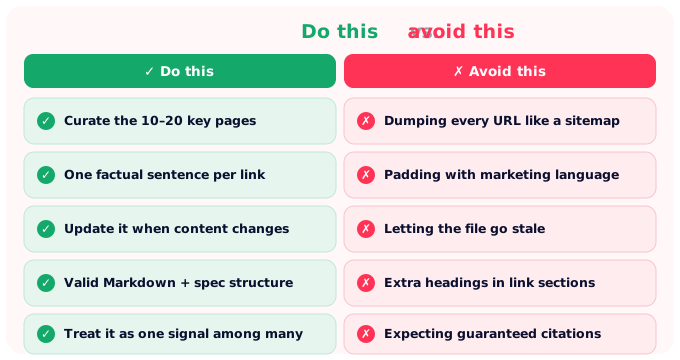
llms.txt and Answer Engine Optimization (AEO)
AEO (Answer Engine Optimization) seems to be the natural evolution of SEO as users shift from typing queries into Google to asking questions directly to AI tools. llms.txt is just another technical signal that helps with AEO. It doesn't guarantee you'll be cited, but it makes it easier for models to do so. It pairs with GEO (Generative Engine Optimization) and stronger AI citations as part of the same playbook.
Think of the bigger picture: Even if GPT-4o doesn't read your llms.txt today, the mere act of creating one forces you to audit your most important content, write clean Markdown versions of your key pages, and think carefully about your site's core value proposition. That exercise is great for SEO and AEO, independent of AI crawler adoption.
If you want to measure the impact of your llms.txt and other AEO signals, the right metric is brand mentions in AI-generated answers. SEOcrawl AI's Prompt Tracking monitors thousands of prompts daily across ChatGPT, Claude, Gemini, Perplexity, and Copilot, with share-of-voice data and citation source breakdowns that tell you whether your content is actually being surfaced.
FAQs
What is llms.txt?
llms.txt is a plain-text Markdown file placed at a website's root that gives AI models a curated summary of the site's content and key links. It improves how LLMs understand and cite the site.
Is llms.txt worth implementing?
For most sites, yes. The effort is minimal, and the potential upside grows as AI crawler adoption increases. Right now, it is most valuable for documentation-heavy, SaaS, and developer-focused sites.
Is llms.txt actually being used by AI models?
Partially. Claude and developer tools like Cursor actively read it. Major consumer AI models like ChatGPT and Gemini do not reliably fetch llms.txt at inference time as of 2026.
What is the difference between robots.txt and llms.txt?
robots.txt tells crawlers which pages to allow or block. llms.txt provides curated content context for AI models. They serve different purposes and can coexist without conflict.
Where do I place the llms.txt file?
You should place your llms.txt file at the root of your domain, accessible at yourdomain.com/llms.txt (the same location as robots.txt).
How do I create an llms.txt file?
Write an H1 (site name), add a short blockquote description, then list links to key pages in Markdown H2 sections. Save as plain text and upload to your root directory. If you want to skip the manual process, SEOcrawl AI's llms.txt Generator creates a ready-to-host file automatically for free.
What is llms-full.txt?
An optional companion file containing the full Markdown content of your key pages (not just links). Useful for AI tools that can process larger context windows and need full content access.
Does llms.txt help with SEO?
An llms.txt file does not help with traditional Google rankings, but it supports AEO by helping AI-powered answer engines surface and accurately cite your content.
Author: David Kaufmann

I've spent the last 10+ years completely obsessed with SEO — and honestly, I wouldn't have it any other way.
My career hit a new level when I worked as a senior SEO specialist for Chess.com — one of the top 100 most visited websites on the entire internet. Operating at that scale, across millions of pages, dozens of languages, and one of the most competitive SERPs out there, taught me things no course or certification ever could. That experience changed my perspective on what great SEO really looks like — and it became the foundation for everything I've built since.
From that experience, I founded SEO Alive — an agency for brands that are serious about organic growth. We're not here to sell dashboards and monthly reports. We're here to build strategies that actually move the needle, combining the best of classical SEO with the exciting new world of Generative Engine Optimization (GEO) — making sure your brand shows up not just in Google's blue links, but inside the AI-generated answers that ChatGPT, Perplexity, and Google AI Overviews are delivering to millions of people every single day.
And because I couldn't find a tool that handled both of those worlds properly, I built one myself — SEOcrawl AI, an enterprise SEO intelligence platform that brings together rankings, technical audits, backlink monitoring, crawl health, and AI brand visibility tracking all in one place. It's the platform I always wished existed.
Discover more content about this author
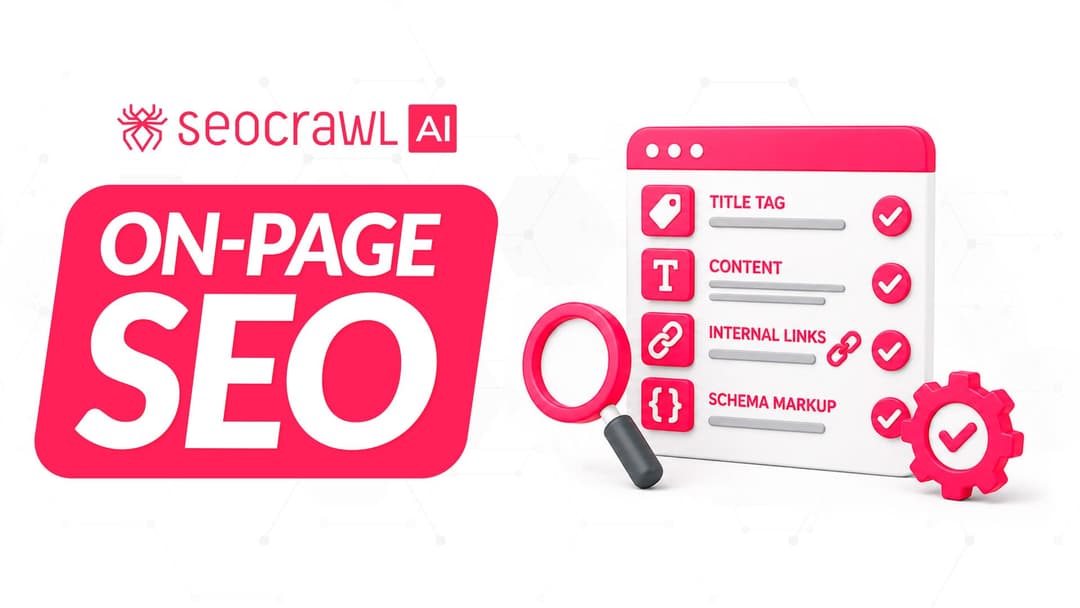
On-page SEO is everything you control on a page: content, title, meta description, headings, URL, images and internal links. Here is a checklist element by element, an audit process and what changes with AI Overviews and AI Mode.