SEO-Friendly URLs: Best Practices for Slugs
In digital marketing we are used to working with English terms to unify and diversify our vocabulary, so you have surely heard of the "slug" at some point. If you want to know more about this term, why it is so important and how to optimize it to achieve SEO-friendly URLs, keep reading!
What is a slug and how can I modify it?
The slug is the term that names a specific page contained within a URL.
Let's take this URL as an example: /blog/web-migration/
Where the slug is /web-migration/

What is a friendly URL?
A friendly URL is one that has a slug and does not contain parameters and/or numbers in it, allowing it to be readable for both users and search engines. If there is no friendly URL, there would be no slug either.
As illustrated in the following example:
www.example.com/?p=227
Why should I optimize the slug for SEO?
Is the URL important in our search engine positioning strategy? Of course!
Here are some of the most important arguments:
-
URLs are an influential factor in SEO positioning since they must contain a specific keyword.
-
The information architecture of a website will follow a folder structure that goes from categories to product pages.
-
The URL must contain the correct keyword within our semantic strategy.
-
The URL tells Google and the user the name of the page, so it is relevant that it is properly optimized to guide the user, and to indicate to Google the content of the page through its keyword.
-
An optimized URL is essential when displaying a search result to the user.

- URL optimization falls within the category of on-page SEO where, based on keyword research, URLs will be optimized according to a prior semantic architecture.
Tips for creating a friendly URL
Follow these optimization tips to achieve friendly URLs:
Always use lowercase letters
Google does not like URLs with uppercase letters, so never use them.
Do not introduce punctuation marks
Avoid using underscores (_), semicolons (;), or periods (.). These attributes do not add value and will only clutter the URL.
No parameters
The use of the question mark "?" usually indicates that the URL is a search URL. As in the case: https://www.zalando.es/mujer/?q=zapatos+negros
Do not introduce numbers randomly
Numbers do not add much to the description of a URL, so avoid their use if you want a friendly URL.
Exclude the use of articles in the URL
Words like "in" or "and" do not add much information to a URL and also lengthen it, so we should exclude their use.
Avoid spaces between words, opt for hyphens
Hyphens are the substitutes for spaces in the URL, allowing it to be friendly.
Add the keyword
You must be objective in your choice, since it must represent the content of the page and help position it in search engines. Do not overdo it with the number of words; two or three is enough.
The shorter the better
It should be brief and descriptive. Try to synthesize the content of the page in two or three words that represent it and that appear within your keyword research.
Be natural
It is always the best option to choose naturalness when selecting keywords. If you do not force the construction of URLs, you will please Google.
How to optimize the URL for SEO in WordPress?
Fortunately, all CMSs or content managers have the possibility of modifying the URL to add an optimized slug. If you do not optimize it, WordPress will give you a slug composed of a random set of numbers and letters that is part of an ID, and which, as you can understand, adds nothing from an SEO perspective. With WordPress you can change slugs on pages, posts, categories, tags, users, product categories, and product pages.
Recommended Material: WordPress SEO Tutorial
WordPress makes life easy, and by following these simple steps you can achieve a friendly URL:
1. Configure the Permalinks
Change the default WordPress configuration to get a friendly URL. You must go to Settings > Permalinks to choose the permalink structure you prefer. But, what are permalinks? Permalinks differ from slugs in that they build the link structure of a website.
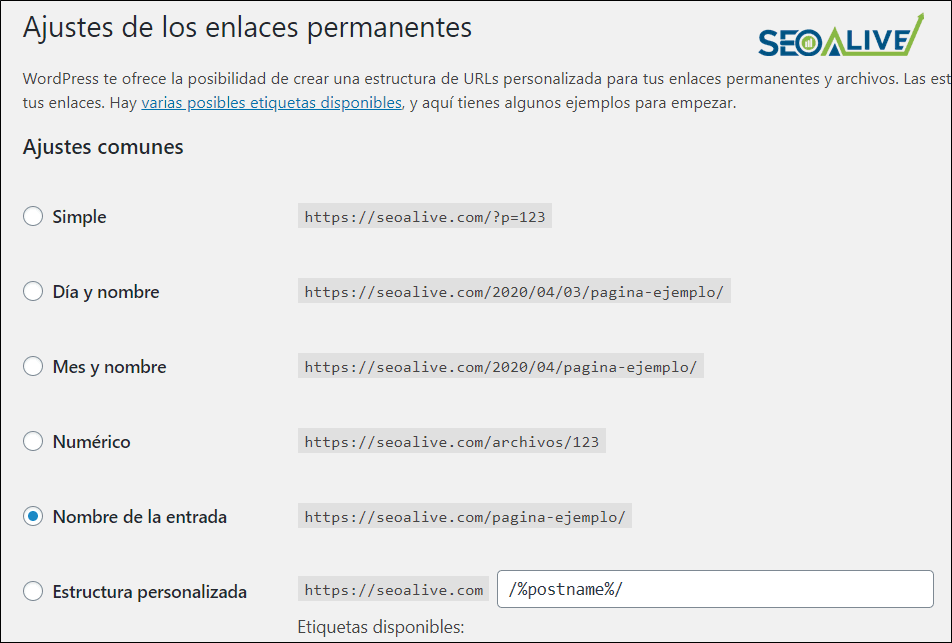
2. Select the post name option to have friendly URLs
To edit the friendly URLs of posts, you just have to go to "Settings" > "Permalinks" and there select "post name" for the articles you write.
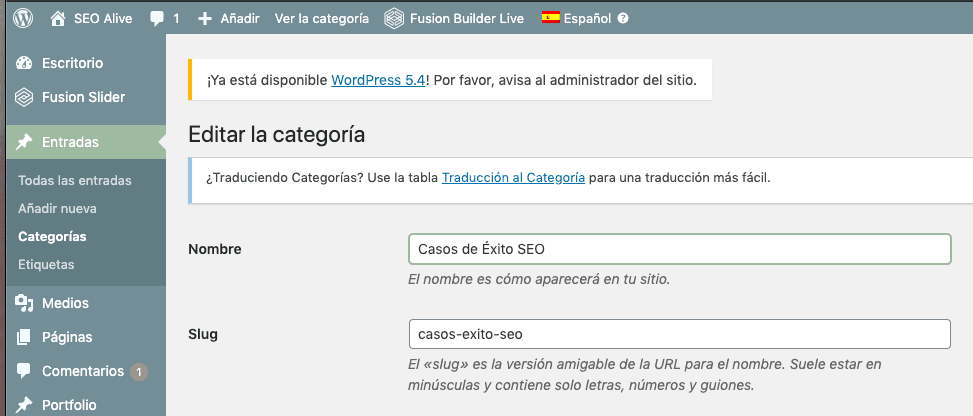
You can also modify the category
3. Modify it manually
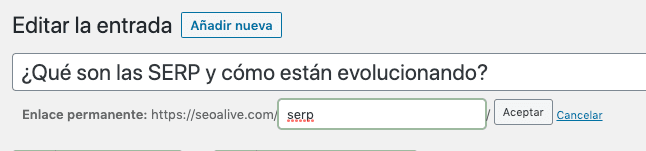
Within each page or post you will have the ability to modify it manually. Select "edit", add the one you want, and then "accept".
4. Modify it with an SEO plugin
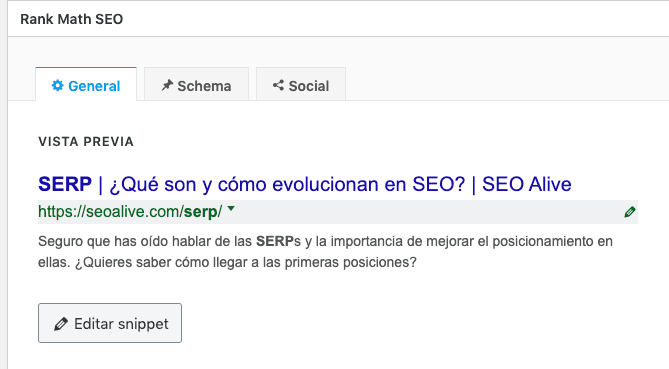
If you use a plugin like Yoast SEO or Rank Math, you can modify the URLs by editing the snippet.
Recommendations and warnings
So far we have given you some guidelines to improve your URLs. Now, we would like to mention some typical mistakes we have seen and a small warning.
Unique URLs
Do not forget that each slug must be unique, because otherwise WordPress will add a "2" to the URL since that slug is already in use in another previously created URL and cannot be repeated. Keep in mind that it can also detect the duplicate slug of a post that is in the trash, so in that case you must delete it from the trash to prevent this duplication from being detected.
URL changes
Be careful! You must be very attentive when changing the slug of existing URLs by performing a 301 redirect from the old URL to the new one. Because if you do not, the page will give a 404 error and users accessing the old URL will not reach the page content. The Yoast SEO plugin will help you with redirects to prevent this from happening.
Conclusion
Follow these tips and you will see how they help you improve the CTR or click-through rate of your search results, offering the user a clear URL that synthesizes the content of the page it leads to. For more tips and best practices in your SEO positioning strategy, contact us and we will be happy to help you.
Author: David Kaufmann

I've spent the last 10+ years completely obsessed with SEO — and honestly, I wouldn't have it any other way.
My career hit a new level when I worked as a senior SEO specialist for Chess.com — one of the top 100 most visited websites on the entire internet. Operating at that scale, across millions of pages, dozens of languages, and one of the most competitive SERPs out there, taught me things no course or certification ever could. That experience changed my perspective on what great SEO really looks like — and it became the foundation for everything I've built since.
From that experience, I founded SEO Alive — an agency for brands that are serious about organic growth. We're not here to sell dashboards and monthly reports. We're here to build strategies that actually move the needle, combining the best of classical SEO with the exciting new world of Generative Engine Optimization (GEO) — making sure your brand shows up not just in Google's blue links, but inside the AI-generated answers that ChatGPT, Perplexity, and Google AI Overviews are delivering to millions of people every single day.
And because I couldn't find a tool that handled both of those worlds properly, I built one myself — SEOcrawl AI, an enterprise SEO intelligence platform that brings together rankings, technical audits, backlink monitoring, crawl health, and AI brand visibility tracking all in one place. It's the platform I always wished existed.
Discover more content about this author
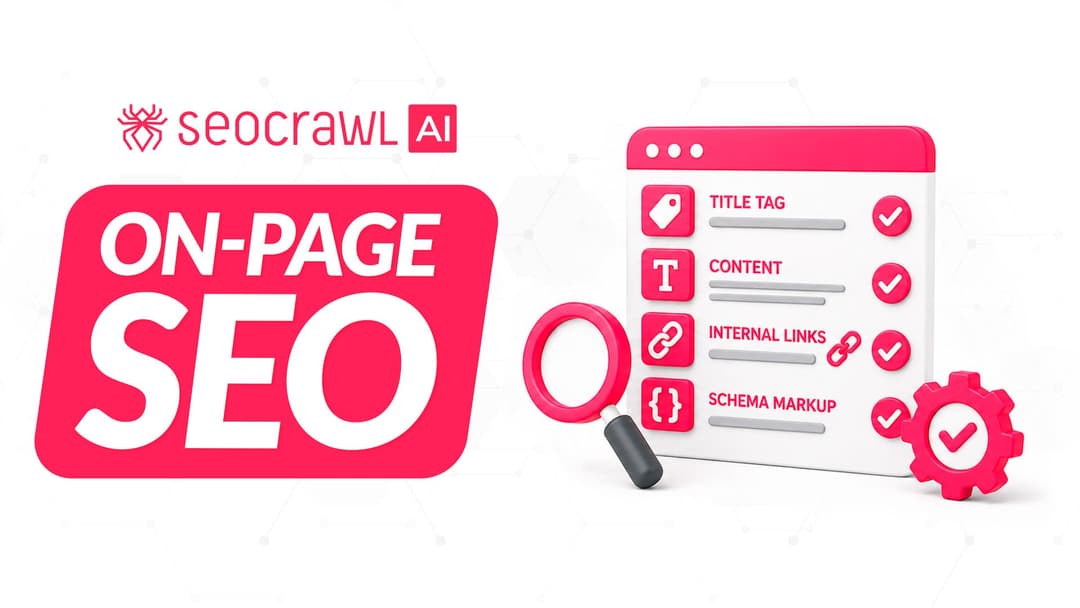
On-page SEO is everything you control on a page: content, title, meta description, headings, URL, images and internal links. Here is a checklist element by element, an audit process and what changes with AI Overviews and AI Mode.