How to Build an SEO Workflow That Moves Rankings
You do SEO work every week, but the rankings still barely move.
The problem is usually that the work is scattered and reactive, so nothing compounds and you can't tell which action actually paid off. An SEO workflow fixes that. Instead of a to-do list you react to, you get a system that tells you what to do next and why.
This guide covers a six-stage workflow you can run solo or as a team, the tools and owner for each stage, a weekly and monthly cadence so nothing slips, an honest take on what to automate, and a free template you can copy today.
What an SEO workflow is (and why you need one)
An SEO workflow is a fixed set of steps your team repeats to research, prioritize, execute, and measure SEO work. It turns "SEO tasks" from a pile of one-off jobs into a process where each step has an input, an owner, and an output that feeds the next.
The difference shows up fast:
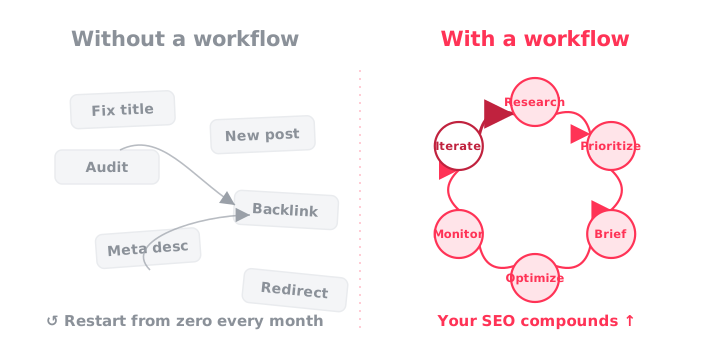
Without a loop that measures and feeds back, you restart from zero every month. With one, your SEO compounds.
The end-to-end SEO workflow, stage by stage
Every solid SEO process runs the same six stages in a loop. For each stage there's an input, the tools, who owns it, and what it produces.
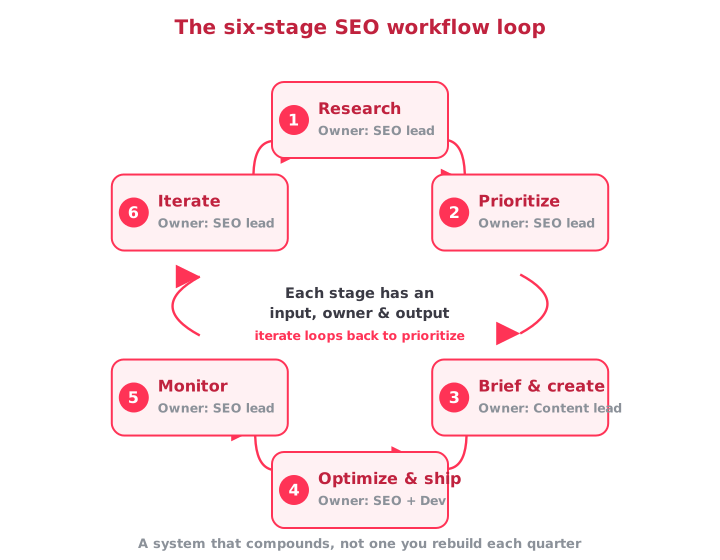
The owner column is the one most published guides leave out, and it's a big reason changes stall: when a task has no name next to it, people assume someone else is handling it, so no one does. Naming an owner holds your team accountable for their share of the load.
Stage 1: Research, find the opportunities
- Input: business goals + current Search Console data.
- Tools: Ahrefs or Semrush, Google Search Console, the live SERP.
- Owner: SEO lead.
- Output: a list of target queries tagged by intent and volume.
Start where you already show up. Pull queries from Google Search Console that sit in positions 8 to 20 with impressions but low clicks — those are the fastest wins.
Then add new topics from your keyword tool. Read the SERP for each one: what ranks, what the AI Overview pulls in, and which questions appear in "People also ask." That tells you what the query actually wants before you write a word.
Stage 2: Prioritize, decide what to do first
- Input: the opportunity list.
- Tools: a scoring model, a task board.
- Owner: SEO lead.
- Output: a ranked backlog.
This is the stage people skip, and it's exactly why their work doesn't amount to growth. Score each opportunity by impact, confidence, and ease (ICE). Then work the top of the list, not whatever landed in your inbox that morning.
You can also apply the 80/20 rule of SEO: roughly 20% of tasks drive most of the results, like changes to internal linking, refreshing decaying pages, and fixing high-impression, low-CTR titles.
Stage 3: Brief and create, turn a target into a page
- Input: target keyword, intent, SERP notes.
- Tools: a brief template, your writer or AI drafting tool.
- Owner: content lead.
- Output: a draft that matches search intent.
A brief removes the guesswork and aligns priorities: target query, secondary terms, the questions to answer, the sections to include, the internal links to add, a word-count range taken from the SERP, and the one differentiator (a stat, a quote, a real example) that beats what currently ranks.
So far, Google doesn't penalize whether a person or a model writes the draft. But a clear brief is what keeps the content on-intent instead of generic.
Stage 4: Optimize and ship, make it publish-ready
- Input: the draft or an existing page.
- Tools: an on-page checklist, a browser SEO extension, a developer handoff.
- Owner: SEO plus developer.
- Output: a published, technically clean page.
On-page work (title, meta, H1, heading structure, internal links, alt text, schema) and technical checks (crawlability, canonical, status codes, speed) both live here.
For anything that needs code, a named developer owner is what keeps the fix from sitting in limbo for three weeks.
Stage 5: Monitor, watch what the change did
- Input: the shipped change and its date.
- Tools: Search Console, GA4, a rank tracker, annotations.
- Owner: SEO lead.
- Output: a before-and-after read on clicks, position, and traffic.
Log the change with a date so you can tie a later ranking movement to a specific action instead of guessing. Track clicks, impressions, average position, and how much traffic comes from organic search versus AI answers.
Skip this step and the loop breaks, because you never get the chance to learn what worked in the first place.
Stage 6: Iterate, close the loop
- Input: the monitoring read.
- Tools: the same dashboard and backlog.
- Owner: SEO lead.
- Output: the next action.
Here's where the big changes come: winners get more internal links, an expanded cluster, and more of the format that worked, while flat pages get diagnosed and losers get reverted or reworked.
The output of "iterate" flows straight back into "prioritize," and that return trip is the whole point. It's what turns an SEO process into a system that compounds rather than one you rebuild from scratch each quarter.
How to run your SEO workflow: cadence and automation
The six stages only pay off if they run on a schedule and you hand off the repetitive parts. Two things keep the loop turning without eating your week: a fixed cadence, and a clear line on what to automate.
A weekly and monthly SEO cadence
An SEO workflow is useless if tasks only run when someone remembers. Attach everything to a calendar. A repeatable rhythm keeps the highest-impact work moving and stops small problems from becoming ranking drops.
| Cadence | Time | What you do |
|---|---|---|
| Daily | 5-10 min | Scan alerts: traffic drops, indexation changes, newly broken pages. |
| Weekly | ~2 hrs | Review winners and losers, publish or optimize one or two pages, log annotations, clear the top of the backlog. |
| Monthly | Half a day | Full performance review (month-over-month and year-over-year), refresh decaying content, re-score the backlog, send the report. |
| Quarterly | 1 day | Content-gap analysis against competitors, a technical audit, and a strategy reset. |
The weekly slot is where consistent growth actually comes from. Protect two hours, run the same checklist, and the compounding takes care of itself.
Where to automate your SEO workflow (and where not to)
Everyone wants to automate their SEO workflow, but automation isn't magic. The key is to automate the repetitive tasks like data collection and monitoring, and keep judgment human.
Tasks that can be automated: data pulls (rankings, Search Console, GA4), alerts, scheduled reports, clustering and tagging, technical checks.
Those data pulls don't have to be manual: wire them into your own stack with the SEO API, query them from Claude or ChatGPT through the MCP server, or script them from your terminal with the CLI.
Keep humans on the decisions: strategy, prioritization, briefs, and QA before anything ships.
A script sees rows and thresholds. It doesn't see the low-impression page that's one internal link away from ranking, the query whose intent just shifted, or the thin post that will age badly. That judgment is what actually makes SEO work, and it's the one thing you can't hand to a machine.
Free SEO workflow template
Copy this into a Google Sheet or Notion, and you have a working system. Two tabs do the job: a backlog for scoring, and a workflow tracker for execution.
Backlog (Stages 1-2):
| Opportunity | Target query | Intent | Impact (1-5) | Confidence (1-5) | Ease (1-5) | ICE score | Priority |
|---|---|---|---|---|---|---|---|
| Refresh decaying pillar | seo workflow | Informational | 5 | 4 | 3 | 60 | 1 |
Workflow tracker (Stages 3-6):
| Page / task | Stage | Owner | Tool | Output | Date shipped | Result (clicks / position) | Next action |
|---|---|---|---|---|---|---|---|
| /blog/seo-workflow | Optimize & ship | Camila | SEO extension | Published, clean page | 2026-07-03 | +120 clicks / pos 6 | Add internal links |
Fill the backlog first, sort by ICE score, then move the top rows into the tracker and run them through the six stages. The "next action" column is what routes finished work back to the top, keeping the loop alive.
Run the whole workflow in one place with SEOcrawl AI
The friction in most SEO workflows comes from having to stitch together different tabs: rankings in one tool, GA4 in another, the backlog in a spreadsheet nobody remembers to update, technical issues in a crawler, AI mentions nowhere.
That spreadsheet works right up until it doesn't. SEOcrawl AI is built to run the entire loop, SEO and GEO, in one workspace. Here's how the stages map to the product:
- Research and monitor run on the SEO Dashboard, which unifies Google Search Console and GA4 with month-over-month and year-over-year growth, brand versus non-brand splits, and unlimited data storage.
- Prioritize and assign happen in the Task Manager: every backlog item becomes a task with an owner, due date, priority, tags, and status, on a clean list or a drag-and-drop Kanban board.
- Track movement with the unlimited Rank Tracker, which surfaces winners and losers automatically and clusters keywords and URLs (blog versus non-blog, informational versus transactional) so you see where the value actually sits.
- Log every change with Annotations: mark a metadata edit, a redesign, or an algorithm update and get the before-and-after impact by email.
- Guard the technical side with the SEO Audit crawler (an Audit Health Score across six categories, with issues linked to the affected URLs) and 24/7 SEO Monitor.
- Report and close the loop with automated weekly and monthly reports built on real GSC and GA4 data.
The Task Manager is what holds the loop together. Because it lives in the same platform as your dashboard, rankings, and annotations, you can spot a drop in the data, create a task to fix it, assign it, and track the result without switching tools or losing the thread.
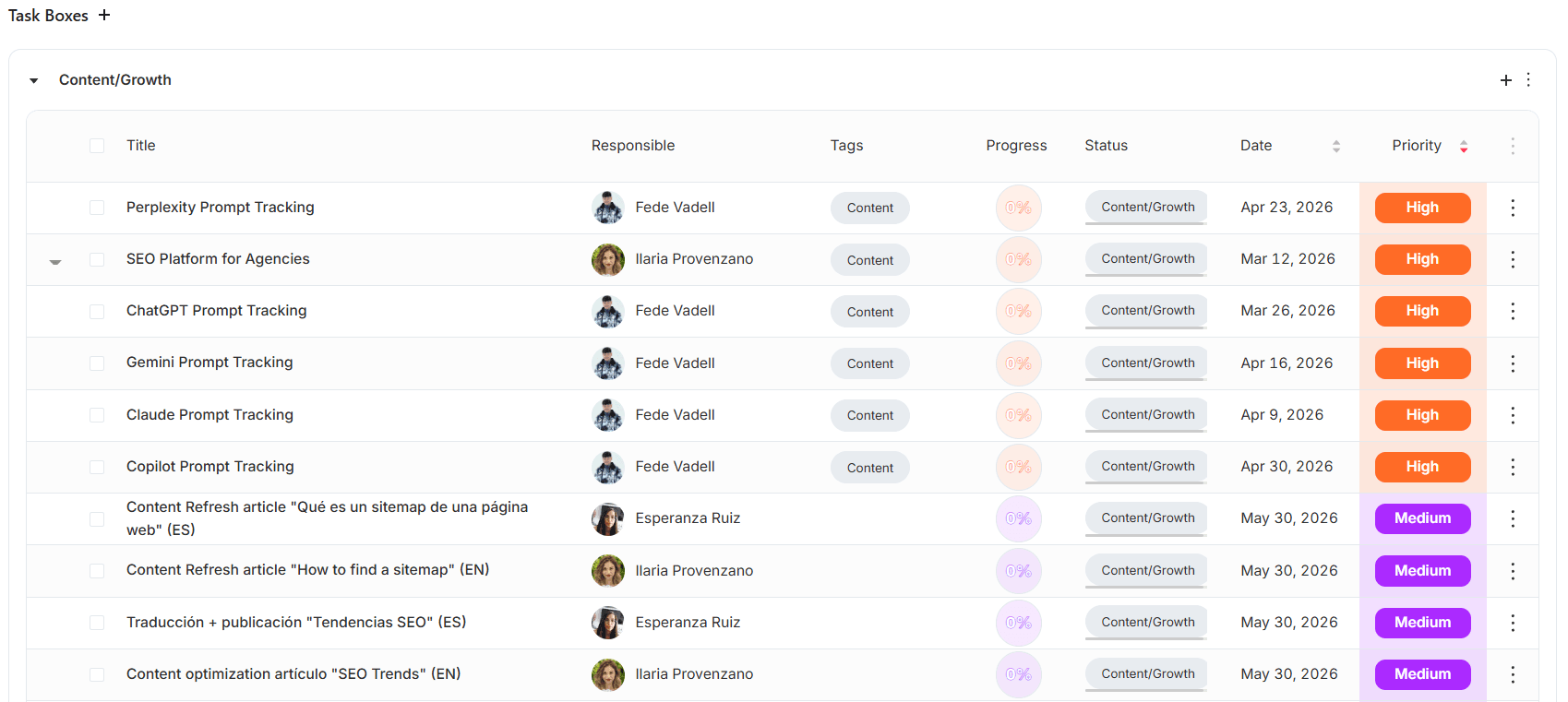
Each task carries its own subtasks, attachments, and comments, so the brief and the discussion sit with the work instead of scattered across Slack and email. It's included on every plan, with no separate add-on.
FAQs
How long before an SEO workflow shows results?
Technical fixes (broken pages, indexation, canonical errors) can show within days to a few weeks. Content and ranking gains usually take three to six months, depending on competition and site authority.
A workflow doesn't make SEO faster, but the monitoring stage lets you catch leading indicators like rising impressions well before clicks move, so you know you're on track sooner.
Is SEO still worth it in 2026, or is AI search replacing it?
It's still worth it. AI search adds a layer rather than replacing SEO: Google's AI Overviews draw from its core ranking systems, so pages that don't rank rarely get cited, and the vast majority of people still use traditional search.
What changes is that you now also track brand mentions in ChatGPT, Claude, and other engines. That's Generative Engine Optimization, and it runs on the same workflow.
What's the difference between an SEO workflow and an SEO strategy?
Strategy is the what and why: your goals, target topics, and positioning. A workflow is the how and when: the repeatable steps you run to execute that strategy and measure it.
You need both, and the workflow is what turns a strategy into actual rankings.
Does a solo SEO or small team really need a formal workflow?
Solo operators run on memory, which is where follow-ups get dropped and work gets duplicated. Scale the ceremony down, not the loop: a single board, a weekly two-hour slot, and a backlog you actually rank.
The six stages stay the same whether one person or ten are running them.
Author: David Kaufmann

I've spent the last 10+ years completely obsessed with SEO — and honestly, I wouldn't have it any other way.
My career hit a new level when I worked as a senior SEO specialist for Chess.com — one of the top 100 most visited websites on the entire internet. Operating at that scale, across millions of pages, dozens of languages, and one of the most competitive SERPs out there, taught me things no course or certification ever could. That experience changed my perspective on what great SEO really looks like — and it became the foundation for everything I've built since.
From that experience, I founded SEO Alive — an agency for brands that are serious about organic growth. We're not here to sell dashboards and monthly reports. We're here to build strategies that actually move the needle, combining the best of classical SEO with the exciting new world of Generative Engine Optimization (GEO) — making sure your brand shows up not just in Google's blue links, but inside the AI-generated answers that ChatGPT, Perplexity, and Google AI Overviews are delivering to millions of people every single day.
And because I couldn't find a tool that handled both of those worlds properly, I built one myself — SEOcrawl AI, an enterprise SEO intelligence platform that brings together rankings, technical audits, backlink monitoring, crawl health, and AI brand visibility tracking all in one place. It's the platform I always wished existed.
Discover more content about this author
CTR tells you how many of the people who saw your result actually clicked. Here's the formula, what a good CTR looks like in 2026 by channel and by Google position, and how to get more clicks from the rankings you already have.