Site Kit: Google's New Plugin for WordPress
It seems that not everything from Google is scary (algorithm updates). Every once in a while, they also surprise us with good news. In this case, it's the launch of an SEO tool for WordPress called Site Kit, which will allow us to view data from different Google tools directly within the platform.
A few weeks ago, the Google team announced the beta of this tool, and yesterday the official launch in the WordPress plugin directory was finally announced, which means this plugin is now available for every website in the world.
Below, you can see a short review of the tool with the essential elements analyzed so you can decide whether it's worth it or not. Let's get started!
1) What is Google Site Kit?
Google Site Kit is a new plugin launched by Google (with over 1,000 downloads already within just a few hours) that lets us get information about how users find our website, how to improve it, and how to monetize it directly from the WordPress dashboard.
It's a new project launched at the end of October and beginning of November, and it appears to be the start of an integration process between tools like Search Console, Analytics, and WordPress, which would make these tools much easier to understand for the basic-to-intermediate user who doesn't have advanced SEO knowledge and doesn't visit these tools on a daily basis.
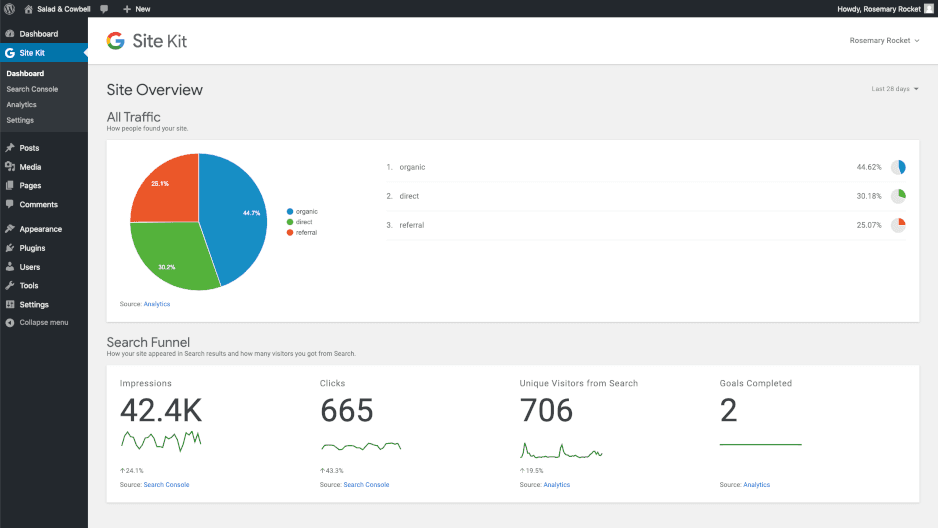
Example of the Site Kit tool Dashboard in WordPress.
2) What is Site Kit used for?
Currently, Site Kit has 4 main modules:
- Search Console, which allows us to see performance statistics about which are the most important keywords sending us the most traffic, average CTR, number of impressions... and we can choose any time period we want for our analysis.
- Analytics, which will not only let us see the number of users per day, page views... but will also provide very useful information about the evolution of these metrics over time, whether there has been a particularly intense day of activity... which will help us make better decisions.
- Page Speed Insights, which will provide information about each page's performance in terms of speed, requests... and will show us a metric we can interpret to know whether we're doing a good job or, on the contrary, we need to dedicate more effort to WPO (Web Performance Optimization).
- AdSense, which will give us information about the advertising revenue the website is generating.
Although these are the only modules initially active, it's true that we can expand this selection with other options like Optimize or Tag Manager.
3) Advantages and Disadvantages of Site Kit
Now that you know the main features and functionalities of the plugin, you're surely wondering... is it really worth it? That's why we've compiled a series of advantages and disadvantages so you can make the decision with all the facts on the table.
Advantages:
- Easy installation
- Pleasant and intuitive design
- Very useful alert system
- Accessibility of the data
Disadvantages:
- Slightly increases web requests, reducing web performance.
- Asks for a lot of permissions, which is sensitive and requires careful review.
- Simple interface without many filtering options or data manipulation features.
4) Personal opinion
I tried this tool when it was still in beta by installing it manually and, honestly, it didn't quite convince me. However, after all the improvements the plugin has received, the truth is that it has changed a lot and both the features and the design look very promising, so for now we're going to give it a chance at SEOcrawl AI.
Have you tried it yet? How were your first impressions?
We'd be delighted to hear your opinion and exchange experiences in the comments section.
5) References
Author: David Kaufmann

I've spent the last 10+ years completely obsessed with SEO — and honestly, I wouldn't have it any other way.
My career hit a new level when I worked as a senior SEO specialist for Chess.com — one of the top 100 most visited websites on the entire internet. Operating at that scale, across millions of pages, dozens of languages, and one of the most competitive SERPs out there, taught me things no course or certification ever could. That experience changed my perspective on what great SEO really looks like — and it became the foundation for everything I've built since.
From that experience, I founded SEO Alive — an agency for brands that are serious about organic growth. We're not here to sell dashboards and monthly reports. We're here to build strategies that actually move the needle, combining the best of classical SEO with the exciting new world of Generative Engine Optimization (GEO) — making sure your brand shows up not just in Google's blue links, but inside the AI-generated answers that ChatGPT, Perplexity, and Google AI Overviews are delivering to millions of people every single day.
And because I couldn't find a tool that handled both of those worlds properly, I built one myself — SEOcrawl AI, an enterprise SEO intelligence platform that brings together rankings, technical audits, backlink monitoring, crawl health, and AI brand visibility tracking all in one place. It's the platform I always wished existed.
Discover more content about this author
On-page SEO is everything you control on a page: content, title, meta description, headings, URL, images and internal links. Here is a checklist element by element, an audit process and what changes with AI Overviews and AI Mode.