The 10 Factors to Choose a Good SEO Hosting

For those of us who work in the world of SEO and online marketing in general, there are different aspects that depend on the state of the project and the type of client. This is the case we are going to tackle today: the decision of choosing a good hosting.
First of all, I want to clarify a point on this topic because we are going to talk about features for choosing a good SEO Hosting. Using the term SEO Hosting is only marketing as a way of configuration so that all of us who work in SEO are provided with an ideal setup, or one more concerned with solving the possible needs that an SEO project may have.
What is SEO Hosting?
SEO hosting is a type of web hosting configured to offer the best performance to a website whose main objective is search engine ranking. The most important feature is undoubtedly the use of different IPs, although there are other features to take into account such as: capacity, monthly transfer, type of hard drives, domains, processor, database version, admin panels...
We are going to talk about all of this in this article so that, after reading it, you have a clearer idea of which Hosting to choose for your SEO projects.
IP Addresses
In recent years, Hosting providers have offered us configurations to be able to work with different IPs for our projects even if we share the same server. For those starting in the sector, this option is designed for PBNs or for those who own a network of niche sites that they don't want to have any relation between each other at a server level.
In the end, the aim is for Google not to find any relation between two sites that link to each other, and if someone sets up a private blog network (PBN), whose objective is to link to a website they own to improve authority, they don't want anyone to be able to find a relation through the IP.
There are tools like https://viewdns.info/ that offer you the option of knowing all the domains hosted on the IP of a specific server; this function is called Reverse IP Lookup, and if what you want is to get the server's IP, you just have to enter the name of a domain hosted on that server.
IP Geolocation
Geolocation is another feature of SEO Hosting, although nowadays nobody can prove that it is a ranking factor, which is why, in my opinion, it lacks interest. Another thing is whether the server is closer or farther away, since this does indirectly influence through loading speed or WPO.
Domains
If different IPs are only important in certain types of projects, a feature that every SEO with their own projects is interested in is being able to manage several of their domains on the same server. This feature varies greatly depending on the hosting provider, as they usually use it with different plans ranging from 1 domain per server to several domains on the same server.
Storage Capacity
Capacity depends on the type of project. Think of a hosting service as a personal computer; depending on what you need it for, its configuration will be one way or another. If your project is small and you are only going to upload images to articles (remember to optimize them), 1 GB will be enough because capacity is usually an expandable option with all hosting providers.
Keep in mind that the resources that take up the most space are:
-
Images
-
PDFs
-
Videos
-
Other programs
-
Emails (if they are associated)
-
And Backups (if you make backup copies)
SSD Hard Drives
The use of these storage units has practically been standardized in hosting. There may still be services based on magnetic hard drives, but there must be few. There is a huge difference between HDDs and SSDs, and we're now moving away from 5400, 7200, or 15000 RPM (revolutions per minute) to improve data transfer. Now they are integrated flash memory, making their size smaller, their transfer speed greater, and their boot time very short. So when you choose a server, pay attention to whether the storage is SSD.
Data Transfer
When the user enters a URL, there is a consumption of resources that should in principle be small, but if we host heavy resources such as high-quality images, videos, PDFs, or other types of downloadable files, transfer plays an important role because most hosting providers set a limit on this consumption.
Take into account the traffic factor of your website (users) to multiply this consumption; perhaps in a project that is just starting this shouldn't worry you much, but keep it in mind because everything is relative.
Server Administration Control Panels
Control panels are usually always installed on shared hosting and are an option that not all providers offer when you acquire a VPS or a dedicated server. It is important to know this because there are providers that may offer you a VPS at a price close to SEO Hosting but unmanaged, meaning that you would be the one in charge of setting up a control panel and optimizing the hosting.
Users who have knowledge in server administration prefer the VPS or dedicated option, as they have better performance for their own websites, whereas in other services you have to share the equipment's resources.
Going back to the different control panels, these are the most popular:
Cpanel
Very visual and easy for performing basic tasks such as file administration, creation and installation of databases, FTP accounts, installing applications (they usually have an application installer), and above all with a lot of information available to help you.
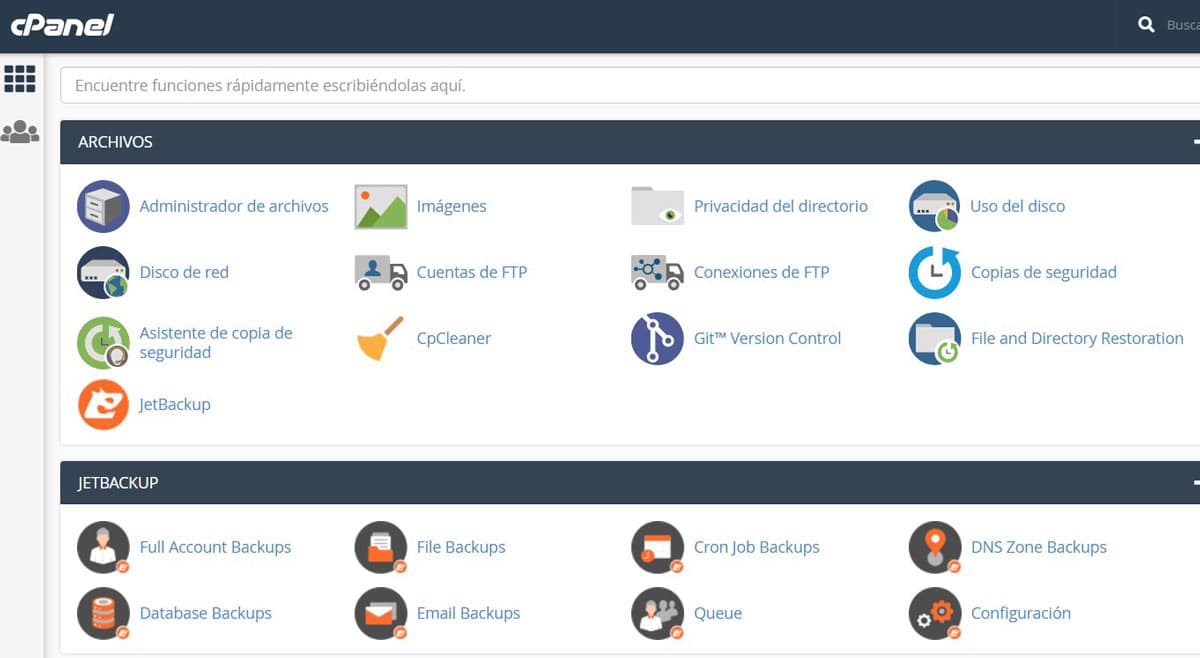
Would you rather install a server on Linux? Don't worry, you have very complete guides on how to carry out a Linux server configuration step by step.
Plesk
A panel with a simple interface for the inexperienced user, just like CPanel. Often, the reason a provider sets up one panel or another is due to commercial agreements rather than performance.
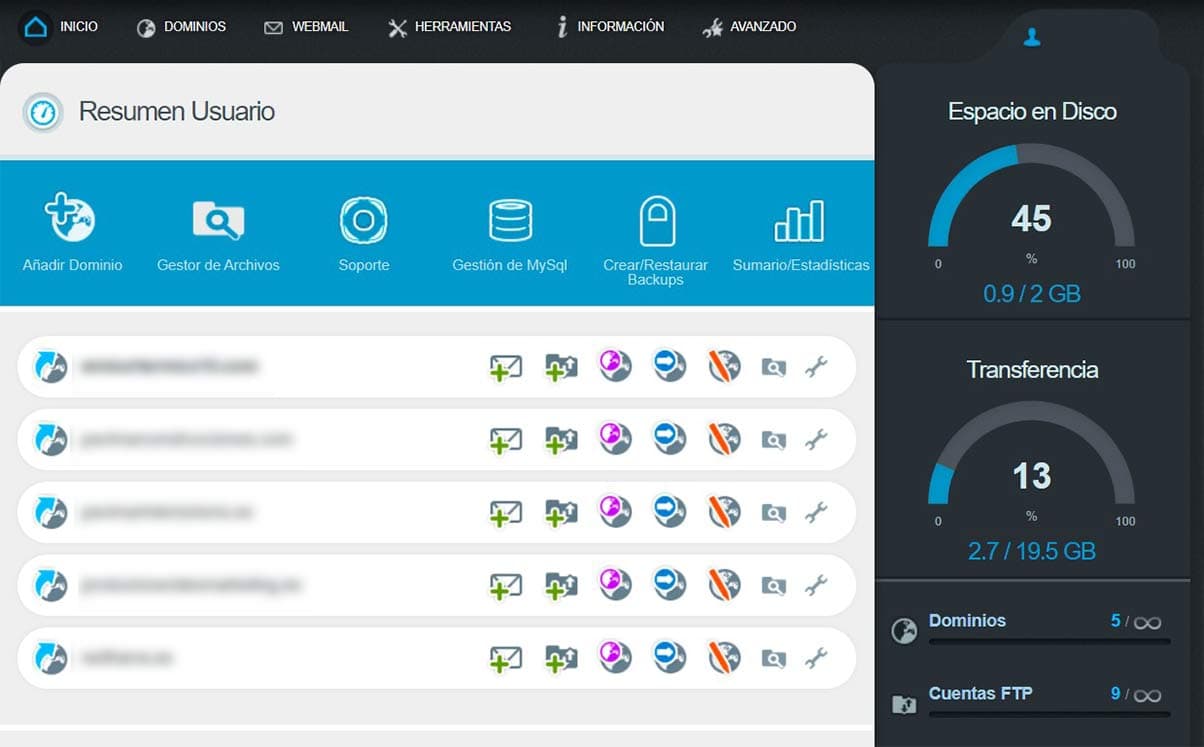
DirectAdmin
I have this panel on some projects; it has practically the same features and with the peculiarity that it is Open Source. Although visually it is not as graphic as Cpanel, its organization through different menus makes it equally accessible.
Vesta CP
This is a more complicated panel to handle for the average user. As with DirectAdmin, it is open source and is used on Linux operating systems.
Personally, I have worked with it on an OVH VPS server under NGINX, and although it is not excessively difficult, visually it doesn't have an interface as attractive as Cpanel or Plesk.
PHP Selector (5.3 to 7.3)
Having the possibility of changing the PHP version and the possible updates is no small matter. From my experience, I have come across cases in which you have to get in contact with the provider to see if they are going to update to more modern versions, and the answer isn't always affirmative.
This is much more important than it seems, because if you install an application under an old PHP version, you may have performance or functionality issues.
It happened to me when updating to the latest version of WordPress and the server was running under PHP 5.3.
SSL Certificates
Simply don't hire a server that doesn't at least offer you a free Let's Encrypt certificate.
Customer Support
Support is one of the most important features that makes me lean towards one provider or another. When the server fails, everything is a drama; being able to count on a fast, 24/7 support service is a non-negotiable option, especially because the best companies already offer it.
Now then, after knowing all these reasons, you will be wondering... which provider should I choose? Below, we recommend the one we use at SEOcrawl AI and explain why we recommend it:
Do you have any questions or recommendations? We'll be happy to read you in the comments!
Author: David Kaufmann

I've spent the last 10+ years completely obsessed with SEO — and honestly, I wouldn't have it any other way.
My career hit a new level when I worked as a senior SEO specialist for Chess.com — one of the top 100 most visited websites on the entire internet. Operating at that scale, across millions of pages, dozens of languages, and one of the most competitive SERPs out there, taught me things no course or certification ever could. That experience changed my perspective on what great SEO really looks like — and it became the foundation for everything I've built since.
From that experience, I founded SEO Alive — an agency for brands that are serious about organic growth. We're not here to sell dashboards and monthly reports. We're here to build strategies that actually move the needle, combining the best of classical SEO with the exciting new world of Generative Engine Optimization (GEO) — making sure your brand shows up not just in Google's blue links, but inside the AI-generated answers that ChatGPT, Perplexity, and Google AI Overviews are delivering to millions of people every single day.
And because I couldn't find a tool that handled both of those worlds properly, I built one myself — SEOcrawl AI, an enterprise SEO intelligence platform that brings together rankings, technical audits, backlink monitoring, crawl health, and AI brand visibility tracking all in one place. It's the platform I always wished existed.
Discover more content about this author

On-page SEO is everything you control on a page: content, title, meta description, headings, URL, images and internal links. Here is a checklist element by element, an audit process and what changes with AI Overviews and AI Mode.