Structured Data for SEO: What It Is and How to Add Schema Markup
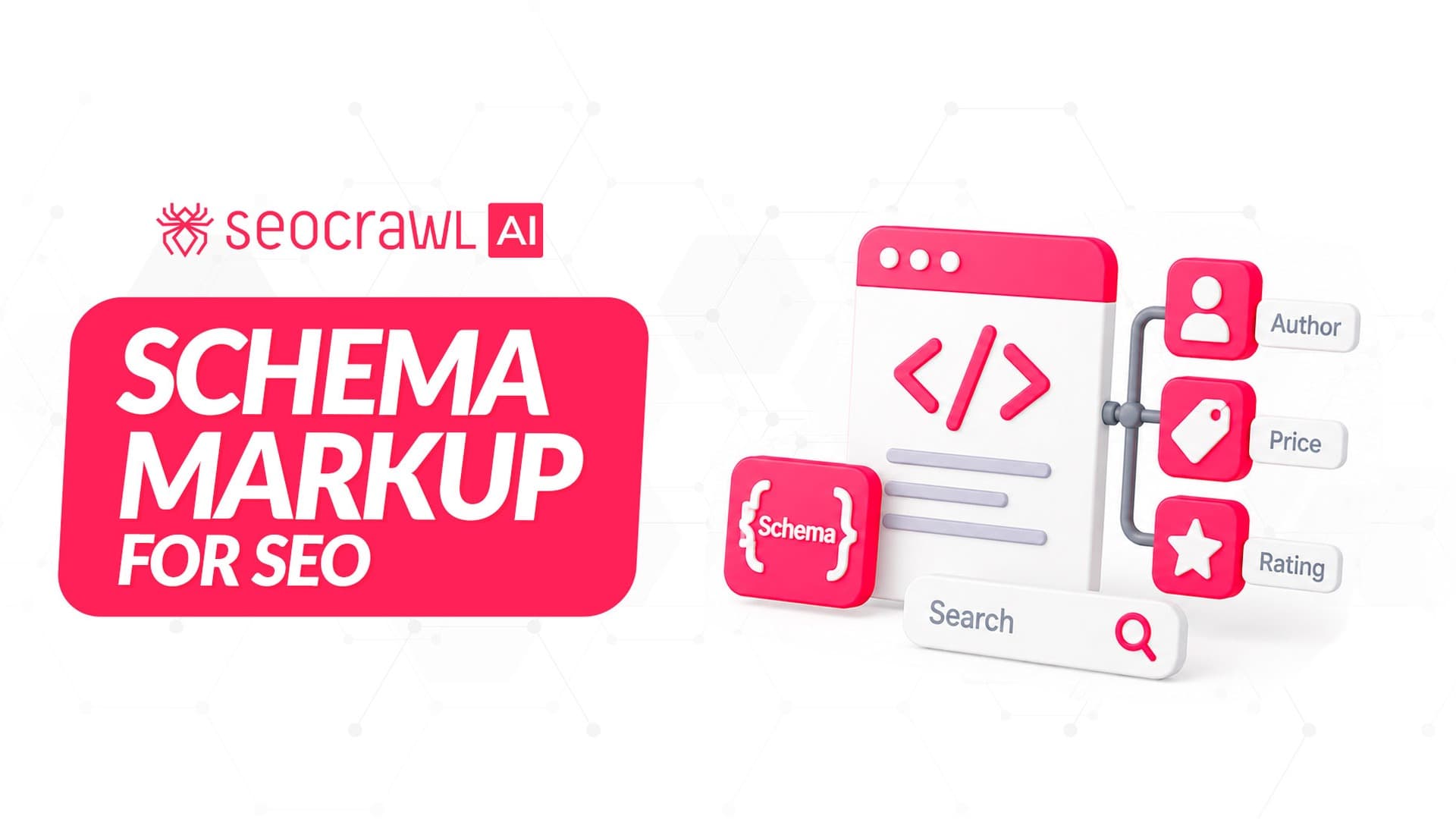
Structured data is code you add to a page to tell search engines exactly what its content means: that this string is a price, this one is an author, this block is a recipe. Most people call it schema markup, after the shared vocabulary almost everyone uses to write it.
If you came here asking "does adding schema move my rankings?", the honest answer is that it doesn't work on its own. Structured data enables a feature to appear; it doesn't guarantee it will, and Google decides per query whether a rich result is the best experience.
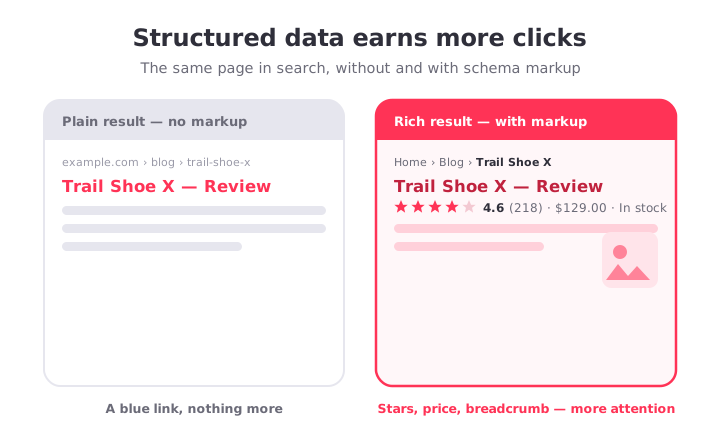
Still, pages that win rich results tend to earn more clicks, and Google's own case studies back that up: Nestlé measured an 82% higher click-through rate on pages that showed as rich results, and Rotten Tomatoes reported a 25% higher CTR on pages with structured data versus those without.
What structured data (schema markup) is
"Schema markup" and "structured data" get used interchangeably, even if they aren't exactly the same thing.
Structured data is the general practice of labeling content in a machine-readable way. Schema.org is the shared vocabulary almost everyone uses for it — a joint project backed by Google, Microsoft, Yahoo and Yandex. So when people say "add schema," they mean "add Schema.org structured data."
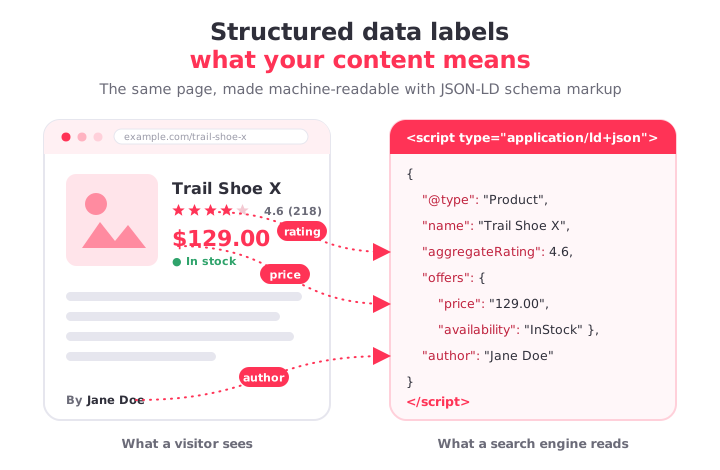
There are three formats: JSON-LD, Microdata and RDFa. Google recommends JSON-LD, and it's the format every example below uses.
JSON-LD sits in a single <script> block, usually in the <head>, separate from your visible HTML. That's why it's easier to add, maintain and debug than Microdata or RDFa, which wrap attributes around your actual page elements. If you inherited a site using Microdata it still works, but new markup should be JSON-LD.
Why schema matters more now, not less
Structured data is more important than ever. Here are three reasons, in order of how much they should drive your decisions.
- Rich results. These are the enhanced listings that go beyond a blue link: star ratings, product prices, breadcrumbs, sitelinks, recipe cards. They take up more space and pull more attention. This is the most direct, measurable benefit.
- Entity understanding. Schema tells Google what you are, not just what words are on the page. Organization markup with
sameAslinks to your LinkedIn, X and Wikipedia profiles helps Google connect your site to a known entity in its Knowledge Graph. - AI and AI Overviews. Schema does not unlock AI citations by itself, but it makes the facts on your page explicit and consistent, which helps any system — human or model — parse them correctly.
The schema types that still earn rich results in 2026
Here are the workhorses, each with copy-paste JSON-LD. Swap in your real values and keep every field consistent with what a visitor actually sees on the page.
Article / BlogPosting
For blog posts, news and editorial content.
{
  "@context": "https://schema.org",
  "@type": "BlogPosting",
  "headline": "Structured Data for SEO: What It Is and How to Add Schema Markup",
  "image": "https://example.com/images/structured-data.png",
  "datePublished": "2026-07-07",
  "dateModified": "2026-07-07",
  "author": {
    "@type": "Person",
    "name": "Jane Doe",
    "url": "https://example.com/author/jane-doe"
  },
  "publisher": {
    "@type": "Organization",
    "name": "Example",
    "logo": {
      "@type": "ImageObject",
      "url": "https://example.com/logo.png"
    }
  }
}
Product (with Offer and rating)
For a page selling a product.
{
  "@context": "https://schema.org",
  "@type": "Product",
  "name": "Trail Running Shoe X",
  "image": "https://example.com/shoe.jpg",
  "description": "Lightweight trail shoe with a grippy outsole.",
  "brand": { "@type": "Brand", "name": "Acme" },
  "sku": "ACME-TRX-42",
  "offers": {
    "@type": "Offer",
    "url": "https://example.com/shoe",
    "price": "129.00",
    "priceCurrency": "USD",
    "availability": "https://schema.org/InStock"
  },
  "aggregateRating": {
    "@type": "AggregateRating",
    "ratingValue": "4.6",
    "reviewCount": "218"
  }
}
Review
For an editorial review of a product, book, movie or service.
{
  "@context": "https://schema.org",
  "@type": "Review",
  "itemReviewed": { "@type": "Product", "name": "Trail Running Shoe X" },
  "reviewRating": {
    "@type": "Rating",
    "ratingValue": "4",
    "bestRating": "5"
  },
  "author": { "@type": "Person", "name": "Jane Doe" },
  "reviewBody": "Comfortable over long distances, though sizing runs small."
}
BreadcrumbList
For any page inside a hierarchy. The current page is the last item and omits item.
{
  "@context": "https://schema.org",
  "@type": "BreadcrumbList",
  "itemListElement": [
    { "@type": "ListItem", "position": 1, "name": "Home", "item": "https://example.com" },
    { "@type": "ListItem", "position": 2, "name": "Blog", "item": "https://example.com/blog" },
    { "@type": "ListItem", "position": 3, "name": "Structured Data" }
  ]
}
Organization (with sameAs)
Place this once, sitewide (homepage or a global template). The sameAs array is the entity-clarity lever.
{
  "@context": "https://schema.org",
  "@type": "Organization",
  "name": "Example",
  "url": "https://example.com",
  "logo": "https://example.com/logo.png",
  "sameAs": [
    "https://www.linkedin.com/company/example",
    "https://x.com/example",
    "https://en.wikipedia.org/wiki/Example"
  ]
}
LocalBusiness
For a business with a physical location. Use the most specific subtype available (Restaurant, Dentist, and so on) instead of the generic LocalBusiness where one exists.
{
  "@context": "https://schema.org",
  "@type": "LocalBusiness",
  "name": "Example Coffee",
  "image": "https://example.com/store.jpg",
  "@id": "https://example.com",
  "url": "https://example.com",
  "telephone": "+1-555-0100",
  "address": {
    "@type": "PostalAddress",
    "streetAddress": "123 Main St",
    "addressLocality": "Austin",
    "addressRegion": "TX",
    "postalCode": "78701",
    "addressCountry": "US"
  },
  "geo": {
    "@type": "GeoCoordinates",
    "latitude": 30.2672,
    "longitude": -97.7431
  },
  "openingHours": "Mo-Fr 07:00-18:00"
}
FAQPage and HowTo
Google deprecated FAQ rich results on May 7, 2026, finishing a rollback that began in August 2023 when it restricted them to authoritative government and health sites. HowTo rich results were deprecated on desktop back in September 2023.
Google still parses FAQPage to understand a page — you just won't get the expandable Q&A panel in search anymore. So keep FAQ content on the page because it answers real questions and helps machines read you. Just don't add the schema expecting a visible SERP feature.
{
  "@context": "https://schema.org",
  "@type": "FAQPage",
  "mainEntity": [{
    "@type": "Question",
    "name": "Does schema markup guarantee rich results?",
    "acceptedAnswer": {
      "@type": "Answer",
      "text": "No. Valid markup makes a page eligible, but Google decides whether to show a rich result."
    }
  }]
}
Which schema type for which page
The single most common mistake is bolting the wrong type onto a page, or stacking types that don't apply. Match the most specific type to what the page actually is, then check whether it still produces a rich result.
| Page | Schema | Rich result in 2026 |
|---|---|---|
| Blog post, news, guide | Article / BlogPosting | Yes |
| Product page | Product + Offer | Yes |
| Editorial review | Product + Review | Yes |
| Any nested page | BreadcrumbList | Yes |
| Homepage / about | Organization | Entity only |
| Physical location | LocalBusiness | Yes (local) |
| Recipe | Recipe | Yes |
| Video | VideoObject | Yes |
| FAQ block | FAQPage | No (deprecated) |
| How-to steps | HowTo | No (deprecated) |
Google's guideline is to use the most specific applicable type, and to put the structured data on the page it describes.
How to test and validate your schema
Never publish schema you haven't checked. Two official tools, one job each:
- Rich Results Test tells you whether a page is eligible for a Google rich result and previews how it could look. Use this to answer "will this earn a feature?"
- Schema Markup Validator validates any Schema.org markup generically, without Google-specific feature checks. Use it to answer "is this syntactically correct?" It replaced the old Structured Data Testing Tool.
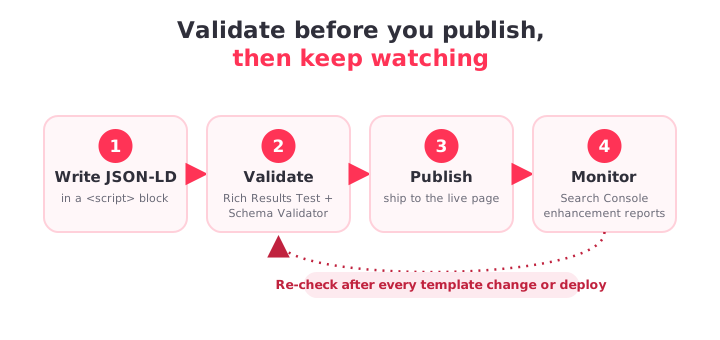
Schema breaks silently. A theme update or a plugin conflict can strip JSON-LD from hundreds of pages with no visible error. That's why the real workflow is: validate before publishing, re-check after every template change or deploy, and monitor rich-result status in Search Console's enhancement reports over time.
Validate every page's structured data with SEOcrawl AI
Running the two Google tools by hand is fine for a spot check, but it doesn't scale and it won't tell you when a deploy quietly breaks markup across a template.
For a fast single-page check, SEOcrawl AI's free Schema Validator audits a URL's JSON-LD against both the Schema.org spec and Google's Rich Results policy. It extracts every block on the page and separates errors that block eligibility from warnings that merely weaken it, so you know exactly what to fix first.
And because markup regressions usually show up as a drop in rich-result coverage, SEOcrawl AI tracks the enhancement side too: pull your Search Console coverage and query data — manually, by auto-rules, or through the SEOcrawl AI MCP server straight from Claude or ChatGPT — so a template change that strips schema shows up as a measurable change, not a mystery.
FAQs
Does schema markup improve rankings, or is that a myth?
Schema is not a ranking factor. It makes a page eligible for rich results and helps engines understand your content, but it won't push you up the results by itself. The benefit is indirect: pages that win rich results tend to earn a higher click-through rate.
FAQ rich results are gone, so should I remove FAQPage schema?
No. Google confirmed FAQPage stays a valid type and it still parses the markup to understand your page. It just won't render the expandable panel. Spend the time on the FAQ content instead, which still earns long-tail traffic and helps AI systems extract answers.
How long until I see a rich result after adding schema?
There's no fixed timeline. Google has to recrawl and reprocess the page first, which can take days to a few weeks depending on how often it crawls your site. And even with valid markup, you only get eligibility, not a promised spot.
Do I need schema for ChatGPT or AI Overviews to cite me?
Not specifically. Google has stated no special schema is required for AI Overviews or AI Mode. What matters is that your structured data matches your visible content and that the content genuinely answers the question. Schema reduces ambiguity for models, which helps, but it doesn't force a citation.
Will adding JSON-LD slow down my page?
No. A JSON-LD block is a small piece of text in the page source and doesn't render or block anything visual. The only real cost is maintenance: keep it accurate and remove blocks for features you no longer target.
Author: David Kaufmann

I've spent the last 10+ years completely obsessed with SEO — and honestly, I wouldn't have it any other way.
My career hit a new level when I worked as a senior SEO specialist for Chess.com — one of the top 100 most visited websites on the entire internet. Operating at that scale, across millions of pages, dozens of languages, and one of the most competitive SERPs out there, taught me things no course or certification ever could. That experience changed my perspective on what great SEO really looks like — and it became the foundation for everything I've built since.
From that experience, I founded SEO Alive — an agency for brands that are serious about organic growth. We're not here to sell dashboards and monthly reports. We're here to build strategies that actually move the needle, combining the best of classical SEO with the exciting new world of Generative Engine Optimization (GEO) — making sure your brand shows up not just in Google's blue links, but inside the AI-generated answers that ChatGPT, Perplexity, and Google AI Overviews are delivering to millions of people every single day.
And because I couldn't find a tool that handled both of those worlds properly, I built one myself — SEOcrawl AI, an enterprise SEO intelligence platform that brings together rankings, technical audits, backlink monitoring, crawl health, and AI brand visibility tracking all in one place. It's the platform I always wished existed.
Discover more content about this author
CTR tells you how many of the people who saw your result actually clicked. Here's the formula, what a good CTR looks like in 2026 by channel and by Google position, and how to get more clicks from the rankings you already have.