Nofollow Links: What They Are and When to Use Them
If you have been in the SEO world for a while, you probably are not surprised by the concept of a "nofollow link". However, if you have just started out, or your SEO team is talking to you about it, we can tell you it is quite simple to understand.
In this article, we will not only define it and give you detailed examples, but we will also tell you in detail about all the changes this tag underwent on March 1st by Google.
Let's get started!
What is a nofollow link?
The nofollow attribute is an encoding of the link that originally told Google whether it was a link it should follow (dofollow) or, alternatively, a non-relevant link that should not be taken into account (nofollow). When no attribute was used, Google understood that we wanted to use the latter.
These attributes have always been one of the most discussed elements among web positioning professionals. However, only recently (on March 1st), the profound changes that Google announced in September 2019 took effect.
Until now, nofollow had been used both to remove relevance from external links we added to our content, and also to try to manipulate "linkjuice" with the goal of improving the page rank of pages. This technique was known as link sculpting.
However, with Google's changes, all of this was no longer valid and new rules came into play...
New types of links
Within these changes, Google announced what these two new link attributes are. They are attributes focused on differentiating the social use and the sponsored use of the linked informational content.
We explain it in full detail below:
UGC Attribute (User Generated Content)
The first of the new link attributes presented is UGC. Its initials correspond to User Generated Content and, in practice, the attribute is written like this:
<a href="https://example.com" rel="ugc">
It should be noted that this link may or may not carry nofollow depending on whether we want Google to follow it or not. There may be certain user-generated content that we believe is of quality and therefore we do not add any attribute, and there may be other content where there is no quality at all and therefore we want to include the nofollow:
<a href="https://example.com" rel="ugc nofollow">
By its nature, it is a recommended attribute for those links included within content that has been generated by users such as:
- Blog comments
- Forum participations
- Other social platforms.
Sponsored attribute
The second of the new attributes is called sponsored, which we can take literally, because it seems to have been created to identify sponsored links, corresponding to an advertising campaign or related to any compensatory action for the website.
In the same way as with ugc, this attribute may or may not be accompanied by the nofollow tag.
<a href="https://example.com" rel="sponsored">
<a href="https://example.com" rel="nofollow sponsored">
This represents an extremely important change in link attributes since the rule up until now was that, given that sponsored links were not natural, they had to carry the "nofollow" attribute. Now, however, we can tag them with the rel="sponsored" encoding and expect Google to understand the correlation.
These new link attributes complement the traditional ones. We remind you what they are and how to use them.
Natural attribute
When a link comes from an optimal source, where the user can also find and expand related information, we are dealing with a natural link. To identify them, we still have the option of rel="dofollow" or adding nothing, in which case Google will understand that it should follow the link.
<a href="https://example.com">
The difference with respect to the previous situation is that until now this was the only attribute that Google valued for the SEO ranking of that link and its destination. Now all existing attributes can have their influence.
Nofollow attribute
The rel="nofollow" encoding, up until now simply indicated that the link should not be taken into account, that is, that it should not pass authority.
<a href="https://example.com" rel="nofollow">
Google therefore made clear that this type of attribute should be used when we wanted to link sponsored content or paid links, in order to tell the search engine that it was not a natural link and therefore should not be taken into account as a ranking signal.
As Google indicates in its guides:
Add the nofollow value to your links if you don't want Google to associate your website with the content of the linked page
Main SEO news regarding link attributes
Since March 1st, 2020, all links are valued based on these attributes and Google will take them into account when crawling and indexing. Google will decide, based on the quality of the link, the destination and the context, the importance it may have with respect to SEO positioning. It may decide not to assign any importance to it, and it may also consider it a priority.
Right now we can only offer "suggestions", based on the importance we believe that link should have. But we can no longer decide whether a link is influential or not.
Finally, given the doubts that are arising among many webmasters, you can rest completely easy. You don't have to change all the links on the website and the attributes you have created so far. If the original attribute was valid then, it will still be valid now.
What you should try to do is take advantage of these announced attributes, to optimize as much as possible the new links you include on your website.
Frequently Asked Questions
To finish the article, we have seen that many users had doubts around nofollow and that is why we have tried to answer the main questions in a clear and concise way.
How to add nofollow links in WordPress?
Natively, WordPress includes the option to add the nofollow attribute to the link. All we have to do is open the link panel of the editor and it will show us the option as you can see in the following screenshot:
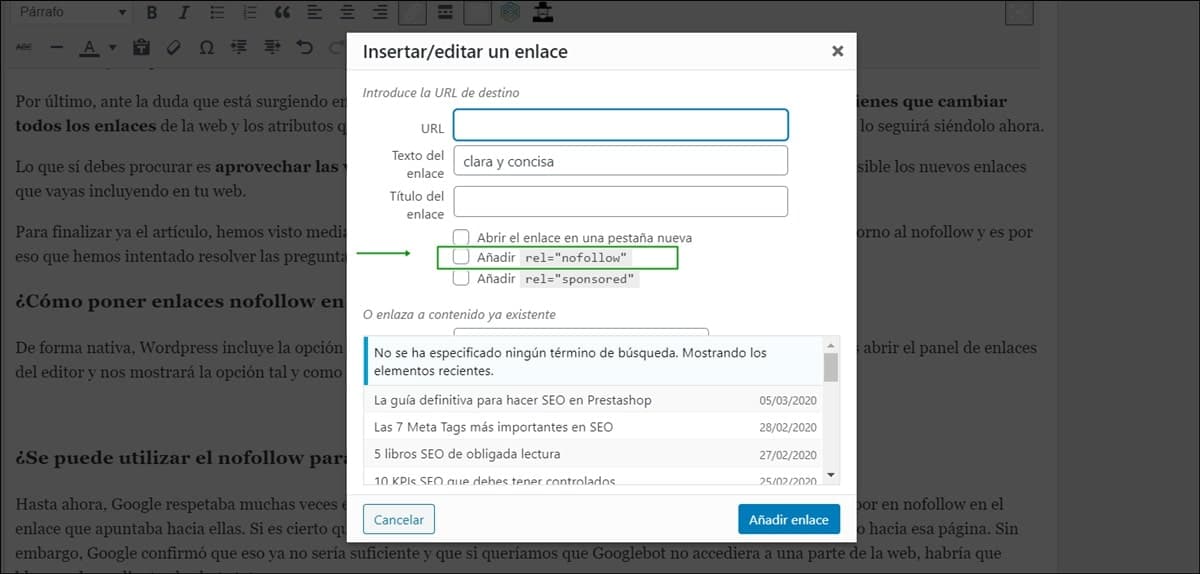
Option to add nofollow and sponsored in WordPress.
Can nofollow be used to control crawling and internal links?
Up until now, Google often respected this directive so as not to crawl many folders that were protected by the nofollow in the link pointing to them. It is true that it could crawl them if it had them in cache or there were other links pointing to that page. However, Google confirmed that this would no longer be sufficient and that if we wanted Googlebot not to access a part of the web, it would have to be blocked via robots.txt
What are the noopener noreferrer attributes that sometimes accompany nofollow?
Many times, we see the "noopener" and "noreferrer" attributes alongside nofollow. These are two VERY NECESSARY attributes whenever we want the link to open in another tab for security, since they prevent malicious deception techniques.
<a href="https://wgp2019.fide.com/" rel="ugc nofollow noreferrer noopener" target="_blank">Women's Grand Prix</a>
How to know if a link is nofollow?
To find out if a link is nofollow, all we have to do is open the "Element Inspector" of our browser, right-click on it, and then we will be able to see whether the "nofollow" attribute is present or not.
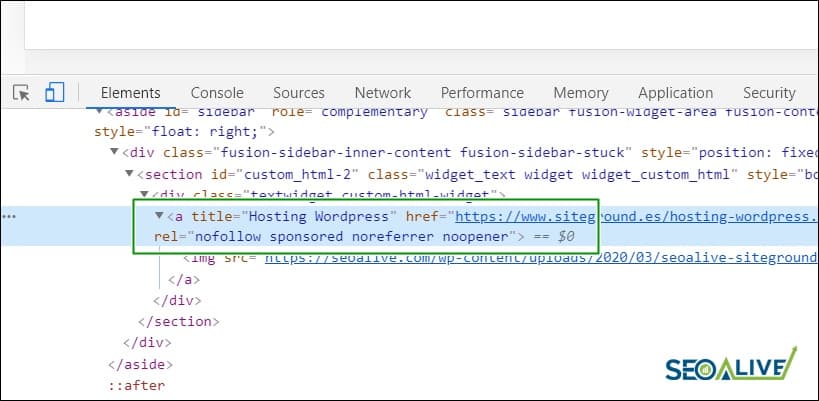
If you right-click on the element and "Inspect", we will be able to see the code.
Do you have any questions left? Do you have any suggestions? We would love to read you in the comments section!
More information and references:
- Google introduces two new link attributes: "ugc" and "sponsored" - by Juan González (USEO)
- Inform Google about the type of outgoing links from a website - Google Support Forum
- How Google's Nofollow, Sponsored, & UGC Links Impact SEO - Moz
Author: David Kaufmann

I've spent the last 10+ years completely obsessed with SEO — and honestly, I wouldn't have it any other way.
My career hit a new level when I worked as a senior SEO specialist for Chess.com — one of the top 100 most visited websites on the entire internet. Operating at that scale, across millions of pages, dozens of languages, and one of the most competitive SERPs out there, taught me things no course or certification ever could. That experience changed my perspective on what great SEO really looks like — and it became the foundation for everything I've built since.
From that experience, I founded SEO Alive — an agency for brands that are serious about organic growth. We're not here to sell dashboards and monthly reports. We're here to build strategies that actually move the needle, combining the best of classical SEO with the exciting new world of Generative Engine Optimization (GEO) — making sure your brand shows up not just in Google's blue links, but inside the AI-generated answers that ChatGPT, Perplexity, and Google AI Overviews are delivering to millions of people every single day.
And because I couldn't find a tool that handled both of those worlds properly, I built one myself — SEOcrawl AI, an enterprise SEO intelligence platform that brings together rankings, technical audits, backlink monitoring, crawl health, and AI brand visibility tracking all in one place. It's the platform I always wished existed.
Discover more content about this author
On-page SEO is everything you control on a page: content, title, meta description, headings, URL, images and internal links. Here is a checklist element by element, an audit process and what changes with AI Overviews and AI Mode.