How to Remove Toxic Links with a Disavow
If there is one thing that becomes clear with the tools Google makes available to Webmasters, it's that we should make their job easier when it comes to detecting or resolving certain problems with our website. In this article we'll talk about the Disavow file and the tool used to submit this file, the Disavow Tool.
Google Penguin, a turning point
With the Google Penguin update in April 2012, Google set out to curb the manual creation of links intended to gain relevance in the eyes of search engines. It's worth remembering that Google itself was the one that emphasized the importance of links for gaining relevance, so naturally, webmasters saw the need to create links of every kind and color.
Link building became popular and link farms proliferated throughout the digital ecosystem (those enormous websites with thousands of outbound links). Google Penguin was born with this purpose in mind, and penalties for these types of links were handed out left and right.
What is the Disavow file?
The Disavow is a .txt file that allows us to tell Google which links or domains we do not want to be taken into account when evaluating the quality of a website's link profile. Many times, thousands of links are created without the company/website's approval, and this sometimes creates negative consequences such as penalties or traffic drops.
In short, it's a tool for removing toxic or low-quality links pointing to a website. However, if we stop to analyze what Google considers toxic or negative, we could get into a whole debate...
Manual Penalty
A manual action for a link profile is one of the most damaging actions an SEO consultant can face.
No one is going to tell you which links you have to remove, and that's when you have to make use of your knowledge and Google's guidelines to detect, and submit in the Disavow file, any link that Google might interpret as negative.
Paid Links
As we see in the excerpt from Google's guidelines on disavowing inbound links, one of the practices that gets manually penalized is the purchase of links.
We all know of platforms or websites where you can buy links to improve a site's authority, but we have to be aware that this isn't a practice Google looks kindly on and that it is punishable.
Linking patterns, domains that everyone uses to buy links, or exact-match anchor texts are indicators that can set off alarms.
Another of the most popular forms of paid links is sponsoring events or articles through a logo or link. For this reason, Google recently created the "sponsored" attribute, to continue fighting against link buying.
Negative SEO or Black Hat
Negative SEO encompasses several actions carried out to harm a third party. Sending thousands of low-quality links to someone else's website is a common negative SEO (black hat) action.
There are many platforms that facilitate these practices for just a few euros.
It should be said that Google has improved its algorithm in recent months so that these kinds of low-quality links don't influence your website. Now it's each person's responsibility either to act or to let Google handle it.
Matt Cutts - Unnatural Links to Site
In this video, Matt Cutts gives more context on the topic and explains where the issue comes from and what actions they've considered to fix search result manipulation.
How to prepare the Disavow.txt file?
Before putting this file together, we have to be very sure that the backlink or domain we're going to list is negative for our site, because otherwise the organic results of our website will be affected.
Format of the disavow.txt file
- One URL or domain per line
- If you want to disavow an entire domain, you need to prefix it with the term "domain:"
- The file must be encoded in UTF-8 or 7-bit ASCII, Notepad (Windows) or Text Edit (Mac).
- The file must end in .txt
- You can use # to comment out a line. Google will ignore that line.
An example of the disavow file's content would be this:
# Two pages to be disavowed
http://spam.example.com/stuff/comments.html
http://spam.example.com/stuff/paid-links.html

# A domain to be disavowed
domain:suspicious-seo.com
How to use the Disavow Tool to disavow links?
In order to use this tool, you need to be registered or have access through Search Console to the destination domain of the links you are going to disavow.
#1 Open the tool and select the domain
You can search Google for "Disavow Tool" or go here.
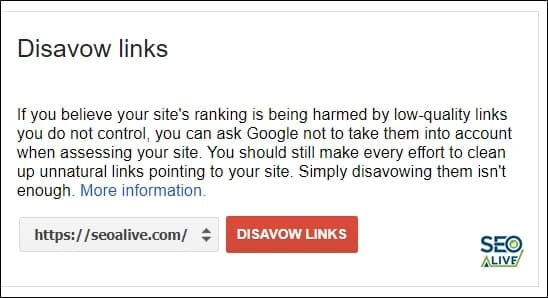
Google's Disavow Tool in Search Console.
Google will send us a warning about how important it is to have control over what we're about to do and its impact on your website's search results.
#2 Upload the file and submit
Everything would be done and we'd be waiting for it to take effect.
Tools for detecting negative links
There are several tools recommended for monitoring and working on your link profile.
The most popular ones are:
- Ahrefs
- Open Link Profile
- Majestic
- SemRush
- Sistrix
- Search Console
- And many others...
It's important to clarify that not all tools detect every link, since this depends on their crawlers and their databases, which is why we recommend using several different tools.
Important indicators for detecting negative links
No matter how much someone tells you that links with a certain UR, DR, DA, PA, CF, or TF are bad, you shouldn't listen.
Only by analyzing each domain individually can you draw conclusions about what is bad or good for your website.
A low DR or DA (metrics from AHREFS and MOZ) can never by itself indicate poor quality.
These metrics will give you information about how little authority or relevance a site has, but a link profile must above all feel natural, and naturalness means diversification in your linking, not only high-quality links.
That's why using the Disavow file shouldn't be taken lightly and should only be used in exceptional cases.
- Geographically: look at the country of origin of those links (China, India, Russia...) are potentially zones used for spam.
- Number of outbound links from the domain.
- Topic/theme of the domain linking to you.
- Links with anchor text related to "viagra, sex..."
- Websites where the domains are very similar, even sharing DNS.
- Websites where the domains reference lists of domains or lists of...
- Pornographic websites, gambling sites, etc...
These are some indicators that help us identify toxic backlinks that we don't want Google to take into account and that we'll send to be "disavowed" through the aforementioned Disavow.txt
If you have any doubts or need help improving your link profile, contact us and we'll be happy to help.
References:
Author: David Kaufmann

I've spent the last 10+ years completely obsessed with SEO — and honestly, I wouldn't have it any other way.
My career hit a new level when I worked as a senior SEO specialist for Chess.com — one of the top 100 most visited websites on the entire internet. Operating at that scale, across millions of pages, dozens of languages, and one of the most competitive SERPs out there, taught me things no course or certification ever could. That experience changed my perspective on what great SEO really looks like — and it became the foundation for everything I've built since.
From that experience, I founded SEO Alive — an agency for brands that are serious about organic growth. We're not here to sell dashboards and monthly reports. We're here to build strategies that actually move the needle, combining the best of classical SEO with the exciting new world of Generative Engine Optimization (GEO) — making sure your brand shows up not just in Google's blue links, but inside the AI-generated answers that ChatGPT, Perplexity, and Google AI Overviews are delivering to millions of people every single day.
And because I couldn't find a tool that handled both of those worlds properly, I built one myself — SEOcrawl AI, an enterprise SEO intelligence platform that brings together rankings, technical audits, backlink monitoring, crawl health, and AI brand visibility tracking all in one place. It's the platform I always wished existed.
Discover more content about this author
On-page SEO is everything you control on a page: content, title, meta description, headings, URL, images and internal links. Here is a checklist element by element, an audit process and what changes with AI Overviews and AI Mode.