SEO Audit
SEO Overview
Starting to analyze the current SEO situation of a project is no easy task. It is very easy to skip some steps or fail to go into enough depth on others. That is why, if you are one of those SEOs who finds themselves in this situation, at SEOcrawl AI we want to help you through this detailed SEO Audit with 28 steps to follow.
Let's get started!
What is an SEO Audit?
An SEO audit is a process through which a list of tasks is laid out to analyze the current state of a project at the SEO level. In particular, it is very useful when it comes to understanding the situation of a website and what the most important next steps to take would be.
SEO Audit Tools
To work on the main elements of an analysis of a website from an SEO perspective, we recommend using, at minimum, the following tools to start your analysis:

Heads up! Remember that this is just an example and that you can use any tools you like; what matters is that you know how to interpret the data and squeeze the most value out of it for your benefit.
SEO Audit Checklist + Example
Now that we have covered the steps needed to perform an SEO audit, let's roll up our sleeves! To organize everything better, we have classified the elements into 6 main categories:
-
On-Page SEO
-
Indexing
-
WPO
-
Link Building
-
Local SEO
On-Page SEO
On-page SEO takes care of all those elements that live on the website. Broadly speaking, the on-page side is one of the pillars to work on in SEO, where we will have to see how well, how-so-so, or how poorly all the components of a site's URLs are performing.
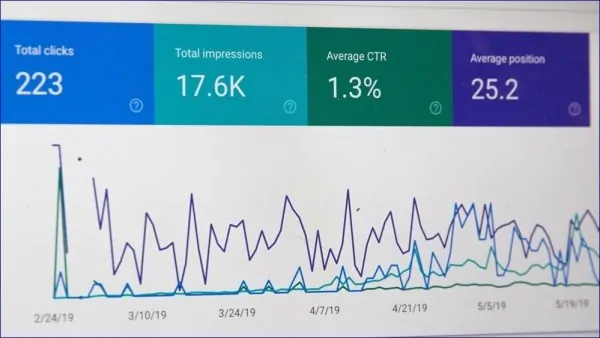
1) Google Search Console
The first step of any SEO audit will be to have access to Google Search Console, either by implementing it ourselves or by getting access through an invitation. With this tool, we can see in detail all the data about the performance of our pages in Google, the indexing status, possible errors... Google Search Console tutorial.
STEP #1: Ask the website administrators for Search Console access, or implement it manually yourself. From there, dive into all the data and let the adventure begin!
2) Other SEO Webmaster Tools
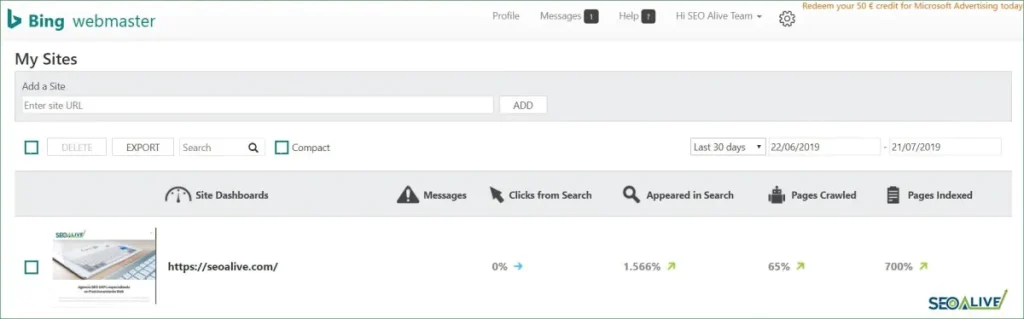
We often focus on Google and believe it is the only thing we need. However, even though Google clearly dominates most of the traffic from search engines, we must not forget that there are other engines such as Bing, Yandex (Russia), and Baidu (China), which can also generate a lot of traffic for us.
Verifying our website in these tools will take just a few minutes and can greatly help us detect errors or see performance statistics within our SEO study or audit.
STEP #2: Register your website on these 3 portals, verify ownership, and check that it is being indexed correctly on each of them.
3) Google Analytics
As with Search Console, access to Google Analytics will give us access to dozens of very important metrics for the website we want to analyze, such as how many people visit the site each day or what percentage of these visits come from organic traffic.
With this tool, we can create truly impressive projects and integrate this important data source with Google Data Studio, Sistrix, and other tools that will allow us to build excellent reporting.
STEP #3: Request access to Google Analytics or implement it yourself. Then verify that all events are being sent correctly and do not forget to define your goals to measure conversion properly.

4) Keyword Research and Search Intent
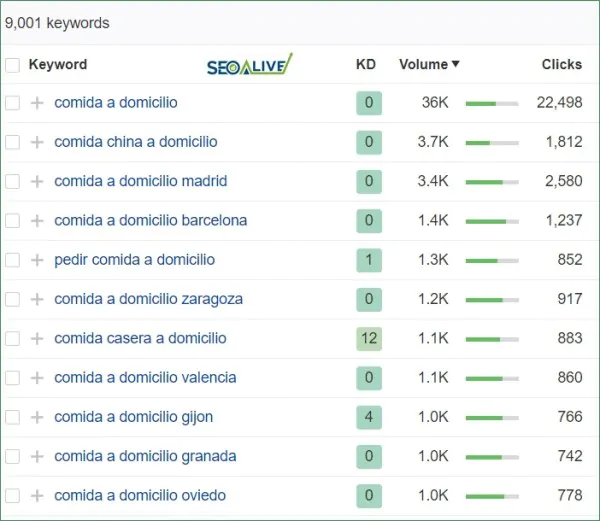
Up to this point, the first steps of the SEO audit had been external to the website. Once we start optimizing it, the first thing we must do is an extensive keyword analysis (keyword research) so we can truly understand the market we are entering and know how we should structure the website.
The first thing we must do before diving deep into a project is to fully understand which keywords are relevant to the business.
To do this, we will carry out a thorough keyword research in which we will analyze all the keywords the website is already ranking for, all those that belong to the industry, and finally, we will classify them according to the nature of the keywords:
-
Informational (searching for the meaning or general information)
-
Transactional (desire to acquire a product or service)
-
Navigational (searching for a company name)
STEP #4: Carry out an exhaustive study of all keywords, classify them in detail, and identify all the important keywords worth fighting for, both the main ones and the long-tail.
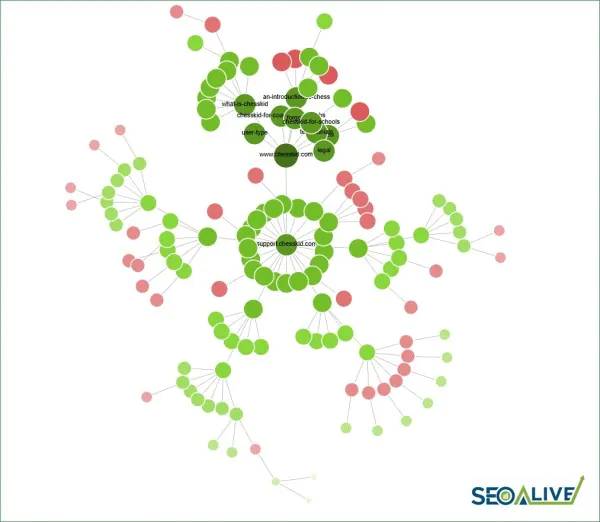
5) Website Map (Hierarchical Structure)
Most businesses and companies structure their website in the way they think will be best for their business. The problem is that this strategy is often not aligned with the SEO strategy. This leads to pages not being well interconnected with each other and Google's crawling and user navigation being seriously affected.
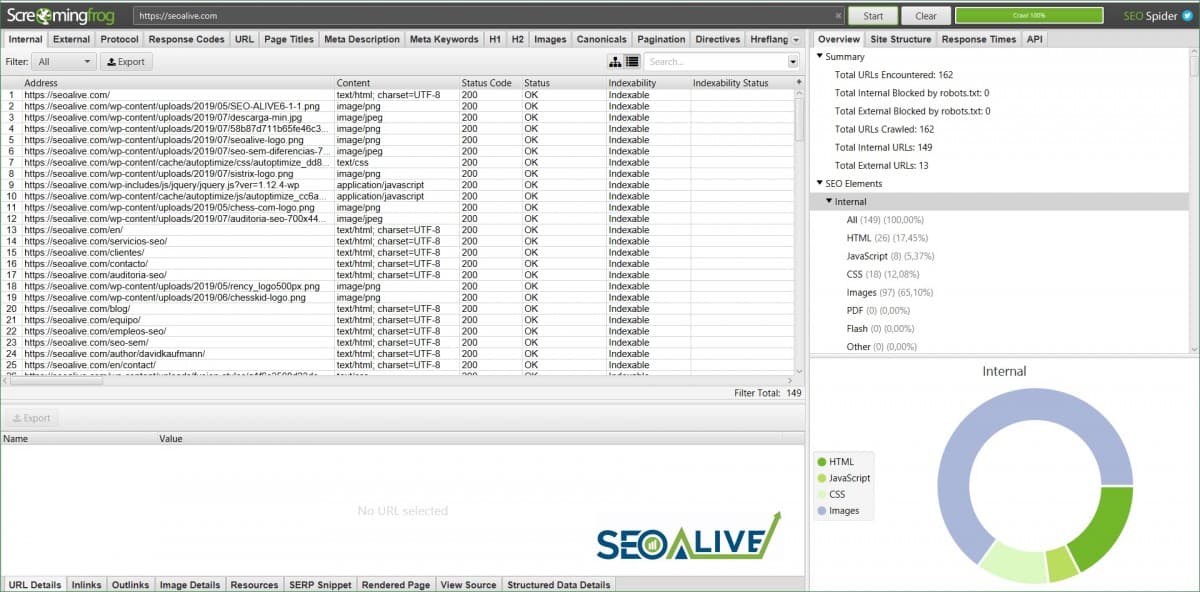
Using tools such as Screaming Frog, we can thoroughly document the website's hierarchy in our SEO audit.
Afterward, we should carry out an in-depth analysis and a proposal with Draw.io, for example, thanks to which we can draw out how we believe the pages should be structured.
STEP #5: Perform a crawl of the entire website and document the current hierarchical structure of all URLs to understand how the project is set up. Once done, look for potential improvements and propose a new, better-organized sitemap that aligns with the keyword research.
6) SEO Plugins
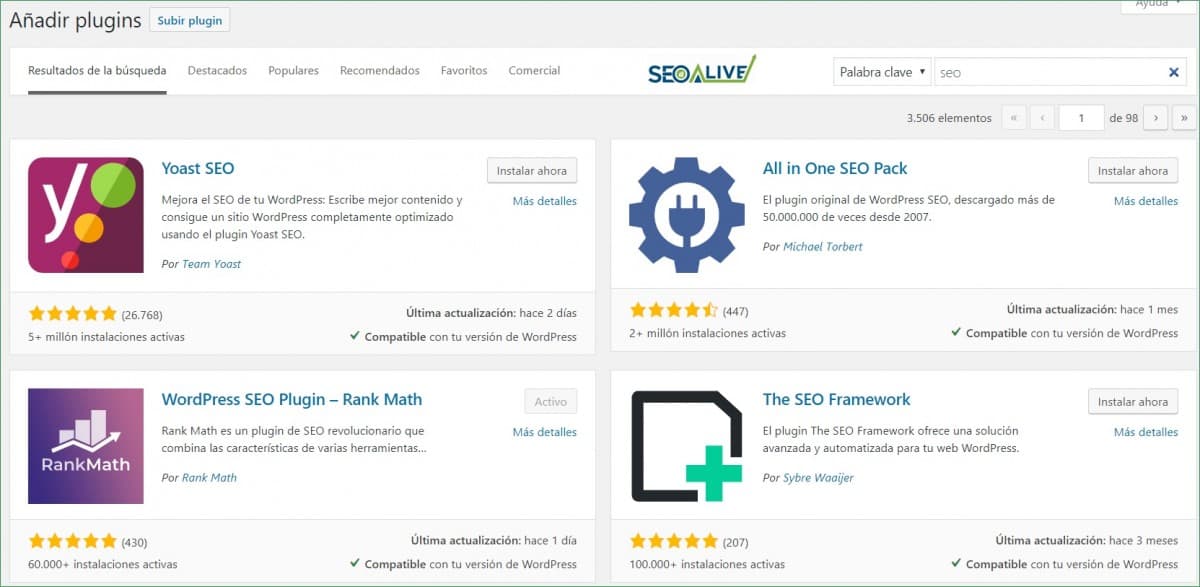
If we are developing with technologies that are not CMS (Content Management Systems), it will be a bit harder, since most of the work will be much more manual and we will depend more heavily on a development team. However, if the website is built with WordPress, Prestashop, or similar platforms, we will have a wide range of possibilities at our disposal. That said, keep in mind that each plugin is an add-on that will impact your website's loading speed, so think carefully about which ones and how many you will use so that web performance is not harmed.
In the specific case of WordPress, we have 4 major solutions that will allow us to do a large part of the work ourselves in a simple way.
From our point of view and from experience, Rank Math would be the winner of this ranking not only for its features and for being free, but also for the ease of its setup and use and its customization capability. This is, for example, the plugin we are using for SEOcrawl AI.
STEP #6: If you work with WordPress, use an SEO plugin to implement all the improvements correctly. Make sure it is compatible with the theme and that it lets you make all the changes you want.
7) Titles and Meta Descriptions
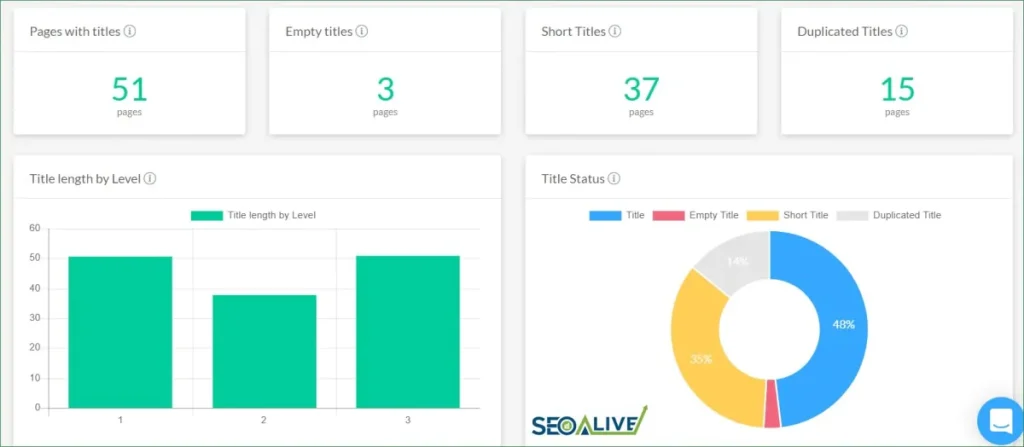
As we move forward with the SEO audit, we will obtain the full list of URLs on the website, and we must then review each of the titles and meta descriptions of each page to ensure they are optimized. Since we have extracted all the essential information during the keyword analysis, what we will do now is "match" the keywords we have with our pages to always try to provide the best possible result for the user and to help Google better understand the topic of each URL (while it is true that meta descriptions are not a ranking factor, they are an opportunity to attract users and make them click on your URL instead of a competitor's).
To do this, we just need to extract all the URLs with Screaming Frog and provide matching meta-data for each page. Additionally, if we use SEO tools, they will also tell us whether we have titles or meta descriptions that are too short, duplicated, or nonexistent.
STEP #7: Create a document with each URL and a proposed title and meta description for each one based on the keyword research, always keeping the CTR factor in mind — in other words, making sure the information is useful and attractive to the user.
8) SEO-Friendly URLs
When analyzing the SEO of a website at the on-page level, we must make sure that the URLs are optimized and well classified. Creating paths in the style of www.mydomain.com/store/computers will always be much better than having patterns in the style of (mydomain.com/store/category-sub566-var-4334). We will have to do this for all the different paths or subfolders the website has.
STEP #8: In any SEO audit, you should review the URL structure and propose improvements so that they are as friendly as possible, both for search engines and for users.
9) Canonicals and Alternates
Every page we have on the website must be unique and high-quality. However, this is not always possible. There are many times when, for technical reasons, we will have duplicate content (whether in categories, products, filters, etc.). That is why the canonical tag plays a fundamental role in indicating to Google which is the original page among all the versions it may end up having.
Reviewing the correct implementation of these meta tags will be essential to ensure a good indexing process.
STEP #9: When working on an SEO audit, it is important that you perform an extensive crawl of all the project's URLs using an automated tool such as Screaming Frog, Ahrefs, Fandango SEO, or any other, and analyze all the canonicals on the pages. Pay special attention to those that are duplicated, missing... and to those belonging to the business-critical pages.
10) Meta Robots
With the goal of guiding search engine robots, there are certain directives that prevent them from accessing specific pages of a website, such as the admin panel. There is no value in having robots trying to access and using up resources. That is why the robots.txt file exists, as well as noindex and nofollow directives at the URL level... so that search engines do not follow links, do not index certain pages, etc.
In an SEO audit you can detect whether this type of implementation has been applied to the wrong pages. We could end up removing successful pages that were bringing us lots of users and revenue.
STEP #10: Always carefully review every implementation you perform and set up ContentKing, FandangoSEO, or any other automatic change monitoring tool that also integrates with Slack or sends you email alerts so you can act immediately on any change.
11) Breadcrumbs
Breadcrumbs let the user easily find their way around within categories, and they also help search engines crawl our website much better.
STEP #11: Check that all pages where they can be implemented (articles, product pages, etc.) have breadcrumbs in place both visually and at the structured data markup level (JSON-LD).
12) Heading Structure
Page headings not only help users have an easier and more organized reading experience, they also help the search engine understand the main topic of the article and help rank the pages much better. In an SEO audit you should verify that each page has a single H1 and several H2s or H3s nested in order of hierarchical importance (starting from the premise that the H1 is the most important). Beyond the 3rd level, it is not recommended to go much deeper. There is no proof that they help much, so skip them.
Note: with HTML5 things change, but in general terms stick with a single H1 per URL.
STEP #12: Review the proper implementation of the headings on each page and make sure that the main business keywords are being used in them.
13) Optimize Images
Images bring websites to life. They engage users and make reading much more comfortable and fluid, so keep them in mind when developing your SEO audit. However, if we do not follow best practices and implement them correctly, we can face serious crawling and speed issues.
So you can get all the information about it, you have a full guide on SEO for images at your disposal.
STEP #13: Check that the images have the correct formats, appropriate file sizes, are compressed, load lazily (lazy load), and meet the standards. Have questions? Don't miss our detailed guide on how to optimize images for SEO -> SEO guide for images

14) Structured Data Markup (Schema Markups)
Do you publish recipes, job offers, articles, videos...? Structured data markup can be the difference between a CTR of 0.5% or 5%. If we tell Google what type of content we are creating, in exchange it will highlight it much more prominently in the search results.
#14: Review all the types of data markup available in your SEO audit and check whether your website has any of them so you can implement them.
15) Content Strategy
Blogs and articles are one of the most important traffic sources for websites. If you manage to create evergreen content (recurring searches and content that is always valid), you will earn a steady flow of customers for your business. Moreover, the first step before any purchase is gathering information, and in that sense, articles play a fundamental role.
STEP #15: Create your content plan for 3–6 months and make sure it is aligned with the most important keywords for the business. Also, always analyze the old content that is already published to see if it can be updated or improved so it gets more traffic.
Indexing
Once the on-page optimization work is complete, let's continue the SEO audit from the perspective of the project's indexing status. Let's keep going!
16) Crawling Errors
Our pages are indexed in Google in several phases. First Google visits our page, then it analyzes/crawls it, and finally it indexes it. These are 3 distinct phases, and it is very important that we pay attention to each of them to avoid problems.
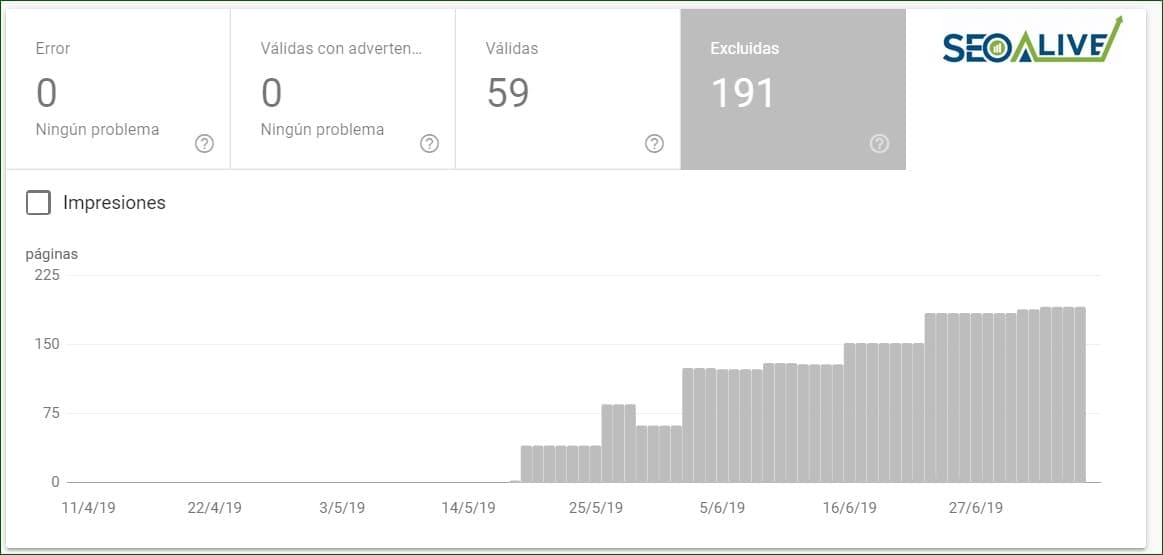
In this regard, Google Search Console will help us a lot, as it will show us the indexing status of our project, the errors Google is detecting, and their types (404: page not found, 301: permanent redirect detected, etc.).
One of the most useful functions of Search Console in this regard is "Fetch as Google," which allows us to test with GoogleBot how Google is seeing our page, whether it detects any issue, etc. Furthermore, whether you are carrying out the SEO audit or performing a recurring follow-up over time, we also have tools such as Broken Link Checker or Screaming Frog, which will also help us detect broken links, redirects, and other crawling issues.
STEP #16: Review the indexing section of Search Console and thoroughly analyze all the errors that appear to try to resolve them.
17) Mobile Friendly Test
Some time ago, Google announced that it takes the mobile version of websites as its reference, which means that speed and usability play a completely fundamental role.
STEP #17: When it comes to usability, take it easy: as you perform the SEO audit, you will have quite a bit of work ahead of you
-
Make sure your website is responsive and displays properly on any device (tablet, mobile, or desktop).
-
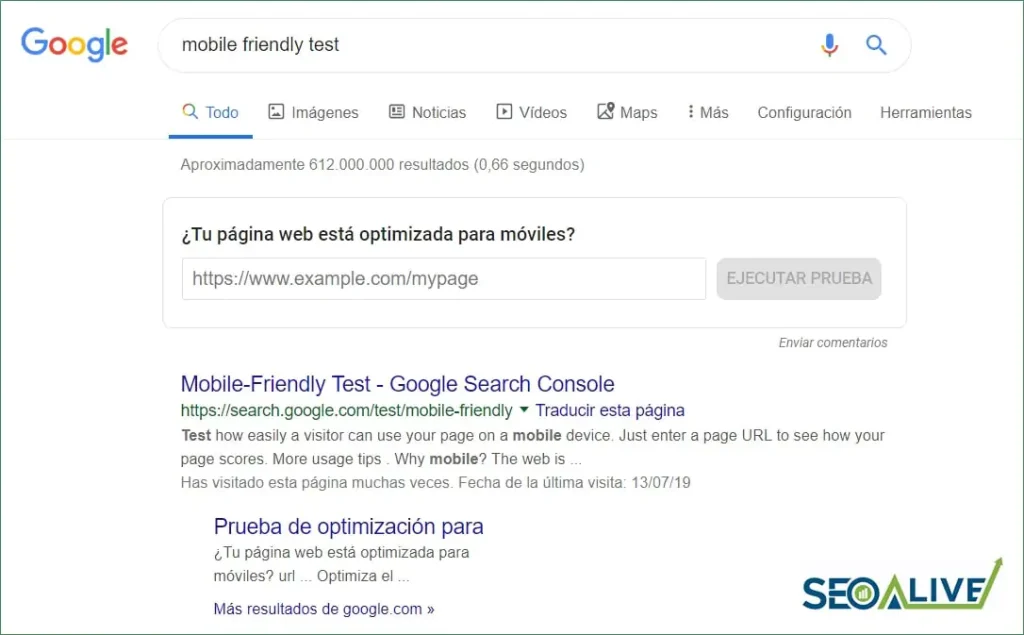
Analyze the site with Google's Mobile Friendly Test and make sure it passes all the checks.
-
Run usability analyses with Google's Lighthouse tool to ensure the website is 100% accessible.
18) Sitemap.xml
One of the most efficient ways to send our URLs to Google is through Sitemap.XML files, which are uploaded to our server and serve as a guide and benchmark for Google's crawling robots. They are very versatile files since there are different types (static pages, images, videos, news, etc.).
STEP #18: Remember to thoroughly review Google's documentation to implement sitemaps correctly, and reflect it in your SEO audit. Afterward, try to create as many as you can in every language in which the website is available. If you use WordPress, most plugins will generate these files automatically.
19) Security Certificate (HTTPS)
In the past, security certificates were considered an "extra" on websites, with no significant role unless the website was an e-commerce site and users were making payments on it. However, now security certificates and protocols (HTTPS) have taken on a critical role, and Google displays a very prominent warning to users who visit insecure websites.
STEP #19: Make sure you have the security certificate fully installed and properly configured and that all insecure URLs (HTTP) are redirecting to their secure equivalent (HTTPS).
Web Performance Optimization (WPO)
20) Preliminary Web Speed Analysis
The first step to work on WPO, or web optimization, is to carry out a preliminary SEO-level analysis of the current situation to see the state of each page, the resources being used, and how we can improve them.
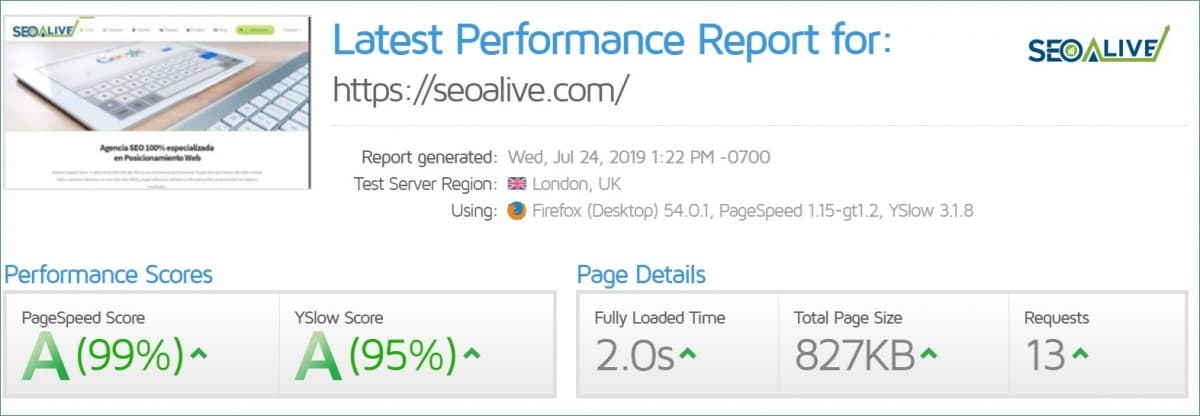
There are currently many free tools that will help us a lot when it comes to analyzing and implementing improvements in web performance. You can see them below:
STEP #20: Analyze the website's performance using different tools:
-
Pingdom Tools
-
GTMetrix
-
Google's Lighthouse
These tools will give you guideline values and will also show you a series of suggestions and possible improvements you can implement.
21) Server Compression (GZIP)
GZIP compression improves server performance and makes its response time much faster.
ACTION #21: Implement it, and then enter your website's URL into this GZIP validator to confirm that everything is working correctly.
22) Async Loading and Lazy Loading
Often, due to business needs, we implement code such as Google Analytics, support chats, and other scripts that cause the website to load much more slowly. The same happens with images, videos, and other large files. If, instead of loading them directly when the user visits the page, we do it when the user scrolls and moves down the page, we will create a much more durable and reliable experience.
STEP #22: If you include recommendations in your SEO audit, remember to mention that async loading of scripts and lazy loading of images and videos should be implemented. Additionally, it should be verified that these are only loading when the user scrolls, by looking at the cascade view in the browser console or with the GTMetrix tool.
Also remember to review that the expire headers are properly configured and that the website uses the HTTP/2 protocol instead of HTTP/1, which will allow several elements to load simultaneously instead of sequentially.
23) CDN
CDNs, or content delivery networks, are tools through which we cause our pages to be stored in cache and served much more quickly from different servers around the world; this way, we can be much closer to the user.
STEP #23: Check whether the website already has a CDN in place, and if not, evaluate implementing one. You have several options to choose from, such as Cloudflare.
24) AMP and PWA
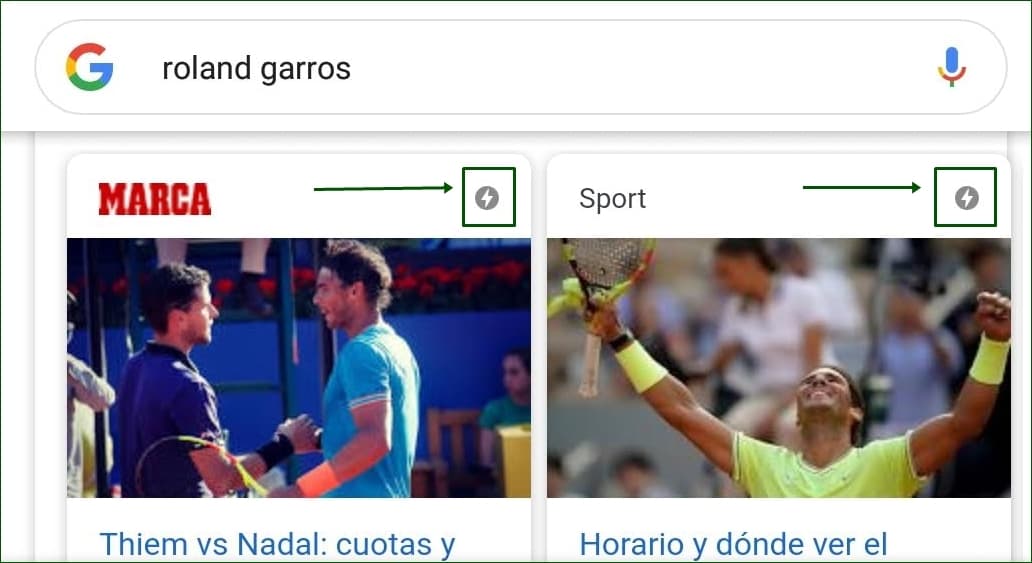
A few years ago, the concepts of AMP and PWA were not heard much inside or outside the SEO world. However, they have now become essential elements for any website. AMP technology allows us to create pages (almost always content pages) that are much faster, with fewer dynamic resources, and therefore ideal for articles and news. It is true that if the implementation is not done well, the bounce rate on these pages can be very high, but if we follow best practices — such as implementing an AMP menu — the situation should improve.
As for PWAs, they are a technology that lets us turn our websites into apps in small steps, improving their speed since a lot of information is cached, and also allowing us to view pages offline.
STEP #24: If you are performing an SEO audit on a WordPress-based project and you need to do the relevant implementations, your life will be much easier with WordPress. You have excellent plugins available to implement AMP and PWA. If, on the other hand, you are implementing on another platform or even custom code, you will have to do the implementation by hand following the recommended best practices explained on their website.
If you are looking for a website that already has both technologies in place... you are in the right place! You can see both technologies implemented at SEOcrawl AI.
International SEO
25) Alternates
While in the on-page SEO audit section we saw the importance of adding canonicals correctly, something that also plays a fundamental role in the analysis of international SEO is the implementation of alternates — that is, those meta tags that tell Google the versions of our website/page in other languages.
STEP #25: Remember that each page must have an alternate to itself indicating the language and another alternate pointing to the versions in the other languages. If you have many languages, it would also be advisable to add the x-default meta tag, which will tell Google which is the main version of the website in case there is any doubt between languages.
26) Domains and Translations
At first, most companies plan to enter a single market. However, as they grow, they often set their sights on new, more ambitious goals — such as wanting to enter international markets. Remember that the SEO strategy must always go hand in hand, so you should ask in advance and reflect it in your SEO audit.
STEP #26: Check that the website you are analyzing owns all its international domains, to prevent brokers or domain agents from buying them first and then trying to resell them. Even though you can follow a structure such as domain.com/LANGUAGE, it never hurts to own the domains domain.es (Spain), domain.fr (France), and so on.
Link Building
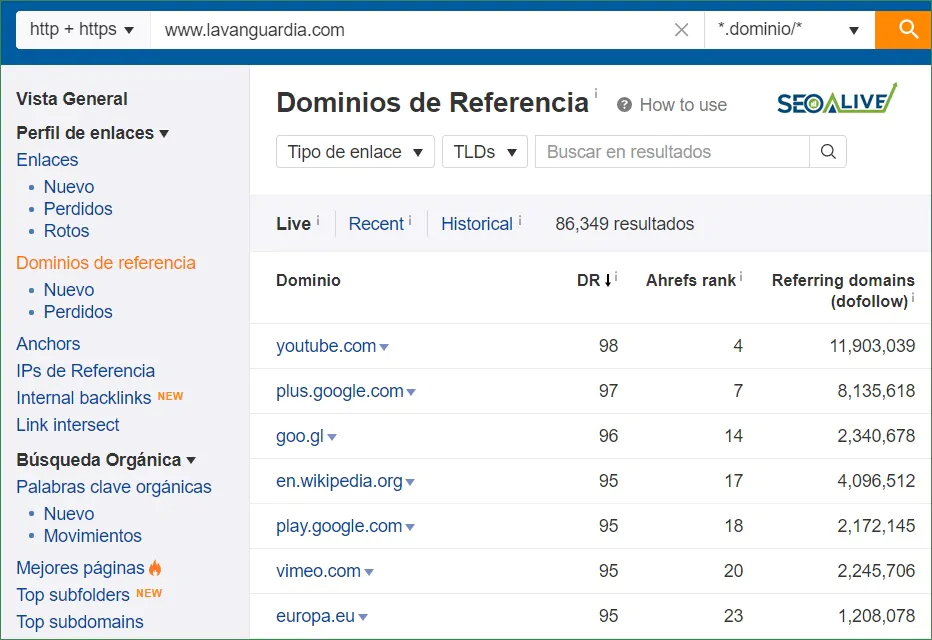
27) Link Profile Analysis
The first thing we should analyze regarding a website's link building strategy is the current situation. That includes concepts such as:
-
Total inbound links
-
Unique domains with inbound links
-
Authority of each URL
-
Domain authority
Once all this information has been analyzed with tools like Ahrefs.com, we will be able to evaluate the next steps, which we detail below.
STEP #27: Now that you know the current situation thanks to the SEO audit, you will be able to act accordingly. Some of the best practices to build natural links and avoid the complex world of link buying are the following:
-
Analyze the competition's links and try to replicate them.
-
Monitor your brand mentions and write to the media outlets that mention you to ask for a link.
-
Occasionally and manually, send your content to select media outlets in the industry or to specialized professionals.
-
Write posts as a guest author on other websites with greater relevance and authority.
28) Local SEO + Reviews
One of the great forgotten pieces of a company's SEO strategy is local SEO. Being close to consumers or users is just as important as having a solid link profile or strong on-page optimization.
STEP #28: Create or thoroughly optimize your Google My Business profile and build up the number of reviews naturally and organically, both to improve the customer's perception of the company and to share the company's latest news with its followers.
*Now, you may be asking yourself: why do you want to share this knowledge? We know that this checklist will be used by professionals all over the world, including our competitors (other SEO agencies). However, we believe our goal is not only to help companies around the world, but also to leave our little grain of sand to the SEO world. That is why we have done it and we sincerely hope you enjoy it. *
And if you feel like it, you can also leave us comments so we can continue to improve/optimize it together. Thank you very much for your collaboration!
Author: David Kaufmann

I've spent the last 10+ years completely obsessed with SEO — and honestly, I wouldn't have it any other way.
My career hit a new level when I worked as a senior SEO specialist for Chess.com — one of the top 100 most visited websites on the entire internet. Operating at that scale, across millions of pages, dozens of languages, and one of the most competitive SERPs out there, taught me things no course or certification ever could. That experience changed my perspective on what great SEO really looks like — and it became the foundation for everything I've built since.
From that experience, I founded SEO Alive — an agency for brands that are serious about organic growth. We're not here to sell dashboards and monthly reports. We're here to build strategies that actually move the needle, combining the best of classical SEO with the exciting new world of Generative Engine Optimization (GEO) — making sure your brand shows up not just in Google's blue links, but inside the AI-generated answers that ChatGPT, Perplexity, and Google AI Overviews are delivering to millions of people every single day.
And because I couldn't find a tool that handled both of those worlds properly, I built one myself — SEOcrawl AI, an enterprise SEO intelligence platform that brings together rankings, technical audits, backlink monitoring, crawl health, and AI brand visibility tracking all in one place. It's the platform I always wished existed.
Discover more content about this author
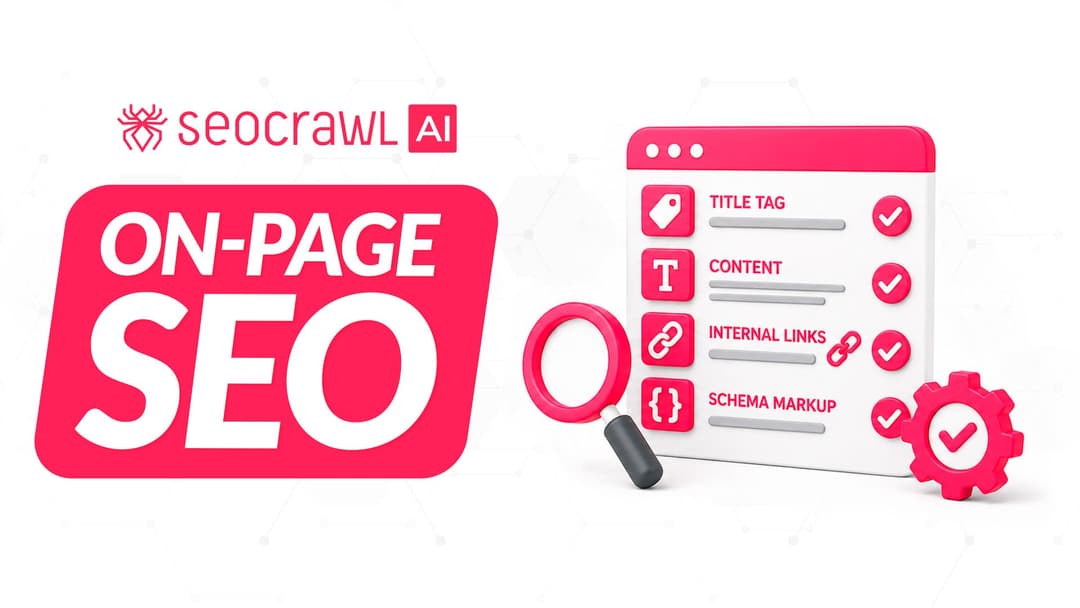
On-page SEO is everything you control on a page: content, title, meta description, headings, URL, images and internal links. Here is a checklist element by element, an audit process and what changes with AI Overviews and AI Mode.