Meta Description: What It Is and How to Write Good Ones
If you work in the world of SEO positioning, knowing the basic HTML tags that search engines consider when crawling and indexing a web page or blog post is a must. This is where one of the most important tags in SEO comes into play: the meta description.
In this article, we explain everything you need to know about the meta description tag, and we'll share the best tips for creating and optimizing it for search engines.
Are you coming along? Let's get started!
What is the meta description tag?
The meta description tag is an HTML code tag added to the <head></head> section of the page, and it has the following basic structure:
<meta name = "description" content= "This is the content where the page's topic is briefly summarized"
This tag is displayed below the title in the snippets on search results pages (SERPs), and its standard length, in number of characters recommended by Google, is between 150 and 160 (including spaces).

Example of SEO title and meta description in Google.
How to identify the meta description of a page?
There are several ways to see the location and content of this meta tag:
Through the source code
This is a quick way to clearly identify where it is within the HTML code of a web page. To do this, we just need to go to the page where we want to find the tag, right-click with the mouse, and select "view page source". Once this is done, the full source code will be shown. To locate it, the best option is to press the key combination "CTRL + F" on the keyboard, and an internal search box will appear where we'll type the word "description". The search tool will then reveal the location of the meta description by highlighting it in color.
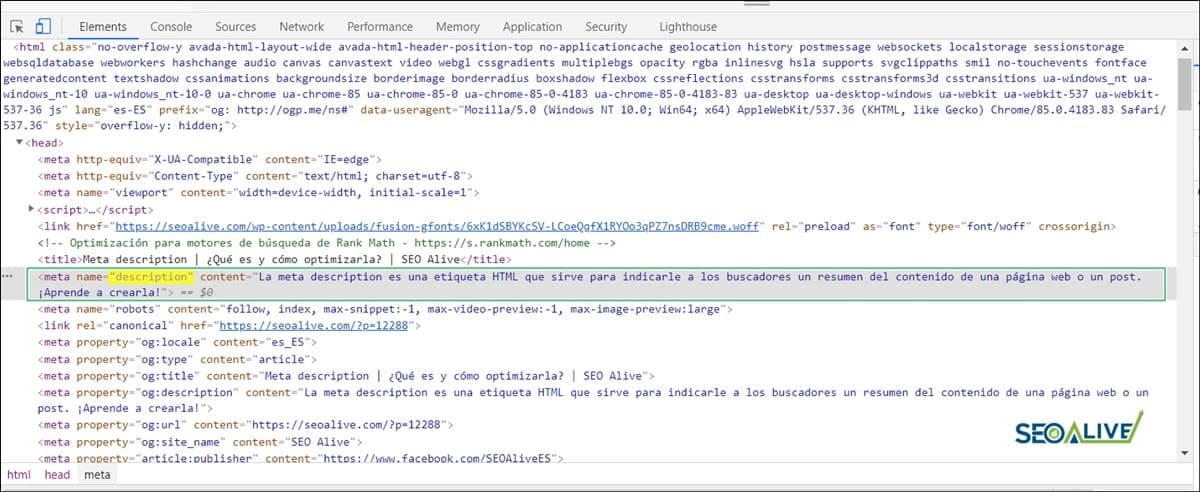
Example of the meta description of this article as seen in the page's source code.
Through a Chrome extension
Within Chrome's extension repository, Google makes available to us a good handful of SEO extensions to make our lives easier. With them, we can identify how the meta description is built and whether it's optimized for search engines. Some of them are (we leave you the link to the download URL on the Chrome Web Store): SEO Quake, Meta SEO inspector, Meta Tag Analyzer, Detailed SEO Extension... and our own free SEO extension for Chrome, which shows the meta description, title, headings and canonical of any page in a single click.
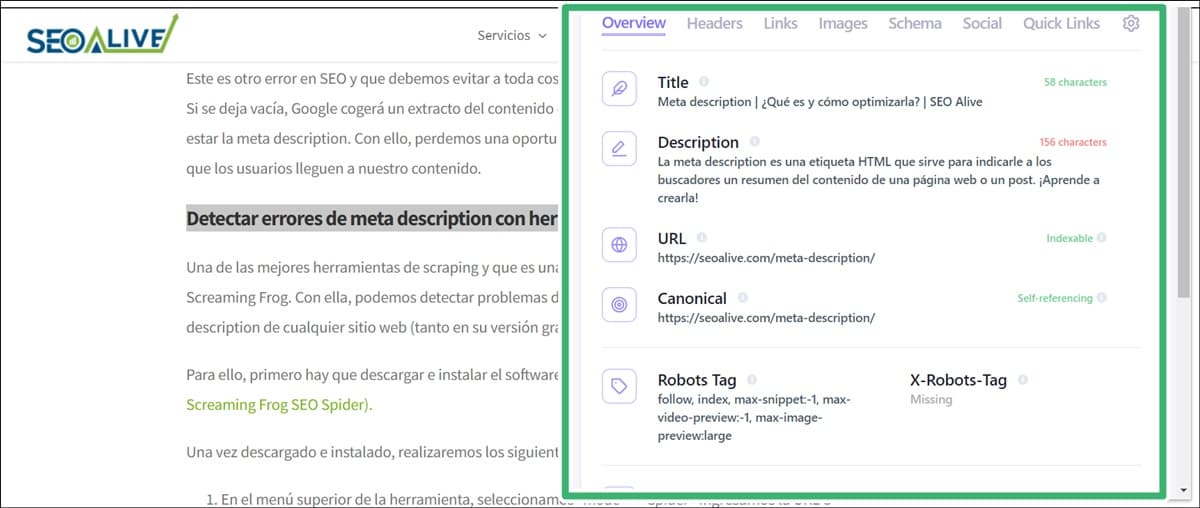
View of the page's meta data thanks to the "Detailed SEO Extension".
Although for some time now Google has not considered meta description tags as a direct organic ranking factor, they are highly visible in search engine results, and they serve as descriptive text that catches users' attention, inviting them to enter each of the pages.
However, there are other search engines such as Yahoo!, Bing, or Yandex that still give a certain relevance to this meta tag.
Why is the meta description important?
If you're committed to a well-optimized SEO effort on your website, or you're planning to do so, then you'll know how difficult it is to appear at the top of search engine results pages.
At this point, it's important to know that if our meta description is optimized and able to "seduce" and catch the attention of our potential users, it will help us receive more organic clicks and therefore improve our CTR %, and this IS a key ranking factor.
The CTR (Click Through Rate) metric evaluates the rate of clicks per impressions measured as a percentage, and for search engines like Google, it helps to gauge how relevant and attractive a website is to users. Let's look at it this way: the greater the number of clicks received, the greater the visibility, and therefore the greater the probability of obtaining higher rankings in the SERPs.
For this reason, this must be one of the objectives to keep in mind when creating a meta description: Create attractive text to get visits to our website. The goal is to achieve the best possible result, and this is accomplished with unbeatable writing of the meta title and meta description tags.
How to create a perfect meta description?
There are a few simple rules we can keep in mind when writing the meta description tag so that it is perfectly optimized for search engines:
- The meta description tag must contain the keyword we want to rank for. It should especially be included at the beginning of the text so it is more visible in search results. But watch out! Do it naturally — over-optimization must be avoided.
- As we've mentioned, the length must be between 150-160 characters maximum, so it's important to capture the main ideas you want to convey to users. Be concise and get to the point.
- Each page of the website should contain a unique and original meta description, and therefore different from the others. If each page has different information, the meta description should also be different.
- The text of the description tag should not only support the calculation of relevance for search engines, but it must also be descriptive and, to a certain extent, sales-oriented, since it can make the difference between whether a user — when comparing it to that of other pages in a search engine results listing — clicks on it or prefers to click on a competitor's page.
- Add a call to action ("Call To Action") inviting users to enter the page and learn more about its content. An example of a call to action would be: "Visit the website to learn more" or "Continue reading".
- Try using emoticons and rich snippets. The use of emojis in description tags can help raise CTR, although ultimately it's Google that decides whether to display them or not. On the other hand, if you create microformats to configure rich snippets, you'll be giving search engines information that your result is different, so they show it as such.
Having an SEO-optimized meta description will make more users click on your website, which translates into a greater number of visits, greater visibility, and therefore better rankings in search engines.
Common mistakes when writing a meta description
Just as writing an SEO-optimized meta description is important for our website's ranking, there are a series of mistakes that are essential to avoid. These are some of them:
Avoid the excessive use of words in uppercase.
It's well known that the use of uppercase letters in internet communication makes it seem like you're shouting and can even come across as an offensive tone. For this reason, it's advisable not to use them, and if you're going to use them, make it only one or two words that can attract the user.
Don't do keyword stuffing in the meta description.
Thinking that by filling the meta description with the main target keyword of our ranking effort we're going to get more visits from users is a fundamental SEO mistake, since you're not providing any value/benefit to them, besides going against the guidelines provided by search engines.
Don't leave the description tag empty
This is another SEO mistake and one we must avoid at all costs if we want to pursue optimization. If left empty, Google will take an excerpt of the page's content and place it where the meta description should be. With this, we lose a very valuable opportunity to get clicks and have users reach our content.
Detecting meta description errors with SEO tools
One of the best scraping tools — and a true Swiss Army knife for SEOs — is Screaming Frog. With it, we can detect optimization issues with the meta description tags of any website (both in its free version and in the paid version).
To do this, you first have to download and install the software (We leave you the link to the official page: Screaming Frog SEO Spider).
Once downloaded and installed, we'll carry out the following steps:
- In the top menu of the tool, we select "mode" > "Spider", enter the URL or domain on which we want to perform the crawl, and click "Start".
- Screaming Frog will perform a thorough crawl of all the URLs on the website we're analyzing. Once it has finished, we'll go to the "meta description" tab and a list of all of them will be displayed.
- To work more comfortably, we can filter from the "Filter" option those that interest us. We have the following options within this mode:
All
-
missing (need to be implemented)
-
duplicate
-
Over 155 characters
-
Below 70 characters
-
multiple.
-
Once we've applied the filter we want, we can export the list in .csv format to work with it and carry out all the necessary implementations in the meta descriptions of our website.
How to add a meta description tag in WordPress?
Now that you know the best practices when writing an optimized meta description, we'll show you how to edit a meta description from the WordPress content manager. To do this, we'll use one of the best SEO plugins that exist for this CMS. This is none other than Rank Math.
To do this, we'll have to follow these steps:
- Once the plugin is installed and activated from the WP repository, we'll go to the enabled Rank Math tab and select the option "Titles and Meta" > "Content Types"
- From there we can configure some important aspects such as the title, the meta description, whether we want to configure rich snippets, the custom values of the meta robots tag... all of this at the level of posts, pages, attachments, portfolio, post, or categories. (Depending on what we're interested in indexing and sending in the sitemap.xml to Google, we'll configure some options or others).
- If what we want is to carry out a custom configuration, we can do it for each publication from the post-editing screen of each individual page.
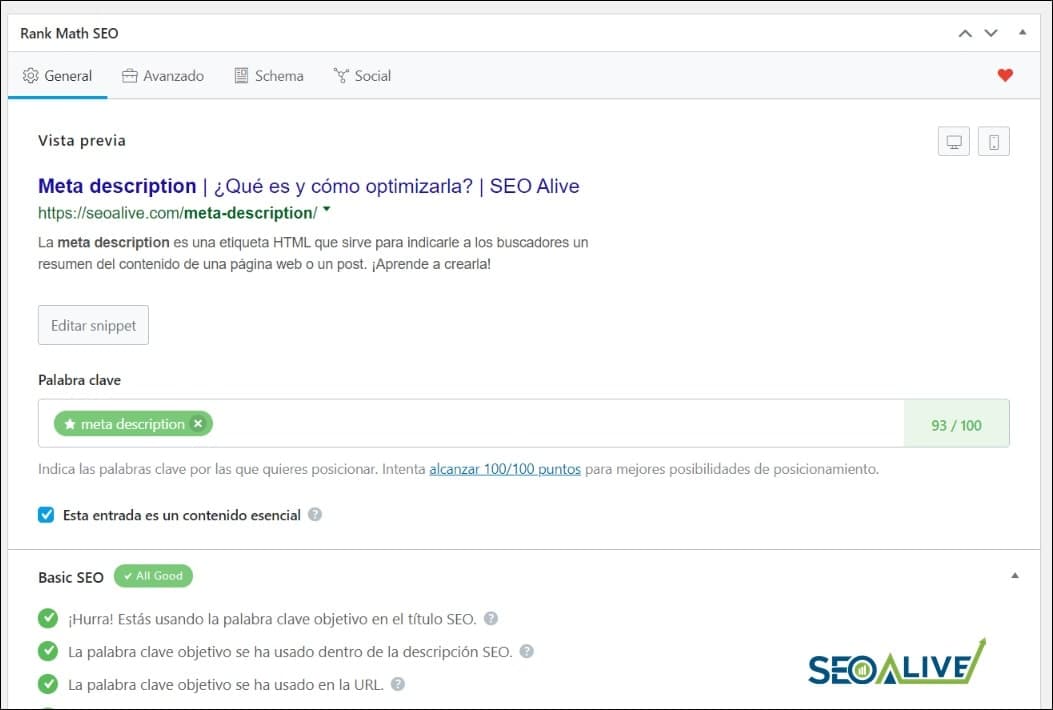
Meta description editing and analysis panel in Rank Math.
We leave you here: Rank Math SEO Plugin, the link to the official Rank Math page for download, but as we've mentioned, it can be conveniently installed from the WordPress plugin repository.
Conclusions
Meta description tags remain a fundamental part of a website's On-Page SEO. For this reason, although they have lost relevance over the years, they are still an indirect ranking factor, and Google still takes them into account when weighing rankings on search results pages. Our recommendation is that you don't stop optimizing them on your site, as it will help you get clicks, visits, and organic traffic.
So now you know... Get going and start working on your meta descriptions!
Do you have any questions or suggestions? Send us a message or leave a comment and we'll answer as quickly as possible!
Author: David Kaufmann

I've spent the last 10+ years completely obsessed with SEO — and honestly, I wouldn't have it any other way.
My career hit a new level when I worked as a senior SEO specialist for Chess.com — one of the top 100 most visited websites on the entire internet. Operating at that scale, across millions of pages, dozens of languages, and one of the most competitive SERPs out there, taught me things no course or certification ever could. That experience changed my perspective on what great SEO really looks like — and it became the foundation for everything I've built since.
From that experience, I founded SEO Alive — an agency for brands that are serious about organic growth. We're not here to sell dashboards and monthly reports. We're here to build strategies that actually move the needle, combining the best of classical SEO with the exciting new world of Generative Engine Optimization (GEO) — making sure your brand shows up not just in Google's blue links, but inside the AI-generated answers that ChatGPT, Perplexity, and Google AI Overviews are delivering to millions of people every single day.
And because I couldn't find a tool that handled both of those worlds properly, I built one myself — SEOcrawl AI, an enterprise SEO intelligence platform that brings together rankings, technical audits, backlink monitoring, crawl health, and AI brand visibility tracking all in one place. It's the platform I always wished existed.
Discover more content about this author