The impact of the Open Graph protocol on SEO
When we put together a search engine positioning strategy, we should not forget about social media. We must take care of titles, descriptions, and images since they are the only elements the user will see and what will make them decide whether to click or not.
Do you know how users see your website when they share it on their social profiles? Keep in mind that the better your content looks and the more attractive it is, the more viral it will become, and therefore the greater the impact on your website, which also helps improve your SEO results.
We'll tell you all about it!
What are Open Graph tags?
The meta tags or Open Graph protocol was created by Facebook and allows any web page to be displayed with an enriched format on social networks. These HTML tags will be in charge of displaying the content (title, description, page image, etc.) of a page that is shared on social networks. If these tags do not exist or are not specified, information will be shown randomly, picking a random photo, a non-descriptive title or description...
What are they used for?
These tags are known as social tags and are very important for achieving positioning in each and every social network. Depending on which social network it is, it will be easier or harder, but positioning on social networks exists, it is real.
The Open Graph protocol was initially used on Facebook and is currently also recognized on LinkedIn. On the other hand, Twitter's tags are exclusive to that social network.
The tags are the following:
og:title:
The "Title" is in charge of telling the search engine what the page is about. Therefore, it must be clear, concise, and unique on each page. Its maximum length is 67 characters.
Example:
<meta property="og:title" content="What are Open Graph tags?"/>
og:description
The "Meta description" will be the one that describes and informs more extensively about the page. It should not exceed 155 characters and can contain a phrase or CTA that encourages the user to click on the result. It should also be unique for each page.
Example:
<meta property="og:description" content="Do you know how users see your website when they share it on their social profiles? Open Graph tags will be in charge of displaying all the information."/>
og:url:
The URL of a web page is displayed, and it can be shown shortened. Try to use this tag with a URL as clean as possible and unique on each page.
Example:
<meta property="og:url" content="/blog/open-graph" />
og:image
You must specify an image URL so it can be shown on each page. This is surely one of the most overlooked and one of the most important. Google Discover, Google News, Facebook, Twitter, LinkedIn... all of them will pick up this image as a hook for the user, and if it is of good quality, you can get tons of visits. Otherwise, if you leave the field empty, the author's photo may be shown, an empty field... You choose which is better! ;)
Example:
<meta property="og:image" content="/blog/images/open-graph.jpg" />
og:video
In case you have a video on the page, you must specify it using this tag, which facilitates its interpretation.
<meta property="og:video" content="http://example.com/bond/trailer.swf" />
og:type
This tag indicates what your content consists of. Whether it's an article, a video, a blog post... Depending on the type, you can assign different properties.
Example:
<meta property="og:type" content="article" />
og:site_name
With it you can specify your website so your brand is displayed.
<meta property="og:site_name" content="SEOcrawl AI" />
Types of social meta tags that exist
Currently, the tags created by Facebook are used on the rest of the social networks, such as LinkedIn. Twitter uses what are known as Twitter Cards. With these tags you have three options:
-
"Photo" for images
-
"Player" for videos and
-
"Summary" for everything else.
In this case, as with Open Graph cards, if it is not optimized, default and non-optimized content will be displayed.
Tag testing tools
Analyzing how pages look when a user shares them on social networks will be crucial if we want everything to work correctly.
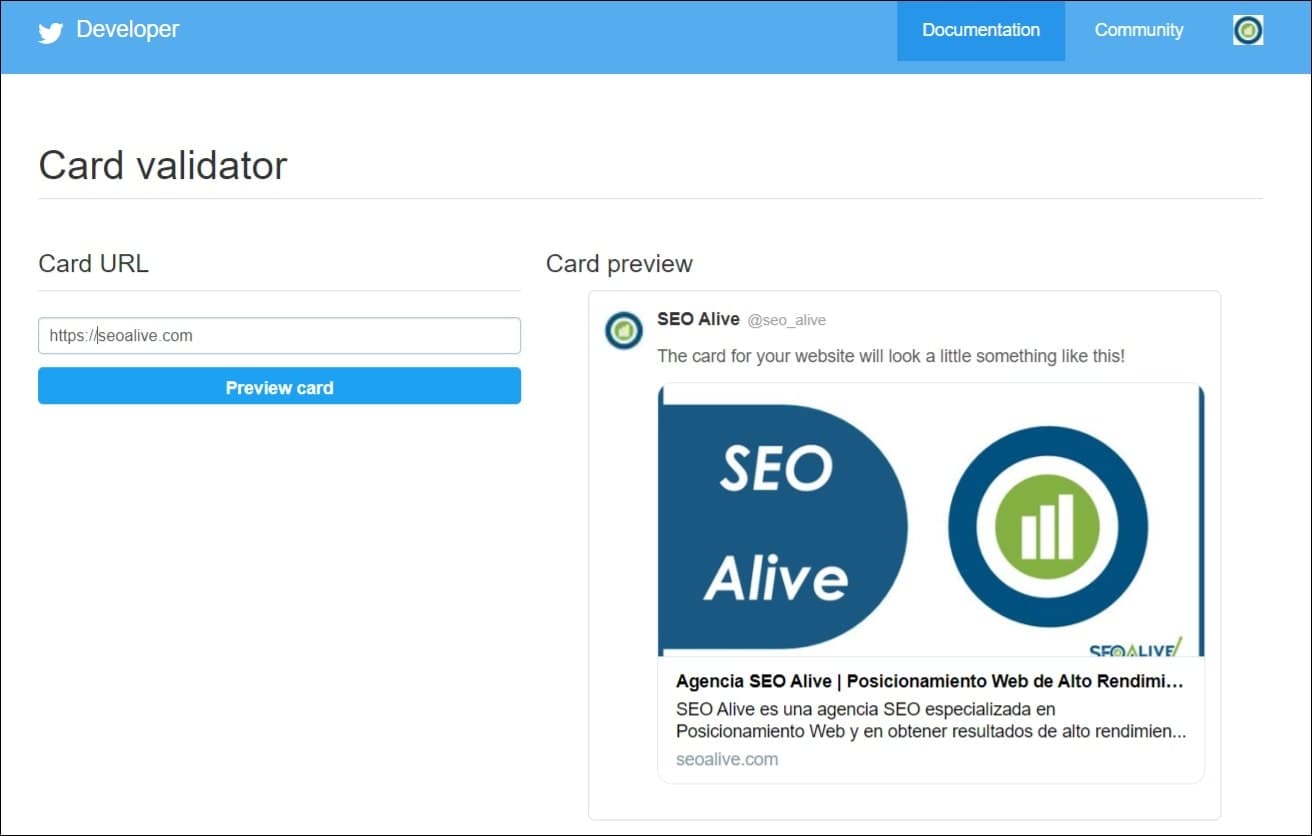
Twitter Card Validator
Twitter's validation tool is Twitter Card Validator. Before publishing anything, if you want to make sure everything is displayed correctly, don't hesitate to enter the URL you want to share. It is also very useful if you have updated the image of a page and the feed is still showing the old one. Re-analyzing it will act as a "cache purge".
Facebook Debugger
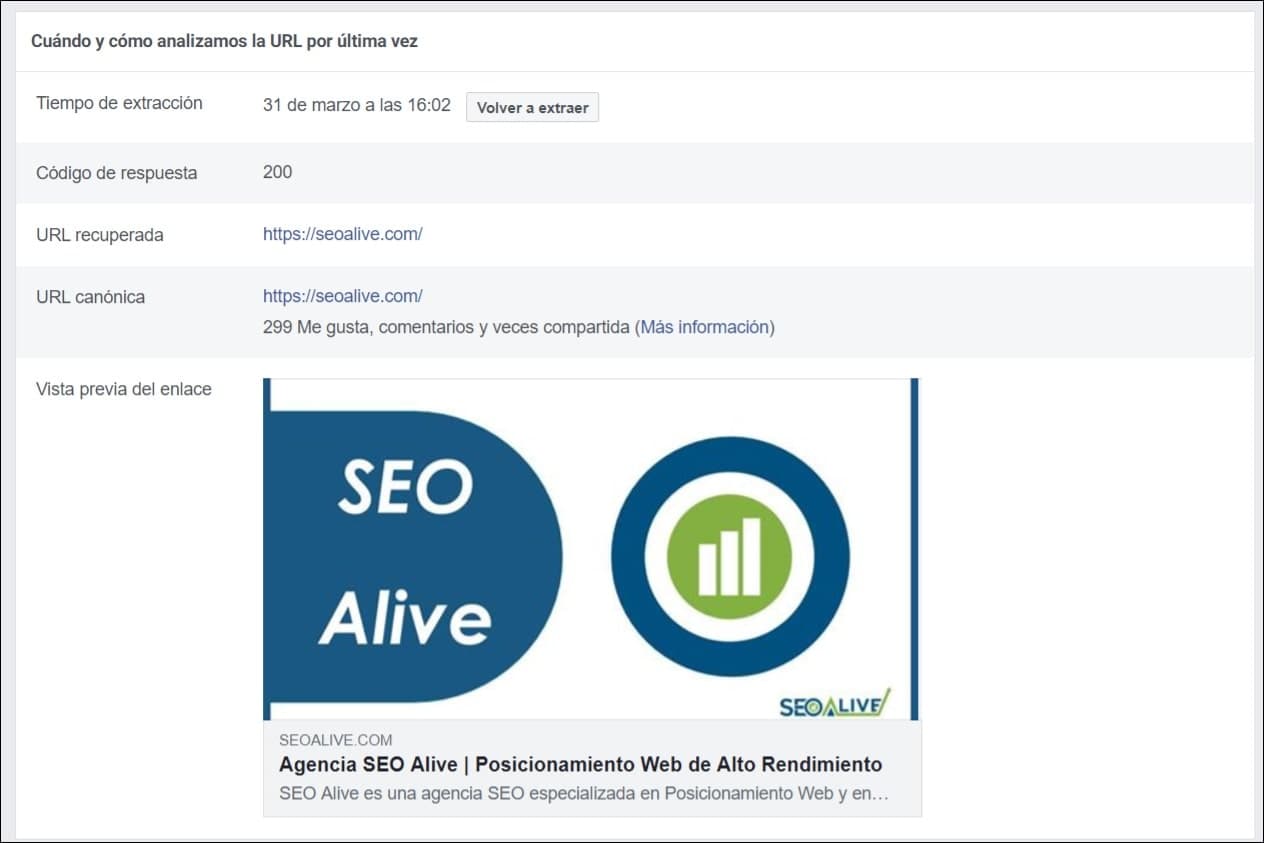
Facebook's debugging tool is known as Facebook Debugger. With it you can see what information is being used and what it looks like when a page from your site is shared. In addition, in case any of the fields is incorrect or missing, a warning will pop up.
Google Structured Data Testing Tool
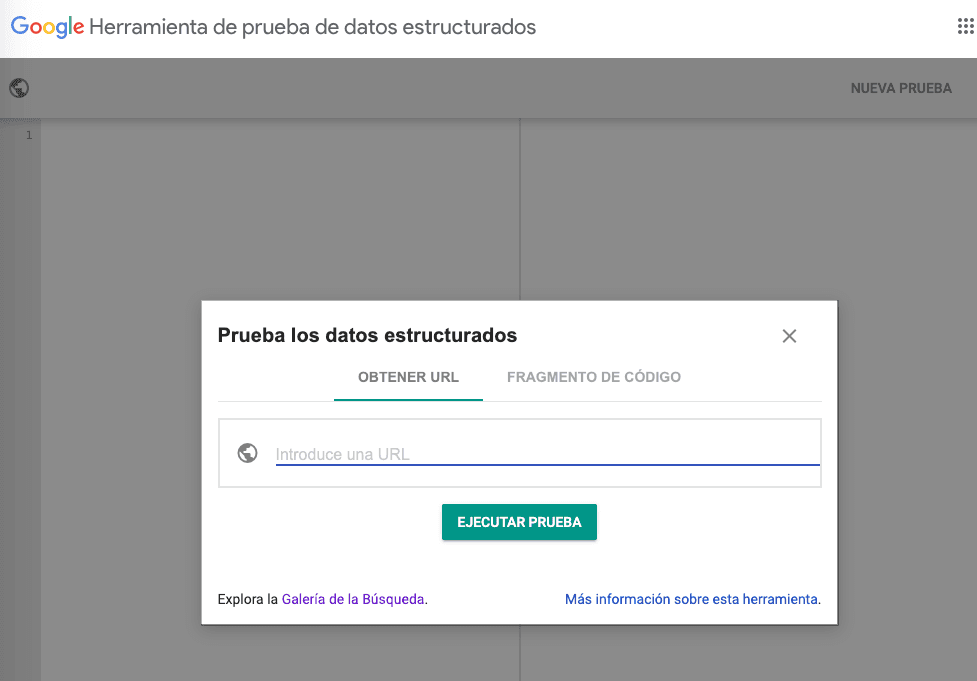
Google also makes available to us the structured data testing tool called Google Structured Data Testing Tool. It is very useful to check what type of markup Google is picking up from a page. The markup is recognized by search engines, which helps make a website "semantic" by introducing the Schema microdata specific to each case.
Rich Pins Validator
Pinterest couldn't be left behind and brings its pin validator, also known as Rich Pins Validator. It works just like the Twitter validator: an approval process is required to obtain the Rich Pin functionality and check the data markup at the same time.

How to optimize these tags in WordPress?
As you may know, one of the great advantages WordPress offers us is its flexibility and its huge community. As a result, processes such as introducing open-graph tags into our pages and articles take just seconds thanks to plugins.
There are many ways to achieve it. In our case, we believe the easiest is to do it through the SEO Rank Math plugin.
Recommended article >** **[In-depth SEO tutorial on Rank Math](/blog/rank-math)
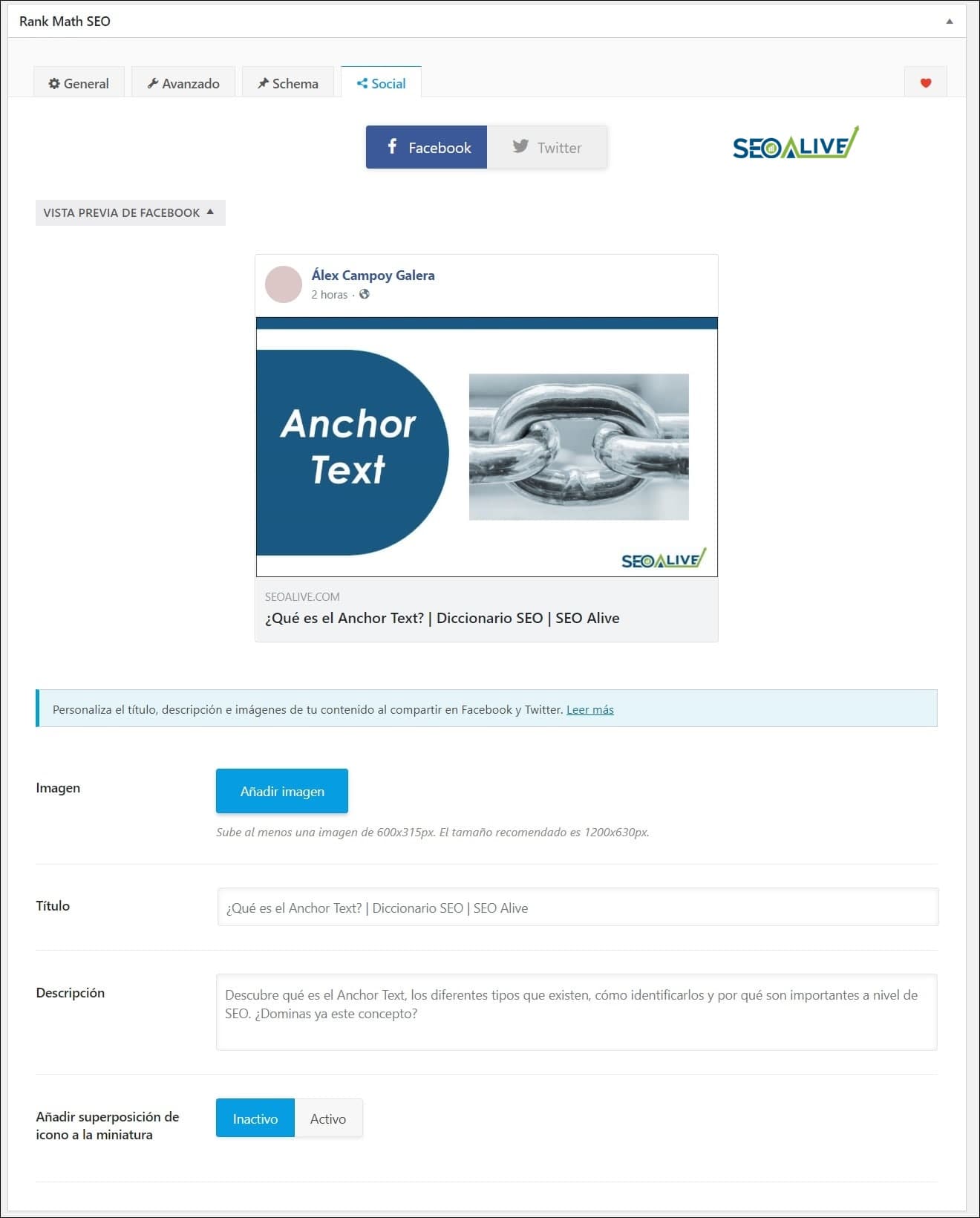
All you have to do is go to the SEO section of the page or article in question, click on the "Social" tab, and there we'll see the option to configure the image. In many cases, if we have uploaded a featured image, it will pick it up directly.
Tips and improvements
Below, you can see some tips based on experience that have worked for us to achieve very good results.
Optimize images
Choose quality images. You must choose each image perfectly because it is going to represent your content. Also, it will be the image that appears when the user shares the content.
Each platform has certain standards; the best thing is to choose a large image that can fit each social network.
Visual content is the most attractive on social networks, and if you manage to go viral, you'll get more visits to your website. You know, invest time in choosing the perfect image to get likes, shares, and comments.
-
Twitter: 120x120px for the small one and 4096x4096px for the large one
-
Facebook: the smallest at 200px and the largest at 1200px
Always use Open Graph
Being an already well-known format, more platforms can use it. It is recommended to use code templates to insert social tags; you can consult all the information in the following guide.
Recommended Guide -> [Meta Tags in SEO](/blog/meta-tags)
Test and experiment
Always test and check in the validators to make sure your site's results are being displayed correctly on social networks.
Conclusions
They are small details that will make your brand look great in the eyes of users. Keep in mind that these tags are essential to properly display your page and attract visits. They also make it easier for search engines to understand your website. So SEO optimization also includes paying attention to social networks.
Remember also that social signals, that is, traffic that comes from social networks, can positively affect an SEO strategy, so every click from social media is worth its weight in gold!
Any questions or suggestions? We're happy to help!
References:
- https://ogp.me/ - Official website of the Open Graph protocol
Author: David Kaufmann

I've spent the last 10+ years completely obsessed with SEO — and honestly, I wouldn't have it any other way.
My career hit a new level when I worked as a senior SEO specialist for Chess.com — one of the top 100 most visited websites on the entire internet. Operating at that scale, across millions of pages, dozens of languages, and one of the most competitive SERPs out there, taught me things no course or certification ever could. That experience changed my perspective on what great SEO really looks like — and it became the foundation for everything I've built since.
From that experience, I founded SEO Alive — an agency for brands that are serious about organic growth. We're not here to sell dashboards and monthly reports. We're here to build strategies that actually move the needle, combining the best of classical SEO with the exciting new world of Generative Engine Optimization (GEO) — making sure your brand shows up not just in Google's blue links, but inside the AI-generated answers that ChatGPT, Perplexity, and Google AI Overviews are delivering to millions of people every single day.
And because I couldn't find a tool that handled both of those worlds properly, I built one myself — SEOcrawl AI, an enterprise SEO intelligence platform that brings together rankings, technical audits, backlink monitoring, crawl health, and AI brand visibility tracking all in one place. It's the platform I always wished existed.
Discover more content about this author