FAQ Schema: What It Is and How to Add It
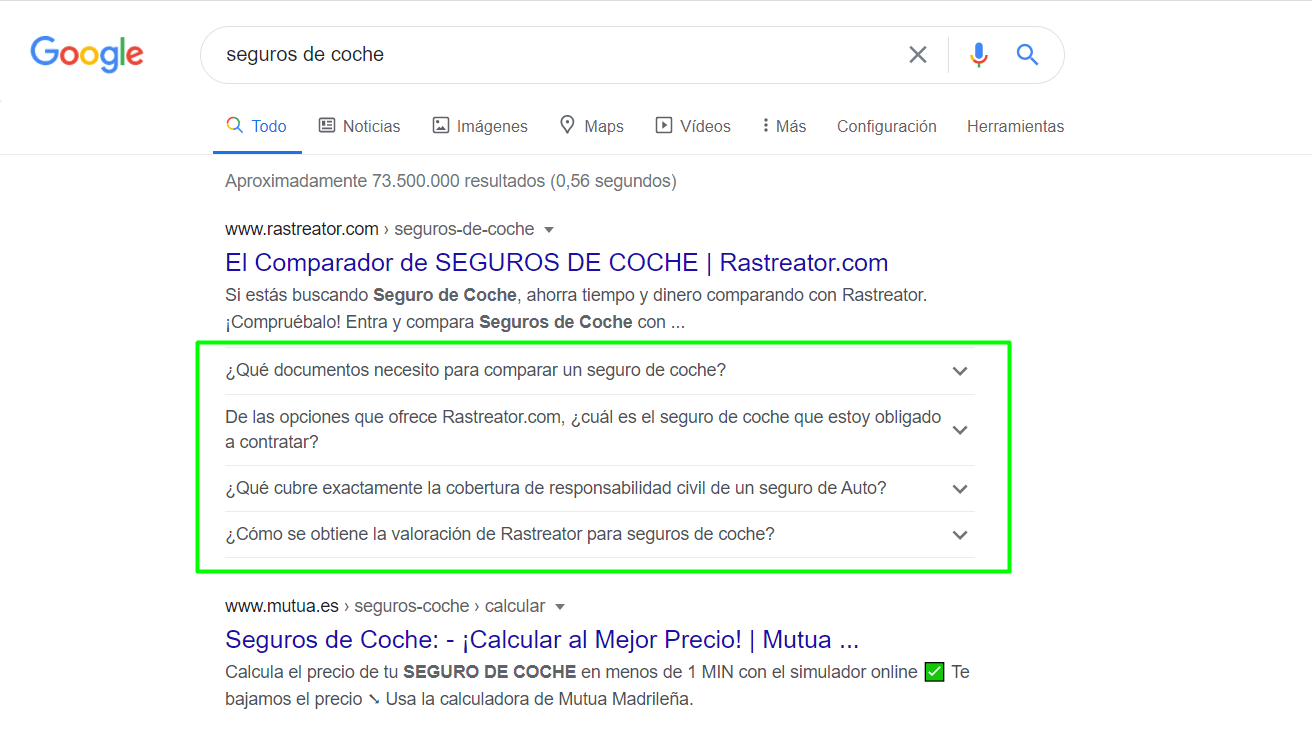
In search engine optimization, FAQ Schema is a specific type of structured data markup that can be included on pages or blog articles of a website. FAQ Schema, also known as FAQ Snippets, was implemented by Google in 2019 and its purpose is that, for a given keyword query, a drop-down is displayed showing information in the form of questions and answers that allow users to satisfy their search intent. Implementing this type of structured data markup directly impacts a website's SEO and visibility. Want to see how? Follow along!
Before we move on, and in case you don't know what structured data is, we recommend you take a look at the article written by our SEO consultant and colleague, Jesús Páez:
Recommended reading: Implementing structured data with Schema
How does FAQ Schema help us improve the SEO of our website?
One of the advantages of implementing a Frequently Asked Questions section in Google's enriched snippets (rich snippets) is that it can generate a considerable increase in organic traffic, and if we include Schema markup, the chances of this happening are even greater.
The CTR (Click Through Rate) metric also benefits from the use of FAQ Schema. Let's imagine we're ranking to break into the Top 3 of Google's SERPs. If our result is more attractive, has a higher CTR percentage than the results in 3rd or 2nd position, and also has FAQ snippets implemented, Google may consider our result more relevant to users and grant us better visibility, which translates into climbing positions.
Generating FAQ Schema for our website will make it occupy more space and be more visible on results pages, and will naturally favor engagement. Well-done SEO has a snowball effect: the more content generates quality traffic to a website, the more organic visibility it will obtain. That's why it's so important to boost our website's content efforts with rich snippets.
When to use FAQ Schema on our website?
When implementing FAQ Schema, it's important to keep in mind Google's official guidelines on structured data, and it's also advisable to follow the content guidelines since proper configuration will allow us to appear as rich results for frequently asked questions.
✅ Cases where FAQ Schema can be implemented
Google allows FAQ Schema to be included in the following cases:
-
On FAQ (Frequently Asked Questions) pages belonging to the webmaster who owns the website, where users cannot submit additional answers.
-
On product support pages that contain an FAQ section, where users cannot submit additional answers.
⛔ Cases where FAQ Schema cannot be implemented
It is not valid or advisable to add FAQ Schema in the following cases:
-
On forum pages where users can submit answers to the same question.
-
On product support pages where users can submit answers to the same question.
-
On product pages where users can submit their answers to the same question.
? Google considerations to keep in mind about FAQ Schema
There are some guidelines that Google recommends keeping in mind:
-
Never use FAQ Schema for advertising purposes.
-
If the content of the FAQ section contains any of these types: obscene, profane, sexually explicit, violent, promoting illegal or dangerous activities, hate speech or harassment, it cannot be displayed as FAQ Snippets.
Methods to implement FAQ Schema on our website
There are several methods or ways to get our website to have well-configured FAQ snippets. Let's take a look at them!
Method #1: Through JSON-LD code for FAQ Schema
One of Google's recommendations is to generate a JSON-LD code script, since the search engine itself can read the data when dynamically injected into the page code via JavaScript or integrated widgets.
Let's look at an example using Google's structured data testing tool. For this, we'll use a JSON-LD code that Google provides in its official guidelines:
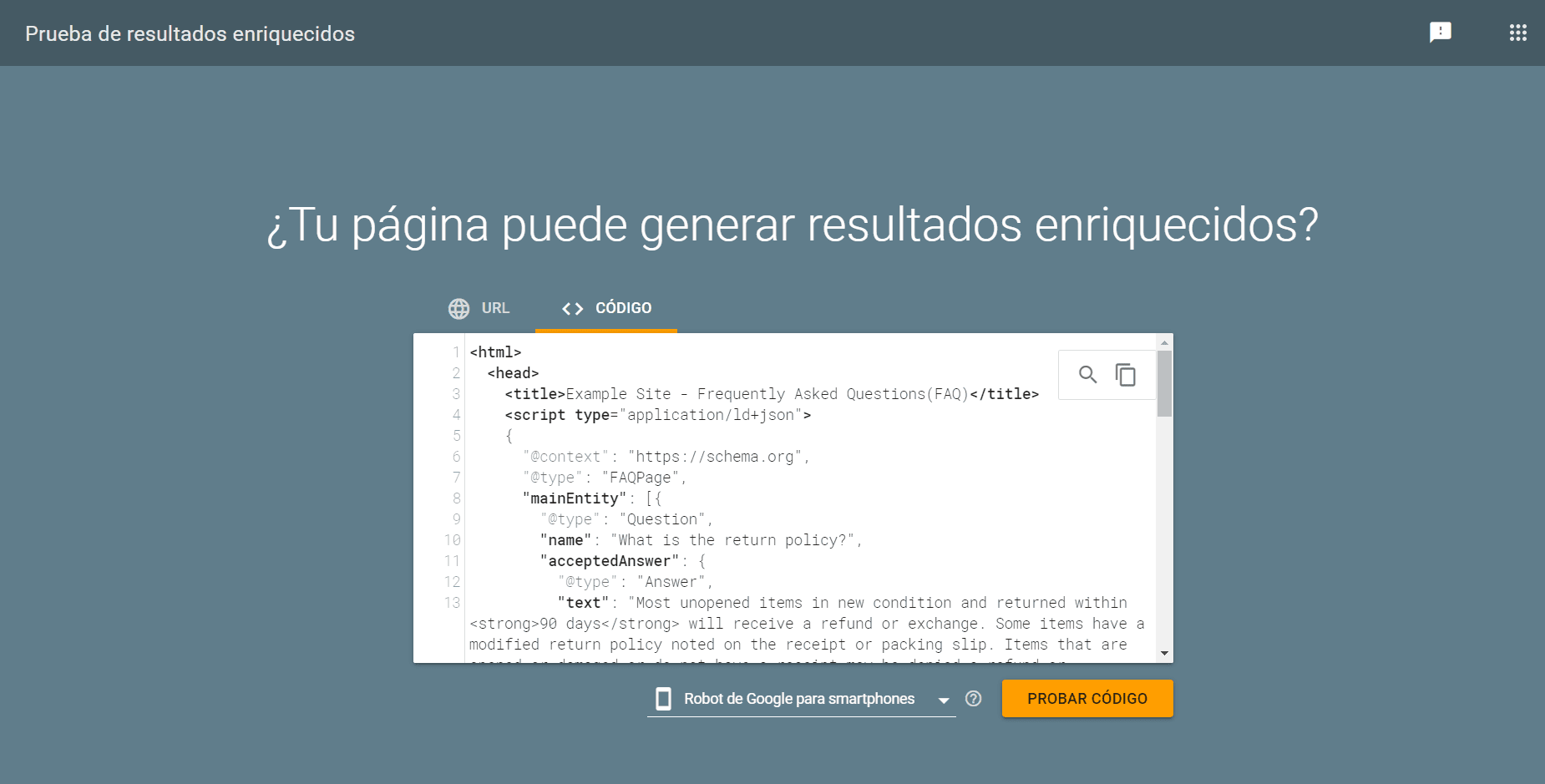
As we can see in the image, we can choose whether we want to validate the code using the "Google smartphone bot" or by selecting the "Google desktop bot". After that, we'll click on "test code":
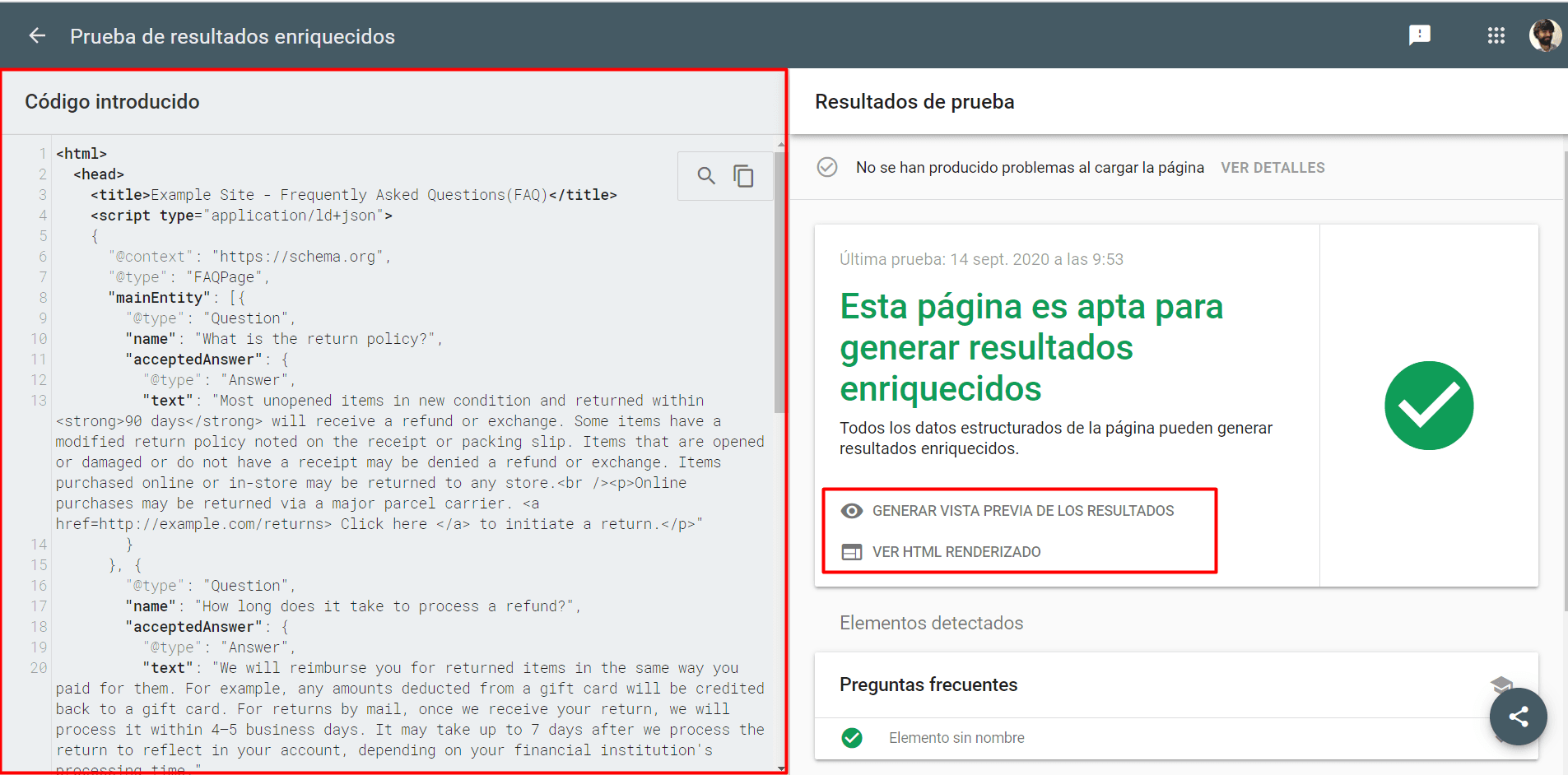
In the view, the tool shows us on two split screens the entered code on one side and the test results on the other. In the test results section, Google's tool will warn us whether the page is eligible to generate FAQ snippets or not, along with two other interesting options:
- Generate results preview: If we click on this option, we can see a simulation of how an FAQ Schema example would look in the SERPs.
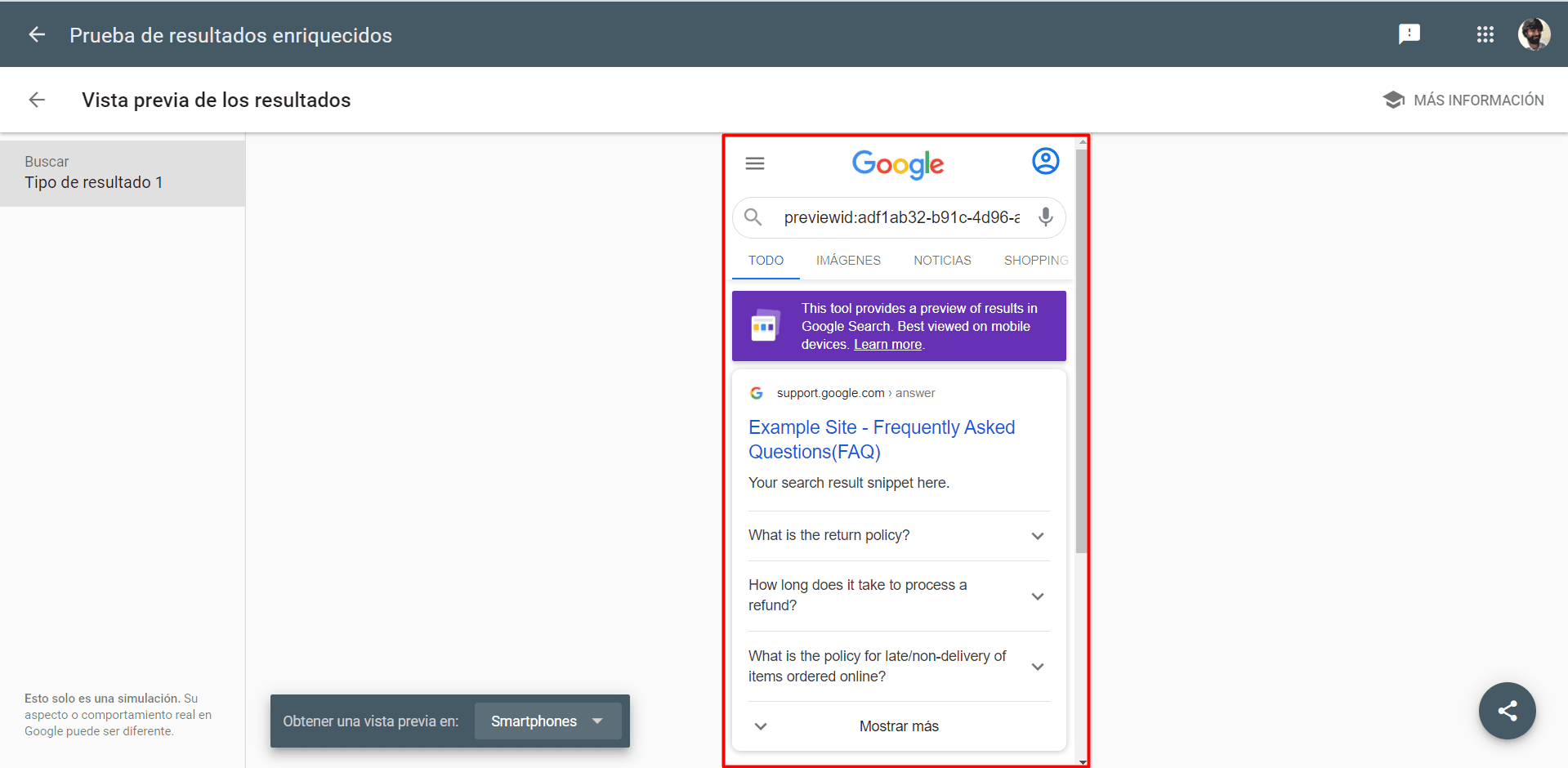
- View rendered HTML: In this option, we can see on the right side of the tool all the HTML code with the JSON-LD script processed and rendered.
Method #2: Inserting microformats
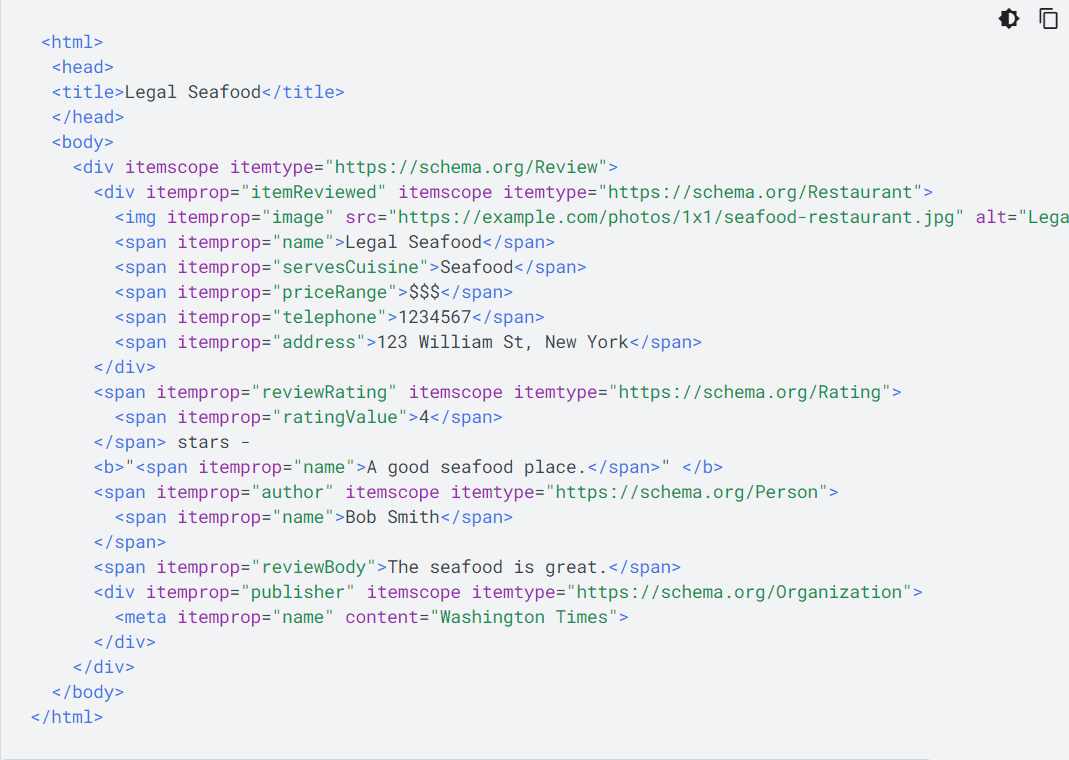
This is one of the more complex configurations of the two methods. Implementing FAQ Schema with microdata involves coding elements into the website. For this task, it is advisable to have a web developer since this can be a tedious and quite challenging process if you don't have the necessary knowledge.
Below is an example of microdata in HTML:
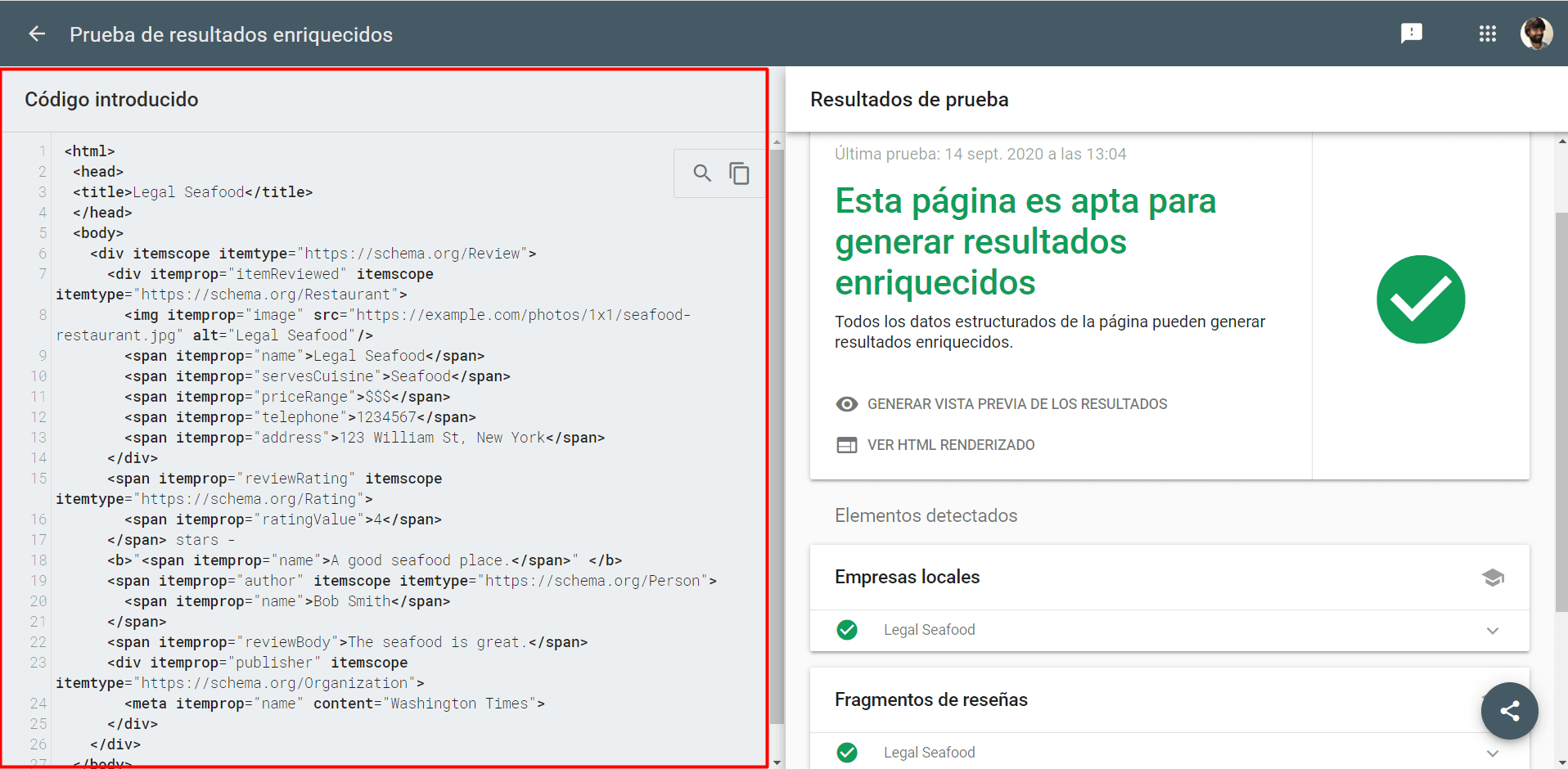
Just as with the JSON-LD example, we can use Google's structured data testing tool to see the rich results with this implementation:
Method #3: Including FAQ Schema in the classic WordPress editor without plugins
For this method, we'll use a free FAQ Schema generator. It's a web page that generates each of the frequently asked questions we want to include in the JSON-LD code, and automatically converts them to structured data.
Here's the link to this website so you can try it yourself: FAQPage JSON-LD Schema Generator
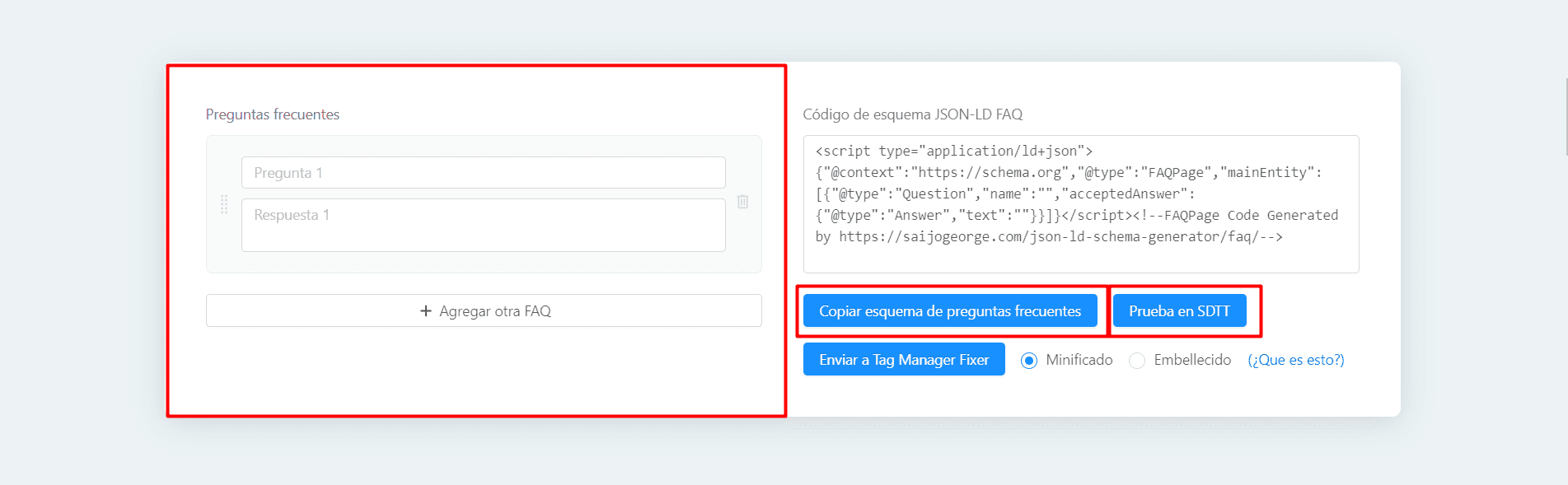
As we see in the image, we can very easily add our FAQs in the block enabled for it, and at the same time they will be generated in the block corresponding to "JSON-LD FAQ schema code". From SEOcrawl AI, we recommend that you implement a maximum of 3-5 frequently asked questions with their corresponding answers, since although it is possible to include more, Google will likely display a "see more results" button from the 5th onwards, which will require the user to click on it to view them.
Another advantage this tool offers is being able to test the code in Google's structured data testing tool. Once the FAQs are implemented, if we click on the "Test in SDTT" (Structured Data Testing Tool) button, we'll go directly to Google's structured data testing tool validator, where we can check that the Schema markup we've implemented is correct.
Once this is done, we'll be ready to copy (with the "Copy FAQ schema" button) the code and take it to the classic WordPress editor. The next thing we'll have to do is go to our page/post, select the "HTML" tab and paste the Script at the bottom.
**⚠️Important: Remember that one of Google's guidelines for this type of data markup is that the frequently asked questions must be displayed in the content of our page/post. Don't forget to include them in your content!
After saving the changes, Google will start processing this JSON-LD data markup to, if applicable, display the FAQ snippets in the SERPs.?
Method #4: Adding FAQ Schema with the #WPSC plugin
The #WPSC plugin is very simple and easy to use, as well as being free. It can be downloaded from the WordPress repository, or from the following link ? Structured Content #WPSC. Once downloaded and activated, if we go to the classic WP editor, a new function will be enabled, as seen in the following image:

It's worth noting that this plugin complies with the official Schema.org guidelines, and works very well with the Gutenberg block editor. In its current version, it offers up to five structured data items:
-
FAQPage
-
JobPosting
-
Event
-
Course
-
Person
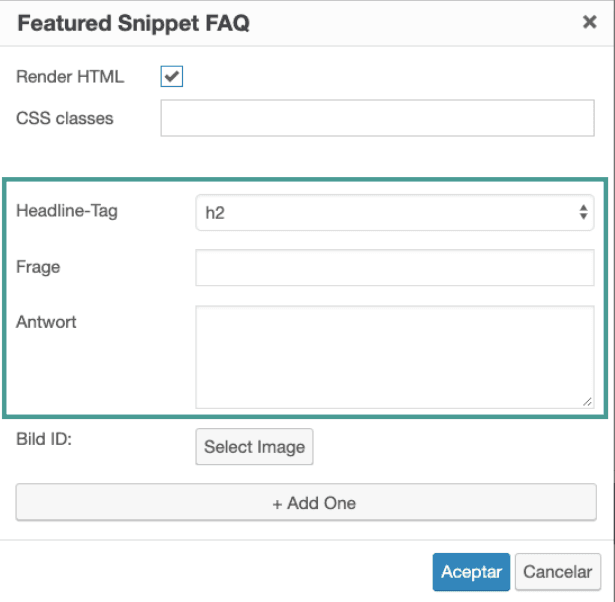
For our case, we'll choose the FAQPage option. Once this is done, a window will open where we'll configure the options to implement FAQ snippets:
-
Decide whether only the JSON-LD code should be displayed in the source code, or whether the content should be preformatted and visible. Check or uncheck the "Render HTML" box to do this.
-
Choose which will be the headers of each of the frequently asked questions. You can choose between (h2, h3, h4...)
-
Insert the question (Frage)
-
Insert the answer (Antwork)
-
Add new FAQs and repeat the process.
-
Once finished, we click on "Accept".
-
After updating or publishing the article, it is advisable to go to Google's structured data testing tool and validate it.
And that's it! ? Creating FAQ snippets is very easy, and as we've seen we can do it in several ways, depending on our interests.
Conclusions
FAQ Pages and FAQ snippets are considered by Google as another on-page factor to take into account for SEO positioning. Their use improves visibility and organic CTR of search results, in addition to offering users rich answers that bring more value to their search intent. At SEOcrawl AI, we recommend that you implement them as much as possible, as it will undoubtedly help you scale your project or your clients' projects in the search engine's SERPs.
Now it's your turn! You can try implementing any of the methods we've explained on your website and tell us how it went by leaving us a comment. Until next time!
Author: David Kaufmann

I've spent the last 10+ years completely obsessed with SEO — and honestly, I wouldn't have it any other way.
My career hit a new level when I worked as a senior SEO specialist for Chess.com — one of the top 100 most visited websites on the entire internet. Operating at that scale, across millions of pages, dozens of languages, and one of the most competitive SERPs out there, taught me things no course or certification ever could. That experience changed my perspective on what great SEO really looks like — and it became the foundation for everything I've built since.
From that experience, I founded SEO Alive — an agency for brands that are serious about organic growth. We're not here to sell dashboards and monthly reports. We're here to build strategies that actually move the needle, combining the best of classical SEO with the exciting new world of Generative Engine Optimization (GEO) — making sure your brand shows up not just in Google's blue links, but inside the AI-generated answers that ChatGPT, Perplexity, and Google AI Overviews are delivering to millions of people every single day.
And because I couldn't find a tool that handled both of those worlds properly, I built one myself — SEOcrawl AI, an enterprise SEO intelligence platform that brings together rankings, technical audits, backlink monitoring, crawl health, and AI brand visibility tracking all in one place. It's the platform I always wished existed.
Discover more content about this author