Lazy Loading

When it comes to using online platforms such as websites, loading speed and optimization become essential, with users demanding more and more speed and responsiveness.
For this reason, the page design pattern known as lazy loading is gaining more and more importance. But what exactly is lazy loading (deferred loading)?
That is what we will be addressing below.
What is Lazy Loading?
Specifically, lazy loading is a technique, a programming design pattern applied to websites, in which elements and resources are not loaded entirely, but rather executed on the fly or on-demand according to the user's usage, producing a "deferred loading" of the contents.
In this way, resources are optimized and content such as text, videos, images, and other material only loads when required, improving speed, memory usage and processing, responsiveness, and loading times. This stands in contrast to full loading, where a site or page is loaded completely, even if the user doesn't use every element.
General advantages of lazy loading
Since the main purpose of lazy loading is to optimize the loading of elements only when they are used, there are multiple advantages that can be summarized as:
- Speed in displaying the main elements of a website.
- Significant improvement in the user experience on the site (UX).
- Improved performance on mobile devices, especially when they have limited network connection resources; having Lazy Loading active will allow browsing on pages that, under such poor coverage conditions, would otherwise be unfeasible.
- Overall and total optimization of resources such as CPU, RAM, and battery on mobile devices.
- The increase in dwell time on our pages, by not having loading issues, translates indirectly into ranking improvements.
- Decrease in bounce rate.
Similarly, the lazy loading programming approach has advantages and novelties from a more technical point of view, such as:
- Lazy loading is fully compatible with JS frameworks such as React and Angular, as well as CMS platforms like WordPress. In fact, it has recently been reported that lazy loading for images will be included by default in WordPress version 5.5.
- Thanks to the IntersectionObserver API, it does not hide images from search engines.
- Support for multiple content types such as images and responsive-class resources.
- It allows site images to be indexed, which is vital for SEO.
- It is a 100% SEO Friendly resource, since it directly and indirectly improves many key points in SEO.
How to implement lazy loading in WordPress?
If we have our site on WordPress, we should know that we have a great advantage since there are many solutions to implement lazy loading on our pages so that they load much faster. This screenshot below shows some of the possible solutions we have in the plugin repository:
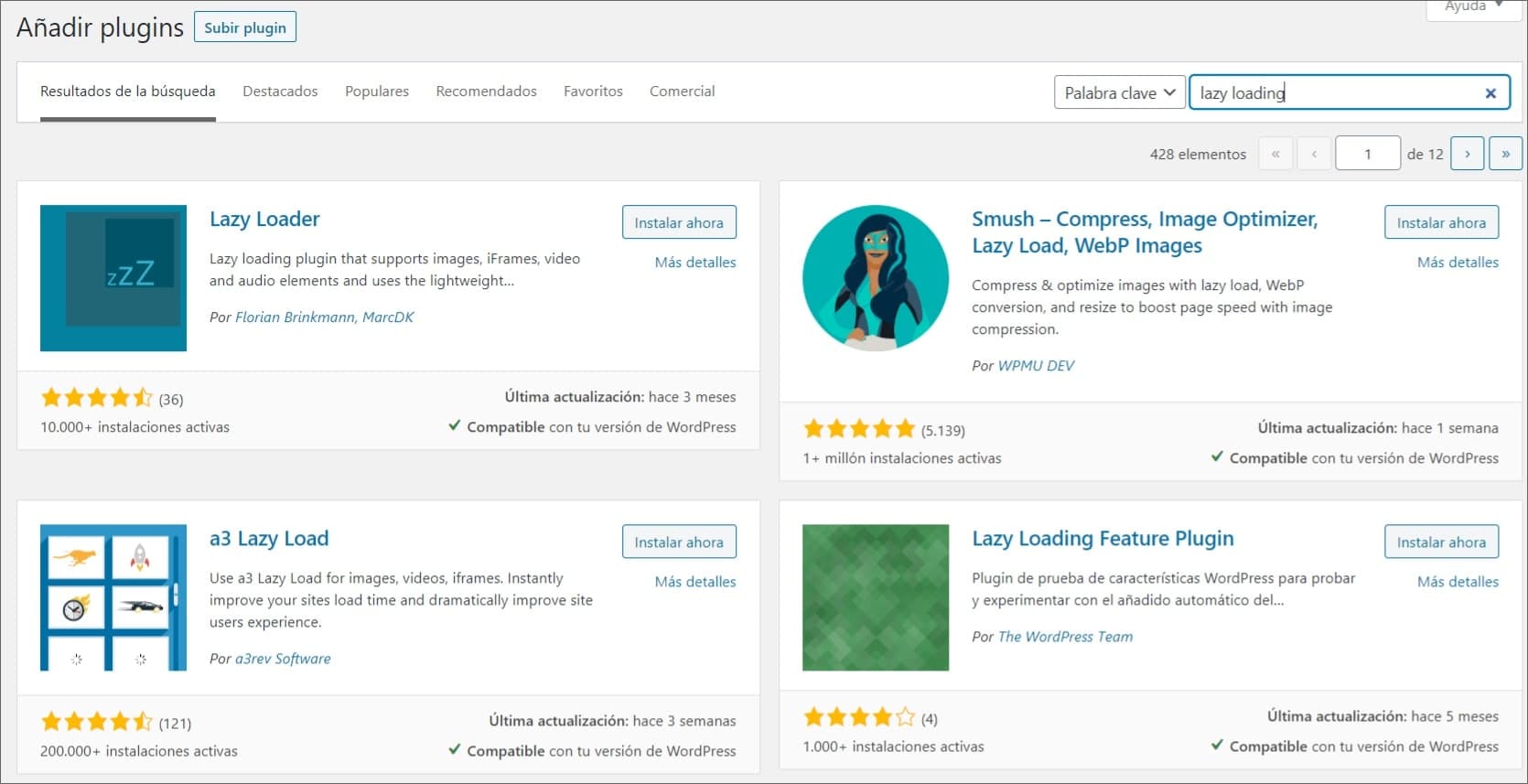
View of the most prominent WordPress plugins for implementing lazy loading.
To carry out this implementation, we have several options:
- Choose a specific lazy loading plugin such as "Lazy loader", "a3 lazy load"...
- Choose a web optimization plugin like "WP Rocket", which already has this option included by default along with other improvements.
SEO aspects related to Lazy Loading
We already know the main mission of deferred loading and its key advantages, and how it affects the improvement of our page performance, our UX, and SEO.
Now, smart use of deferred loading must be made to get the most out of it, since if used improperly it could cause the opposite effect.
For example, lazy loading makes use of the cache to improve speed, so if too much content is stored there, slowdowns or errors may occur if not implemented correctly, even preventing Google from indexing pages and elements, which can have a serious effect on the site's ranking. Some tips are:
- Optimize the cache and make smart use of it.
- Use Google Search Console to verify the content Google crawls on the site.
- Add ALT text to make each image indexable by Google.
- Always make use of the IntersectionObserver API.
- Add the loading attribute to iframe or embedded content from other pages or sources, thanks to the Blink LazyLoad function of the Chrome browser. Applies to images, photos, videos, text, and other content.
Lazy loading and UX
When it comes to a website, both technical and general optimization to offer a good user experience (UX) is essential, with respect to loading times, responsiveness, resource usage, and general behavior. If a site is not very responsive, its bounce rate will be high, and if it offers a poor user experience, that will affect its traffic, visibility, and even SEO.
With deferred loading, the goal is to improve a site's UX dramatically in a single step, by loading its content progressively and when the user requires it as they scroll the page, whether it's images or text, which optimizes resource usage compared to loading the entire platform, probably showing elements that are not important to the user.
Native lazy loading (HTML) in Chrome
Demonstrating the importance Google gives to UX, since 2020 and starting with version 75 of its Chrome browser, it is possible to add native lazy loading to HTML page tags and their multimedia content such as photos, videos, among others.
In this way, by adding the HTML lazy loading attribute automatically, the Chrome browser understands that the page content will load according to the user's navigation and not all at once, improving speed and responsiveness. To use it, the loading attribute with value lazy is added to each tag of the visual and multimedia resources, as well as iframes:
<img src="image.jpg" loading="lazy" alt="..." />
<iframe src="video-player.html" loading="lazy"></iframe>
This resource can be used both in images, which represent a large part of the information the browser needs to download, and in iframes; remember that we use these to embed external resources into our site.
It is important to highlight the use in iframes, since these can represent critical loading points on our site.
On the downside, native lazy loading is only compatible with Chrome, although its use can be implemented in other browsers through compatible libraries, in case there is no support as happens in Mozilla Firefox.
Uses of Lazy loading
As we have already commented, lazy loading focuses on delaying the loading of elements on a page to optimize its response. In this sense, the use given to the tool focuses on all visual resources, although emphasis is placed on images, videos, and iframes that can include documents and other files, all through the modification of tags and the inclusion of the loading attribute with value lazy, optimizing the site's general speed even if it has heavy elements or large multimedia content.
Do you have questions about lazy loading or want to implement it in your project? We are at your disposal!
Documentation and References:
Author: David Kaufmann

I've spent the last 10+ years completely obsessed with SEO — and honestly, I wouldn't have it any other way.
My career hit a new level when I worked as a senior SEO specialist for Chess.com — one of the top 100 most visited websites on the entire internet. Operating at that scale, across millions of pages, dozens of languages, and one of the most competitive SERPs out there, taught me things no course or certification ever could. That experience changed my perspective on what great SEO really looks like — and it became the foundation for everything I've built since.
From that experience, I founded SEO Alive — an agency for brands that are serious about organic growth. We're not here to sell dashboards and monthly reports. We're here to build strategies that actually move the needle, combining the best of classical SEO with the exciting new world of Generative Engine Optimization (GEO) — making sure your brand shows up not just in Google's blue links, but inside the AI-generated answers that ChatGPT, Perplexity, and Google AI Overviews are delivering to millions of people every single day.
And because I couldn't find a tool that handled both of those worlds properly, I built one myself — SEOcrawl AI, an enterprise SEO intelligence platform that brings together rankings, technical audits, backlink monitoring, crawl health, and AI brand visibility tracking all in one place. It's the platform I always wished existed.
Discover more content about this author