New Crawl Stats Report in Google Search Console
In late November 2020, Google re-launched its revamped crawl statistics report, and it seems the technical SEO world has been shaken up. It's now called Crawl Stats and, thanks to it, you'll be able to learn how Google's various bots visit your site and gain valuable insights from this useful data.
What is Google Crawl Stats?
This is a thorough overhaul of the "crawl stats" section that used to be in the old Webmaster Tools. With it, we can access different data and statistics about Googlebot's crawl history on our website. In the new version, it becomes a tool to work, to some extent, with logs and is no longer just a visualization chart.
You can access this report from your Search Console account, under Settings > Crawl stats.
What's new in the revamped report
It brings several new features:
- Total number of bot requests grouped by response code, type of file crawled, crawl purpose, and Googlebot type. Some of them will be very useful to you.
- Detailed information about the host status.
- URL examples to show where on the site the different requests took place.
- Full summary of properties with multiple hosts and support for domain properties.
Sections of Google's log analysis tool
We invite you on a journey through the different sections of Crawl Stats. Care to join us?
Crawl stats chart
This new chart, already adapted to the current Search Console design, shows crawl statistics over time. In it you can view three metrics:
- The total crawl requests over a period of time, or on a daily basis if you hover the cursor over the chart.
- The total size of data downloaded in bytes.
- The average response time in milliseconds.
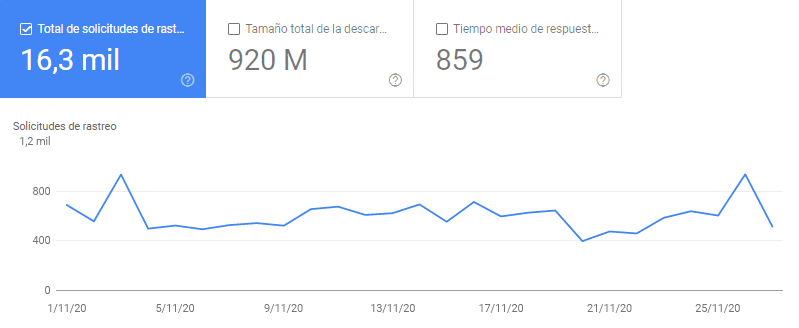
So far not much new; it's more of an interface change. But let's look at the following sections...
Crawling of the different hosts in your domain property
Your domain property in Search Console may be made up of several hosts, such as the versions with and without www, or any subdomain you may have. This chart lets you see how Googlebot crawls them and you can click on each one to get individual, filtered information.
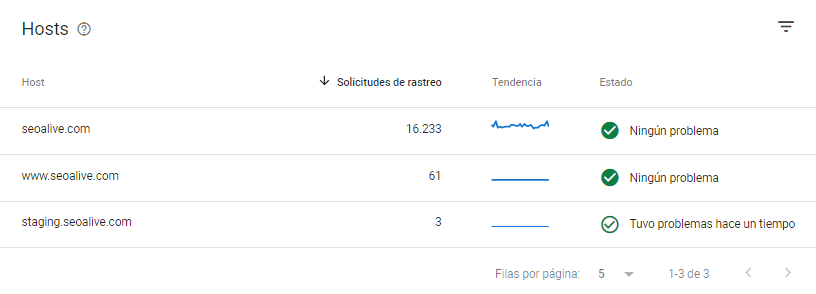
In this section we can have 3 indicators that, at a glance, already tell us a lot:
New groupings of crawl characteristics
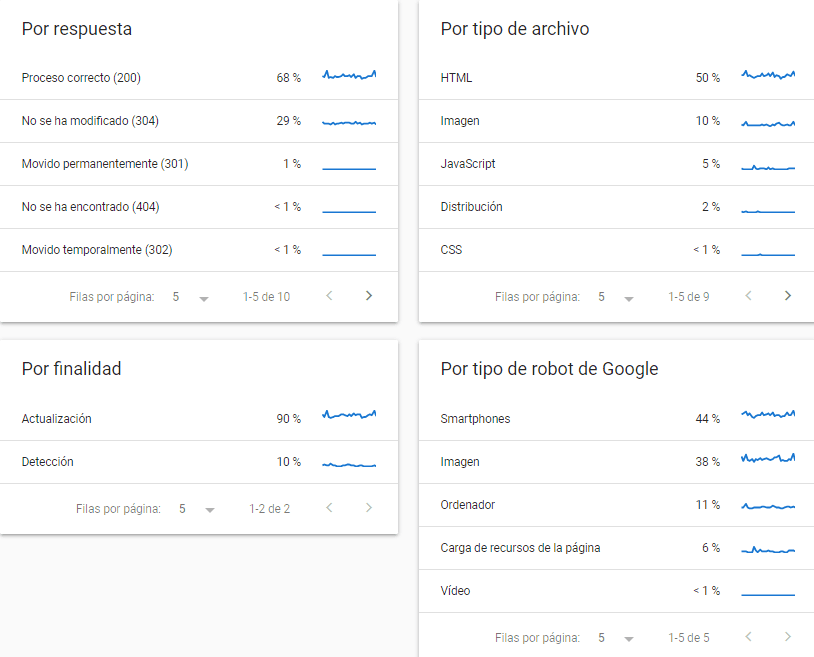
We can now categorize Googlebot visits across several crawl dimensions:
- By response: This way we'll know the redirects and error pages Googlebot went through during the specified time period.
- By file type: Googlebot may spend a lot of crawl time on file types we don't care about. Thanks to this grouping, we'll know.
- By purpose: Here we can distinguish between the percentage of crawling dedicated to pages it already knew and to discovering new URLs.
- By Google bot type: We know Google has different types of bots and each has its own function. In this report we'll see how often each one visits us.
You'll be able to dive into each one and see some URL examples. That said, they're just that — examples. Not all the URLs you see in the report will be available to you. You can spot patterns, but not download the complete information and work from it.
Conclusions about the tool
This is an improvement that greatly helps detect significant crawl issues on a website in a simple, free way. We don't think it will replace log analysis tools like Kibana or Screaming Frog Log File Analyzer, because what Google offers us is a sample, not exact data. That's why, for projects with special requirements, it can't be a replacement. In short, we'll be able to solve many issues, but not fully analyze the crawling Google performs on our website. Keep in mind this is a just-launched feature and, for now, we don't know how it will evolve.
Author: David Kaufmann

I've spent the last 10+ years completely obsessed with SEO — and honestly, I wouldn't have it any other way.
My career hit a new level when I worked as a senior SEO specialist for Chess.com — one of the top 100 most visited websites on the entire internet. Operating at that scale, across millions of pages, dozens of languages, and one of the most competitive SERPs out there, taught me things no course or certification ever could. That experience changed my perspective on what great SEO really looks like — and it became the foundation for everything I've built since.
From that experience, I founded SEO Alive — an agency for brands that are serious about organic growth. We're not here to sell dashboards and monthly reports. We're here to build strategies that actually move the needle, combining the best of classical SEO with the exciting new world of Generative Engine Optimization (GEO) — making sure your brand shows up not just in Google's blue links, but inside the AI-generated answers that ChatGPT, Perplexity, and Google AI Overviews are delivering to millions of people every single day.
And because I couldn't find a tool that handled both of those worlds properly, I built one myself — SEOcrawl AI, an enterprise SEO intelligence platform that brings together rankings, technical audits, backlink monitoring, crawl health, and AI brand visibility tracking all in one place. It's the platform I always wished existed.
Discover more content about this author