YouTube SEO
Google is the most widely used search engine in the world. However, it is by no means the only one. For certain queries, most users have already accepted that they need to turn to other search engines. This is the case with YouTube, which is a benchmark when it comes to music and videos. That is why SEO on YouTube plays a fundamental role due to the huge traffic potential it offers.
Whether you're a YouTuber, manage a company channel, or simply want to improve your understanding of how YouTube SEO works, we hope you find all the information we have prepared useful. Let's get to it!
0. What is YouTube SEO?
We could define YouTube SEO as the process of optimizing your videos, playlists, and channels to achieve a high ranking in YouTube's organic search results for a given search query. Let's not forget that YouTube, in addition to being a social network, is a powerful search engine where we can rank.
1. Keyword Research
One of the first fundamental elements when tackling any project, whether it's a website or a YouTube channel, is carrying out thorough keyword research in order to properly understand the market and correctly satisfy the user's search intent.
As YouTube describes in its official guides, YouTube's algorithm learns from the audience and adapts results based on how users interact with videos according to a series of parameters:
- what they watch
- what they don't watch
- how long they view the content
- likes and dislikes
- "not interested" feedback
Now, how can we see which topics are the most popular and their corresponding search volumes? We have a series of very powerful tools at our disposal that, combined, can give us highly relevant information:
- UberSuggest: Neil Patel's tool (Ubersuggest) will give us information about keywords, search volumes, competitors... and all for free.
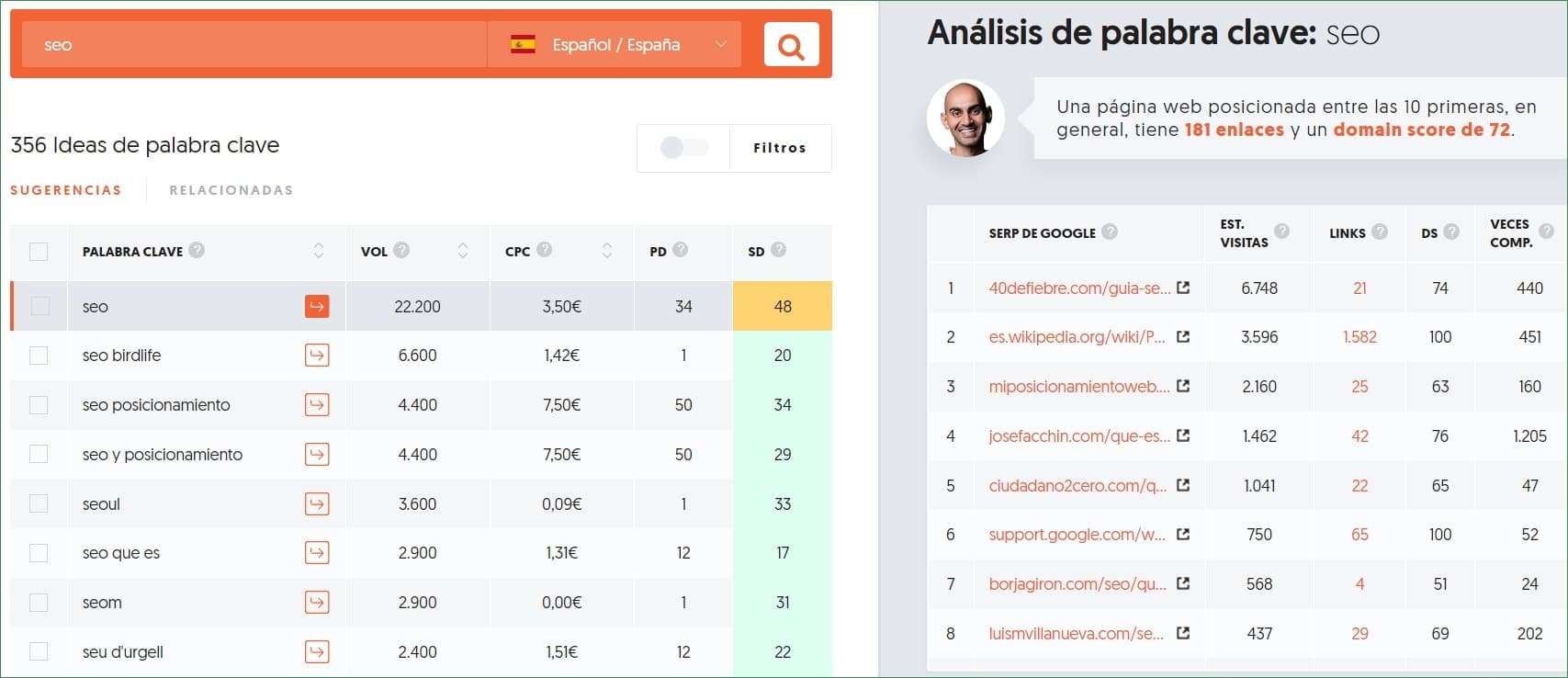
Neil Patel's Ubersuggest tool will provide us with a great deal of information that can be very useful.
- Google Keyword Planner: The Google Ads tool can also help us get ideas and traffic estimates.
- Ahrefs Keyword Explorer: A few months ago, Ahrefs launched a tool that allows us to carry out a fairly thorough keyword study for YouTube, as well as for other networks such as Amazon, for example.
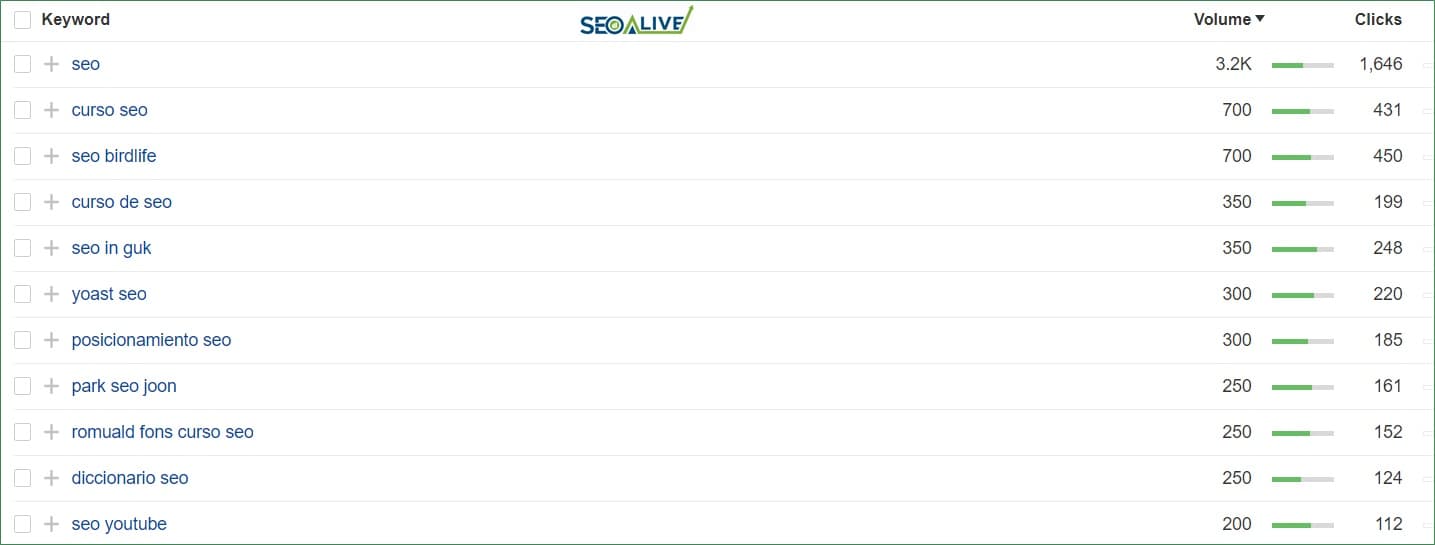
Top searches in Spain on YouTube for the keyword "SEO"
- KeywordTool.io: KeywordTool.io is very similar to Ubersuggest in terms of functionality, although it does have quite a few more limitations on the free plan.
- Google SERP: Without going any further, we can perform a search on Google and look at what kind of videos appear when we search for a word: duration, titles...
- Google Trends: Through Google Trends, we can use the specific estimate they have for YouTube (last 12 months), as it will help us choose between one KW or another if we have doubts.
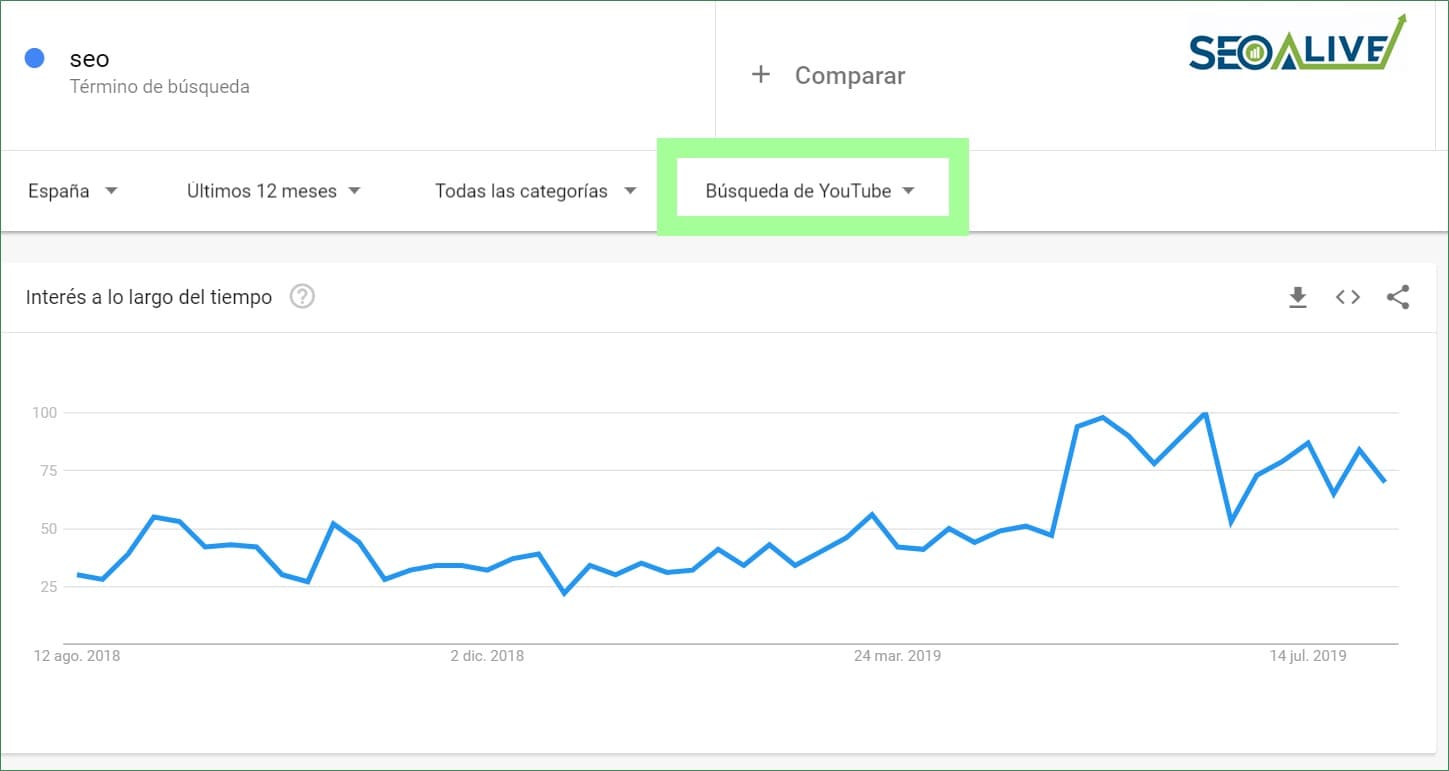
Evolution of the keyword "SEO" in Google Trends, for YouTube searches in Spain.
ADVANCED SEARCH: Another very useful way to analyze the results that are succeeding for a specific search is to run the following search on Google: *site:youtube.com inurl:watch title:seo *
This will return all YouTube videos that have the word "seo" in the title. Then, we sort them by traffic and we already have a large set of ideas and videos that are crushing it.
If we want to complement the analysis from the previous tools, we have 2 Chrome extensions at our disposal that can be very useful.
Once the keyword research is done, we will move on to analyzing the on-page optimization elements, which will have a completely direct impact on the CTR (click-through rate relative to impressions) we achieve:
2. Title
For the title, the most important guidelines will be focused on creating a descriptive title that is faithful to the content and, above all, clearly and transparently tells the user what they will find. In addition, we will always keep the following elements in mind:
- Title under 60 characters.
- Include the most important keywords at the beginning.
- Include at least 5 words: don't be brief with the content.
- Create titles that are eye-catching but always without deceiving the user and without falling into the "cheap" game of clickbait.
There is one last element — emojis — which has been very trendy lately but, as Google has confirmed more than once, they are not an official character and could disappear from one day to the next.
✅??⭐⚡?【Text】► What do you think about it?
3. Thumbnail (video thumbnail)
If there is anything that has an equal or greater impact than the title on the click-through rate a video gets, it is the thumbnail image.
Choosing a good thumbnail for our videos will play a critical role in achieving a good CTR:
To do this, we will try to be as professional as possible when creating them:
- 1280×720 in size with a minimum of 640 pixels
- Format .GIF .JPG .PNG or .BMP / Maximum 2MB with a 16:9 aspect ratio
- Include eye-catching colors that respect the brand image.
- Include an image of the person who will be speaking in the video.
- The words that appear should be large enough to stand out.
- You can include arrows that guide the viewer's eye, so it's easier for the user to direct their gaze to the title.
- Keep the same thumbnail style across all the videos we upload to the channel.
4. Description
The video description is usually one of the most overlooked elements. In most guides and resources, they recommend including a short description and links to the company's official accounts. However, that is only 1% of everything we can achieve with this field. Let's look at it in detail:
- They should have at least 250 words. In search results, the first 125 characters usually appear, so we will try to make sure the most important information appears first.
- They should contain a proper description, which can increase the number of views and watch time, because they help videos appear in the top positions of search results.
- They should use broad match keyword variants in the texts (75% of the top 20 ranked results do this).
- We should also include the important KWs from the title and related KWs (look for variants in the titles and descriptions of the competition).
Something to keep in mind for both the title and the description is that no matter how important SEO is, we should always try to make the structure and the language used correct and natural.
5. Tags
Tags on videos are a reference for how users search for information on YouTube. They will help us classify and contextualize videos in search and in YouTube's suggestions. In this section, we will also include the most relevant keywords.
To create them, we can rely again on the Chrome extension "VidIQ" by searching for the Top 1 video for the keyword we want to rank for.
Something else to avoid is including tags that have nothing to do with our content. We would appear in results where we shouldn't, affecting the number of visits and, in the long run, rankings, since the bounce rate will be very high.
Other recommendations:
- Try to include long-tails in the video title, since we will rank for more than one keyword.
- Include relevant KWs in the name and video files we include (e.g., replace "14455477.avi" with "Best-SEO-tips-for-YouTube-SEO.avi")
- Videos should not be too short, but we also can't exceed 15 minutes, as we run the risk of users abandoning the video. In any case, the longer they stay watching the video, the better for ranking.
- Think about the needs of our buyer persona and create a video we know will be useful to them.
- Very important: it's just as important to optimize the video as it is to promote it (social media, newsletter, embedding the video in blog posts, etc.).
6. Subtitles
Although when producing a video we almost always have a target market in mind, what ends up happening is that if our video is high quality, it ends up spreading to markets all over the world and reaching users with very different languages. If the video is only in one language, what we achieve is that users cannot consume our content.
However, if we add subtitles, we will not only improve the understanding of the video but we will also make it possible for many more people to understand it, improving the spread of our brand and crossing barriers around the world.
To do it, the process is relatively simple. We just have to go to our video editor and select the "subtitles" tab. If we are already using the new editor, we just need to go to the "Advanced" tab and there locate the "Subtitles" section.
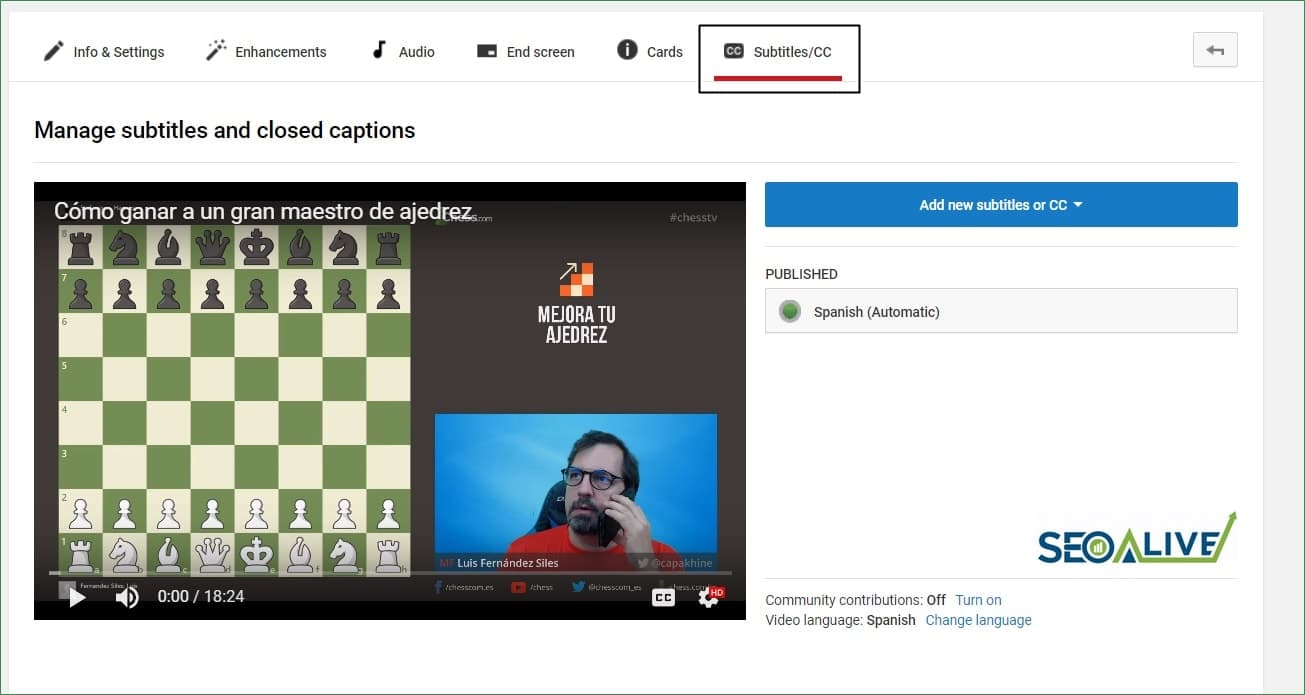
Adding subtitles to our videos will be simple. The real work will come from producing and translating the texts.
7. Transcription in articles and video
Once we have the video produced, which has taken us a lot of time and effort, we'll ask ourselves: How can we maximize its reach and ensure users get as much out of it as possible? In this case, we have two excellent options:
- Transcribe the video into an article and add images, resources, and other elements that enrich it.
An excellent example of this can be found in Moz's Whiteboard Friday, where you can find all the videos transcribed in article format.
- Add the timestamps for each of the sections in the video description so the user can easily locate them. In addition, this significantly increases browsing time.
Example:
01:03 - Introduction
04:20 - SEO Tools
On YouTube, the timestamps turn into links to that exact moment in the video, which means the user lands exactly where they want to go.
8. Watch time
In the same way as in many other areas, it's not about the quantity of elements we produce but the quality of them. The time our users spend on each of our videos and their interaction with them will be key for our content to appear at the top of YouTube search results.
The first 15 seconds of the video will be critical as they will determine whether the user stays or keeps browsing. Try to create a catchy summary and spark the user's curiosity to keep investigating and exploring everything we have to tell them.
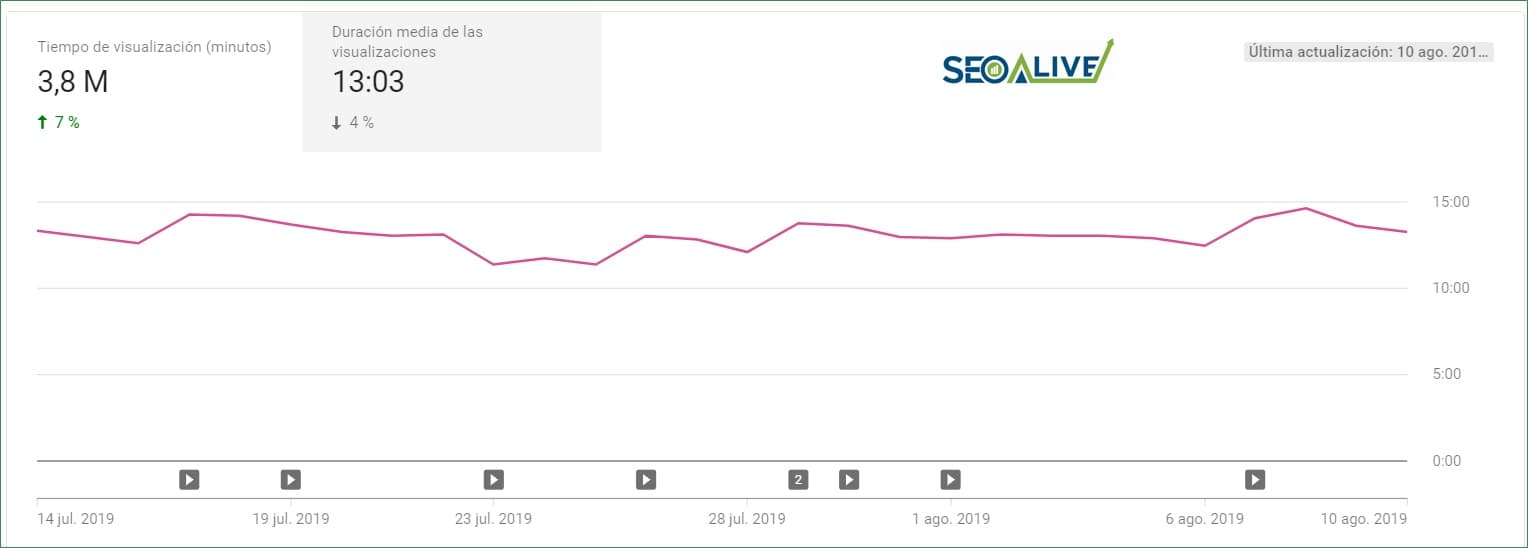
On our channel's statistics panel, we can see critical values in detail, such as total watch time, average time per video...
9. Retention (audience)
Did you know that habits are one of the most powerful marketing elements out there? Checking the latest news on Twitter while having breakfast or playing a game while traveling by train are some examples of habits you've acquired that provide spectacular metrics for these companies.
The same happens on YouTube. If you create a publishing schedule and get your audience used to "expecting" content, you will not only plan and improve your workload and production but you will also create a habit within your community, which will eagerly look forward to your videos on Fridays or your livestreams on Mondays.
As we always say, it is preferable to upload a single (high-quality) video every 2 weeks, respecting regularity, than 6 videos one month and 1 the next.
10. Playlists and structure
Our YouTube channel has strong similarities with our website structure. To take full advantage of this similarity, something that usually works very well is to structure the channel as if it were our own website's architecture: the most generic videos and those with the most important KWs at the top. The playlists would be divided by topics, which would function as the website's categories.
In our case at SEOcrawl AI, for example, we are just starting out with our channel but we are already beginning to define the channel's structure so that everything is well structured and planned. In this case, we have started with:
- SEO Tutorials
- SEO Tools
- SEO News
This way, we will be publishing content in each of these topics and we will make navigation much easier for all users who want to watch videos on these specific subjects.
11. Comments
Comments are often greatly overlooked. If we spend a few seconds at the end of the video asking people to share and comment on the video... why don't we then give them the time and attention they deserve? Replying to comments, thanking people for their support, giving likes, or blocking trolls are some of the community management tasks that indicate the good health of a channel.
In addition, this is something YouTube likes because its existence implies that the video has interested users. The platform likes this feedback, because it translates into time spent on videos.
12. Cards and End-Screens
Almost 1,000 users have watched your videos, 90% of them have made it to the end of the video and... what do we do then? Losing them seems crazy since the value each of these people has for our business can be enormous. That's why YouTube created cards and end-screens.
Cards are elements we can insert in the middle of the video to recommend external links. This is particularly useful if we mention an article we have created on the website about the topic and want to offer it to our community.
On the other hand, we have end-screens, which are always added at the end of the video and are mainly used for two functions:
- Recommending users subscribe to the channel
- Recommending related videos so that users keep browsing.
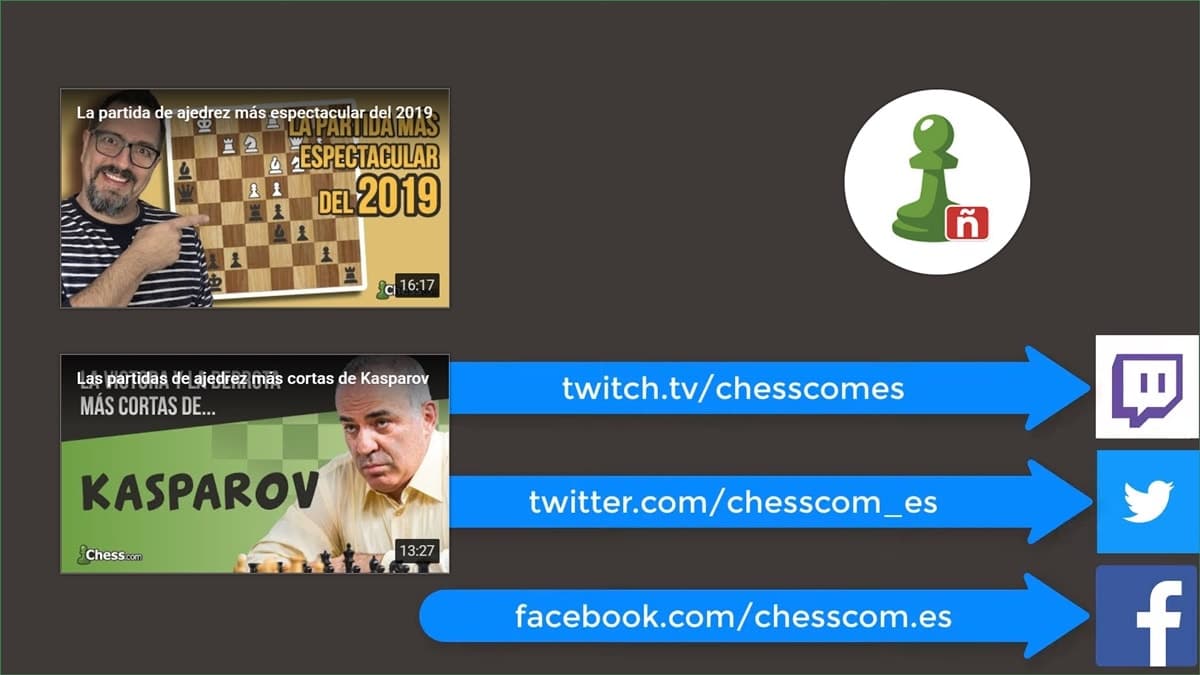
Related videos and information at the end of the video to improve interaction with the other videos on our channel. Example from Chess.com, one of our clients.
Conclusion
As you'll see, there are millions of people creating content every day on YouTube but very few of these videos surpass 1,000, 10,000, or 100,000 views. Working thoroughly on each of these points can help us achieve our goals. Still, 90% of the work will be in the content and in seeing how useful what we are producing is for our community.
To wrap up, we would like to share two pieces of news with you:
- The 1st is that we are launching the SEOcrawl AI YouTube channel and the first video will most likely be "How to do SEO on YouTube", i.e., a video of the article you just read.
- And the 2nd piece of news is that we are starting to work on the YouTube channel of a large company. We hope to be able to share the success story with you in a few months. We'll keep you posted!
And don't forget that this is just the beginning. Once you have published the video, explore the statistics and always look for ways to keep improving your content and your metrics.
Do you manage a YouTube channel and want us to help you grow it from SEOcrawl AI? Contact us!
References
Author: David Kaufmann

I've spent the last 10+ years completely obsessed with SEO — and honestly, I wouldn't have it any other way.
My career hit a new level when I worked as a senior SEO specialist for Chess.com — one of the top 100 most visited websites on the entire internet. Operating at that scale, across millions of pages, dozens of languages, and one of the most competitive SERPs out there, taught me things no course or certification ever could. That experience changed my perspective on what great SEO really looks like — and it became the foundation for everything I've built since.
From that experience, I founded SEO Alive — an agency for brands that are serious about organic growth. We're not here to sell dashboards and monthly reports. We're here to build strategies that actually move the needle, combining the best of classical SEO with the exciting new world of Generative Engine Optimization (GEO) — making sure your brand shows up not just in Google's blue links, but inside the AI-generated answers that ChatGPT, Perplexity, and Google AI Overviews are delivering to millions of people every single day.
And because I couldn't find a tool that handled both of those worlds properly, I built one myself — SEOcrawl AI, an enterprise SEO intelligence platform that brings together rankings, technical audits, backlink monitoring, crawl health, and AI brand visibility tracking all in one place. It's the platform I always wished existed.
Discover more content about this author
On-page SEO is everything you control on a page: content, title, meta description, headings, URL, images and internal links. Here is a checklist element by element, an audit process and what changes with AI Overviews and AI Mode.