Is the ALT Attribute Important for Images?
Have you ever heard the phrase "a picture is worth a thousand words"? Well, it's true, but... what happens if you can't see the image? That's exactly why the ALT tag or attribute was created, and today we're going to explain what it is and how to get the most out of it to boost your SEO.
Get ready, here we go!
What is the ALT attribute?
An ALT attribute or alternative text is a description provided for an image that, in the event the image is broken or cannot be read (such as for bots or visually impaired users), is provided to support our content.
What is the ALT attribute for in an image?
The main purpose of the ALT attribute is to facilitate web accessibility for those users who cannot properly see images. An example of this is users who rely on screen readers, which, as the name suggests, are software programs that read the content of the screen aloud.
When one of these readers reaches an image, since it cannot describe the image itself, it uses the alternative text to give the user context about what could be seen in the photo. This way, the user can navigate a website correctly without having to "lose" information from the images.
Why is the ALT tag important for SEO?
Our role as SEO consultants is to provide Google with as much information as possible so that it can understand our content and, therefore, show it to the right users.
While it's true that Google has greatly improved its image processor and, without a doubt, can understand the content of an image in a general way, it's always a good idea for our images to include the ALT attribute. This way, we make sure that Google has all the information about the photo and can understand its meaning within our content.
As we mentioned, it's best to use them properly and not try to "trick" Google in a bad way. In other words, it doesn't make sense to put a photo of a car in your content and then write "cheap sneakers" as the alternative text. They're unrelated and can raise red flags (especially if the alternative text is used for keyword stuffing).
Use photos and alternative texts that are related to your content. It's best to always follow this rule and include your main keyword, a secondary one, some semantic term, etc. in the alternative text. Normally, you won't have any trouble doing this since you'll be able to include it naturally.
How to add the ALT tag to an image
At this point you're probably wondering: How can I add this alternative text to my website?
Don't worry, because we're here to help. Pay attention as we go through how to do it on the two most popular CMSs:
How to add the ALT attribute to an image in WordPress
In this case it's quite simple. All we have to do is go to our media library, choose the photo, and fill in the field provided for the alternative text:
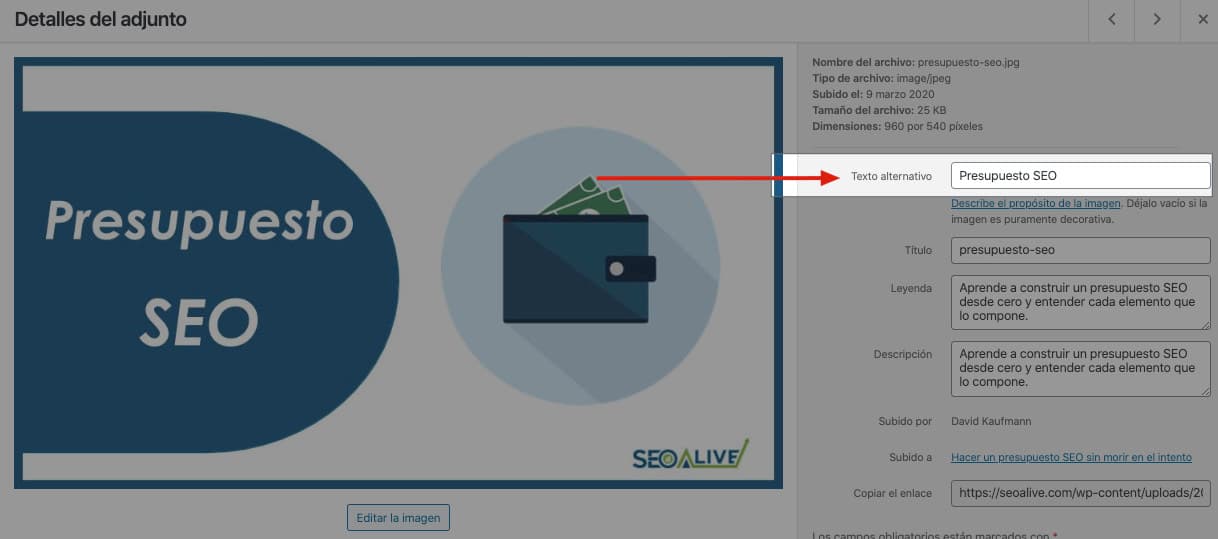
To provide a bit more context, we could even fill in the caption and description as shown in the image. Plus, we can do this directly in the article editor at the moment of adding the image.
How to add the ALT attribute to an image in PrestaShop
In PrestaShop we don't have a media library or a dedicated field for this.
So how do we add it?!
Don't worry, we'll explain the trick. What you have to do is fill in the caption field within the product images:
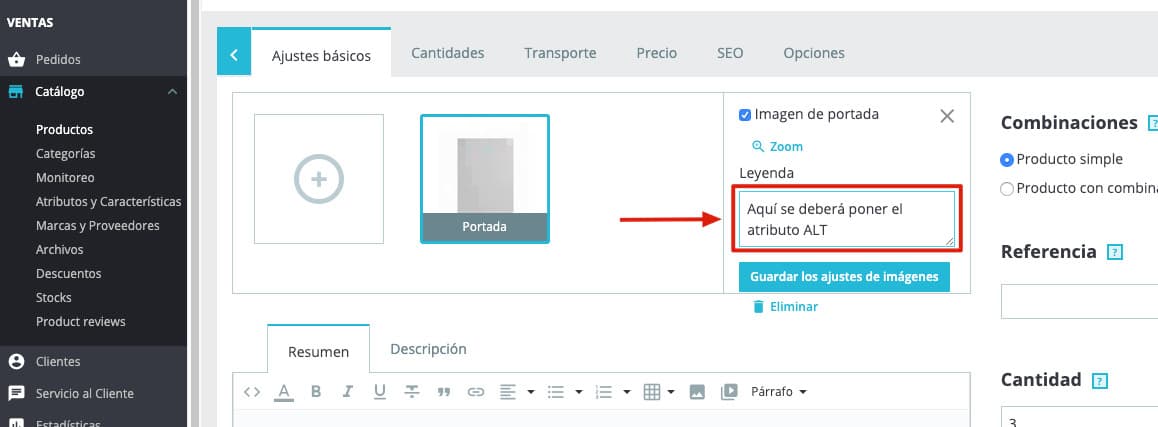
In most themes, whatever you put in the Caption field will be set as the ALT attribute of the image you're editing.
The problem is that in this CMS, adding ALT attributes can be very tedious since you have to do it one by one. For this reason, in our guide to SEO in PrestaShop we mentioned a module that allows you to quickly add ALT to all images.
How to view the ALT attribute of images
Now we'll explain how you can check whether a website has ALT attributes on its images or not. There are two options:
Through the inspector
If you use Chrome, by right-clicking within any website you can access the inspector. Once in it, you just need to select the image and view the ALT:
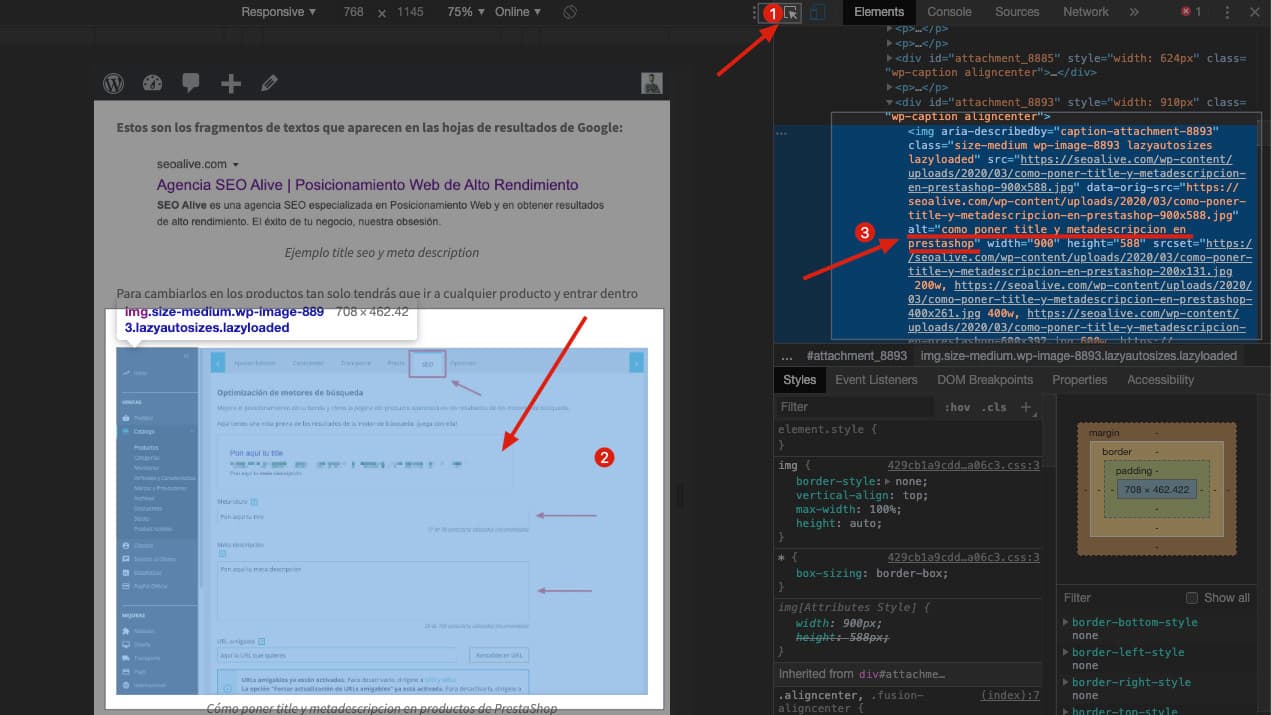
A bit confusing? Maybe, but don't worry, we've brought you another, easier option:
Through a Chrome extension
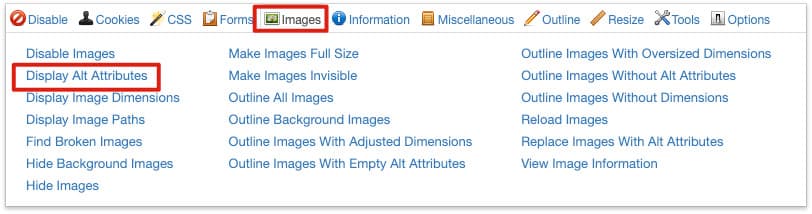
In this case we recommend installing the SEO extension for Chrome called Web Developer. Once you have it, you just need to go to the gear icon and select images > Display Alt Attributes:
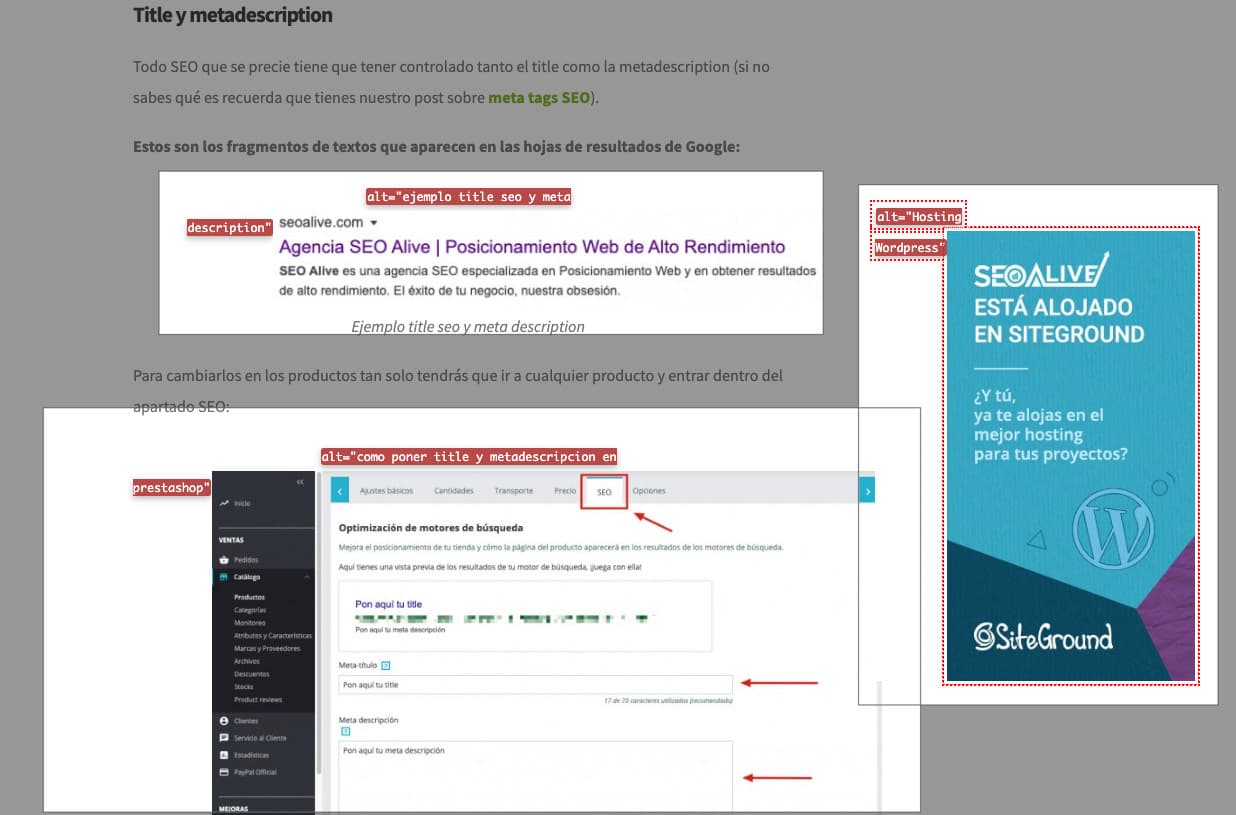
Once you have activated this option, you'll see that next to each image there's a small tooltip with the ALT attribute of each image:
Conclusion
As we've seen, ALT attributes are an SEO factor that's often overlooked but can give you an extra little boost within your SEO strategy.
Remember to always choose a photo that matches the text so the user isn't confused when seeing it, and write an alternative text that's descriptive and relevant both for the user and for our dear friend Google.
As always, we'll be waiting in the comments for any questions you might have :)
Author: David Kaufmann

I've spent the last 10+ years completely obsessed with SEO — and honestly, I wouldn't have it any other way.
My career hit a new level when I worked as a senior SEO specialist for Chess.com — one of the top 100 most visited websites on the entire internet. Operating at that scale, across millions of pages, dozens of languages, and one of the most competitive SERPs out there, taught me things no course or certification ever could. That experience changed my perspective on what great SEO really looks like — and it became the foundation for everything I've built since.
From that experience, I founded SEO Alive — an agency for brands that are serious about organic growth. We're not here to sell dashboards and monthly reports. We're here to build strategies that actually move the needle, combining the best of classical SEO with the exciting new world of Generative Engine Optimization (GEO) — making sure your brand shows up not just in Google's blue links, but inside the AI-generated answers that ChatGPT, Perplexity, and Google AI Overviews are delivering to millions of people every single day.
And because I couldn't find a tool that handled both of those worlds properly, I built one myself — SEOcrawl AI, an enterprise SEO intelligence platform that brings together rankings, technical audits, backlink monitoring, crawl health, and AI brand visibility tracking all in one place. It's the platform I always wished existed.
Discover more content about this author
On-page SEO is everything you control on a page: content, title, meta description, headings, URL, images and internal links. Here is a checklist element by element, an audit process and what changes with AI Overviews and AI Mode.